




软件

产品

LS_3AxisLine (Axis0:=轴号0, Axis1:=轴号1, Axis2:=轴号2, Exec:= 启动信号,
Halt:=暂停信号, Stop:=停止信号, IpoCycle:=插补周期,
PosMode:=坐标模式, EndPos:=终点坐标, VelocityMode:=速度曲线模式,
Velocity:=插补运动最大速度, Acceleration:=加速度, Deceleration:=减速度,
Jerk:=加加速度, Vel=>插补速度, Done=>插补运动结束, Busy=>插补运动中,
CommandAborted=>运动被终止, CommandHalt=>运动暂停,
Error=>指令出错, ErrorID=>错误代码 );
指令中:轴号0、轴号1、轴号2是参与三轴直线插补运动的轴号。
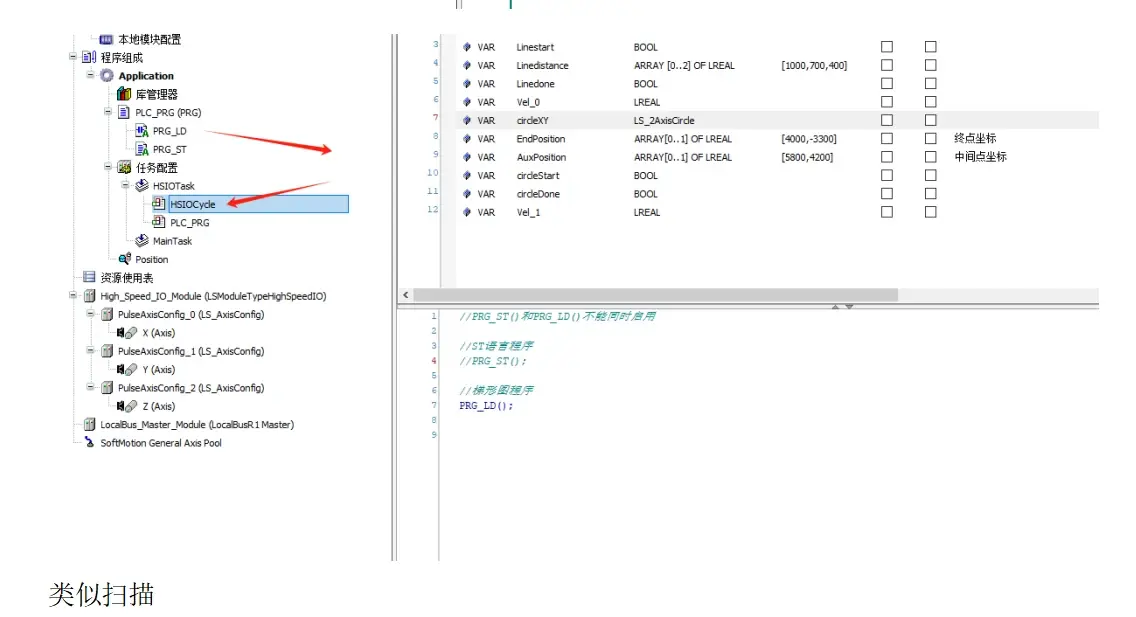
插补周期须设置为HSIO_Task任务相等周期。
坐标模式为0时,终点坐标是绝对坐标,为1时是相对坐标。
速度曲线模式为0时,速度曲线为梯形速度曲线;为1时是S形速度曲线;为3时是二次速度曲线。
直线插补例程
设置坐标模式为绝对坐标,即PosMode = 0,终点坐标为[1000,700,400];速度曲线为梯形,即VelocityMode = 0 ;插补运动的最大速度为1200 unit/s,加速度为5000unit/s2,减速度为10000unit/s2。程序代码如下代码。
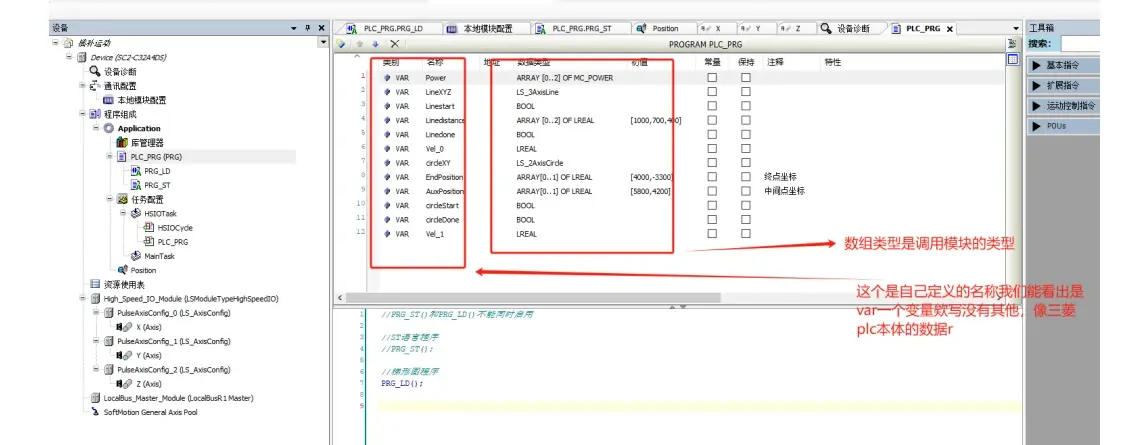
PROGRAM PLC_PRG
VAR
Power: ARRAY [0..2] OF MC_POWER;
LineXYZ: LS_3AxisLine;
Linestart: BOOL;
Linedistance: ARRAY [0..2] OF LREAL:= [1000,700,400];
Linedone: BOOL;
Vel_0: LREAL;
END_VAR
//轴使能
Power[0](Axis:= X, Enable:= 1, bRegulatorOn:= 1, bDriveStart:= 1,
Status=> , bRegulatorRealState=> , bDriveStartRealState=> , Busy=> , Error=> , ErrorID=> );
Power[1](Axis:= Y, Enable:= 1, bRegulatorOn:= 1, bDriveStart:= 1,
Status=> , bRegulatorRealState=> , bDriveStartRealState=> , Busy=> , Error=> , ErrorID=> );
Power[2](Axis:= Z, Enable:= 1, bRegulatorOn:= 1, bDriveStart:= 1,
Status=> , bRegulatorRealState=> , bDriveStartRealState=> , Busy=> , Error=> , ErrorID=> );
(*直线插补
绝对坐标模式,终点坐标为[1000,700,400],速度曲线为梯形;
插补运动的最大速度为1200 unit/s,加速度为5000unit/s2,减速度为10000unit/s2
*)
LineXYZ(Axis0:=X, Axis1:=Y, Axis2:=Z, Exec:=Linestart, Halt:= , Stop:= , IpoCycle:= 4000,
PosMode:=0, EndPos:=Linedistance, VelocityMode:=0, Velocity:=1200, Acceleration:=5000,Deceleration:=10000, Jerk:=, Vel=>Vel_0, Done=>Linedone, Busy=> ,
CommandAborted=> , CommandHalt=> , Error=> , ErrorID=> );
两轴圆弧插补指令如下。
LS_2AxisCircle( Axis0:=轴号0, Axis1:=轴号1, Exec:=启动信号, Halt:=暂停信号,
Stop:=停止信号, IpoCycle:=插补周期, PosMode:=坐标模式,
ArcIpo_dir:=圆弧方向, Circle_Mode:=圆弧模式, StopAngle:=圆心角,
CircleRadiual:=半径, AuxPos:=辅助坐标, EndPos:= 终点坐标,
RunCycle:=圆弧循环次数, VelocityMode:=速度曲线模式,
Velocity:=插补运动最大速度, Acceleration:=加速度, Deceleration:=减速度,
Jerk:=加加速度, Vel=>插补速度, Done=>插补运动结束, Busy=>插补运动中,
CommandAborted=>运动被终止, CommandHalt=>运动暂停,
Error=>指令出错, ErrorID=>错误代码 );
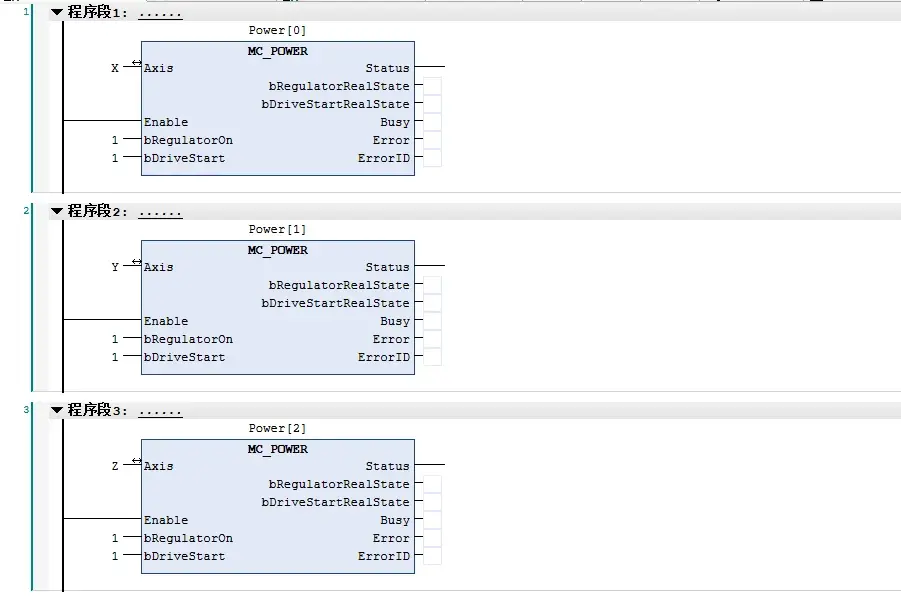
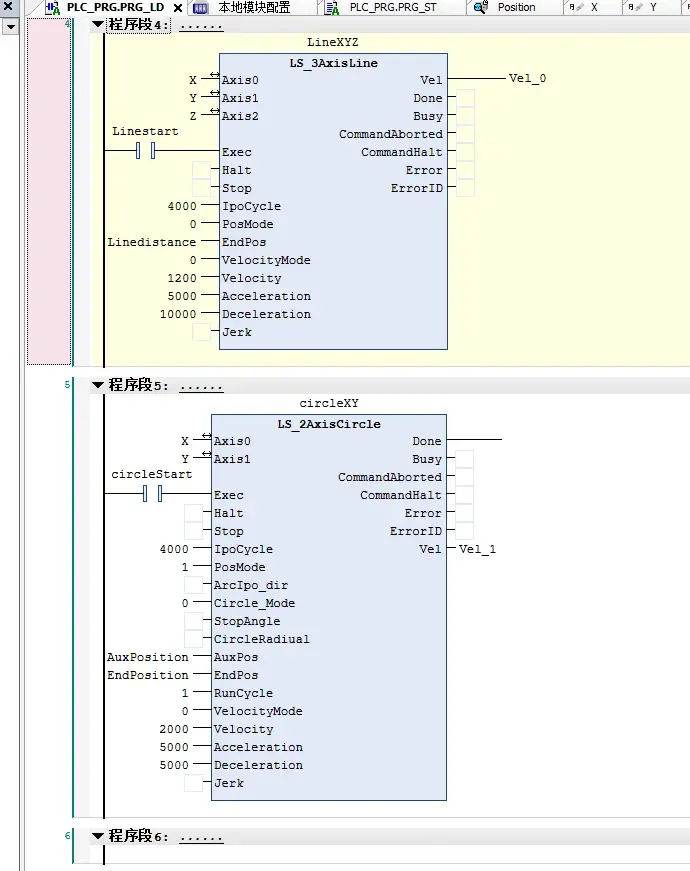
直线插补
//轴使能
Power[0](Axis:= X, Enable:= 1, bRegulatorOn:= 1, bDriveStart:= 1,
Status=> , bRegulatorRealState=> , bDriveStartRealState=> , Busy=> , Error=> , ErrorID=> );
Power[1](Axis:= Y, Enable:= 1, bRegulatorOn:= 1, bDriveStart:= 1,
Status=> , bRegulatorRealState=> , bDriveStartRealState=> , Busy=> , Error=> , ErrorID=> );
Power[2](Axis:= Z, Enable:= 1, bRegulatorOn:= 1, bDriveStart:= 1,
Status=> , bRegulatorRealState=> , bDriveStartRealState=> , Busy=> , Error=> , ErrorID=> );
(*直线插补
绝对坐标模式,终点坐标为[1000,700,400],速度曲线为梯形;
插补运动的最大速度为1200 unit/s,加速度为5000unit/s2,减速度为10000unit/s2
*)
LineXYZ(Axis0:=X, Axis1:=Y, Axis2:=Z, Exec:=Linestart, Halt:= , Stop:= , IpoCycle:= 4000,
PosMode:=0, EndPos:=Linedistance, VelocityMode:=0, Velocity:=1200, Acceleration:=5000,
Deceleration:=10000, Jerk:=, Vel=>Vel_0, Done=>Linedone, Busy=> ,
CommandAborted=> , CommandHalt=> , Error=> , ErrorID=> );
(*圆弧插补
相对坐标模式,三点圆弧模式,终点坐标为[4000,-3300],中间点坐标为[5800,4200],速度曲线为梯形;
插补运动的最大速度为2000 unit/s,加速度为5000unit/s2,减速度为5000unit/s2
*)
circleXY( Axis0:=X, Axis1:=Y, Exec:=circleStart, Halt:= , Stop:= , IpoCycle:= 4000, PosMode:=1,
ArcIpo_dir:=, Circle_Mode:=0, StopAngle:= , CircleRadiual:= ,
AuxPos:=AuxPosition, EndPos:=EndPosition, RunCycle:=1, VelocityMode:=0,
Velocity:=2000, Acceleration:=5000, Deceleration:=5000, Jerk:= ,
Vel=>Vel_1, Done=>circleDone, Busy=> , CommandAborted=> ,
CommandHalt=> , Error=> , ErrorID=> );
免责声明:本文系网络转载或改编,未找到原创作者,版权归原作者所有。如涉及版权,请联系删
 技术文档
技术文档
 推荐好文
推荐好文






 155-2731-8020