




软件

产品


对于python调节音量的问题,一般都是直接使用pycaw库进行调节,但是当我们要设定电脑音量的时候,不能实现精确映射(我想让我的电脑音量是40,不能直接输入40),但是由于内部确实没有精确的关系,只能用一对一映射的方式。详情请参照:
python-使用pycaw设置电脑音量(包含转换)_独憩的博客-CSDN博客
手部识别可以通过mediapipe库进行:
python-OpenCV 视频中的手部跟踪: 基于mediapipe库_独憩的博客-CSDN博客
对于调用视频识别手势进行电脑音量调节这个问题,网上有很多教程,一般是直接测量两个手指的距离进行映射,这样的问题是:我改变了自身位置就很难进行 控制 。故我本次对其进行改进:即先进行标定,标定的目的是获取此时的两个手指直接的最大距离,以这个maxlengh为基础,进行映射。
import cv2import mathimport timeimport mediapipe as mpfrom os import listdirfrom datetime import datetimeimport timeimport datetime from ctypes import cast, POINTERfrom comtypes import CLSCTX_ALLfrom pycaw.pycaw import AudioUtilities, IAudioEndpointVolumemp_drawing = mp.solutions.drawing_utilsmp_hands = mp.solutions.handsdevices = AudioUtilities.GetSpeakers()interface = devices.Activate( IAudioEndpointVolume._iid_, CLSCTX_ALL, None)volume = cast(interface, POINTER(IAudioEndpointVolume))volRange = volume.GetVolumeRange()这个函数的作用是将识别到的手的点映射到图像坐标上,为后期的画点及计算距离服务。
def Normalize_landmarks(image, hand_landmarks): new_landmarks = [] for i in range(0, len(hand_landmarks.landmark)): float_x = hand_landmarks.landmark[i].x float_y = hand_landmarks.landmark[i].y width = image.shape[1] height = image.shape[0] pt = mp_drawing._normalized_to_pixel_coordinates(float_x, float_y, width, height) new_landmarks.append(pt) return new_landmarks这个函数是画图函数,将食指与拇指的位置单独画出,并连线,至于为什么是landmarks[4]与landmarks[8],请参照python-OpenCV 视频中的手部跟踪: 基于mediapipe库_独憩的博客-CSDN博客
def Draw_hand_points(image, normalized_hand_landmarks): cv2.circle(image, normalized_hand_landmarks[4], 12, (255, 0, 255), -1, cv2.LINE_AA) cv2.circle(image, normalized_hand_landmarks[8], 12, (255, 0, 255), -1, cv2.LINE_AA) cv2.line(image, normalized_hand_landmarks[4], normalized_hand_landmarks[8], (255, 0, 255), 3) x1, y1 = normalized_hand_landmarks[4][0], normalized_hand_landmarks[4][1] x2, y2 = normalized_hand_landmarks[8][0], normalized_hand_landmarks[8][1] mid_x, mid_y = (x1 + x2) // 2, (y1 + y2) // 2 length = math.sqrt((x2 - x1)**2+(y2 - y1)**2) #得到大拇指到食指的距离 if length < 100: cv2.circle(image, (mid_x, mid_y), 12, (0, 255, 0), cv2.FILLED) else: cv2.circle(image, (mid_x, mid_y), 12, (255, 0, 255), cv2.FILLED) return image, length这两个函数的作用是将电脑的音量数字(0-100)与pycaw库中的数字对应,很蠢但是很有效,由于反向对应做不到11对应,只能找到误差最小的点进行对应:
def vol_tansfer(x): dict = {0: -65.25, 1: -56.99, 2: -51.67, 3: -47.74, 4: -44.62, 5: -42.03, 6: -39.82, 7: -37.89, 8: -36.17, 9: -34.63, 10: -33.24, 11: -31.96, 12: -30.78, 13: -29.68, 14: -28.66, 15: -27.7, 16: -26.8, 17: -25.95, 18: -25.15, 19: -24.38, 20: -23.65, 21: -22.96, 22: -22.3, 23: -21.66, 24: -21.05, 25: -20.46, 26: -19.9, 27: -19.35, 28: -18.82, 29: -18.32, 30: -17.82, 31: -17.35, 32: -16.88, 33: -16.44, 34: -16.0, 35: -15.58, 36: -15.16, 37: -14.76, 38: -14.37, 39: -13.99, 40: -13.62, 41: -13.26, 42: -12.9, 43: -12.56, 44: -12.22, 45: -11.89, 46: -11.56, 47: -11.24, 48: -10.93, 49: -10.63, 50: -10.33, 51: -10.04, 52: -9.75, 53: -9.47, 54: -9.19, 55: -8.92, 56: -8.65, 57: -8.39, 58: -8.13, 59: -7.88, 60: -7.63, 61: -7.38, 62: -7.14, 63: -6.9, 64: -6.67, 65: -6.44, 66: -6.21, 67: -5.99, 68: -5.76, 69: -5.55, 70: -5.33, 71: -5.12, 72: -4.91, 73: -4.71, 74: -4.5, 75: -4.3, 76: -4.11, 77: -3.91, 78: -3.72, 79: -3.53, 80: -3.34, 81: -3.15, 82: -2.97, 83: -2.79, 84: -2.61, 85: -2.43, 86: -2.26, 87: -2.09, 88: -1.91, 89: -1.75, 90: -1.58, 91: -1.41, 92: -1.25, 93: -1.09, 94: -0.93, 95: -0.77, 96: -0.61, 97: -0.46, 98: -0.3, 99: -0.15, 100: 0.0} return dict[x] def vol_tansfer_reverse(x): error = [] dict = {0: -65.25, 1: -56.99, 2: -51.67, 3: -47.74, 4: -44.62, 5: -42.03, 6: -39.82, 7: -37.89, 8: -36.17, 9: -34.63, 10: -33.24, 11: -31.96, 12: -30.78, 13: -29.68, 14: -28.66, 15: -27.7, 16: -26.8, 17: -25.95, 18: -25.15, 19: -24.38, 20: -23.65, 21: -22.96, 22: -22.3, 23: -21.66, 24: -21.05, 25: -20.46, 26: -19.9, 27: -19.35, 28: -18.82, 29: -18.32, 30: -17.82, 31: -17.35, 32: -16.88, 33: -16.44, 34: -16.0, 35: -15.58, 36: -15.16, 37: -14.76, 38: -14.37, 39: -13.99, 40: -13.62, 41: -13.26, 42: -12.9, 43: -12.56, 44: -12.22, 45: -11.89, 46: -11.56, 47: -11.24, 48: -10.93, 49: -10.63, 50: -10.33, 51: -10.04, 52: -9.75, 53: -9.47, 54: -9.19, 55: -8.92, 56: -8.65, 57: -8.39, 58: -8.13, 59: -7.88, 60: -7.63, 61: -7.38, 62: -7.14, 63: -6.9, 64: -6.67, 65: -6.44, 66: -6.21, 67: -5.99, 68: -5.76, 69: -5.55, 70: -5.33, 71: -5.12, 72: -4.91, 73: -4.71, 74: -4.5, 75: -4.3, 76: -4.11, 77: -3.91, 78: -3.72, 79: -3.53, 80: -3.34, 81: -3.15, 82: -2.97, 83: -2.79, 84: -2.61, 85: -2.43, 86: -2.26, 87: -2.09, 88: -1.91, 89: -1.75, 90: -1.58, 91: -1.41, 92: -1.25, 93: -1.09, 94: -0.93, 95: -0.77, 96: -0.61, 97: -0.46, 98: -0.3, 99: -0.15, 100: 0.0} for i in range (100): error.append(abs(dict[i]-x)) return error.index(min(error))主要的逻辑是在大循环下设置两个小循环,第一个循环是标定循环,持续5秒,可以得到5秒内的len_max。以此为依据映射到电脑音量(0-100):
vol = int((length) / len_max * 100)hands = mp_hands.Hands( min_detection_confidence=0.5, min_tracking_confidence=0.5)cap = cv2.VideoCapture(0)len_max = 0len_min = 0num = 0 while cap.isOpened(): stop = datetime.datetime.now() + datetime.timedelta(seconds=5) if num == 0: while datetime.datetime.now() < stop: success, image = cap.read() if not success: print("camera frame is empty!") continue image = cv2.cvtColor(cv2.flip(image, 1), cv2.COLOR_BGR2RGB) image.flags.writeable = False results = hands.process(image) image.flags.writeable = True image = cv2.cvtColor(image, cv2.COLOR_RGB2BGR) if results.multi_hand_landmarks: for hand_landmarks in results.multi_hand_landmarks: mp_drawing.draw_landmarks( image, hand_landmarks, mp_hands.HAND_CONNECTIONS) normalized_landmarks = Normalize_landmarks(image, hand_landmarks) image, length = Draw_hand_points(image, normalized_landmarks) if length>len_max: len_max = length strRate = 'Start calibration' cv2.putText(image, strRate, (10, 410), cv2.FONT_HERSHEY_COMPLEX, 1.2, (255, 0, 0), 2) strRate1 = 'max length = %d'%len_max cv2.putText(image, strRate1, (10, 110), cv2.FONT_HERSHEY_COMPLEX, 1.2, (255, 0, 0), 2) cv2.imshow('result', image) if cv2.waitKey(5) & 0xFF == 27: break num = 1 success, image = cap.read() if not success: print("camera frame is empty!") continue image = cv2.cvtColor(cv2.flip(image, 1), cv2.COLOR_BGR2RGB) image.flags.writeable = False results = hands.process(image) image.flags.writeable = True image = cv2.cvtColor(image, cv2.COLOR_RGB2BGR) if results.multi_hand_landmarks: for hand_landmarks in results.multi_hand_landmarks: mp_drawing.draw_landmarks( image, hand_landmarks, mp_hands.HAND_CONNECTIONS) normalized_landmarks = Normalize_landmarks(image, hand_landmarks) try: image, length = Draw_hand_points(image, normalized_landmarks) # print(length) #20~300 cv2.rectangle(image, (50, 150), (85, 350), (255, 0, 0), 1) if length >len_max: length = len_max vol = int((length) / len_max * 100) volume.SetMasterVolumeLevel(vol_tansfer(vol), None) cv2.rectangle(image, (50, 150+200-2*vol), (85, 350), (255, 0, 0), cv2.FILLED) percent = int(length / len_max * 100) # print(percent) strRate = str(percent) + '%' cv2.putText(image, strRate, (40, 410), cv2.FONT_HERSHEY_COMPLEX, 1.2, (255, 0, 0), 2) vol_now = vol_tansfer_reverse(volume.GetMasterVolumeLevel()) strvol = 'Current volume is'+str(vol_now) cv2.putText(image, strvol, (10, 470), cv2.FONT_HERSHEY_COMPLEX, 1.2, (255, 0, 0), 2) except: pass cv2.imshow('result', image) if cv2.waitKey(10) & 0xFF == ord('q'): len_max = 0 num = 0 if cv2.waitKey(10) & 0xFF == 27: breakcv2.destroyAllWindows()hands.close()cap.release()最后,敲入"q"可以重新标定,敲入"esc"可以退出。
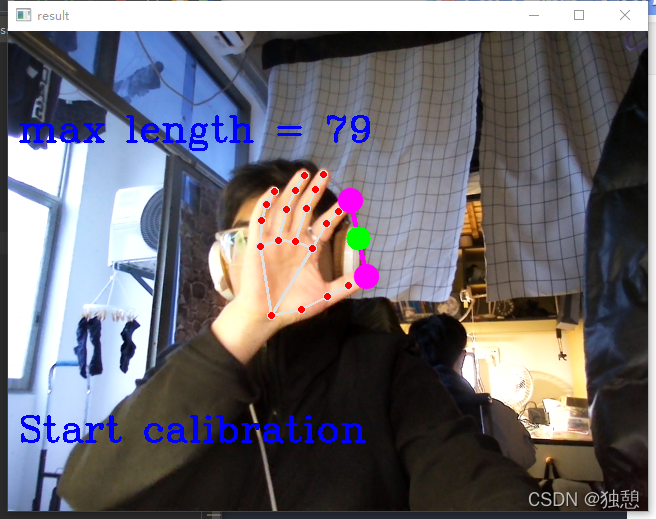
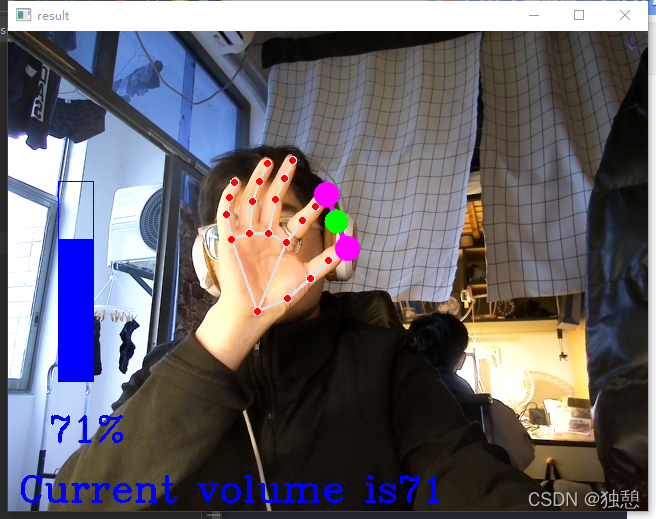
import cv2import mathimport timeimport mediapipe as mpfrom os import listdirfrom datetime import datetimeimport timeimport datetime from ctypes import cast, POINTERfrom comtypes import CLSCTX_ALLfrom pycaw.pycaw import AudioUtilities, IAudioEndpointVolume mp_drawing = mp.solutions.drawing_utilsmp_hands = mp.solutions.handsdevices = AudioUtilities.GetSpeakers()interface = devices.Activate( IAudioEndpointVolume._iid_, CLSCTX_ALL, None)volume = cast(interface, POINTER(IAudioEndpointVolume))volRange = volume.GetVolumeRange()minVol = volRange[0]maxVol = volRange[1]print(minVol, maxVol) def Normalize_landmarks(image, hand_landmarks): new_landmarks = [] for i in range(0, len(hand_landmarks.landmark)): float_x = hand_landmarks.landmark[i].x float_y = hand_landmarks.landmark[i].y width = image.shape[1] height = image.shape[0] pt = mp_drawing._normalized_to_pixel_coordinates(float_x, float_y, width, height) new_landmarks.append(pt) return new_landmarks def Draw_hand_points(image, normalized_hand_landmarks): cv2.circle(image, normalized_hand_landmarks[4], 12, (255, 0, 255), -1, cv2.LINE_AA) cv2.circle(image, normalized_hand_landmarks[8], 12, (255, 0, 255), -1, cv2.LINE_AA) cv2.line(image, normalized_hand_landmarks[4], normalized_hand_landmarks[8], (255, 0, 255), 3) x1, y1 = normalized_hand_landmarks[4][0], normalized_hand_landmarks[4][1] x2, y2 = normalized_hand_landmarks[8][0], normalized_hand_landmarks[8][1] mid_x, mid_y = (x1 + x2) // 2, (y1 + y2) // 2 length = math.sqrt((x2 - x1)**2+(y2 - y1)**2) #得到大拇指到食指的距离 if length < 100: cv2.circle(image, (mid_x, mid_y), 12, (0, 255, 0), cv2.FILLED) else: cv2.circle(image, (mid_x, mid_y), 12, (255, 0, 255), cv2.FILLED) return image, length def vol_tansfer(x): dict = {0: -65.25, 1: -56.99, 2: -51.67, 3: -47.74, 4: -44.62, 5: -42.03, 6: -39.82, 7: -37.89, 8: -36.17, 9: -34.63, 10: -33.24, 11: -31.96, 12: -30.78, 13: -29.68, 14: -28.66, 15: -27.7, 16: -26.8, 17: -25.95, 18: -25.15, 19: -24.38, 20: -23.65, 21: -22.96, 22: -22.3, 23: -21.66, 24: -21.05, 25: -20.46, 26: -19.9, 27: -19.35, 28: -18.82, 29: -18.32, 30: -17.82, 31: -17.35, 32: -16.88, 33: -16.44, 34: -16.0, 35: -15.58, 36: -15.16, 37: -14.76, 38: -14.37, 39: -13.99, 40: -13.62, 41: -13.26, 42: -12.9, 43: -12.56, 44: -12.22, 45: -11.89, 46: -11.56, 47: -11.24, 48: -10.93, 49: -10.63, 50: -10.33, 51: -10.04, 52: -9.75, 53: -9.47, 54: -9.19, 55: -8.92, 56: -8.65, 57: -8.39, 58: -8.13, 59: -7.88, 60: -7.63, 61: -7.38, 62: -7.14, 63: -6.9, 64: -6.67, 65: -6.44, 66: -6.21, 67: -5.99, 68: -5.76, 69: -5.55, 70: -5.33, 71: -5.12, 72: -4.91, 73: -4.71, 74: -4.5, 75: -4.3, 76: -4.11, 77: -3.91, 78: -3.72, 79: -3.53, 80: -3.34, 81: -3.15, 82: -2.97, 83: -2.79, 84: -2.61, 85: -2.43, 86: -2.26, 87: -2.09, 88: -1.91, 89: -1.75, 90: -1.58, 91: -1.41, 92: -1.25, 93: -1.09, 94: -0.93, 95: -0.77, 96: -0.61, 97: -0.46, 98: -0.3, 99: -0.15, 100: 0.0} return dict[x] def vol_tansfer_reverse(x): error = [] dict = {0: -65.25, 1: -56.99, 2: -51.67, 3: -47.74, 4: -44.62, 5: -42.03, 6: -39.82, 7: -37.89, 8: -36.17, 9: -34.63, 10: -33.24, 11: -31.96, 12: -30.78, 13: -29.68, 14: -28.66, 15: -27.7, 16: -26.8, 17: -25.95, 18: -25.15, 19: -24.38, 20: -23.65, 21: -22.96, 22: -22.3, 23: -21.66, 24: -21.05, 25: -20.46, 26: -19.9, 27: -19.35, 28: -18.82, 29: -18.32, 30: -17.82, 31: -17.35, 32: -16.88, 33: -16.44, 34: -16.0, 35: -15.58, 36: -15.16, 37: -14.76, 38: -14.37, 39: -13.99, 40: -13.62, 41: -13.26, 42: -12.9, 43: -12.56, 44: -12.22, 45: -11.89, 46: -11.56, 47: -11.24, 48: -10.93, 49: -10.63, 50: -10.33, 51: -10.04, 52: -9.75, 53: -9.47, 54: -9.19, 55: -8.92, 56: -8.65, 57: -8.39, 58: -8.13, 59: -7.88, 60: -7.63, 61: -7.38, 62: -7.14, 63: -6.9, 64: -6.67, 65: -6.44, 66: -6.21, 67: -5.99, 68: -5.76, 69: -5.55, 70: -5.33, 71: -5.12, 72: -4.91, 73: -4.71, 74: -4.5, 75: -4.3, 76: -4.11, 77: -3.91, 78: -3.72, 79: -3.53, 80: -3.34, 81: -3.15, 82: -2.97, 83: -2.79, 84: -2.61, 85: -2.43, 86: -2.26, 87: -2.09, 88: -1.91, 89: -1.75, 90: -1.58, 91: -1.41, 92: -1.25, 93: -1.09, 94: -0.93, 95: -0.77, 96: -0.61, 97: -0.46, 98: -0.3, 99: -0.15, 100: 0.0} for i in range (100): error.append(abs(dict[i]-x)) return error.index(min(error)) hands = mp_hands.Hands( min_detection_confidence=0.5, min_tracking_confidence=0.5)cap = cv2.VideoCapture(0)len_max = 0len_min = 0num = 0 while cap.isOpened(): stop = datetime.datetime.now() + datetime.timedelta(seconds=5) if num == 0: while datetime.datetime.now() < stop: success, image = cap.read() if not success: print("camera frame is empty!") continue image = cv2.cvtColor(cv2.flip(image, 1), cv2.COLOR_BGR2RGB) image.flags.writeable = False results = hands.process(image) image.flags.writeable = True image = cv2.cvtColor(image, cv2.COLOR_RGB2BGR) if results.multi_hand_landmarks: for hand_landmarks in results.multi_hand_landmarks: mp_drawing.draw_landmarks( image, hand_landmarks, mp_hands.HAND_CONNECTIONS) normalized_landmarks = Normalize_landmarks(image, hand_landmarks) image, length = Draw_hand_points(image, normalized_landmarks) if length>len_max: len_max = length strRate = 'Start calibration' cv2.putText(image, strRate, (10, 410), cv2.FONT_HERSHEY_COMPLEX, 1.2, (255, 0, 0), 2) strRate1 = 'max length = %d'%len_max cv2.putText(image, strRate1, (10, 110), cv2.FONT_HERSHEY_COMPLEX, 1.2, (255, 0, 0), 2) cv2.imshow('result', image) if cv2.waitKey(5) & 0xFF == 27: break num = 1 success, image = cap.read() if not success: print("camera frame is empty!") continue image = cv2.cvtColor(cv2.flip(image, 1), cv2.COLOR_BGR2RGB) image.flags.writeable = False results = hands.process(image) image.flags.writeable = True image = cv2.cvtColor(image, cv2.COLOR_RGB2BGR) if results.multi_hand_landmarks: for hand_landmarks in results.multi_hand_landmarks: mp_drawing.draw_landmarks( image, hand_landmarks, mp_hands.HAND_CONNECTIONS) normalized_landmarks = Normalize_landmarks(image, hand_landmarks) try: image, length = Draw_hand_points(image, normalized_landmarks) # print(length) #20~300 cv2.rectangle(image, (50, 150), (85, 350), (255, 0, 0), 1) if length >len_max: length = len_max vol = int((length) / len_max * 100) volume.SetMasterVolumeLevel(vol_tansfer(vol), None) cv2.rectangle(image, (50, 150+200-2*vol), (85, 350), (255, 0, 0), cv2.FILLED) percent = int(length / len_max * 100) # print(percent) strRate = str(percent) + '%' cv2.putText(image, strRate, (40, 410), cv2.FONT_HERSHEY_COMPLEX, 1.2, (255, 0, 0), 2) vol_now = vol_tansfer_reverse(volume.GetMasterVolumeLevel()) strvol = 'Current volume is'+str(vol_now) cv2.putText(image, strvol, (10, 470), cv2.FONT_HERSHEY_COMPLEX, 1.2, (255, 0, 0), 2) except: pass cv2.imshow('result', image) if cv2.waitKey(10) & 0xFF == ord('q'): len_max = 0 num = 0 if cv2.waitKey(10) & 0xFF == 27: breakcv2.destroyAllWindows()hands.close()cap.release()
免责声明:本文系网络转载或改编,未找到原创作者,版权归原作者所有。如涉及版权,请联系删
 技术文档
技术文档
 推荐好文
推荐好文






 155-2731-8020




