




软件

产品


OpenCV(Open Source Computer Vision Library)是一个跨平台的 计算机视觉 库,它提供了许多用于图像和视频处理的功能,包括图像和视频的读取、预处理、特征提取、特征匹配、目标检测等。OpenCV是C++编写的,也提供了Python、Java等语言的接口,可以方便地在不同平台上使用。OpenCV已经被广泛应用于工业自动化、安防监控、机器人、医疗诊断、智能交通等领域。
MediaPipe是Google开发的一种跨平台、开源的框架,用于构建实时的、基于机器学习的应用程序。它提供了一系列的计算机视觉和 机器学习算法 和工具,包括对象检测、人脸检测、关键点检测、手部跟踪、语义分割等。这些算法都是经过训练的,可以在移动设备、桌面和服务器上运行,并且能够实现实时处理。
MediaPipe使用了图形数据流编程 模型 ,可以快速地构建出复杂的机器学习应用程序。使用MediaPipe,开发人员可以构建跨平台的机器学习应用程序,包括移动应用、Web应用和桌面应用。MediaPipe还提供了多种语言的接口,包括C++、Python和Java等,可以方便地与其他应用程序进行集成。
本文利用mediapipe对手部的识别追踪,再通过手部21个坐标点的位置计算,实现一个简单的手势识别功能。
MediaPipe官网:https://github.com/google/mediapipe
1.安装opencv和mediapipe
pip install mediapipepip install opencv-python2.MediaPipe Hand Tracking
MediaPipe Hand Tracking模型可以精准地检测手的21个关键点,这些点包括:
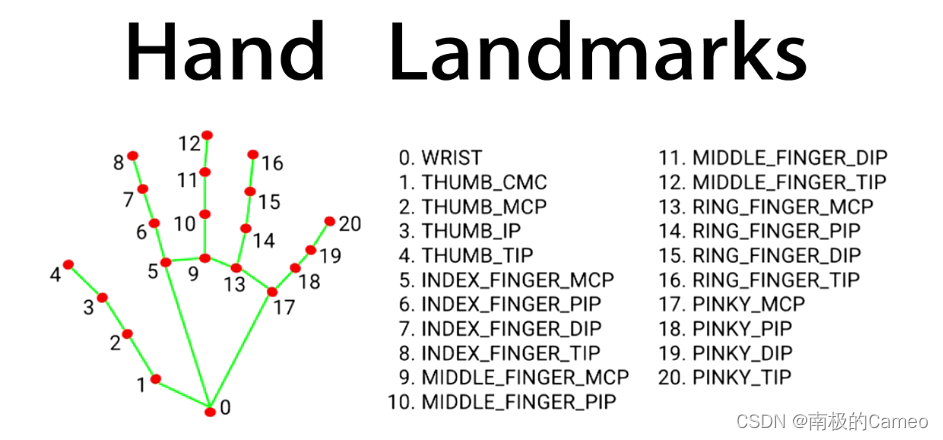
以上21个关键点描述了手部的基本形状和姿态,可以用于许多应用,如手势识别、手写识别、AR/VR应用等。
3.手部识别跟踪代码
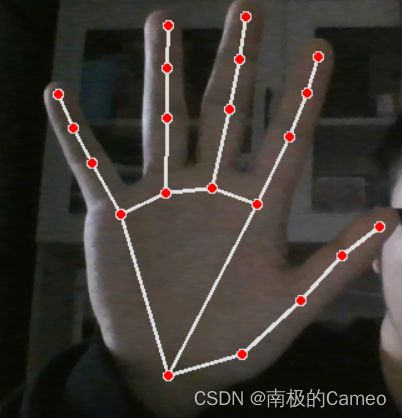
import cv2import mediapipe as mpimport time cap = cv2.VideoCapture(0) # 调用镜头wcap = cap.set(3, 800) # 设置相框大小hcap = cap.set(4, 800) mpHands = mp.solutions.hands # 使用mediapipe 手部模型hands = mpHands.Hands()drawmp = mp.solutions.drawing_utils # 画线topIds = [4, 8, 12, 16, 20] #5根手指的指尖pTime = 0while True: success, img = cap.read() # cap.read()会返回两个值:Ture或False 和 帧 if success: list = [] #opencv调用相机拍摄的图像格式是BGR,得转化为RGB格式便于图像处理 imgRGB = cv2.cvtColor(img, cv2.COLOR_BGR2RGB) result = hands.process(imgRGB) # print(result.multi_hand_landmarks) #打印手部21个点的坐标信息 if result.multi_hand_landmarks: for handlm in result.multi_hand_landmarks: # print(handlm) #打印坐标信息 drawmp.draw_landmarks(img, handlm, mpHands.HAND_CONNECTIONS) #将21个点连线 for id, lm in enumerate(handlm.landmark): h, w, c = img.shape #图像的长、宽、通道 cx, cy = int(lm.x * w), int(lm.y * h) #坐标cx,cy转为整数 list.append([id, cx, cy]) #记录每点坐标 if len(list) != 0: # 判断左右手 if result.multi_hand_landmarks: hand_landmarks = result.multi_hand_landmarks[0] # 仅取第一个检测到的手 if hand_landmarks.landmark[mpHands.HandLandmark.WRIST].x < hand_landmarks.landmark[ mpHands.HandLandmark.THUMB_TIP].x: print("右手") else: print("左手") #检测帧数 cTime = time.time() fps = 1 / (cTime - pTime) pTime = cTime cv2.putText(img, str(int(fps)), (10, 70), cv2.FONT_HERSHEY_PLAIN, 3, (255, 255, 255), 2) cv2.imshow("images", img) if cv2.waitKey(1) & 0xff == 27: #按‘ESC’键退出 break效果图:
4.手势识别
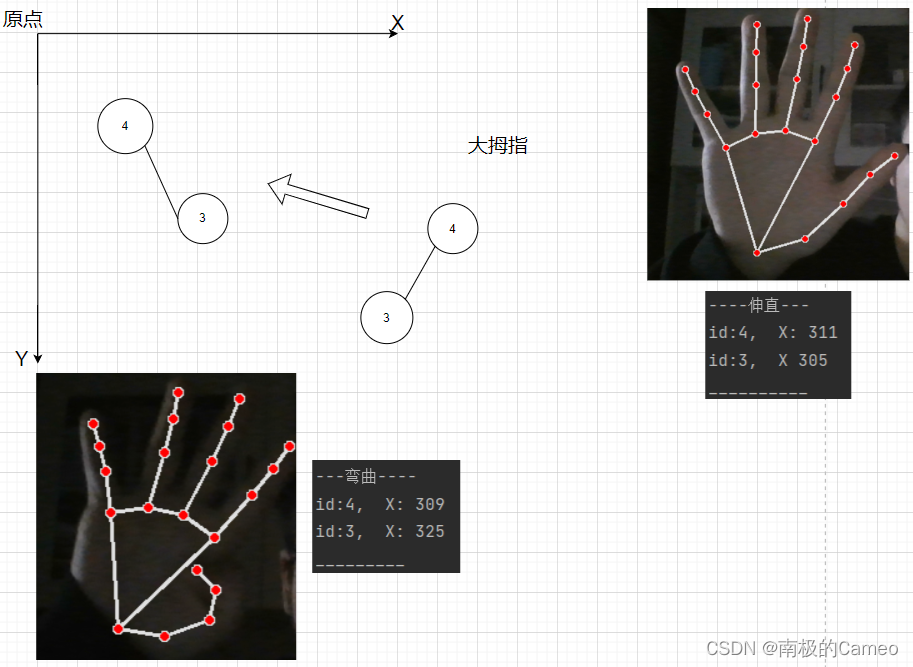
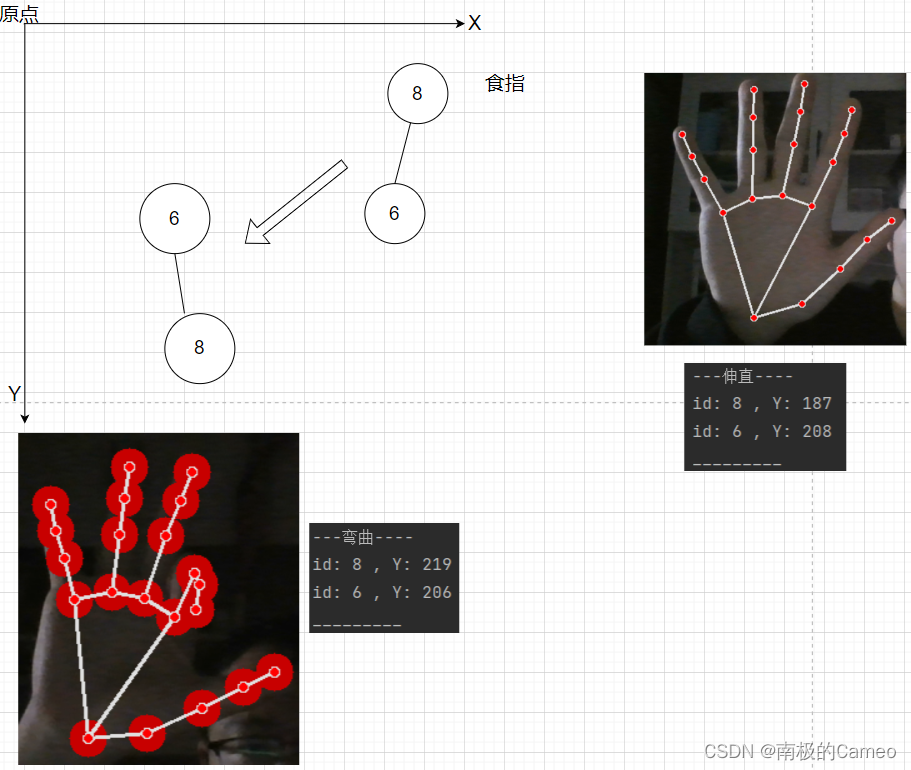
这里手势识别的原理是:根据手部关键点的坐标位置,来判断手部姿态(手指弯曲或者伸直)。大拇指比较特殊,和其余四指的弯曲方向不同。大拇指可以依靠X坐标,比较第4点和第3点的X值,来判断是否弯曲;其余四指可以依靠Y坐标,比如食指比较第8点和第6点的Y值,来判断是否弯曲。如下图所示:
手势识别代码:
# 判断左右手if result.multi_hand_landmarks: hand_landmarks = result.multi_hand_landmarks[0] # 仅取第一个检测到的手 #大拇指 if hand_landmarks.landmark[mpHands.HandLandmark.WRIST].x < hand_landmarks.landmark[ mpHands.HandLandmark.THUMB_TIP].x: #右手 if list[topIds[0]][1] > list[topIds[0] - 1][1]: finger.append(1) else: finger.append(0) else: #左手 if list[topIds[0]][1] < list[topIds[0] - 1][1]: finger.append(1) else: finger.append(0)#其余四指for id in range(1, 5): if list[topIds[id]][2] < list[topIds[id] - 2][2]: finger.append(1) # print("---伸直----") # print('id:', topIds[id], ', Y:', list[topIds[id]][2]) # print('id:', topIds[id] - 2, ', Y:', list[topIds[id] - 2][2]) # print("_________ ") else: finger.append(0) # print("---弯曲----") # print('id:', topIds[id], ', Y:', list[topIds[id]][2]) # print('id:', topIds[id] - 2, ', Y:', list[topIds[id] - 2][2]) # print("_________ ") totalFinger = finger.count(1) #统计伸直的手指个数 print(totalFinger)cv2.putText(img, str(totalFinger), (40, 350), cv2.FONT_HERSHEY_PLAIN, 10, (255, 0, 0), 25)5.完整代码
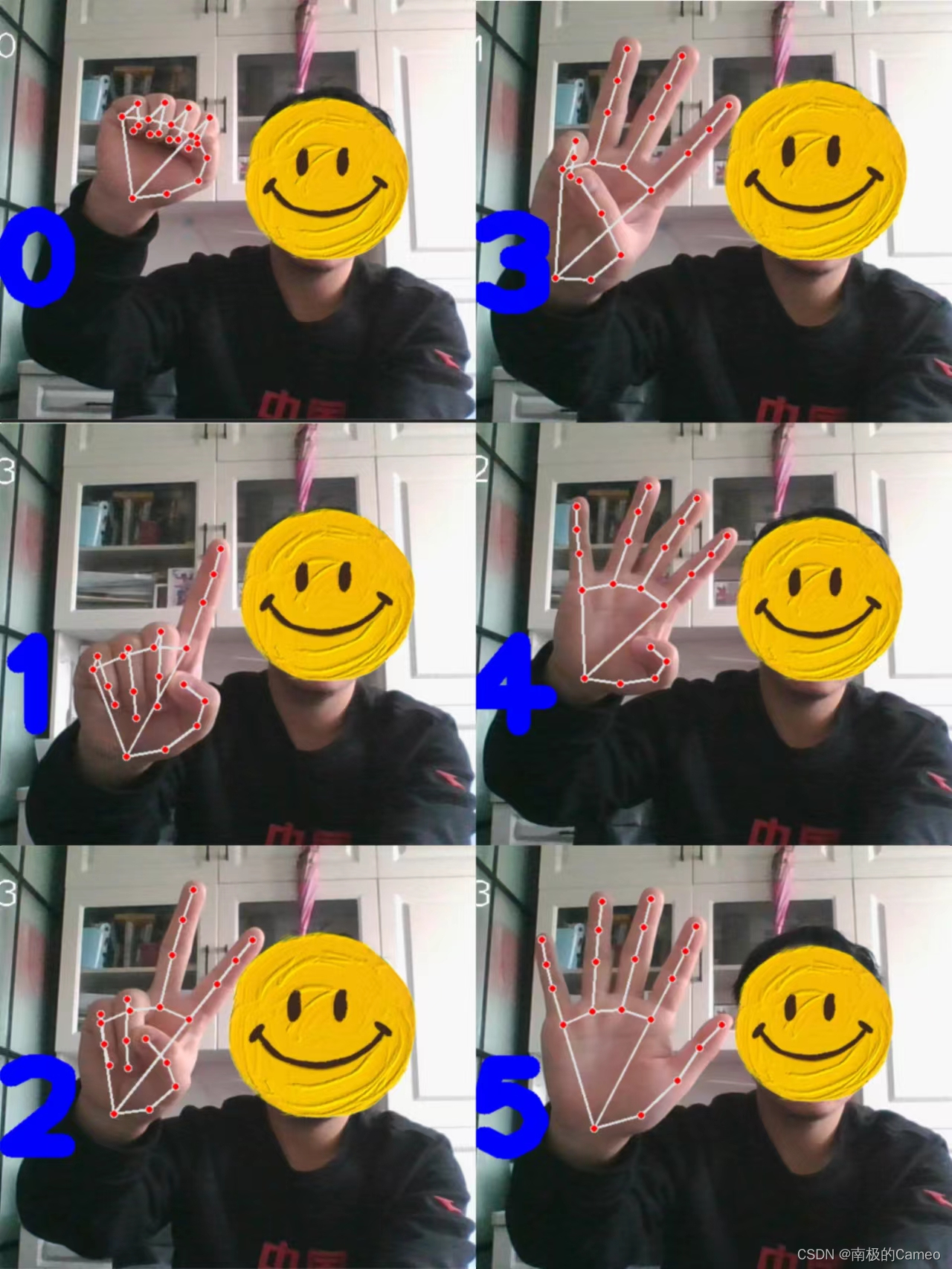
import cv2import mediapipe as mpimport time cap = cv2.VideoCapture(0) # 调用镜头wcap = cap.set(3, 800)hcap = cap.set(4, 800) mpHands = mp.solutions.hands # 使用mediapipe 手部模型hands = mpHands.Hands()drawmp = mp.solutions.drawing_utils # 画线topIds = [4, 8, 12, 16, 20]pTime = 0while True: success, img = cap.read() # cap.read()会返回两个值:Ture或False 和 帧 if success: list = [] # opencv调用相机拍摄的图像格式是BGR,得转化为RGB格式便于图像处理 imgRGB = cv2.cvtColor(img, cv2.COLOR_BGR2RGB) result = hands.process(imgRGB) # print(result.multi_hand_landmarks) #打印手部21个点的坐标信息 if result.multi_hand_landmarks: for handlm in result.multi_hand_landmarks: # print(landmarks) #打印坐标信息 drawmp.draw_landmarks(img, handlm, mpHands.HAND_CONNECTIONS) for id, lm in enumerate(handlm.landmark): h, w, c = img.shape # 图像的长、宽、通道 cx, cy = int(lm.x * w), int(lm.y * h) # 将坐标数值转为整数 list.append([id, cx, cy]) if len(list) != 0: finger = [] # 判断左右手 if result.multi_hand_landmarks: hand_landmarks = result.multi_hand_landmarks[0] # 仅取第一个检测到的手 # 大拇指 if hand_landmarks.landmark[mpHands.HandLandmark.WRIST].x < hand_landmarks.landmark[ mpHands.HandLandmark.THUMB_TIP].x: if list[topIds[0]][1] > list[topIds[0] - 1][1]: finger.append(1) else: finger.append(0) else: if list[topIds[0]][1] < list[topIds[0] - 1][1]: finger.append(1) else: finger.append(0) # 其余四指 for id in range(1, 5): if list[topIds[id]][2] < list[topIds[id] - 2][2]: finger.append(1) # print("---伸直----") # print('id:', topIds[id], ', Y:', list[topIds[id]][2]) # print('id:', topIds[id] - 2, ', Y:', list[topIds[id] - 2][2]) # print("_________ ") else: finger.append(0) # print("---弯曲----") # print('id:', topIds[id], ', Y:', list[topIds[id]][2]) # print('id:', topIds[id] - 2, ', Y:', list[topIds[id] - 2][2]) # print("_________ ") totalFinger = finger.count(1) print(totalFinger) cv2.putText(img, str(totalFinger), (40, 350), cv2.FONT_HERSHEY_PLAIN, 10, (255, 0, 0), 25) # 检测帧数 cTime = time.time() fps = 1 / (cTime - pTime) pTime = cTime cv2.putText(img, str(int(fps)), (10, 70), cv2.FONT_HERSHEY_PLAIN, 3, (255, 255, 255), 2) cv2.imshow("images", img) if cv2.waitKey(1) & 0xff == 27: # 按'ESC'键退出 break6.效果图
可以实现数字0到5的识别,如图所示:
最后,附上手势识别进阶篇《Unity 3D 手部追踪》,以及Mediapipe姊妹篇:《Opencv+Mediapipe->人脸特征点检测》和《OpenCV + Mediapipe ->人体姿态估计》,持续迸发。
免责声明:本文系网络转载或改编,未找到原创作者,版权归原作者所有。如涉及版权,请联系删
 技术文档
技术文档
 推荐好文
推荐好文






 155-2731-8020




