




软件

产品


中文文档:
[face_recognition/README_Simplified_Chinese.md]
Face Recognition 库主要封装了dlib这一 C++ 图形库,通过 Python 语言将它封装为一个非常简单就可以实现人脸识别的 API 库,屏蔽了人脸识别的算法细节,大大降低了人脸识别功能的开发难度, face_recognition是基于dlib进行了二次封装,号称世界上最简洁的人脸识别库。
(1)github地址:https://github.com/ageitgey/face_recognition
(2)官方指南:face_recognition软件包 — 人脸识别 1.4.0 文档 (face-recognition.readthedocs.io)
关于face_recognition包的安装,pycharm中并不包含,所以需要 下载 外部导入。
(1) dlib的安装步骤:
(1)首先电脑中需要安装Visual Studio
dlib在Windows系统下的编译依赖于Visual C++,所以需要安装Visual Studio,为dlib的安装提供Visual C++编译器支持。
(2)安装 cmake
pip install cmake
(3)安装dlib
访问Links for dlib (pypi.org),选择适合适的dlib版本的安装包进行下载,然后进行离线安装。
在pycharm中启动python 命令行 ,输入:
pip install D:\microsoft_down\dlib-19.24.0.tar.gz
(注意!!!下载下来的文件名是dlib-19.24.0.tar,实际上是一个压缩包,所以在安装时要加上压缩包后缀.gz)
安装过程比较久,待界面上出现【Successfully installed dlib-19.24.0】提示时,dlib安装成功。
(2) 安装face_recognition_models
下载 face_recognition_models 0.3.0, 然后进行离线安装。
在pycharm中启动python命令行,输入:
pip install D:\microsoft_down\face_recognition_models-0.3.0.gz
待界面上出现【Successfully installed face_recognition_models-0.3.0】提示时,face_recognition_models安装成功。
(3)安装face_recognition
在pycharm中启动python命令行,输入:
python setup.py install
待界面上出现【Finished processing dependencies for face-recognition==1.4.0】提示时,face_recognition安装成功。
import face_recognition
image = face_recognition.load_image_file("your_file.jpg")
face_locations = face_recognition.face_locations(image)
获取每个人的眼睛,鼻子,嘴巴和下巴的位置和轮廓。
import face_recognition
image = face_recognition.load_image_file("your_file.jpg")
face_landmarks_list = face_recognition.face_landmarks(image)
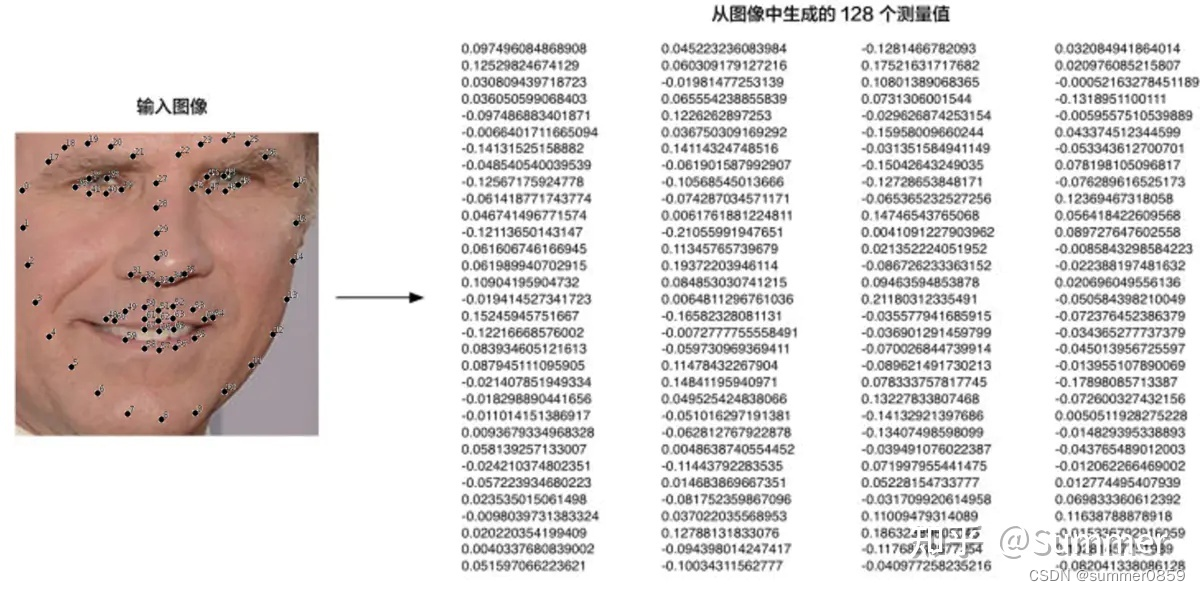
import face_recognition
known_image = face_recognition.load_image_file("biden.jpg")
unknown_image = face_recognition.load_image_file("unknown.jpg")
biden_encoding = face_recognition.face_encodings(known_image)
unknown_encoding = face_recognition.face_encodings(unknown_image)
识别每张照片中出现的用户
results = face_recognition.compare_faces([biden_encoding], unknown_encoding)
(1)face_recognition.api.batch_face_locations(图像,number_of_times_to_upsample=1,batch_size=128)
使用 cnn 人脸检测器返回图像中人脸边界框的 2d 数组 如果您使用的是 GPU,这可以为您提供更快的结果,因为 GPU 可以一次处理成批的图像。如果您没有使用GPU,则不需要此功能。
参数:
images – 图像列表(每个图像作为 numpy 数组)number_of_times_to_upsample - 对图像进行上采样以查找人脸的次数。数字越高,面孔越小。batch_size – 每个 GPU 处理批处理中要包含的图像数。
返回:
按 css 顺序(上、右、下、左)找到的人脸位置的元组列表
(2)face_recognition.api.compare_faces(known_face_encodings、face_encoding_to_check、公差=0.6)
将人脸编码列表与候选编码进行比较,以查看它们是否匹配。
参数:
known_face_encodings – 已知人脸编码列表face_encoding_to_check – 用于与列表进行比较的单人脸编码容差 – 脸之间的距离,以将其视为匹配项。越低越严格。0.6 是典型的最佳性能。
返回:
真/假值列表,指示哪些known_face_encodings与要检查的人脸编码匹配
(3)face_recognition.api.face_distance(face_encodings,face_to_compare)
给定人脸编码列表,将它们与已知人脸编码进行比较,并获取每个比较人脸的欧氏距离。距离告诉您人脸的相似程度。
参数:
face_encodings – 要比较的人脸编码列表face_to_compare – 要与之进行比较的人脸编码
返回:
一个 numpy ndarray,其每张面的距离与“面”数组的顺序相同
(4)face_recognition.api.face_encodings(face_image,known_face_locations=无,num_jitters=1,模型='小')
给定一个图像,返回图像中每个人脸的 128 维人脸编码。
参数:
face_image – 包含一张或多张人脸的图像known_face_locations - 可选 - 每张脸的边界框(如果您已经知道的话)。num_jitters – 计算编码时对人脸重新采样的次数。越高越准确,但越慢(即 100 表示慢 100 倍)模型 – 可选 - 要使用的模型。“大”或“小”(默认),仅返回5分但速度更快。
返回:
128 维人脸编码的列表(图像中每个人脸一个)
(5)face_recognition.api.face_landmarks(face_image,face_locations=无,模型='大')
给定图像,返回图像中每个人脸的人脸特征位置(眼睛、鼻子等)的字典
参数:
face_image – 要搜索的图像face_locations – (可选)提供要检查的人脸位置列表。模型 – 可选 - 要使用的模型。“大”(默认)或“小”,仅返回5分但速度更快。
返回:
人脸特征位置(眼睛、鼻子等)的字典列表
(6)face_recognition.api.face_locations(img,number_of_times_to_upsample=1,model='hog')
返回图像中人脸的边界框数组
参数:
img – 图像(作为数字数组)number_of_times_to_upsample - 对图像进行上采样以查找人脸的次数。数字越高,面孔越小。model – 要使用的人脸检测模型。“hog”在CPU上不太准确,但更快。“cnn”是一个更准确的深度学习模型,它是GPU / CUDA加速的(如果可用)。默认值为“hog”。
返回:
按 css 顺序(上、右、下、左)找到的人脸位置的元组列表
(7)face_recognition.api.load_image_file(文件,模式 ='RGB')
将图像文件(.jpg、.png等)加载到numpy数组中
参数:
文件 – 要加载的图像文件名或文件对象mode ―要将图像转换为的格式。仅支持“RGB”(8 位 RGB,3 个通道)和“L”(黑白)。
返回:
图像内容作为数字数组
import face_recognition
import cv2


def show_landmarks(img, landmarks):
    for landmarks_dict in landmarks:
        for landmarks_key in landmarks_dict.keys():
            for point in landmarks_dict[landmarks_key]:
                cv2.circle(img, point, 2, (0, 0, 255), -1)
    cv2.imshow('img_landmarks', img)


def show_locations(img, locations):
    for face_location in locations:
        # Print the location of each face in this image
        top, right, bottom, left = face_location
        print("A face is located at pixel location Top: {}, Left: {}, Bottom: {}, Right: {}".format(top, left, bottom, right))
        start = (left, top)  # 左上
        end = (right, bottom)  # 右下
        # 在图片上绘制矩形框,从start坐标开始,end坐标结束,矩形框的颜色为红色(0,255,255),矩形框粗细为2
        cv2.rectangle(img, start, end, (0, 255, 255), thickness=1)
    cv2.imshow('img_locations', img)

# 1.读取图片
# 将图像文件(.jpg、.png等)加载到numpy数组中
image_origin = face_recognition.load_image_file("obama.jpg")
# cv2.imshow('image_origin', image_origin)  # 原始图片展示 BGR 格式

# 2.格式转换
# 该face_recognition库仅支持 BGR 格式的图像,在打印输出图像时,我们应该使用 OpenCV 将其转换为 RGB。
img_rgb = cv2.cvtColor(image_origin, cv2.COLOR_BGR2RGB)
cv2.imshow('img_rgb', img_rgb)  # 展示 RGB 格式图片

img_copy = img_rgb.copy()  # 避免形参对实参的影响

# 3.通过face_recognition.face_landmarks()方法读取人脸关键点
# 返回人脸特征位置(眼睛、鼻子等)的字典列表
face_landmarks_list = face_recognition.face_landmarks(img_rgb)

# show_landmarks(img_copy, face_landmarks_list)  # 在人脸上绘制关键点进行展示

# 4.通过face_recognition.face_locations()方法获得人脸边框
# 返回图像中人脸的边界框数组 按 css 顺序(上、右、下、左)找到的人脸位置的元组列表
face_locations = face_recognition.face_locations(img_rgb)
print("I found {} face(s) in this photograph.".format(len(face_locations)))

# show_locations(img_copy, face_locations)

# 5.通过face_recognition.face_encodings()方法获得人脸编码
# 给定一个图像,返回图像中每个人脸的 128 维人脸编码。
list_of_face_encodings = face_recognition.face_encodings(img_rgb, known_face_locations=face_locations)


# 6.通过face_recognition.api.compare_faces()方法获得人脸匹配结果
# 将人脸编码列表与候选编码进行比较,以查看它们是否匹配
# (known_face_encodings、face_encoding_to_check、公差=0.6)
test = face_recognition.load_image_file('biden.jpg')
test = cv2.cvtColor(test, cv2.COLOR_BGR2RGB)
cv2.imshow('test', test)

test_encode = face_recognition.face_encodings(test)[0]
print(face_recognition.compare_faces([list_of_face_encodings], test_encode))  # 获取经过训练的编码列表和未知图像的测试编码。

# 7.通过face_recognition.face_distance()方法获取每个比较人脸的欧氏距离
# 给定人脸编码列表,将它们与已知人脸编码进行比较,并获取每个比较人脸的欧氏距离。距离告诉您人脸的相似程度。距离越小越相似
face_distances = face_recognition.face_distance(list_of_face_encodings, test_encode)

for i, face_distance in enumerate(face_distances):
    print("The test image has a distance of {:.2} from known image #{}".format(face_distance, i))
    print("- With a normal cutoff of 0.6, would the test image match the known image? {}".format(face_distance < 0.6))
    print("- With a very strict cutoff of 0.5, would the test image match the known image? {}".format(face_distance < 0.4))

cv2.waitKey(0)


免责声明:本文系网络转载或改编,未找到原创作者,版权归原作者所有。如涉及版权,请联系删
 技术文档
技术文档
 推荐好文
推荐好文






 155-2731-8020




