




软件

产品


元学习论文总结||小样本学习论文总结
2017-2019年计算机视觉顶会文章收录 AAAI2017-2019 CVPR2017-2019 ECCV2018 ICCV2017-2019 ICLR2017-2019 NIPS2017-2019
完整源码自 vieo.zhu@foxmail.com 申请
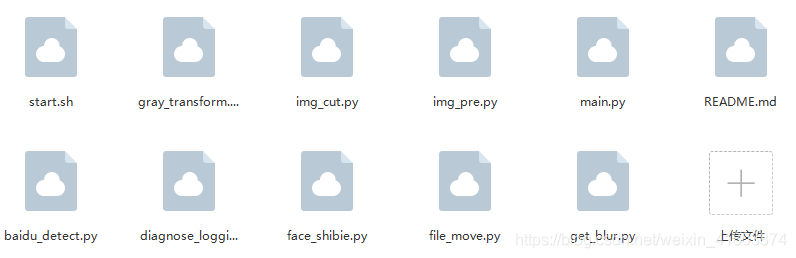
一:环境
python3.5
二:代码实现
# coding:utf-8## BaiduFaceDetect## 获取百度人脸检测接口信息返回## 百度人脸检测文档:# https://ai.baidu.com/docs#/Face-Detect-V3/top## ============================================================================== import urllib3, base64import urllibimport socketfrom urllib.parse import urlencodefrom urllib import requestimport jsonfrom diagnose_logging import Logger # 日志log = Logger('baidu_detect.py')logger = log.getlog() # face_field:人脸检测项目,详情参考百度人脸检测文档face_field = 'landmark,gender,race,age,facetype,quality,glasses' # 无空格 def get_token(): """根据认证信息获取access_token. access_token的有效期为30天,切记需要每30天进行定期更换,或者每次请求都拉取新token; """ try: # 账号信息 client_id = '***' client_secret = '***' host = 'https://aip.baidubce.com/oauth/2.0/token?grant_type=client_credentials&client_id=%s&client_secret=%s' % ( client_id, client_secret) # HTTP请求,获取access_token req = request.Request(host) req.add_header('Content-Type', 'application/json; charset=UTF-8') response = request.urlopen(req, timeout=1000) # 获得请求结果 content = response.read() # 结果转化为字符 content = bytes.decode(content) # 结果转化为字典 content = eval(content[:-1]) # 日志 logger.info('get_token SUCCES: %s', content['access_token']) logger.info('get_token SUCCES') return content['access_token'] except Exception as ee: logger.error(ee) except urllib.error.URLError as e: if isinstance(e.reason, socket.timeout): logger.error('get_token ERROR:TIME OUT') def get_baidu_result(rootPath): """调取百度人脸检测,取得图像的分析结果. Args: rootPath:源图片地址 Returns: result:字典类型,详情参考下文 image_type:BASE64,FACE_TOKEN,URL FACE_TOKEN:图片上传,返回json结果中包含face_token params={image,image_type,face_field} 两种格式: params={'image':'f7ec8ecd441886371b9749d1fc853f44','image_type':'FACE_TOKEN','face_field':'age,beauty,faceshape,gender,glasses'} params={'image':'https://www.xsshome.cn/face.jpg','image_type':'URL','face_field':'age,beauty,faceshape,gender,glasses'} """ try: # api请求 # access_token = get_token() # 当access_token过期后再重新调取 http = urllib3.PoolManager() url = 'https://aip.baidubce.com/rest/2.0/face/v3/detect?access_token=' + access_token # 图像读入,转二进制 with open(rootPath, 'rb') as image: # 图像为文件完整路径,而不是文件名 # 转base64编码 img = base64.b64encode(image.read()) # 接口必要参数 params = {'image': '' + str(img, 'utf-8') + '', 'image_type': 'BASE64', 'face_field': face_field} # 对base64数据进行urlencode解析,返回值为字符串 params = urlencode(params) # 调取接口,检测图片 try: req = http.request('POST', url, body=params, headers={'Content-Type': 'application/json'}) except Exception as e: logger.error('get_request ERROR') logger.error(e) # 返回结果为byte字节,处理成可读的Unicode字符串,转换成字典 req_data = json.loads(str(req.data, 'utf-8')) result = req_data # 日志 logger.info('get_baiduApi: %s', result['error_msg']) # logger.info('get_api_result: %s', result) return result except Exception as e: logger.error('baidu_result ERROR') logger.error(e)二:解析72个人脸特征点
def get_faceList(baidu_result): """对检测结果,解析出faceList并返回. {'age': 23, 'landmark72': [{'x': 167.3847198, 'y': 71.8085556}, ], 'race': {'probability': 0.9999984503, 'type': 'yellow'}, 'gender': {'probability': 0.9995638728, 'type': 'female'}, 'landmark': [{'x': 228.6446533, 'y': 100.6326599}, ], 'angle': {'pitch': 7.808499336, 'yaw': -7.641532898, 'roll': 16.28609276}, 'quality': {'occlusion': {'left_cheek': 0.01251564454, 'left_eye': 0.01948842965, 'mouth': 0, 'nose': 0, 'chin_contour': 0, 'right_eye': 0, 'right_cheek': 0.01564828679}, 'illumination': 213, 'blur': 1.894906276e-08, 'completeness': 1}, 'face_probability': 1, 'face_token': 'dbcee960bd59b0e12ffa5a579b7b2744', 'location': {'width': 196, 'height': 188, 'top': 48.5020256, 'rotation': 16, 'left': 174.3717194}, 'face_type': {'probability': 0.9740739465, 'type': 'human'}} """ try: result = baidu_result # 取得face_list,只有一个元素 face_list = result['result']['face_list'][0] # 日志 # logger.info('get_faceList') # logger.info('get_faceList: %s',face_list) return face_list except Exception as e: logger.error('get_faceList ERROR') logger.error(e) def get_landmark(baidu_result): """传入rootPath,独立请求百度接口,返回特征点. Args: rootPath:源图片地址 Returns: landmark:72对值的列表 [{"x": 115.86531066895,"y": 170.0546875},...] """ try: # 单独调取接口 result = get_faceList(baidu_result) landmark = result['landmark72'] # 日志 # logger.info('get_landmark') return landmark except Exception as e: logger.error('get_landmarkPath ERROR') logger.error(e) if __name__ == '__main__': # 测试上述方法 rootPath = 'E:/face/0.jpg' # 计时 import datetime print('start...') start_time = datetime.datetime.now() # api请求 result = get_baidu_result(rootPath) # 结果解析 get_faceList(result) get_landmark(result) end_time = datetime.datetime.now() time_consume = (end_time - start_time).microseconds / 1000000 logger.info('start_time: %s', start_time) logger.info('end_time: %s', end_time) logger.info('time_consume: %s(s)', time_consume) # 0.280654(s) logger.info('main finish') 三:diagnose_logging
import loggingclass Logger(): def __init__(self, logName): # 创建一个logger self.logger = logging.getLogger(logName) # 判断,如果logger.handlers列表为空,则添加,否则,直接去写日志,试图解决日志重复 if not self.logger.handlers: self.logger.setLevel(logging.INFO) # 创建一个handler,用于写入日志文件 fh = logging.FileHandler('log.log') fh.setLevel(logging.INFO) # 再创建一个handler,用于输出到控制台 ch = logging.StreamHandler() ch.setLevel(logging.INFO) # 定义handler的输出格式 formatter = logging.Formatter('%(levelname)s:%(asctime)s -%(name)s -%(message)s') fh.setFormatter(formatter) ch.setFormatter(formatter) # 给logger添加handler处理器 self.logger.addHandler(fh) self.logger.addHandler(ch) def getlog(self): return self.logger四:接口返回参数
# 百度人脸检测返回参数 返回结果字段 必选 类型 说明face_num 是 int 检测到的图片中的人脸数量face_list 是 array 人脸信息列表,具体包含的参数参考下面的列表。+face_token 是 string 人脸图片的唯一标识+location 是 array 人脸在图片中的位置++left 是 double 人脸区域离左边界的距离++top 是 double 人脸区域离上边界的距离++width 是 double 人脸区域的宽度++height 是 double 人脸区域的高度++rotation 是 int64 人脸框相对于竖直方向的顺时针旋转角,[-180,180]+face_probability 是 double 人脸置信度,范围[0~1],代表这是一张人脸的概率,0最小、1最大。+angel 是 array 人脸旋转角度参数++yaw 是 double 三维旋转之左右旋转角[-90(左), 90(右)]++pitch 是 double 三维旋转之俯仰角度[-90(上), 90(下)]++roll 是 double 平面内旋转角[-180(逆时针), 180(顺时针)]+age 否 double 年龄 ,当face_field包含age时返回+beauty 否 int64 美丑打分,范围0-100,越大表示越美。当face_fields包含beauty时返回+expression 否 array 表情,当 face_field包含expression时返回++type 否 string none:不笑;smile:微笑;laugh:大笑++probability 否 double 表情置信度,范围【0~1】,0最小、1最大。+face_shape 否 array 脸型,当face_field包含faceshape时返回++type 否 double square: 正方形 triangle:三角形 oval: 椭圆 heart: 心形 round: 圆形++probability 否 double 置信度,范围【0~1】,代表这是人脸形状判断正确的概率,0最小、1最大。+gender 否 array 性别,face_field包含gender时返回++type 否 string male:男性 female:女性++probability 否 double 性别置信度,范围【0~1】,0代表概率最小、1代表最大。+glasses 否 array 是否带眼镜,face_field包含glasses时返回++type 否 string none:无眼镜,common:普通眼镜,sun:墨镜++probability 否 double 眼镜置信度,范围【0~1】,0代表概率最小、1代表最大。+race 否 array 人种 face_field包含race时返回++type 否 string yellow: 黄种人 white: 白种人 black:黑种人 arabs: 阿拉伯人++probability 否 double 人种置信度,范围【0~1】,0代表概率最小、1代表最大。+face_type 否 array 真实人脸/卡通人脸 face_field包含facetype时返回++type 否 string human: 真实人脸 cartoon: 卡通人脸++probability 否 double 人脸类型判断正确的置信度,范围【0~1】,0代表概率最小、1代表最大。+landmark 否 array 4个关键点位置,左眼中心、右眼中心、鼻尖、嘴中心。face_field包含landmark时返回+landmark72 否 array 72个特征点位置 face_field包含landmark时返回+quality 否 array 人脸质量信息。face_field包含quality时返回++occlusion 否 array 人脸各部分遮挡的概率,范围[0~1],0表示完整,1表示不完整+++left_eye 否 double 左眼遮挡比例,[0-1] ,1表示完全遮挡+++right_eye 否 double 右眼遮挡比例,[0-1] , 1表示完全遮挡+++nose 否 double 鼻子遮挡比例,[0-1] , 1表示完全遮挡+++mouth 否 double 嘴巴遮挡比例,[0-1] , 1表示完全遮挡+++left_cheek 否 double 左脸颊遮挡比例,[0-1] , 1表示完全遮挡+++right_cheek 否 double 右脸颊遮挡比例,[0-1] , 1表示完全遮挡+++chin 否 double 下巴遮挡比例,,[0-1] , 1表示完全遮挡++blur 否 double 人脸模糊程度,范围[0~1],0表示清晰,1表示模糊++illumination 否 double 取值范围在[0~255], 表示脸部区域的光照程度 越大表示光照越好++completeness 否 int64 人脸完整度,0或1, 0为人脸溢出图像边界,1为人脸都在图像边界内 五:参数结构
# 返回结果结构 "face_num": 1,"error_msg" : 'SUCCESS'"error_code" : 0"result" :{ "face_list": [ { "face_token": "35235asfas21421fakghktyfdgh68bio", "location": { "left": 117, "top": 131, "width": 172, "height": 170, "ro tation": 4 }, "face_probability": 1, "angle" :{ "yaw" : -0.34859421849251 "pitch" 1.9135693311691 "roll" :2.3033397197723 } "landmark": [ { "x": 161.74819946289, "y": 163.30244445801 }, ... ], "landmark72": [ { "x": 115.86531066895, "y": 170.0546875 }, ... ], "age": 29.298097610474, "beauty": 55.128883361816, "expression": { "type": "smile", "probability" : 0.5543018579483 }, "gender": { "type": "male", "probability": 0.99979132413864 }, "glasses": { "type": "sun", "probability": 0.99999964237213 }, "race": { "type": "yellow", "probability": 0.99999976158142 }, "face_shape": { "type": "triangle", "probability": 0.5543018579483 } "quality": { "occlusion": { "left_eye": 0, "right_eye": 0, "nose": 0, "mouth": 0, "left_cheek": 0.0064102564938366, "right_cheek": 0.0057411273010075, "chin": 0 }, "blur": 1.1886881756684e-10, "illumination": 141, "completeness": 1 } } ]}六:特征点图像
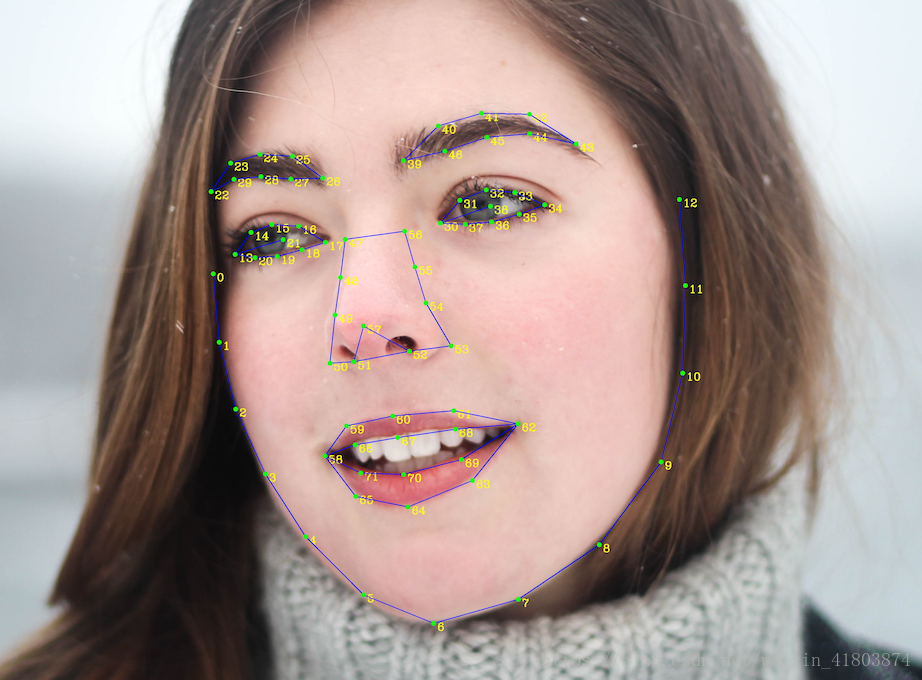
七:关于账号
注册 :
https://login.bce.baidu.com/?account=&redirect=http%3A%2F%2Fconsole.bce.baidu.com%2F%3Ffromai%3D1#/aip/overview
client_id = API Key
client_secret = Secret Key
# 打赏鼓励请扫支付宝微信二维码O(∩_∩)O金额不限噢噢!如果有修改建议或者疑问请留言!

支付宝

微信支付
免责声明:本文系网络转载或改编,未找到原创作者,版权归原作者所有。如涉及版权,请联系删
 技术文档
技术文档
 推荐好文
推荐好文






 155-2731-8020




