




软件

产品


Allegro在画板的过程中,有时候会根据规格书修改封装,或者基于此封装的基础上新建其它的封装。那么如何替换原封装中的焊盘呢?具体操作方法如下
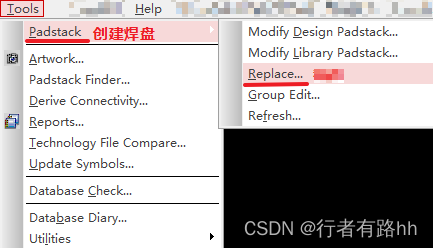
1、选择菜单栏Tools→Padstack(创建焊盘)→Replace(替换)
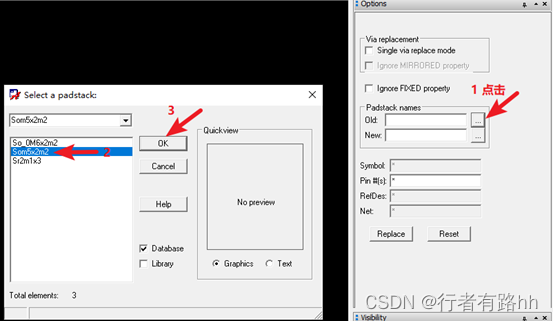
2、在Options选项卡,点击Old后面的...,跳出左侧的对话框,选择要更改的旧焊盘,点击OK,如下图所示
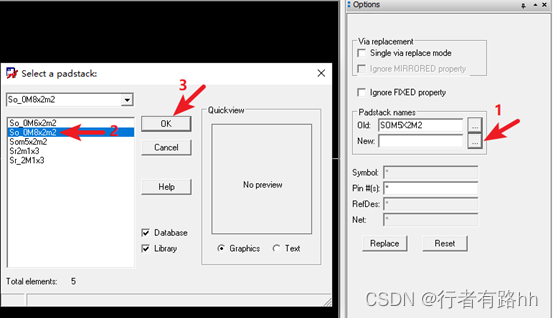
3、然后同样点击New后面的...,跳出左侧的对话框,选择要替换成的新焊盘,然后点击OK。如下图
然后点击Replace(替换),
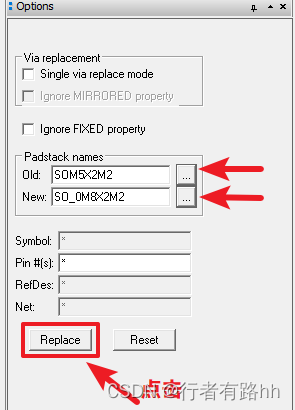
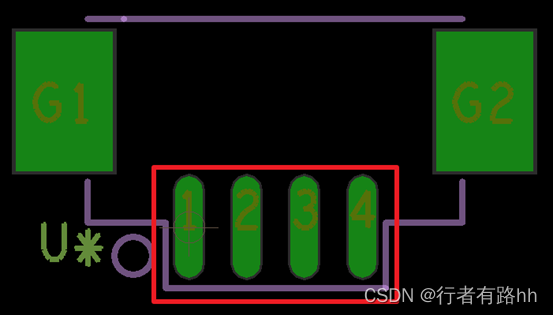
焊盘即被替换成想要的新焊盘,如下图所示
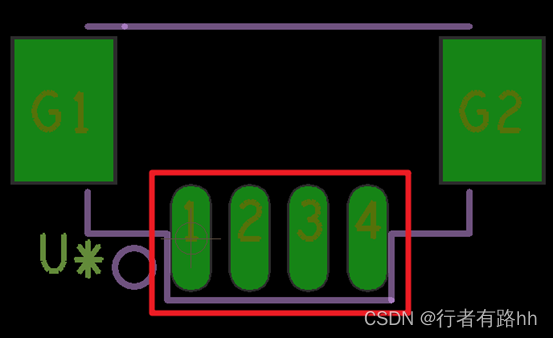
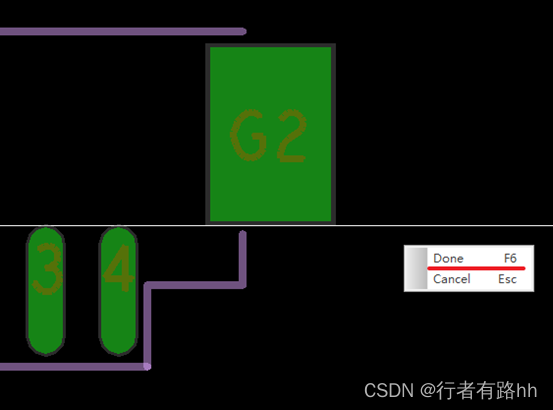
完成后,在PCB界面鼠标右击Done
博主专注职场硬件设计,如果文章对你有帮助,请关注,点赞,收藏。成长路上有前行者。博主将会定期或不定期分享PADS,Allegro设计技巧和经验。
Allegro provides a good and interactive working interface and powerful functions, and its front-end products Cadence, OrCAD, Capture, the combination of high-speed, high-density, multi-layer complex PCB design routing provides the most perfect solution.
Allegro has perfect Constraint Settings, users only need to set the wiring rules according to the requirements, and the design requirements of the wiring can be achieved without violating the DRC when routing, thus saving the tedious manual inspection time and improving the work efficiency!
It can also define parameters such as minimum wire-width or wire-length to meet the needs of today's high-speed circuit board wiring.
Constraint Manger provides a simple interface for users to set and view Constraint declarations.
Its combination with Capture allows E.E. electronics engineers to set up regular data when drawing a circuit diagram and bring it with them to the Allegro working environment, where it can be automatically processed and checked when placing parts and wiring. The empirical values of these regular data can be reused for the same nature of the circuit board design.
In addition to the above functions, Allegro's powerful automatic push and stick line and perfect automatic repair line function provide users with great convenience;
The powerful mapping function can provide multiple users to deal with a complex board at the same time, thus greatly improving the work efficiency.
Or use the optional graph cutting function to cut the circuit board into various blocks, so that each block has a full-time person at the same time to design, to achieve the purpose of the same graph design and can shorten the time course.
After renaming, online interchange and modifying logic during routing, users can easily return to Capture wiring diagram, and update the wiring diagram to Allegro after modification.
Users can also click and modify objects between Capture and Allegro.
免责声明:本文系网络转载或改编,未找到原创作者,版权归原作者所有。如涉及版权,请联系删
 技术文档
技术文档
 推荐好文
推荐好文






 155-2731-8020




