



软件

产品


动图
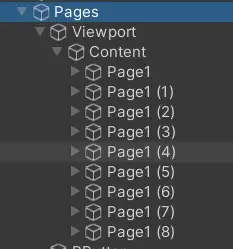
结构
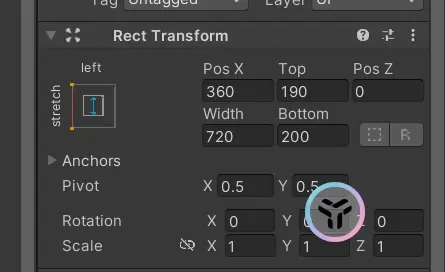
左对齐
代码块
using System.Collections.Generic;
using UnityEngine;
using UnityEngine.UI;

[RequireComponent(typeof(ScrollRect))]//必须要有这个组件
public class FenqunziPageView: MonoBehaviour
{
    //自身组件
    public ScrollRect scrollRect;
    public RectTransform content;
    //页面表
    public List<RectTransform> page = new List<RectTransform>();
    //水平滑动
    public bool horizontal = true;
    //是否可以循环滑动
    public bool loop = false;
    //速度
    public float snapSpeed = 10f;
    //当前页面
    public int currentPageIndex = 0;
    //目标位置
    private float targetPosition = 0f;
    //正在滑动
    private bool isScrolling = false;

    [Header("UI表现")]
    public Text currText;
    public Text maxText;

    public void Start()
    {
        //获取组件
        if(scrollRect==null)
        {
            scrollRect = GetComponent<ScrollRect>();
        }
        if(content==null)
        {
            content = scrollRect.content;
        }
        //页面初始化
        InitPagePosition();
        //添加事件
        scrollRect.onValueChanged.AddListener(OnScrollChanged);
        //给按钮添加事件
        AddEventToAllButton();
    }
    //页面初始化
    public void InitPagePosition()
    {
        //记录尺寸
        float offset = 0;
        foreach (var i in page)
        {
            //设置父物体
            i.SetParent(content);
            //自适应固定在最左边
            i.anchorMin = new Vector2(0, 0);
            i.anchorMax = new Vector2(0, 1);
            i.pivot = new Vector2(0, 0.5f);
            //根据偏移设置位置
            i.anchoredPosition = horizontal ? new Vector2(offset, 0) : new Vector2(0, -offset);
            offset += horizontal ? i.rect.width : i.rect.height;
        }

        //设置content总长度
        Vector2 size = content.sizeDelta;
        if (horizontal) size.x += (offset-page[0].rect.width);
        else size.y += (offset-page[0].rect.height);
        content.sizeDelta = size;

        //初始处于0索引
        GotoPage(0);
    }
    //改变时的事件
    public void OnScrollChanged(Vector2 vec2)
    {
        if (!isScrolling)
        {
            //获取当前位置
            float currentPos = horizontal ? vec2.x : vec2.y;
            //获取当前索引,四舍五入
            //注意这个是四舍五入,如果是Int(数),是强制取整,比如,1.4和1.8都是转换为1
            currentPageIndex = Mathf.RoundToInt(currentPos * (page.Count - 1));
        }
    }
    public void Update()
    {
        if(isScrolling)
        {
            //获取当前位置
            Vector2 pos = content.anchoredPosition;
            //使用lerp来进行模拟滑动
            if (horizontal) pos.x = Mathf.Lerp(pos.x, targetPosition, snapSpeed * Time.deltaTime);
            else pos.y = Mathf.Lerp(pos.y, targetPosition, snapSpeed * Time.deltaTime);
            content.anchoredPosition = pos;
            //滑动停止
            if (Mathf.Abs((horizontal ? pos.x : pos.y)-targetPosition)<0.5f)
            {
                isScrolling = false;
            }
        }
    }
    //移动目标页面
    public void GotoPage(int index)
    {
        //越界
        if (index < 0 || index >= page.Count) return;

        //更新UI表现
        currText.text=(index+1).ToString();
        maxText.text=page.Count.ToString();

        currentPageIndex = index;
        targetPosition = GetPagePosition(index);
        isScrolling = true;
    }
    //获取页面
    public float GetPagePosition(int index)
    {
        //获取位置
        float pos = 0;
        //注意计算公式是(数量*尺寸)/2-当前索引*尺寸
        if(horizontal)
        {
            //pos = (page.Count * page[0].rect.width) / 2 - index * page[0].rect.width;
            pos=index*page[0].rect.width;
        }
        else
        {
            //pos = (page.Count * page[0].rect.height) / 2-index* page[0].rect.height;
            pos=index*page[0].rect.height;
        }

        return -pos;
    }
    //上一个页面
    public void PreviousPage()
    {
        int prev = currentPageIndex - 1;
        //可以循环转到最大页面
        if (loop && prev < 0) prev = page.Count - 1;
        if (prev >= 0) GotoPage(prev);
        FenqunziAudManager.instance.PlayAud(FenqunziAudManager.instance.clickAud);
    }
    //下一个页面
    public void NextPage()
    {
        int next = currentPageIndex + 1;
        //可以循环转到最小页面
        if (loop && next >= page.Count) next = 0;
        if (next < page.Count) GotoPage(next);
        FenqunziAudManager.instance.PlayAud(FenqunziAudManager.instance.clickAud);
    }
}


      复制成功
注意创建的ScrollRect和content都要左对齐。
利用rect大小适配好位置,然后使用Math.Lerp进行插值移动。
免责声明:本文系网络转载或改编,未找到原创作者,版权归原作者所有。如涉及版权,请联系删
 技术文档
 推荐好文





 155-2731-8020