



软件

产品


本文使用Int作为事件的Key,事件结构体作为输入参数。
好处是性能好,无gc。
坏处是所有的事件key,事件结构体和内部的参数都需要主动设置,要是忘了就比较麻烦。
代码结构如下:
编辑器扩展代码
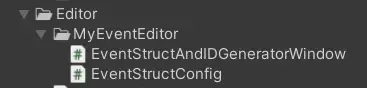
Editor目录下
核心代码

Script目录下
EventStructAndIDGeneratorWindow代码如下:
代码块
using UnityEditor;
using UnityEngine;
using System.Collections.Generic;
using System.Text;
using System.IO;

/// <summary>
/// 事件结构体生成编辑器工具(支持JSON直接导入)
/// </summary>
public class EventStructAndIDGeneratorWindow : EditorWindow
{
    // 配置数据(可视化配置模式)
    private EventStructConfig _config;
    // 输入缓存(可视化配置模式)
    private string _moduleName = "";
    private string _eventName = "";
    private List<EventParam> _tempParams = new List<EventParam>();
    private string _newParamType = "int";
    private string _newParamName = "Param1";
    int selectedTypeIndex = 0;
    // 滚动位置
    private Vector2 _scrollPos;
    private Vector2 _savedEventsScrollPos;
    // 常用参数类型下拉选项
    private readonly string[] _commonParamTypes = {
        "int", "float", "bool", "string", "long", "double",
        "Vector2", "Vector3", "Vector4", "Quaternion", "Color",
        "GameObject", "Transform", "Component"
    };

    // 打开工具窗口(菜单栏:Tools/事件结构体生成工具)
    [MenuItem("Tools/事件结构体和事件ID类生成工具")]
    public static void ShowWindow()
    {
        GetWindow<EventStructAndIDGeneratorWindow>("事件结构体和事件ID类生成器");
    }
    private void OnEnable()
    {
        // 加载默认配置(可视化模式)
        _config = EventStructConfig.LoadFromJson();
    }
    private void OnGUI()
    {
        ShowVisualConfigUI();
    }
    #region 可视化配置模式界面
    private void ShowVisualConfigUI()
    {
        GUI.skin.label.fontSize = 12;
        GUI.skin.label.fontStyle = FontStyle.Bold;
        EditorGUILayout.LabelField("基本事件信息");
        GUI.skin.label.fontStyle = FontStyle.Normal;

        // 基本信息输入
        EditorGUILayout.BeginHorizontal();
        EditorGUILayout.LabelField("所属模块:", GUILayout.Width(80));
        _moduleName = EditorGUILayout.TextField(_moduleName);
        EditorGUILayout.EndHorizontal();
        EditorGUILayout.BeginHorizontal();
        EditorGUILayout.LabelField("事件名称:", GUILayout.Width(80));
        _eventName = EditorGUILayout.TextField(_eventName);
        EditorGUILayout.EndHorizontal();
        GUI.skin.label.fontStyle = FontStyle.Bold;
        EditorGUILayout.LabelField("参数配置");
        GUI.skin.label.fontStyle = FontStyle.Normal;
        // 常用参数类型下拉选择
        EditorGUILayout.BeginHorizontal();
        EditorGUILayout.LabelField("常用参数类型:", GUILayout.Width(80));
        selectedTypeIndex = EditorGUILayout.Popup(selectedTypeIndex, _commonParamTypes);
        _newParamType = _commonParamTypes[selectedTypeIndex];
        EditorGUILayout.EndHorizontal();
        // 自定义参数类型输入
        EditorGUILayout.BeginHorizontal();
        EditorGUILayout.LabelField("自定义类型:", GUILayout.Width(80));
        _newParamType = EditorGUILayout.TextField(_newParamType);
        EditorGUILayout.EndHorizontal();
        // 参数名称输入
        EditorGUILayout.BeginHorizontal();
        EditorGUILayout.LabelField("参数名称:", GUILayout.Width(80));
        _newParamName = EditorGUILayout.TextField(_newParamName);
        if (GUILayout.Button("添加参数", GUILayout.Width(100)))
        {
            AddNewParam();
        }
        EditorGUILayout.EndHorizontal();
        // 参数列表
        _scrollPos = EditorGUILayout.BeginScrollView(_scrollPos);
        for (int i = 0; i < _tempParams.Count; i++)
        {
            var param = _tempParams[i];
            EditorGUILayout.BeginHorizontal("Box");
            EditorGUILayout.LabelField($"参数 {i + 1}", GUILayout.Width(60));
            param.ParamType = EditorGUILayout.TextField(param.ParamType);
            param.ParamName = EditorGUILayout.TextField(param.ParamName);
            if (GUILayout.Button("删除", GUILayout.Width(60)))
            {
                _tempParams.RemoveAt(i);
                EditorGUILayout.EndHorizontal();

                break;
            }
            EditorGUILayout.EndHorizontal();
        }
        EditorGUILayout.EndScrollView();
        // ========== 新增:已配置事件列表(带删除功能) ==========
        GUI.skin.label.fontStyle = FontStyle.Bold;
        EditorGUILayout.LabelField("已配置事件列表(可删除)");
        GUI.skin.label.fontStyle = FontStyle.Normal;
        _savedEventsScrollPos = EditorGUILayout.BeginScrollView(_savedEventsScrollPos);
        if (_config.Events.Count == 0)
        {
            EditorGUILayout.LabelField("暂无已配置的事件");
        }
        else
        {
            for (int i = 0; i < _config.Events.Count; i++)
            {
                var evt = _config.Events[i];
                EditorGUILayout.BeginVertical("Box");
                EditorGUILayout.BeginHorizontal();
                EditorGUILayout.LabelField($"模块:{evt.ModuleName} | 事件:{evt.EventName}", GUILayout.ExpandWidth(true));
                // 删除按钮
                if (GUILayout.Button("删除事件", GUILayout.Width(100)))
                {
                    if (EditorUtility.DisplayDialog("确认删除", $"是否删除「{evt.ModuleName}/{evt.EventName}」事件?\n删除后无法恢复!", "是", "否"))
                    {
                        DeleteSavedEvent(evt.ModuleName, evt.EventName);
                        // 刷新列表(重新加载配置)
                        _config = EventStructConfig.LoadFromJson();
                        EditorGUILayout.EndHorizontal();
                        EditorGUILayout.EndVertical();
                        break;
                    }
                }
                EditorGUILayout.EndHorizontal();
                EditorGUILayout.LabelField($"参数数:{evt.Params.Count}");
                EditorGUILayout.EndVertical();
            }
        }
        EditorGUILayout.EndScrollView();
        // 操作按钮
        EditorGUILayout.BeginHorizontal();
        if (GUILayout.Button("保存配置到JSON", GUILayout.Height(40)))
        {
            SaveEventConfig();
        }
        if (GUILayout.Button("基于JSON生成事件结构体和事件ID类", GUILayout.Height(40)))
        {
            if (ValidateImportedConfig())
            {
                GenerateEventStructs(_config);
            }
        }
        EditorGUILayout.EndHorizontal();
        // 配置信息显示
        GUI.skin.label.fontStyle = FontStyle.Italic;
        EditorGUILayout.LabelField($"当前已配置事件数:{_config.Events.Count}");
        EditorGUILayout.LabelField($"JSON配置路径:{EventStructConfig.GetConfigPath().Replace(Application.dataPath, "Assets")}");
    }
    #endregion
    #region 新增:核心删除逻辑
    /// <summary>
    /// 删除可视化配置中已保存的事件(同步更新JSON文件)
    /// </summary>
    private void DeleteSavedEvent(string moduleName, string eventName)
    {
        // 从配置中移除事件
        _config.Events.RemoveAll(e =>
            e.ModuleName.Equals(moduleName, System.StringComparison.OrdinalIgnoreCase) &&
            e.EventName.Equals(eventName, System.StringComparison.OrdinalIgnoreCase));
        // 保存修改后的配置到JSON
        _config.SaveToJson();
        EditorUtility.DisplayDialog("成功", $"已删除「{moduleName}/{eventName}」事件!", "确定");
    }
    #endregion
    #region 核心逻辑(新增/修改部分)
    /// <summary>
    /// 验证导入的配置(避免生成错误代码)
    /// </summary>
    private bool ValidateImportedConfig()
    {
        foreach (var evt in _config.Events)
        {
            // 验证事件名称合法性
            if (!IsValidIdentifier(evt.EventName))
            {
                EditorUtility.DisplayDialog("错误", $"事件「{evt.EventName}」名称不符合C#标识符规范!", "确定");
                return false;
            }
            // 验证参数合法性
            foreach (var param in evt.Params)
            {
                if (string.IsNullOrEmpty(param.ParamType))
                {
                    EditorUtility.DisplayDialog("错误", $"事件「{evt.EventName}」存在空参数类型!", "确定");
                    return false;
                }
                if (!IsValidIdentifier(param.ParamName))
                {
                    EditorUtility.DisplayDialog("错误", $"事件「{evt.EventName}」的参数「{param.ParamName}」名称不符合C#标识符规范!", "确定");
                    return false;
                }
            }
        }
        return true;
    }
    /// <summary>
    /// 通用生成逻辑(接收配置参数,支持两种模式)
    /// </summary>
    private void GenerateEventStructs(EventStructConfig targetConfig)
    {
        if (targetConfig.Events.Count == 0)
        {
            EditorUtility.DisplayDialog("警告", "暂无事件配置,无法生成!", "确定");
            return;
        }
        // 生成路径(Scripts/Events/ 下,自动创建文件夹)
        string outputPath = Application.dataPath + "/Scripts/MyEvent/Data/";
        Directory.CreateDirectory(outputPath);
        // 按事件数据类型分组生成
        GenerateStructsFile(outputPath, targetConfig);
        GenerateEventIDFile(outputPath, targetConfig);
        AssetDatabase.Refresh();
        EditorUtility.DisplayDialog("成功", $"事件结构体和事件ID类生成完成!\n路径:{outputPath}", "确定");
    }
    #endregion
    #region 原有逻辑(复用,仅修改参数传递)
    /// <summary>
    /// 添加新参数(输入校验)
    /// </summary>
    private void AddNewParam()
    {
        if (string.IsNullOrEmpty(_newParamType))
        {
            EditorUtility.DisplayDialog("警告", "参数类型不能为空!", "确定");
            return;
        }
        if (string.IsNullOrEmpty(_newParamName))
        {
            EditorUtility.DisplayDialog("警告", "参数名称不能为空!", "确定");
            return;
        }
        if (!IsValidIdentifier(_newParamName))
        {
            EditorUtility.DisplayDialog("警告", "参数名称不符合C#标识符规范(只能包含字母、数字、下划线,不能以数字开头)!", "确定");
            return;
        }
        if (_tempParams.Exists(p => p.ParamName.Equals(_newParamName, System.StringComparison.OrdinalIgnoreCase)))
        {
            EditorUtility.DisplayDialog("警告", "该参数名称已存在!", "确定");
            return;
        }
            _tempParams.Add(new EventParam
        {
            ParamType = _newParamType.Trim(),
            ParamName = _newParamName.Trim()
        });
    }
    /// <summary>
    /// 保存事件配置到JSON
    /// </summary>
    private void SaveEventConfig()
    {
        // 输入校验
        if (string.IsNullOrEmpty(_moduleName))
        {
            EditorUtility.DisplayDialog("警告", "所属模块不能为空!", "确定");
            return;
        }
        if (string.IsNullOrEmpty(_eventName))
        {
            EditorUtility.DisplayDialog("警告", "事件名称不能为空!", "确定");
            return;
        }
        if (!IsValidIdentifier(_eventName))
        {
            EditorUtility.DisplayDialog("警告", "事件名称不符合C#标识符规范!", "确定");
            return;
        }
        if (_config.IsEventExists(_eventName))
        {
            if (!EditorUtility.DisplayDialog("提示", "该事件类型已存在,是否覆盖配置?", "是", "否"))
            {
                return;
            }
            // 移除旧配置
            _config.Events.RemoveAll(e =>e.EventName.Equals(_eventName));
        }
        // 计算事件哈希ID(关联之前的哈希工具)
        int eventHashID = EventIDHashTool.CalculateHash(_moduleName, _eventName);
        // 添加新配置
        var newEvent = new EventData
        {
            ModuleName = _moduleName.Trim(),
            EventName = _eventName.Trim(),
            EventHashID = eventHashID,
            Params = new List<EventParam>(_tempParams) // 深拷贝参数列表
        };
        _config.Events.Add(newEvent);
        // 保存JSON
        _config.SaveToJson();
        EditorUtility.DisplayDialog("成功", "事件配置已保存到JSON!", "确定");
        // 重置输入(提升体验)
        _tempParams.Clear();
        _newParamName = "Param1";
    }
    private void GenerateEventIDFile(string outputPath, EventStructConfig targetConfig)
    {
        var structEvents = targetConfig.Events;
        if (structEvents.Count == 0) return;
        StringBuilder code = new StringBuilder();
        code.AppendLine("/// <summary>");
        code.AppendLine("/// 自动生成的事件ID常量类(基于FNV-1a哈希,低碰撞)");
        code.AppendLine($"/// 生成时间:{System.DateTime.Now:yyyy-MM-dd HH:mm:ss}");
        code.AppendLine("/// 请勿手动修改,修改请通过EventID生成工具");
        code.AppendLine("/// </summary>");
        code.AppendLine("namespace Game.Events");
        code.AppendLine("{");
        code.AppendLine("public static class EventID");
        code.AppendLine("{");
        code.AppendLine("    // 基于FNV-1a 32位哈希生成,低碰撞率");
        code.AppendLine();
        foreach (var evt in structEvents)
        {
            code.AppendLine($"    // {evt.ModuleName}模块");
            // 生成常量(备注原始模块名和事件名,方便溯源)
            code.AppendLine($"    public const int {evt.EventName} = {evt.EventHashID}; // 模块:{evt.ModuleName},哈希输入:{evt.ModuleName}|{evt.EventName}");
            code.AppendLine();
        }
        code.AppendLine("}");
        code.AppendLine("}");
        string filePath = outputPath + "EventID.cs";
        File.WriteAllText(filePath, code.ToString(), Encoding.UTF8);
    }
    /// <summary>
    /// 生成Struct类型事件文件
    /// </summary>
    private void GenerateStructsFile(string outputPath, EventStructConfig targetConfig)
    {
        var structEvents = targetConfig.Events;
        if (structEvents.Count == 0) return;
        StringBuilder code = new StringBuilder();
        code.AppendLine("/// <summary>");
        code.AppendLine("/// 自动生成的事件结构体(值类型,零GC)");
        code.AppendLine($"/// 生成时间:{System.DateTime.Now:yyyy-MM-dd HH:mm:ss}");
        code.AppendLine("/// 请勿手动修改,修改请通过「事件结构体生成工具」");
        code.AppendLine("/// </summary>");
        code.AppendLine("using UnityEngine;\n");
        code.AppendLine("namespace Game.Events");
        code.AppendLine("{");
        foreach (var evt in structEvents)
        {
            code.AppendLine($"    /// <summary>");
            code.AppendLine($"    /// {evt.ModuleName}模块 - {evt.EventName}事件");
            code.AppendLine($"    /// 关联EventID:{evt.EventHashID}({evt.ModuleName}|{evt.EventName})");
            code.AppendLine($"    /// </summary>");
            code.AppendLine($"    public struct {evt.EventName}Event");
            code.AppendLine($"    {{");
            // 生成参数字段
            if (evt.Params.Count == 0)
            {
                code.AppendLine($"        // 无参数事件");
            }
            else
            {
                foreach (var param in evt.Params)
                {
                    code.AppendLine($"        /// <summary>");
                    code.AppendLine($"        /// {param.ParamType}类型参数:{param.ParamName}");
                    code.AppendLine($"        /// </summary>");
                    code.AppendLine($"        public {param.ParamType} {param.ParamName};");
                }
            }
            code.AppendLine($"    }}");
            code.AppendLine();
        }
        code.AppendLine("}");
        // 写入文件
        string filePath = outputPath + "EventStructs.cs";
        File.WriteAllText(filePath, code.ToString(), System.Text.Encoding.UTF8);
    }
    /// <summary>
    /// 检查字符串是否符合C#标识符规范
    /// </summary>
    private bool IsValidIdentifier(string input)
    {
        if (string.IsNullOrEmpty(input)) return false;
        if (!char.IsLetter(input[0]) && input[0] != '_') return false;
        for (int i = 1; i < input.Length; i++)
        {
            if (!char.IsLetterOrDigit(input[i]) && input[i] != '_') return false;
        }
        return true;
    }
    /// <summary>
    /// 获取类型的默认值字符串(用于Reset方法)
    /// </summary>
    private string GetDefaultValue(string paramType)
    {
        return paramType switch
        {
            "int" => "0",
            "float" => "0f",
            "bool" => "false",
            "string" => "null",
            "long" => "0L",
            "double" => "0.0d",
            "Vector2" => "Vector2.zero",
            "Vector3" => "Vector3.zero",
            "Vector4" => "Vector4.zero",
            "Quaternion" => "Quaternion.identity",
            "Color" => "Color.clear",
            "GameObject" => "null",
            "Transform" => "null",
            "Component" => "null",
            _ => "default", // 自定义类型使用default
        };
    }
    #endregion
}

      复制成功
EventStructConfig类代码如下:
代码块
using System.Collections.Generic;
using UnityEngine;
using System.IO;
/// <summary>
/// 事件结构体配置数据(JSON序列化用)
/// </summary>
[System.Serializable]
public class EventStructConfig
{
    /// <summary>
    /// 所有事件配置列表
    /// </summary>
    public List<EventData> Events = new List<EventData>();
    /// <summary>
    /// 保存配置到JSON文件
    /// </summary>
    public void SaveToJson()
    {
        string configPath = GetConfigPath();
        Directory.CreateDirectory(Path.GetDirectoryName(configPath));
        string json = JsonUtility.ToJson(this, prettyPrint: true);
        File.WriteAllText(configPath, json, System.Text.Encoding.UTF8);
    }
    /// <summary>
    /// 从JSON文件加载配置
    /// </summary>
    public static EventStructConfig LoadFromJson()
    {
        string configPath = GetConfigPath();
        if (File.Exists(configPath))
        {
            string json = File.ReadAllText(configPath, System.Text.Encoding.UTF8);
            return JsonUtility.FromJson<EventStructConfig>(json);
        }
        return new EventStructConfig();
    }
    /// <summary>
    /// 检查事件是否已存在(事件名唯一)
    /// </summary>
    public bool IsEventExists(string eventName)
    {
        return Events.Exists(e =>e.EventName.Equals(eventName, System.StringComparison.OrdinalIgnoreCase));
    }
    /// <summary>
    /// 获取配置文件路径
    /// </summary>
    public static string GetConfigPath()
    {
        return Application.dataPath + "/Editor/MyEventEditor/EventStructConfig.json";
    }
}
/// <summary>
/// 单个事件配置
/// </summary>
[System.Serializable]
public class EventData
{
    /// <summary>
    /// 所属模块名(关联EventID的模块)
    /// </summary>
    public string ModuleName;
    /// <summary>
    /// 事件名称(对应EventID的事件名)
    /// </summary>
    public string EventName;
    /// <summary>
    /// 事件对应的哈希ID(关联EventID)
    /// </summary>
    public int EventHashID;
    /// <summary>
    /// 参数列表
    /// </summary>
    public List<EventParam> Params = new List<EventParam>();
}
/// <summary>
/// 事件参数配置
/// </summary>
[System.Serializable]
public class EventParam
{
    /// <summary>
    /// 参数类型(如int、string、float、Vector3)
    /// </summary>
    public string ParamType;
    /// <summary>
    /// 参数名称(符合C#标识符规范)
    /// </summary>
    public string ParamName;
}
哈希工具类,用于生成事件的Int类型的ID值
代码块
using System.Collections.Generic;
/// <summary>
/// 低碰撞EventID哈希工具(基于FNV-1a 32位算法)
/// </summary>
public static class EventIDHashTool
{
    // FNV-1a 32位核心参数(数学优化值,确保低碰撞)
    private const uint FNV_OFFSET_BASIS = 2166136261u;
    private const uint FNV_PRIME = 16777619u;
    /// <summary>
    /// 计算EventID哈希值(模块名+事件名唯一组合)
    /// </summary>
    /// <param name="moduleName">模块名(如"Battle")</param>
    /// <param name="eventName">事件名(如"PlayerDead")</param>
    /// <returns>非负int类型EventID(0~2^31-1)</returns>
    public static int CalculateHash(string moduleName, string eventName)
    {
        // 输入合法性校验(避免空字符串导致碰撞)
        if (string.IsNullOrEmpty(moduleName))
            throw new System.ArgumentException("模块名不能为空", nameof(moduleName));
        if (string.IsNullOrEmpty(eventName))
            throw new System.ArgumentException("事件名不能为空", nameof(eventName));
        // 拼接唯一输入(竖线分隔,避免交叉拼接重复)
        string input = $"{moduleName}|{eventName}";
        uint hash = FNV_OFFSET_BASIS;
        // FNV-1a核心逻辑:逐字节异或+乘质数
        for (int i = 0; i < input.Length; i++)
        {
            hash ^= input[i]; // 异或当前字符的ASCII值
            hash *= FNV_PRIME; // 乘质数,扩散哈希分布
        }
        // 转换为非负int(32位uint转int,避免负数ID)
        return (int)(hash & 0x7FFFFFFFu); // 屏蔽符号位,保留0~2^31-1
    }
    /// <summary>
    /// 碰撞检测(验证新ID是否与已存在ID冲突)
    /// </summary>
    /// <param name="newModule">新模块名</param>
    /// <param name="newEvent">新事件名</param>
    /// <param name="existingIDs">已存在的EventID集合</param>
    /// <returns>是否碰撞</returns>
    public static bool IsCollision(string newModule, string newEvent, HashSet<int> existingIDs)
    {
        int newID = CalculateHash(newModule, newEvent);
        return existingIDs.Contains(newID);
    }
    /// <summary>
    /// 处理碰撞(碰撞时在事件名后拼接索引,重新计算哈希)
    /// </summary>
    /// <param name="moduleName">模块名</param>
    /// <param name="eventName">事件名</param>
    /// <param name="existingIDs">已存在的EventID集合</param>
    /// <returns>无碰撞的EventID</returns>
    public static int ResolveCollision(string moduleName, string eventName, HashSet<int> existingIDs)
    {
        int index = 1;
        int newID;
        do
        {
            string resolvedEventName = $"{eventName}_{index}";
            newID = CalculateHash(moduleName, resolvedEventName);
            index++;
        } while (existingIDs.Contains(newID));
        return newID;
    }
}
事件中心静态类:
代码块
// 3. 核心事件系统(int Key + 强类型约束)
using System;
using System.Collections.Generic;
public static class MyEvent
{
    // 存储:int ID → 对应事件数据类型的委托(无装箱拆箱)
    private static readonly Dictionary<int, Delegate> _eventDict = new();
    // 线程安全锁(可选,多线程触发时启用)
    private static readonly object _lockObj = new();
    #region 注册事件
    // 泛型重载:绑定ID与事件数据类型(T为struct,零GC)
    public static void Register<T>(int eventID, Action<T> handler) where T : struct
    {
        lock (_lockObj)
        {
            if (!_eventDict.TryAdd(eventID, handler))
            {
                // 合并委托(支持多订阅)
                _eventDict[eventID] = Delegate.Combine(_eventDict[eventID], handler);
            }
        }
    }
    // 非泛型重载(无参数事件)
    public static void Register(int eventID, Action handler)
    {
        lock (_lockObj)
        {
            if (!_eventDict.TryAdd(eventID, handler))
            {
                _eventDict[eventID] = Delegate.Combine(_eventDict[eventID], handler);
            }
        }
    }
    #endregion
    #region 触发事件
    // 泛型触发:强类型转换,无反射(T为struct,零GC)
    public static void Trigger<T>(int eventID, T eventData) where T : struct
    {
        lock (_lockObj)
        {
            if (_eventDict.TryGetValue(eventID, out var handler))
            {
                // 强类型调用,性能等同于普通委托
                (handler as Action<T>)?.Invoke(eventData);
            }
        }
    }
    // 非泛型触发(无参数事件)
    public static void Trigger(int eventID)
    {
        lock (_lockObj)
        {
            if (_eventDict.TryGetValue(eventID, out var handler))
            {
                (handler as Action)?.Invoke();
            }
        }
    }
    #endregion
    #region 注销事件(避免内存泄漏)
    public static void Unregister<T>(int eventID, Action<T> handler) where T : struct
    {
        lock (_lockObj)
        {
            if (_eventDict.TryGetValue(eventID, out var existingHandler))
            {
                var newHandler = Delegate.Remove(existingHandler, handler);
                if (newHandler == null)
                {
                    _eventDict.Remove(eventID);
                }
                else
                {
                    _eventDict[eventID] = newHandler;
                }
            }
        }
    }
    public static void Unregister(int eventID, Action handler)
    {
        lock (_lockObj)
        {
            if (_eventDict.TryGetValue(eventID, out var existingHandler))
            {
                var newHandler = Delegate.Remove(existingHandler, handler);
                if (newHandler == null)
                {
                    _eventDict.Remove(eventID);
                }
                else
                {
                    _eventDict[eventID] = newHandler;
                }
            }
        }
    }
    #endregion
    // 清空所有事件(场景切换时使用)
    public static void ClearAll()
    {
        lock (_lockObj)
        {
            _eventDict.Clear();
        }
    }
}
编辑器扩展使用方法:
Tools选项下点击事件结构体和事件ID类生成工具
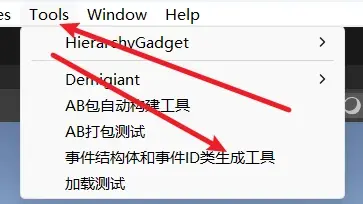
会出现这样一个窗口
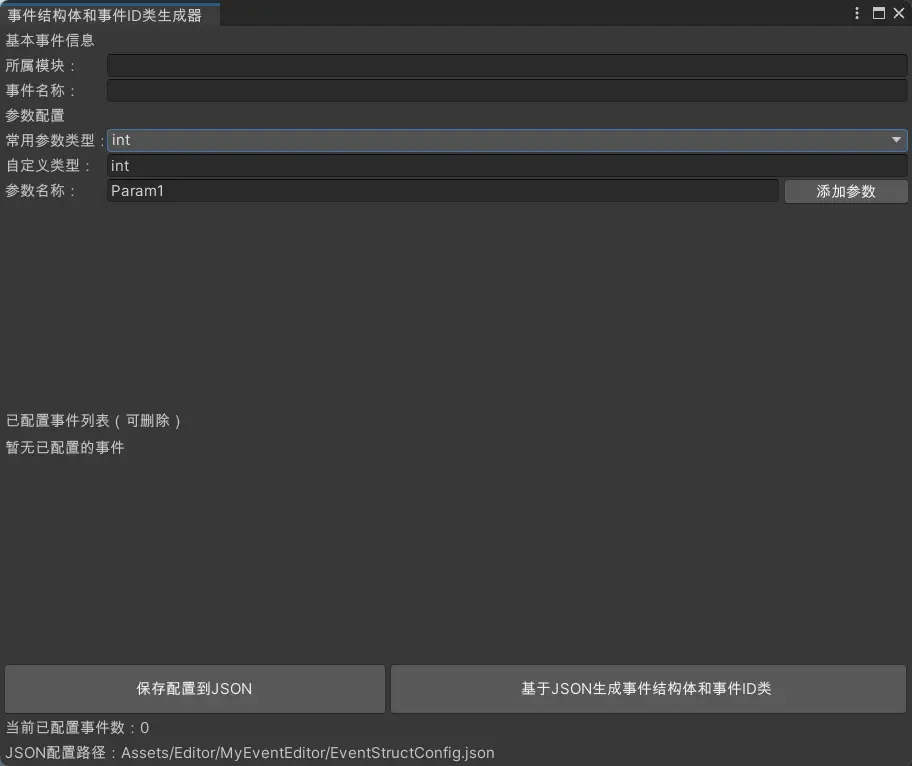
假设现在要添加一个游戏开始的事件,一个游戏结束的事件,后者需要输入一个string类型的参数。
可以这样设置:
不需要添加参数,点击保存配置到Json
注意:所属模块Game只是作为事件类型的划分注释,不在事件系统中起到任何作用
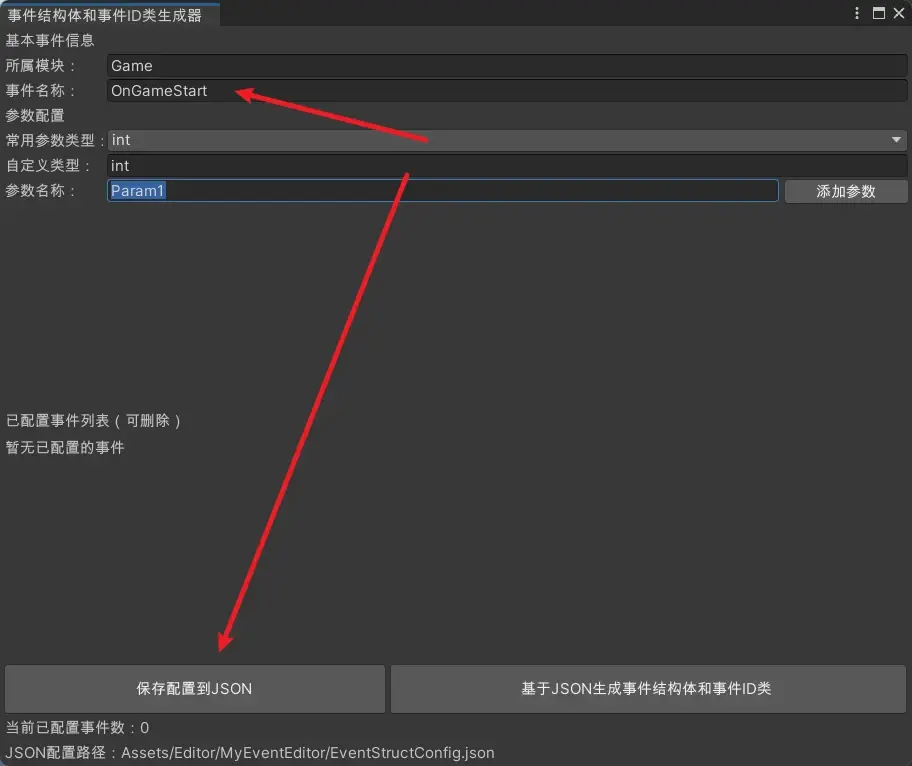
确认后会发现窗口变化
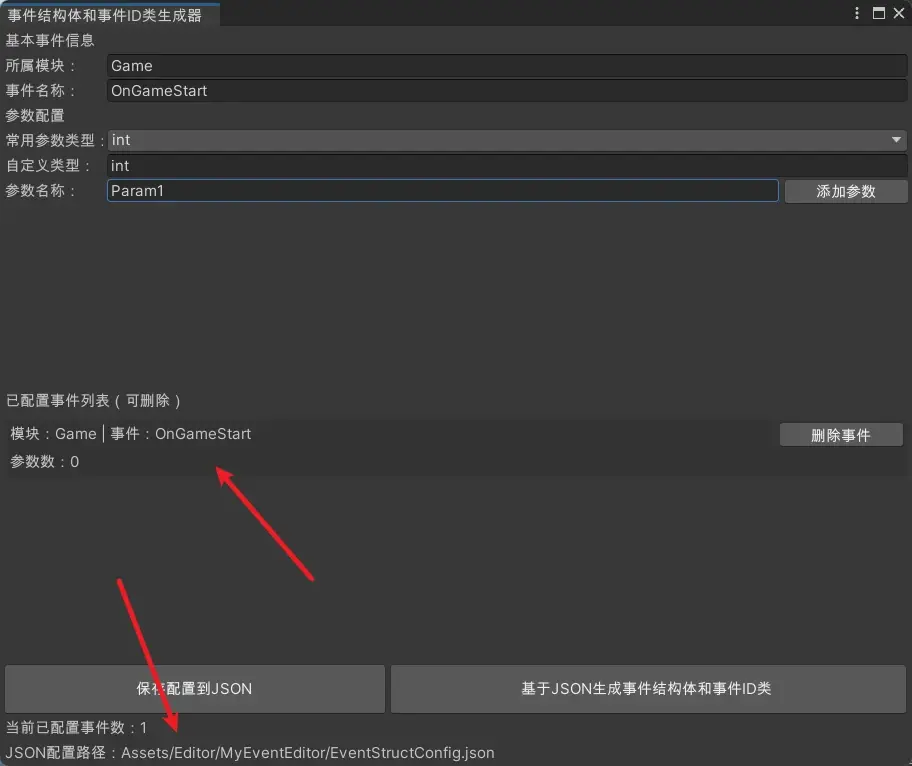
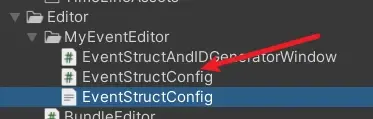
此时会在Json配置路径下生成Json文件,路径可在代码中自定义修改
Json文件内容如下:
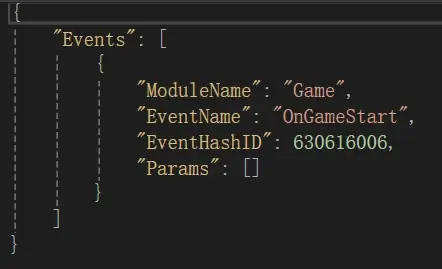
但是现在还没有生成对应的事件结构体和事件ID
继续配置游戏结束的事件,需要一个String类型的参数
点击下拉框,选择string
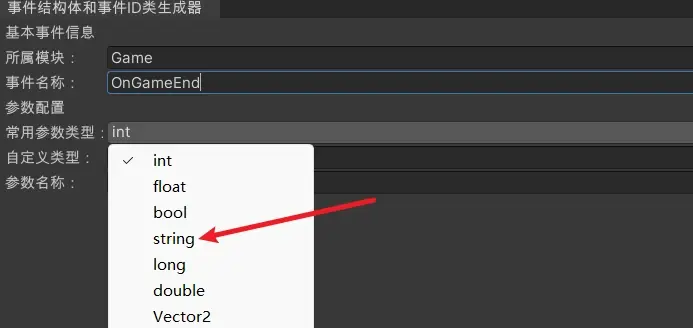
修改参数名称并点击添加参数按钮
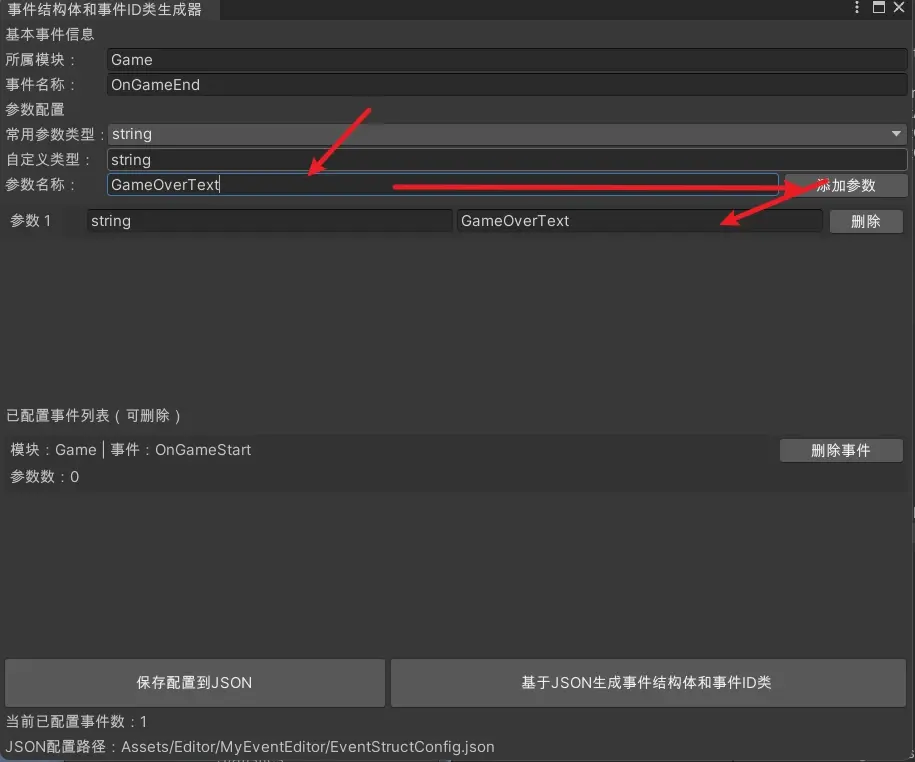
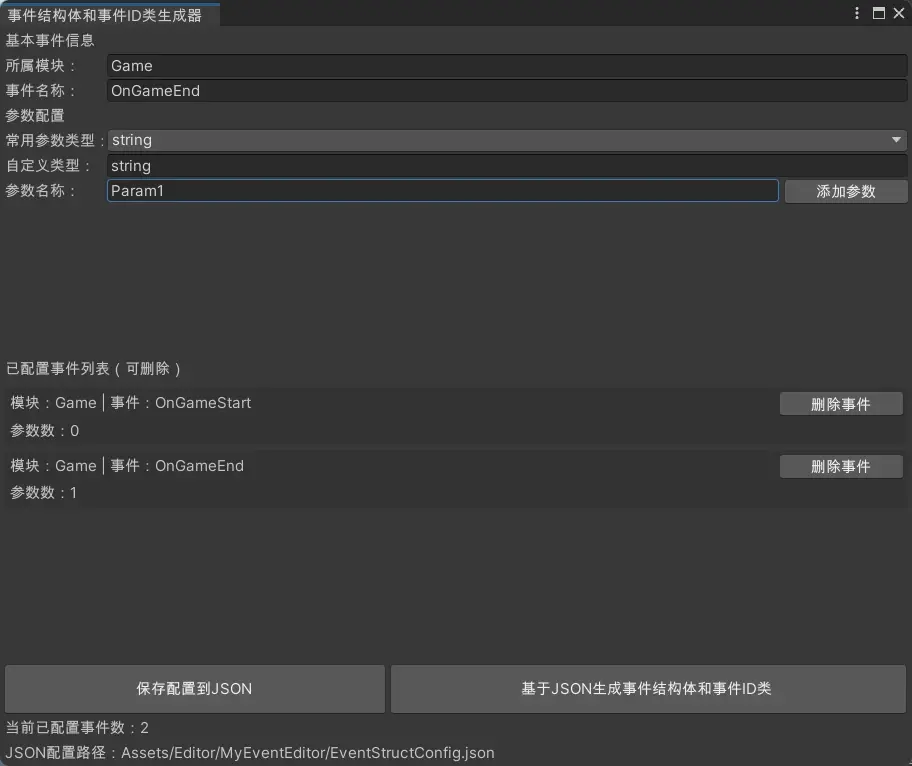
再次点击保存配置到Json按钮,窗口变化如下:
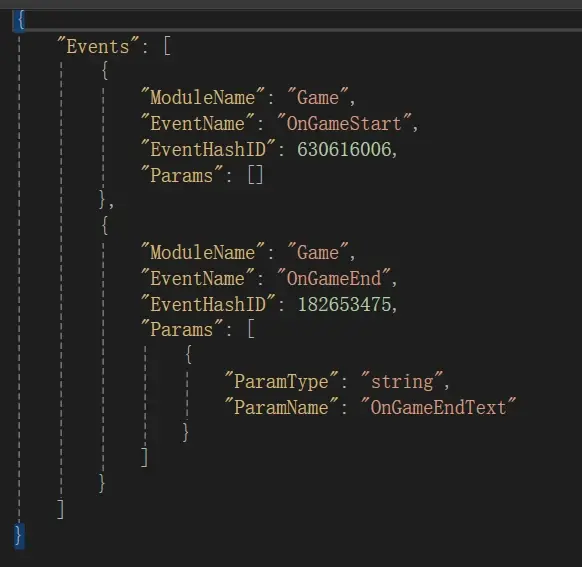
Json文件变化:
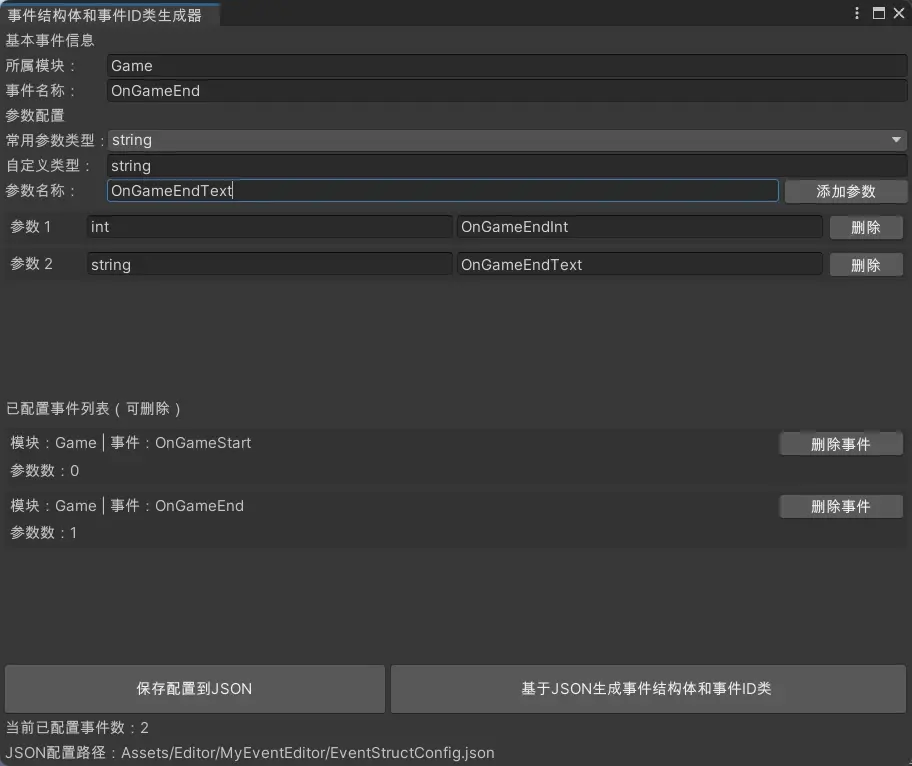
需要注意的是:该事件系统设置的事件类型名称(指的是OnGameStart和OnGameEnd)具有唯一性,不能存在重复,不过编辑器也会提示输入事件已经存在,是否进行覆盖。
现在再次进行OnGameEnd事件的配置,这次参数为两个,一个int,一个string
点击保存配置到Json,发现提示
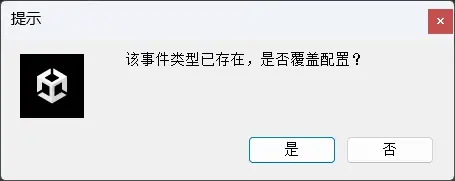
点击否会返回,点击是则进行覆盖更新
点击是之后窗口更新如下:

Json文件变化如下:
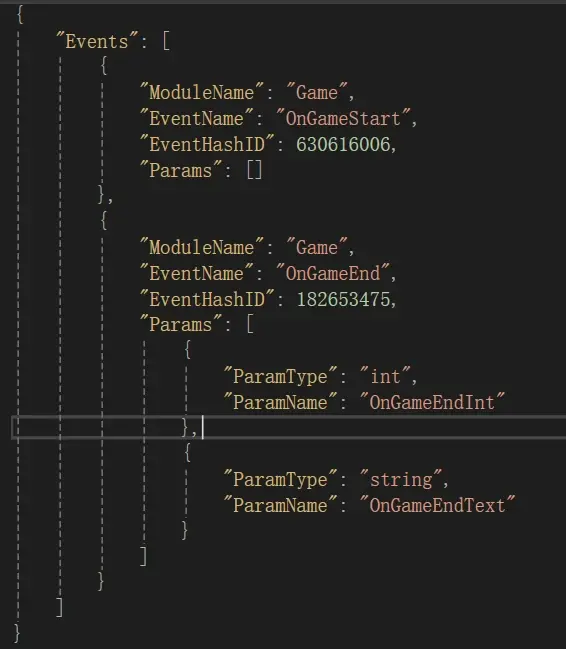
好了,现在事件配置完成,需要进行生成,点击右下角按钮基于Json生成事件结构体和事件ID类,等待编辑器刷新后观察到
MyEvent目录下新创建Data目录,并生成了两个代码文件
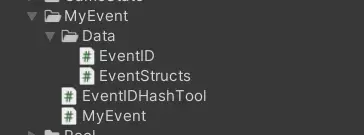
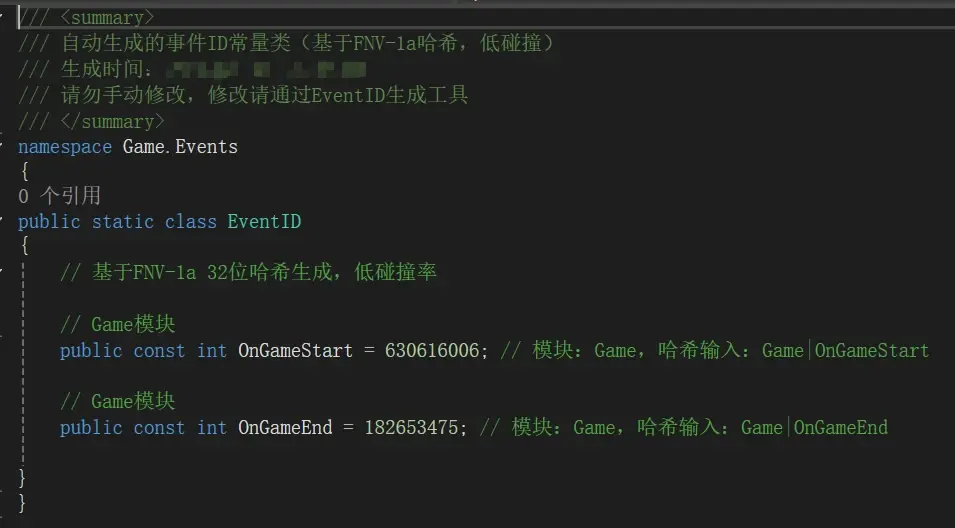
EventID如下:
EventStructs如下:
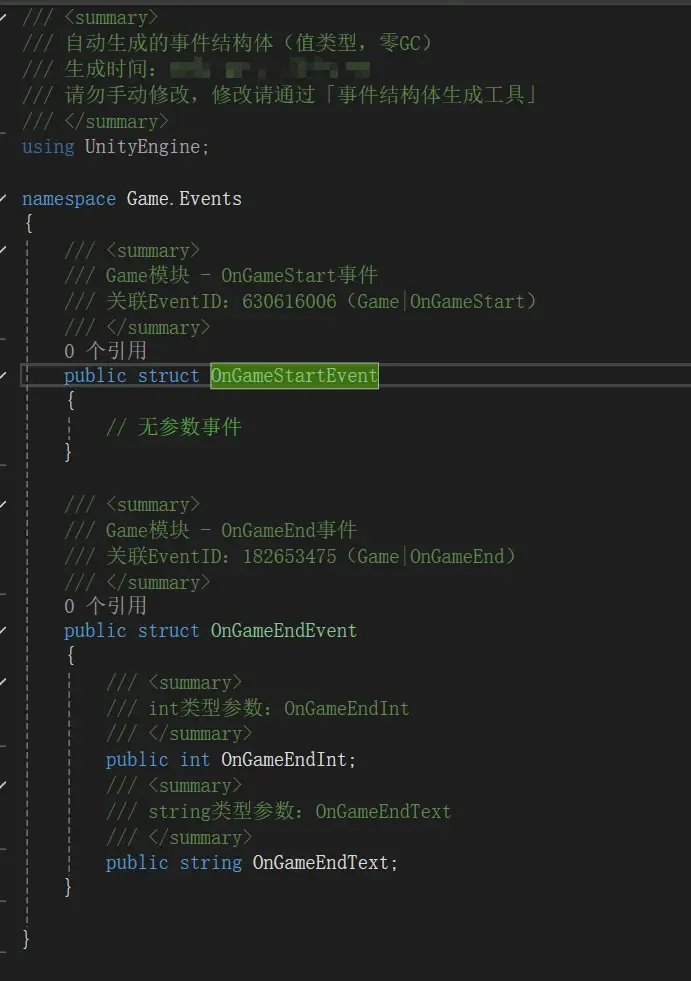
现在来看如何使用该事件系统
代码块
using UnityEngine;
using Game.Events;//必须引用命名空间才能得到事件结构体和ID值
public class GameStart : MonoBehaviour {

    private void OnEnable()
    {
        //事件监听注册
        MyEvent.Register<OnGameStartEvent>(EventID.OnGameStart, OnGameStart);//指定事件类型并通过EventID寻找对应的ID值
        MyEvent.Register<OnGameEndEvent>(EventID.OnGameEnd, OnGameEnd);
    }
    public void Start() {
        //执行事件
        MyEvent.Trigger(EventID.OnGameStart, new OnGameStartEvent());//OnGameStartEvent无参数
        MyEvent.Trigger(EventID.OnGameEnd, new OnGameEndEvent//OnGameEndEvent有两个参数需要赋值
        {
            OnGameEndText = "Bye Bye !!!",
            OnGameEndInt = 999
        });
    }
    private void OnDisable()
    {
        //事件监听移除
        MyEvent.Unregister<OnGameStartEvent>(EventID.OnGameStart, OnGameStart);
        MyEvent.Unregister<OnGameEndEvent>(EventID.OnGameStart, OnGameEnd);
    }
    //OnGameStart事件绑定执行的方法
    public void OnGameStart(OnGameStartEvent onGameEndEvent)
    {
        Debug.Log("Game Start !!!");
    }
    //OnGameEnd事件绑定执行的方法
    public void OnGameEnd(OnGameEndEvent onGameEndEvent)
    {
        Debug.Log(onGameEndEvent.OnGameEndText);
        Debug.Log(onGameEndEvent.OnGameEndInt);
    }
}
输出结果:
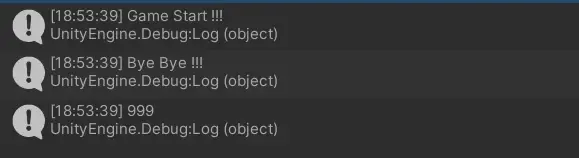
如果有错误和想法,还请补充评论。
免责声明:本文系网络转载或改编,未找到原创作者,版权归原作者所有。如涉及版权,请联系删
 技术文档
 推荐好文





 155-2731-8020