




软件

产品


在 命令行 中键入alexnet
alexnet若未安装用于AlexNet网络支持包的神经网络工具包,则该函数提供到安装该工具包链接 Add -On-Exploer,单击安装则可安装该工具包,再次键入alexnet检查是否安装成功,若安装成功则返回一个SeriesNetwork对象。
将新图像解压并作为图像数据存储加载。imageDatastore会根据 文件夹 名自动给图像打上标签。
unzip('MerchData.zip');imds = imageDatastore('MerchData', ... 'IncludeSubfolders',true, ... 'LabelSource','foldernames');将数据分为训练数据和测试数据。将70%图像作为进行训练,30%图像用来测验,splitEachLabel将图像数据存储拆分为两个新的数据存储。
[imdsTrain imdsValidation]=splitEachLabel(imds,0.7,'randomized');numTrainImages=numel(imdsTrain.Labels);idx=randperm(numTrainImages,16);figurefor i=1:16 subplot(4,4,i) I=readimage(imdsTrain,idx(i)); imshow(I)end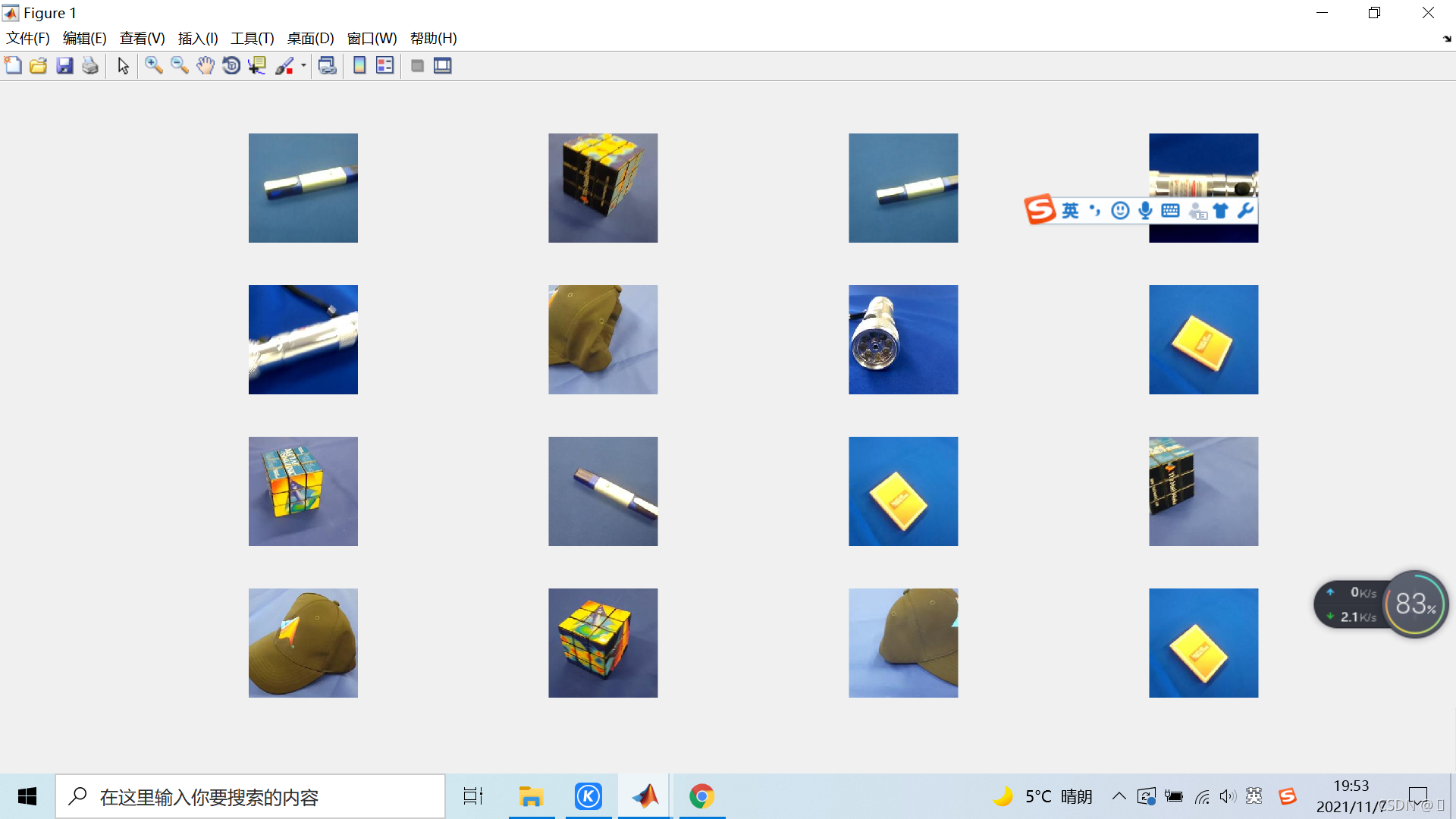
net=alexnet;net.Layers ans = 25x1 Layer array with layers: 1 'data' Image Input 227x227x3 images with 'zerocenter' normalization 2 'conv1' Convolution 96 11x11x3 convolutions with stride [4 4] and padding [0 0 0 0] 3 'relu1' ReLU ReLU 4 'norm1' Cross Channel Normalization cross channel normalization with 5 channels per element 5 'pool1' Max Pooling 3x3 max pooling with stride [2 2] and padding [0 0 0 0] 6 'conv2' Convolution 256 5x5x48 convolutions with stride [1 1] and padding [2 2 2 2] 7 'relu2' ReLU ReLU 8 'norm2' Cross Channel Normalization cross channel normalization with 5 channels per element 9 'pool2' Max Pooling 3x3 max pooling with stride [2 2] and padding [0 0 0 0] 10 'conv3' Convolution 384 3x3x256 convolutions with stride [1 1] and padding [1 1 1 1] 11 'relu3' ReLU ReLU 12 'conv4' Convolution 384 3x3x192 convolutions with stride [1 1] and padding [1 1 1 1] 13 'relu4' ReLU ReLU 14 'conv5' Convolution 256 3x3x192 convolutions with stride [1 1] and padding [1 1 1 1] 15 'relu5' ReLU ReLU 16 'pool5' Max Pooling 3x3 max pooling with stride [2 2] and padding [0 0 0 0] 17 'fc6' Fully Connected 4096 fully connected layer 18 'relu6' ReLU ReLU 19 'drop6' Dropout 50% dropout 20 'fc7' Fully Connected 4096 fully connected layer 21 'relu7' ReLU ReLU 22 'drop7' Dropout 50% dropout 23 'fc8' Fully Connected 1000 fully connected layer 24 'prob' Softmax softmax 25 'output' Classification Output crossentropyex with 'tench' and 999 other classes通过查看分类输出层(最后一层)的类别,可以查看到网络 学习 到的类的名称,此处选择查看前10个类。
net.Layers(end).ClassNames(1:10) ans = 10×1 cell 数组 {'tench' } {'goldfish' } {'great white shark'} {'tiger shark' } {'hammerhead' } {'electric ray' } {'stingray' } {'cock' } {'hen' } {'ostrich' }第一层为图像输入层,输入尺寸为227*227*3的图像,其中3为彩色通道的数量
inputSize=net.Layers(1).InputSize inputSize = 227 227 3预训练网络的最后三层被配置为1000个类。最后三层必须针对新的分类问题进行 微调 ,从预先训练的网络中提取除最后三层外的所有层。
layersTransfer=net.Layers(1:end-3);通过全连接层、softmax层以及类别输出层替代最后三层。
numClass=numel(categories(imdsTrain.Labels));%表示训练的图片的类别数layers = [ layersTransfer fullyConnectedLayer(numClass,'WeightLearnRateFactor',20,'BiasLearnRateFactor',20) softmaxLayer classificationLayer];网络需要大小为227*227*3的输入图像,但图像数据存储中的大小不同。使用扩充图像数据存储来自动调整训练图像的大小,指定要对训练图像执行的附加增强操作,沿垂直轴随机翻转训练图像,并随机将它们水平和垂直方向平移30像素。
imageAugmenter = imageDataAugmenter( ... 'RandXReflection',true, ... 'RandXTranslation',pixelRange, ... 'RandYTranslation',pixelRange);augimdsTrain = augmentedImageDatastore(inputSize(1:2),imdsTrain, ... 'DataAugmentation',imageAugmenter);若要自动调整验证图像的大小而不执行进一步的数据扩展,使用扩展后的图像数据进行存储,而不指定任何额外的预处理。
augmidsValidation=augmentedImageDatastore(inputSize(1:2),imdsValidation);指定训练选择。对于迁移学习,保留预先训练网络的早期层的特征(迁移层权值)。为了降低传输层的学习速率,将初始学习速率设置为一个较小的值,而在之前的步骤中,设置了完全连接层的学习率因素,为了加速新的最后层学习。该学习速率设置方法能保证在新层中学习速率快,而在其它层学习速率慢,在训练期间,可以在每次ValidationFrequency迭代中验证网络。
options = trainingOptions('sgdm', ... 'MiniBatchSize',10, ... 'MaxEpochs',6, ... 'InitialLearnRate',1e-4, ... 'ValidationData',augimdsValidation, ... 'ValidationFrequency',3, ... 'ValidationPatience',Inf, ... 'Verbose',false, ... 'Plots','training-progress'); netTransfer = trainNetwork(augimdsTrain,layers,options);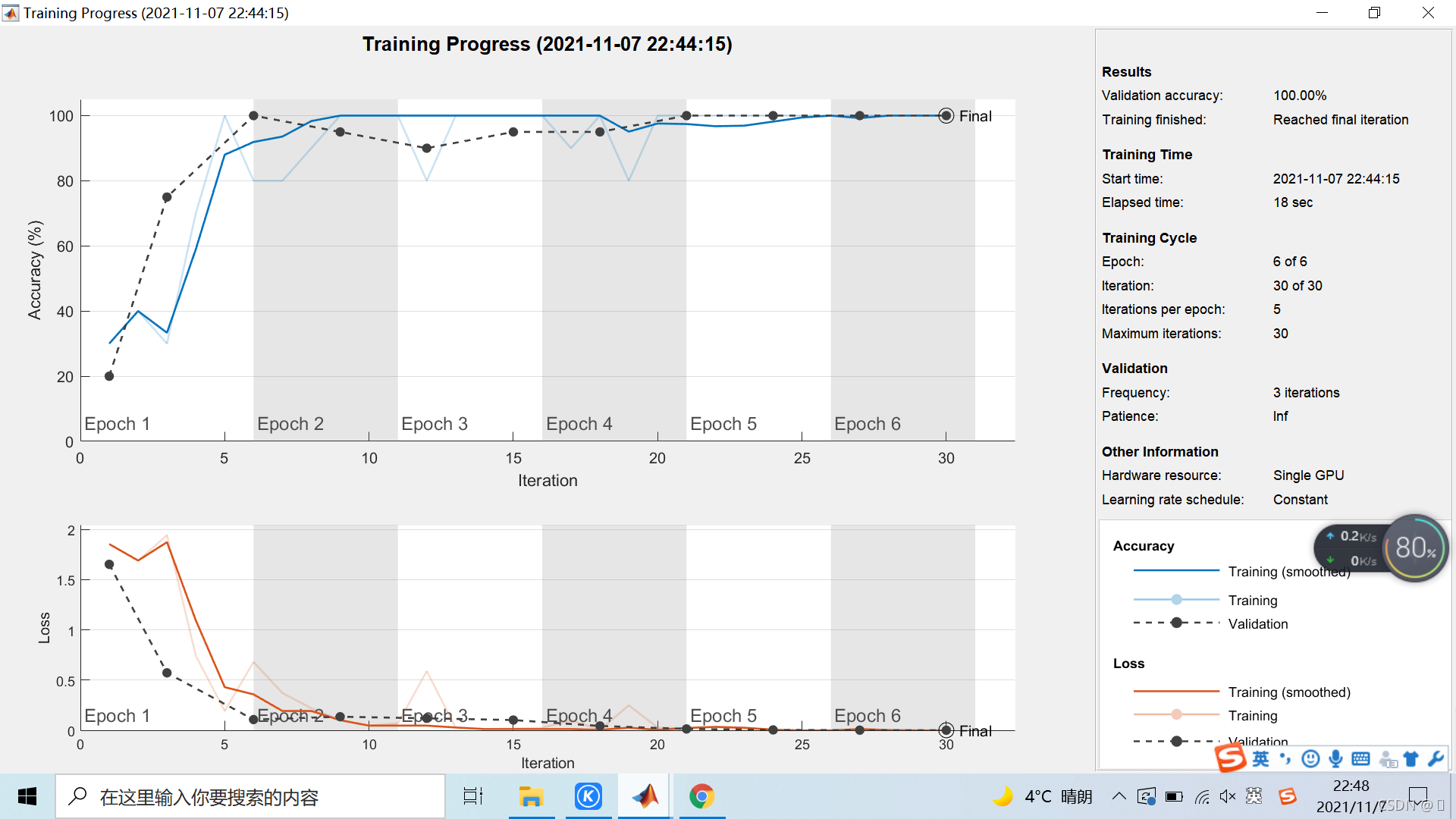
[YPred,scores] = classify(netTransfer,augimdsValidation);>> idx = randperm(numel(imdsValidation.Files),4);figurefor i = 1:4 subplot(2,2,i) I = readimage(imdsValidation,idx(i)); imshow(I) label = YPred(idx(i)); title(string(label));end
免责声明:本文系网络转载或改编,未找到原创作者,版权归原作者所有。如涉及版权,请联系删
 技术文档
技术文档
 推荐好文
推荐好文






 155-2731-8020




