




软件

产品


开源库有dlib
安装:https://pypi.org/simple/dlib/ , 下载 后pip安装
模型下载:Index of /files
左右眼角及人中5点。
import dlibimport numpy as npimport cv2import time predictor_path = '../model/shape_predictor_5_face_landmarks.dat'detector = dlib.get_frontal_face_detector()predictor = dlib.shape_predictor(predictor_path) start_time = time.time() frame = cv2.imread("../image/ab.jpg")img = cv2.cvtColor(frame, cv2.COLOR_RGB2GRAY)dets = detector(img, 1) print(dets) for index, det in enumerate(dets): right_top = (det.right(), det.top()) left_bottom = (det.left(), det.bottom()) # 画面部检测框 # cv2.rectangle(frame, right_top, left_bottom, (255, 0, 0), 2) print(right_top,left_bottom) # 面部特征点检测 shape = predictor(img, det) landmarks = np.matrix([[p.x, p.y] for p in shape.parts()]) for idx, point in enumerate(landmarks): # 68点的坐标 pos = (point[0, 0], point[0, 1]) cv2.circle(frame, pos, 5, (0, 0, 255), -1) cv2.putText(frame,str(idx),pos,cv2.FONT_HERSHEY_COMPLEX,0.6,(0,0,255),1) cv2.imwrite('kp2.jpg',frame)cv2.imshow('res',frame)cv2.waitKey()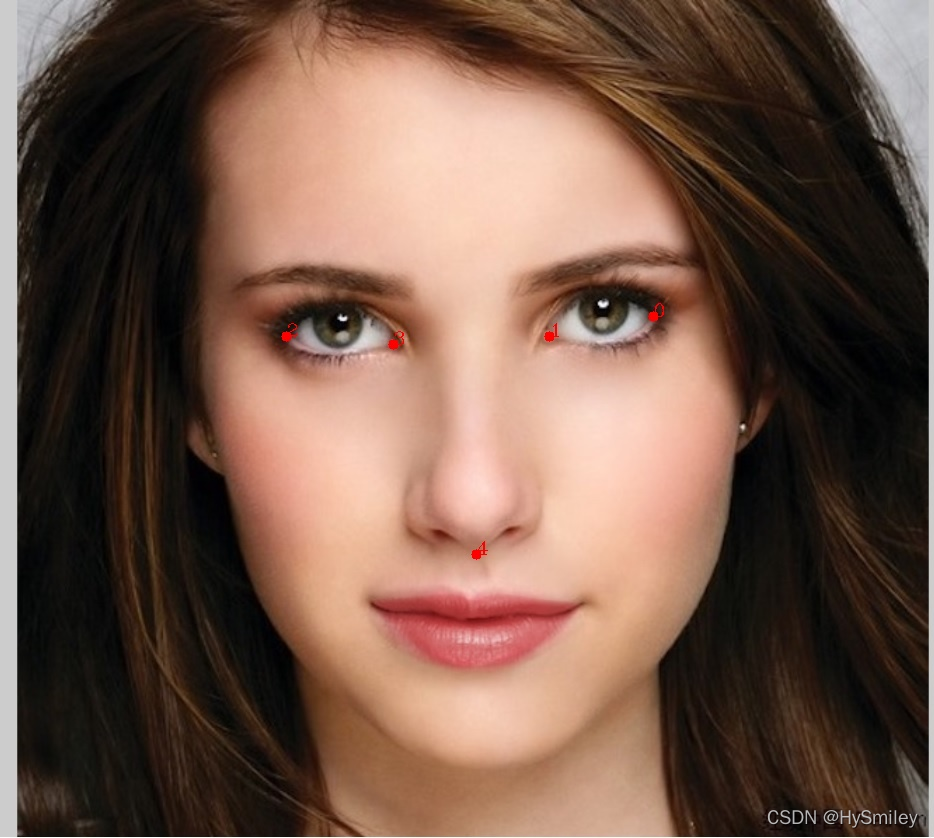
基本包含脸部区域关键点,但是额头区域没有关键点以及只有眉毛的上 边缘点 。
import dlibimport numpy as npimport cv2import time predictor_path = '../model/shape_predictor_68_face_landmarks.dat'detector = dlib.get_frontal_face_detector()predictor = dlib.shape_predictor(predictor_path) start_time = time.time() frame = cv2.imread("../image/ab.jpg")img = cv2.cvtColor(frame, cv2.COLOR_RGB2GRAY)dets = detector(img, 1) print(dets) for index, det in enumerate(dets): right_top = (det.right(), det.top()) left_bottom = (det.left(), det.bottom()) # 画面部检测框 # cv2.rectangle(frame, right_top, left_bottom, (255, 0, 0), 2) print(right_top,left_bottom) # 面部特征点检测 shape = predictor(img, det) landmarks = np.matrix([[p.x, p.y] for p in shape.parts()]) for idx, point in enumerate(landmarks): # 68点的坐标 pos = (point[0, 0], point[0, 1]) cv2.circle(frame, pos, 5, (0, 0, 255), -1) cv2.putText(frame,str(idx),pos,cv2.FONT_HERSHEY_COMPLEX,0.6,(0,0,255),1) cv2.imwrite('kp2.jpg',frame)cv2.imshow('res',frame)cv2.waitKey()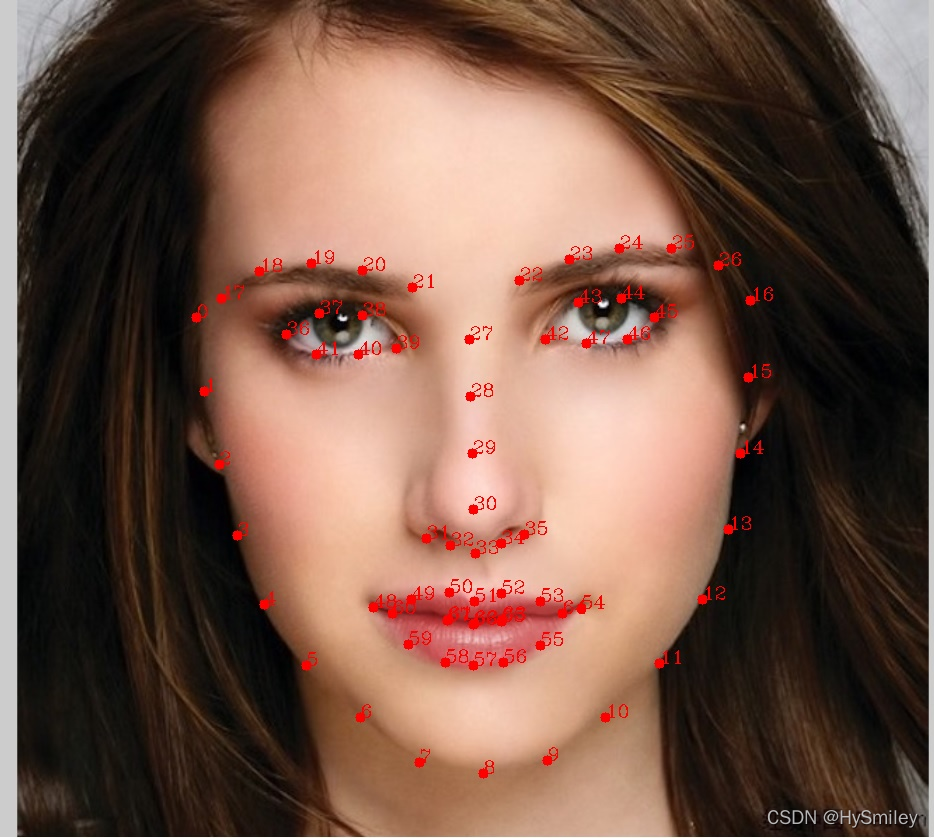
相比较68点,多出13点分布在额头区域,但是点的精度不是太高。
import dlibimport numpy as npimport cv2import time predictor_path = '../model/shape_predictor_81_face_landmarks.dat'detector = dlib.get_frontal_face_detector()predictor = dlib.shape_predictor(predictor_path) start_time = time.time() frame = cv2.imread("../image/ab.jpg")img = cv2.cvtColor(frame, cv2.COLOR_RGB2GRAY)dets = detector(img, 1) print(dets) for index, det in enumerate(dets): right_top = (det.right(), det.top()) left_bottom = (det.left(), det.bottom()) # 画面部检测框 # cv2.rectangle(frame, right_top, left_bottom, (255, 0, 0), 2) print(right_top,left_bottom) # 面部特征点检测 shape = predictor(img, det) landmarks = np.matrix([[p.x, p.y] for p in shape.parts()]) for idx, point in enumerate(landmarks): # 68点的坐标 pos = (point[0, 0], point[0, 1]) cv2.circle(frame, pos, 5, (0, 0, 255), -1) cv2.putText(frame,str(idx),pos,cv2.FONT_HERSHEY_COMPLEX,0.6,(0,0,255),1) cv2.imwrite('kp2.jpg',frame)cv2.imshow('res',frame)cv2.waitKey()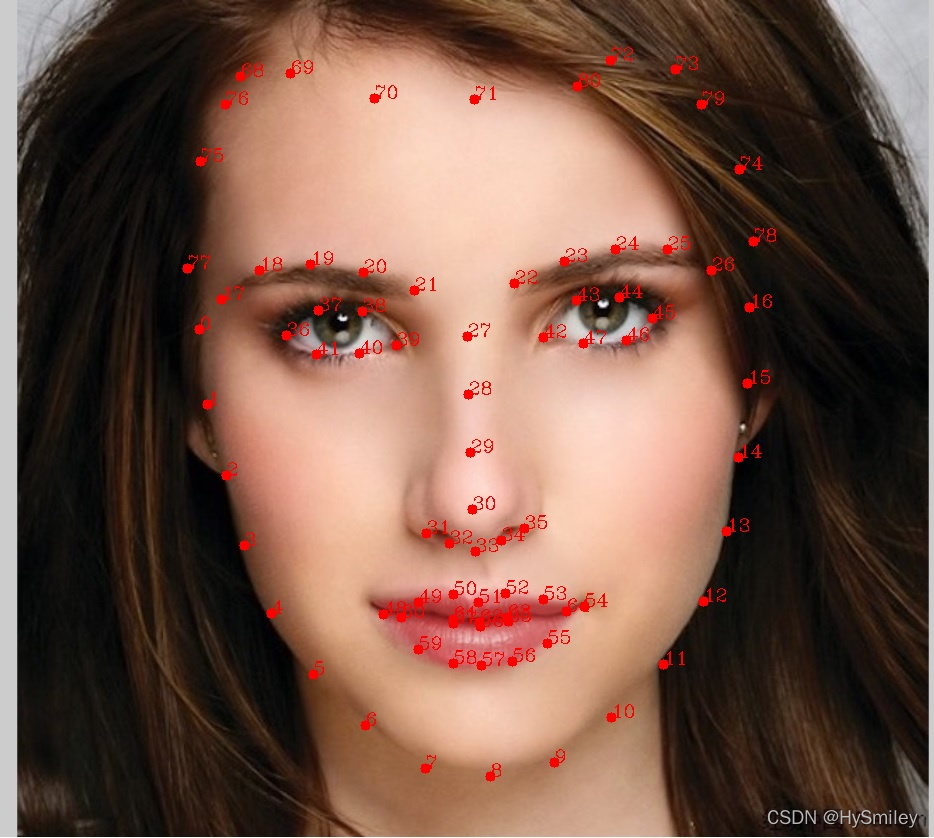
免责声明:本文系网络转载或改编,未找到原创作者,版权归原作者所有。如涉及版权,请联系删
 技术文档
技术文档
 推荐好文
推荐好文






 155-2731-8020




