




软件

产品


Dlib是一个包含机器学习算法的C++开源工具包,Dlib可以用于人脸检测、特征点检测、人脸对齐、人脸识别。
shape_predictor_68_face_landmarks.dat.bz2模型能够检测人脸的68个特征点,其中在人脸中68个关键点位置示意图如下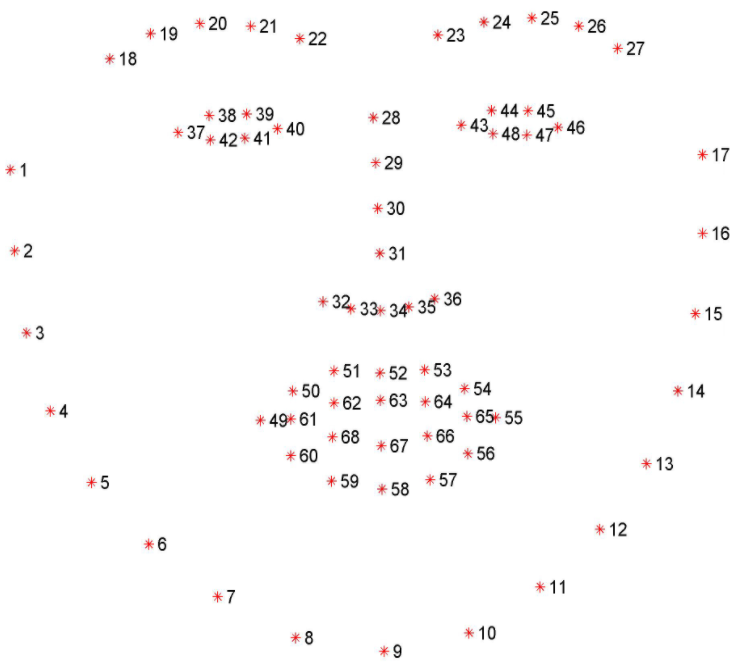
shape_predictor_68_face_landmarks.dat.bz2模型进行人脸关键点检测的相应的代码和结果如下所示
import sys
import cv2
import dlib

def face_detect(file_path, model_path):
    color_image = cv2.imread(file_path)
    gray_image = cv2.cvtColor(color_image, cv2.COLOR_BGR2GRAY)  # RGB img to Gray img to improve detection rate

    # color_image = cv2.imread(file_path, cv2.IMREAD_COLOR)
    # B, G, R = cv2.split(color_image)   # Split the color channels
    # color_image = cv2.merge([R, G, B]) # Merge three colors into a new image

    # face detector
    detector = dlib.get_frontal_face_detector()
    # feature point detector
    predictor = dlib.shape_predictor(model_path)
    # detect face
    # The 1 in the second argument indicates that we should upsample the image 1 time.
    faces = detector(gray_image, 1)

    for face in faces:
        # Search 68 facial landmarks
        shape = predictor(color_image, face)
        # Traverse all points, print out their coordinates and circle them
        for idx, pt in enumerate(shape.parts()):
            pt_pos = (pt.x, pt.y)
            # The parameters are: image, center coordinates, radius, color and line thickness
            cv2.circle(color_image, pt_pos, 3, (0, 0, 255), -1)
            # cv2.putText output 1-68
            font = cv2.FONT_HERSHEY_SIMPLEX
            cv2.putText(color_image, '', pt_pos, font, 0.3, (255, 0, 0), 1, cv2.LINE_AA)
            # position,font,size,color,font thickness
    cv2.namedWindow("Image", cv2.WINDOW_NORMAL)
    cv2.imwrite("Image.png", color_image)
    cv2.imshow("Image", color_image)
    cv2.waitKey(0)
    cv2.destroyAllWindows()


if __name__ == '__main__':
    img_path = r'img.png'
    model_path = r'shape_predictor_68_face_landmarks.dat'
    face_detect(img_path, model_path)
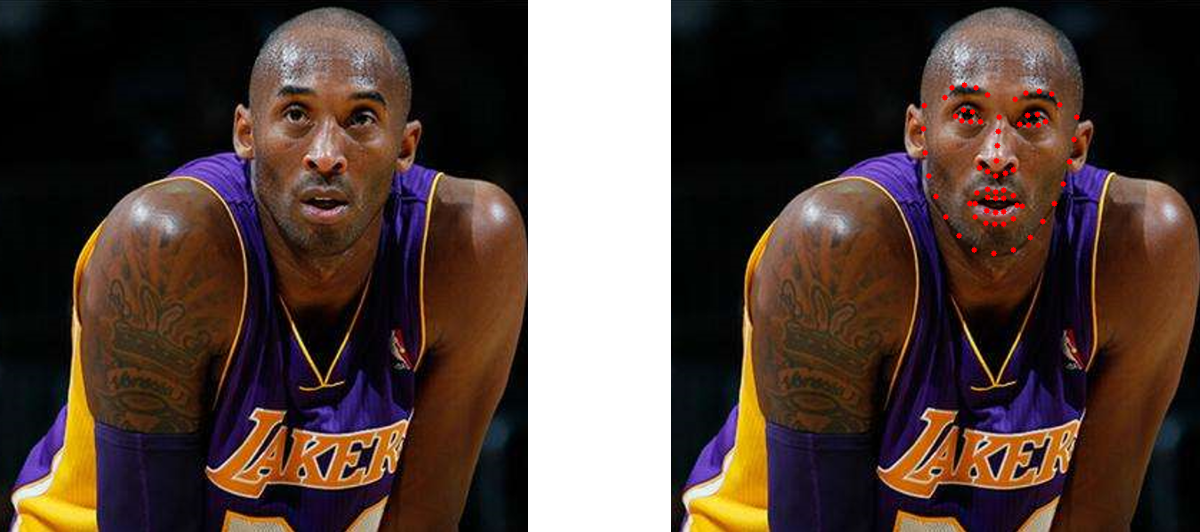
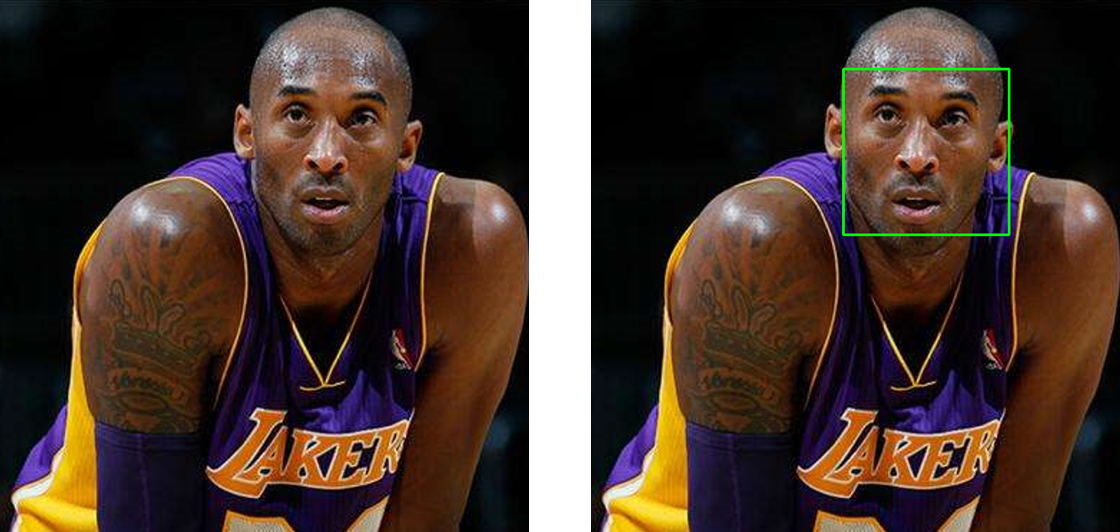
dlib库中的get_frontal_face_detector函数和cv2模块中的cv2.CascadeClassifier可以对人脸进行矩形人脸检测的代码和实验结果如下所示
import sys
import cv2
import dlib

def face_detect(file_path, model_path):
    color_image = cv2.imread(file_path)
    gray_image = cv2.cvtColor(color_image, cv2.COLOR_BGR2GRAY)  # RGB img to Gray img to improve detection rate

    # face detector
    detector = dlib.get_frontal_face_detector()
    # feature point detector
    predictor = dlib.shape_predictor(model_path)
    # detect face
    faces = detector(gray_image, 1)

    for face in faces:
        # Rectangle add into face image
        left = face.left()
        top = face.top()
        right = face.right()
        bottom = face.bottom()
        cv2.rectangle(color_image, (left, top), (right, bottom), (0, 255, 0), 2)

    cv2.namedWindow("Image", cv2.WINDOW_NORMAL)
    cv2.imwrite("Image.png", color_image)
    cv2.imshow("Image", color_image)
    cv2.waitKey(0)
    cv2.destroyAllWindows()

if __name__ == '__main__':
    img_path = r'img.png'
    model_path = r'shape_predictor_68_face_landmarks.dat'
    face_detect(img_path, model_path)
import cv2
filename = 'image.png'
def detect(filename):
    path = r'haarcascade_frontalface_alt2.xml' #cv2 package
    face_cascade = cv2.CascadeClassifier(path)
    img = cv2.imread(filename)
    gray = cv2.cvtColor(img, cv2.COLOR_BGR2GRAY)
    faces = face_cascade.detectMultiScale(gray, 1.3, 5)
    for (x, y, w, h) in faces:
        img = cv2.rectangle(img, (x, y), (x+w, y+h), (255, 0, 0), 2)
    cv2.namedWindow('Image')
    cv2.imshow('Image', img)
    cv2.imwrite('Image.png', img)
    cv2.waitKey(0)
detect(filename)
对人脸进行不规则分割的代码和结果如下所示
import os.path as osp
import os
import numpy as np
import cv2
import dlib
def get_image_hull_mask(image_shape, image_landmarks, ie_polys=None):
# get the mask of the image
if image_landmarks.shape[0] != 68:
raise Exception(
'get_image_hull_mask works only with 68 landmarks')
int_lmrks = np.array(image_landmarks, dtype=np.int)
#hull_mask = np.zeros(image_shape[0:2]+(1,), dtype=np.float32)
hull_mask = np.full(image_shape[0:2] + (1,), 0, dtype=np.float32)
cv2.fillConvexPoly(hull_mask, cv2.convexHull(
np.concatenate((int_lmrks[0:9],
int_lmrks[17:18]))), (1,))
cv2.fillConvexPoly(hull_mask, cv2.convexHull(
np.concatenate((int_lmrks[8:17],
int_lmrks[26:27]))), (1,))
cv2.fillConvexPoly(hull_mask, cv2.convexHull(
np.concatenate((int_lmrks[17:20],
int_lmrks[8:9]))), (1,))
cv2.fillConvexPoly(hull_mask, cv2.convexHull(
np.concatenate((int_lmrks[24:27],
int_lmrks[8:9]))), (1,))
cv2.fillConvexPoly(hull_mask, cv2.convexHull(
np.concatenate((int_lmrks[19:25],
int_lmrks[8:9],
))), (1,))
cv2.fillConvexPoly(hull_mask, cv2.convexHull(
np.concatenate((int_lmrks[17:22],
int_lmrks[27:28],
int_lmrks[31:36],
int_lmrks[8:9]
))), (1,))
cv2.fillConvexPoly(hull_mask, cv2.convexHull(
np.concatenate((int_lmrks[22:27],
int_lmrks[27:28],
int_lmrks[31:36],
int_lmrks[8:9]
))), (1,))
# nose
cv2.fillConvexPoly(
hull_mask, cv2.convexHull(int_lmrks[27:36]), (1,))
if ie_polys is not None:
ie_polys.overlay_mask(hull_mask)
print()
return hull_mask
# 加入alpha通道 控制透明度
def merge_add_alpha(img_1, mask):
# merge rgb and mask into a rgba image
r_channel, g_channel, b_channel = cv2.split(img_1)
if mask is not None:
alpha_channel = np.ones(mask.shape, dtype=img_1.dtype)
alpha_channel *= mask*255
else:
alpha_channel = np.zeros(img_1.shape[:2], dtype=img_1.dtype)
img_BGRA = cv2.merge((b_channel, g_channel, r_channel, alpha_channel))
return img_BGRA
def merge_add_mask(img_1, mask):
if mask is not None:
height = mask.shape[0]
width = mask.shape[1]
channel_num = mask.shape[2]
for row in range(height):
for col in range(width):
for c in range(channel_num):
if mask[row, col, c] == 0:
mask[row, col, c] = 0
else:
mask[row, col, c] = 255
r_channel, g_channel, b_channel = cv2.split(img_1)
r_channel = cv2.bitwise_and(r_channel, mask)
g_channel = cv2.bitwise_and(g_channel, mask)
b_channel = cv2.bitwise_and(b_channel, mask)
res_img = cv2.merge((b_channel, g_channel, r_channel))
else:
res_img = img_1
return res_img
def get_landmarks(image):
predictor_model = 'shape_predictor_68_face_landmarks.dat'
detector = dlib.get_frontal_face_detector()
predictor = dlib.shape_predictor(predictor_model)
img_gray = cv2.cvtColor(image, cv2.COLOR_RGB2GRAY)
rects = detector(img_gray, 0)
for i in range(len(rects)):
landmarks = np.matrix([[p.x, p.y] for p in predictor(image, rects[i]).parts()])
return landmarks
def get_seg_face(img_path):
image = cv2.imread(img_path)
image = cv2.cvtColor(image, cv2.COLOR_BGR2RGB)
landmarks = get_landmarks(image)
mask = get_image_hull_mask(np.shape(image), landmarks).astype(np.uint8)
image_bgra = merge_add_alpha(image, mask)
cv2.imwrite("KOBE.png", image_bgra)
image_bgr = merge_add_mask(image, mask)
cv2.imwrite("KOBE.png", image_bgr)
if __name__ == "__main__":
get_seg_face('image.png')
 免责声明:本文系网络转载或改编,未找到原创作者,版权归原作者所有。如涉及版权,请联系删
 技术文档
技术文档
 推荐好文
推荐好文






 155-2731-8020




