




软件

产品


https://mydreamambitious.blog.csdn.net/article/details/124851743
import os
import cv2
import dlib
import numpy as np
from collections import OrderedDict
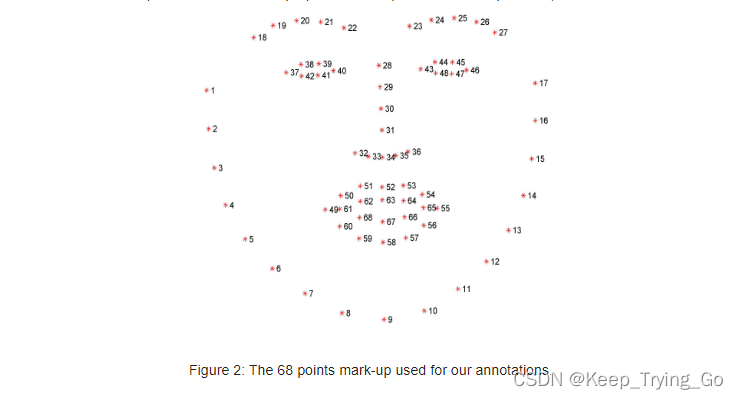
#对于68个检测点,将人脸的几个关键点排列成有序,便于后面的遍历
shape_predictor_68_face_landmark=OrderedDict([
    ('mouth',(48,68)),
    ('right_eyebrow',(17,22)),
    ('left_eye_brow',(22,27)),
    ('right_eye',(36,42)),
    ('left_eye',(42,48)),
    ('nose',(27,36)),
    ('jaw',(0,17))
])
# 加载人脸检测与关键点定位
#http://dlib.net/python/index.html#dlib_pybind11.get_frontal_face_detector
detector = dlib.get_frontal_face_detector()
#http://dlib.net/python/index.html#dlib_pybind11.shape_predictor
criticPoints = dlib.shape_predictor("shape_predictor_68_face_landmarks.dat")
#绘制人脸画矩形框
def drawRectangle(detected,frame):
    margin = 0.2
    img_h,img_w,_=np.shape(frame)
    if len(detected) > 0:
        for i, locate in enumerate(detected):
            x1, y1, x2, y2, w, h = locate.left(), locate.top(), locate.right() + 1, locate.bottom() + 1, locate.width(), locate.height()

            xw1 = max(int(x1 - margin * w), 0)
            yw1 = max(int(y1 - margin * h), 0)
            xw2 = min(int(x2 + margin * w), img_w - 1)
            yw2 = min(int(y2 + margin * h), img_h - 1)

            cv2.rectangle(frame, (x1, y1), (x2, y2), (0, 255, 0), 2)

            face = frame[yw1:yw2 + 1, xw1:xw2 + 1, :]
            cv2.putText(frame, 'Person', (locate.left(), locate.top() - 10),
            cv2.FONT_HERSHEY_SIMPLEX, 1.2, (255, 0, 0), 3)
    return frame
#对检测之后获取的人脸关键点坐标进行转换
def predict2Np(predict):
    # 创建68*2关键点的二维空数组[(x1,y1),(x2,y2)……]
    dims=np.zeros(shape=(predict.num_parts,2),dtype=np.int)
    #遍历人脸的每个关键点获取二维坐标
    length=predict.num_parts
    for i in range(0,length):
        dims[i]=(predict.part(i).x,predict.part(i).y)
    return dims
#遍历预测框,进行人脸的关键点绘制
def drawCriticPoints(detected,frame):
    for (step,locate) in enumerate(detected):
        #对获取的人脸框再进行人脸关键点检测
        #获取68个关键点的坐标值
        dims=criticPoints(frame,locate)
        #将得到的坐标值转换为二维
        dims=predict2Np(dims)
        #通过得到的关键点坐标进行关键点绘制
        # 从i->j这个范围内的都是同一个区域:比如上面的鼻子就是从27->36
        for (name,(i,j)) in shape_predictor_68_face_landmark.items():
            #对每个部位进行绘点
            for (x,y) in dims[i:j]:
                cv2.circle(img=frame,center=(x,y),
                           radius=2,color=(0,255,0),thickness=-1)
    return frame
import os
import cv2
import dlib
import numpy as np
from collections import OrderedDict
#https://mydreamambitious.blog.csdn.net/article/details/123535760
#对于68个检测点,将人脸的几个关键点排列成有序,便于后面的遍历
shape_predictor_68_face_landmark=OrderedDict([
    ('mouth',(48,68)),
    ('right_eyebrow',(17,22)),
    ('left_eye_brow',(22,27)),
    ('right_eye',(36,42)),
    ('left_eye',(42,48)),
    ('nose',(27,36)),
    ('jaw',(0,17))
])

#绘制人脸画矩形框
def drawRectangle(detected,frame):
    margin = 0.2
    img_h,img_w,_=np.shape(frame)
    if len(detected) > 0:
        for i, locate in enumerate(detected):
            x1, y1, x2, y2, w, h = locate.left(), locate.top(), locate.right() + 1, locate.bottom() + 1, locate.width(), locate.height()

            xw1 = max(int(x1 - margin * w), 0)
            yw1 = max(int(y1 - margin * h), 0)
            xw2 = min(int(x2 + margin * w), img_w - 1)
            yw2 = min(int(y2 + margin * h), img_h - 1)

            cv2.rectangle(frame, (x1, y1), (x2, y2), (0, 255, 0), 2)

            face = frame[yw1:yw2 + 1, xw1:xw2 + 1, :]
            cv2.putText(frame, 'Person', (locate.left(), locate.top() - 10),
            cv2.FONT_HERSHEY_SIMPLEX, 1.2, (255, 0, 0), 3)
    return frame

#对检测之后获取的人脸关键点坐标进行转换
def predict2Np(predict):
    # 创建68*2关键点的二维空数组[(x1,y1),(x2,y2)……]
    dims=np.zeros(shape=(predict.num_parts,2),dtype=np.int)
    #遍历人脸的每个关键点获取二维坐标
    length=predict.num_parts
    for i in range(0,length):
        dims[i]=(predict.part(i).x,predict.part(i).y)
    return dims

# 加载人脸检测与关键点定位
#http://dlib.net/python/index.html#dlib_pybind11.get_frontal_face_detector
detector = dlib.get_frontal_face_detector()
#http://dlib.net/python/index.html#dlib_pybind11.shape_predictor
criticPoints = dlib.shape_predictor("shape_predictor_68_face_landmarks.dat")

#遍历预测框,进行人脸的关键点绘制
def drawCriticPoints(detected,frame):
    for (step,locate) in enumerate(detected):
        #对获取的人脸框再进行人脸关键点检测
        #获取68个关键点的坐标值
        dims=criticPoints(frame,locate)
        #将得到的坐标值转换为二维
        dims=predict2Np(dims)
        #通过得到的关键点坐标进行关键点绘制
        # 从i->j这个范围内的都是同一个区域:比如上面的鼻子就是从27->36
        for (name,(i,j)) in shape_predictor_68_face_landmark.items():
            #对每个部位进行绘点
            for (x,y) in dims[i:j]:
                cv2.circle(img=frame,center=(x,y),
                           radius=2,color=(0,255,0),thickness=-1)
    return frame


#单张图片的人脸关键点检测
def signal_detect(img_path='images/face1.jpg'):
    img=cv2.imread(img_path)
    detected=detector(img)
    frame=drawRectangle(detected,img)
    frame = drawCriticPoints(detected, img)
    cv2.imshow('frame',frame)
    cv2.waitKey(0)
    cv2.destroyAllWindows()

#实时的人脸关键点检测
def detect_time():
    cap=cv2.VideoCapture(0)
    while cap.isOpened():
        ret,frame=cap.read()
        detected = detector(frame)
        frame = drawRectangle(detected, frame)
        frame=drawCriticPoints(detected,frame)
        cv2.imshow('frame', frame)
        key=cv2.waitKey(1)
        if key==27:
            break
    cap.release()
    cv2.destroyAllWindows()

if __name__ == '__main__':
    print('Pycharm')
    signal_detect()
    # detect_time()
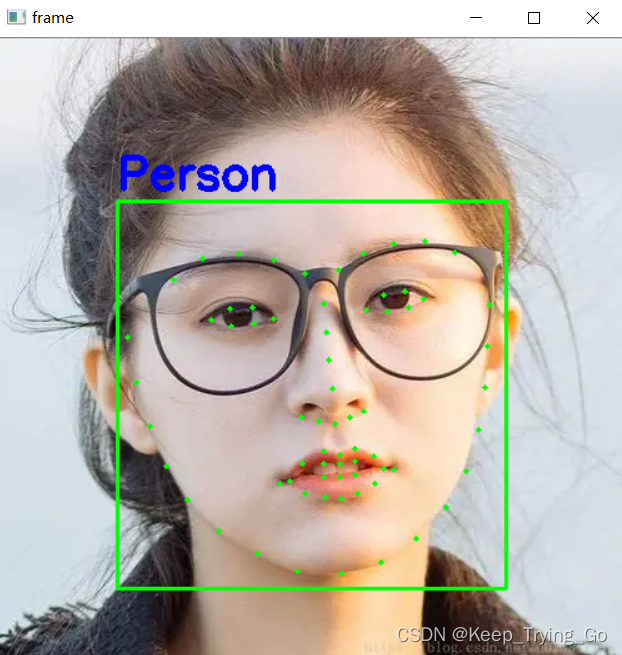
注:实时检测部分读者可以自己测试。
免责声明:本文系网络转载或改编,未找到原创作者,版权归原作者所有。如涉及版权,请联系删
 技术文档
技术文档
 热门文章
热门文章






 155-2731-8020






