




软件

产品


人脸遮挡检测
Facial landmarks detection or facial keypoints detection has a lot of uses in computer vision like face alignment, drowsiness detection, Snapchat filters to name a few. The most widely known model for this task is Dlib’s 68 keypoints landmark predictor which gives very good results in real-time. But the problem starts when the face is occluded or at an angle to the camera. Getting accurate results at angles is crucial for tasks like head pose estimation. So in this article, I will introduce a lesser-known Tensorflow model that can achieve this mission.
面部标志检测或面部关键点检测在计算机视觉中有很多用途,例如面部对齐,睡意检测,Snapchat过滤器等等。 此任务最广为人知的模型是Dlib的68个关键点地标预测器,它可以实时提供非常好的结果。 但是,当面部被遮挡或与相机成一定角度时,问题就开始了。 正确获取角度结果对于诸如头姿势估计之类的任务至关重要。 因此,在本文中,我将介绍一个鲜为人知的Tensorflow模型,该模型可以实现此任务。
Now, this is finding drawbacks just because I want to but in essence, installing Dlib in Windows is a little tough and one needs to install Cmake and some other applications to do so. If you are using Anaconda and try using conda install, then the version for Windows is outdated as well and does not support Python>3.5. If you are using any other operating system then you will be fine.
现在,发现缺陷只是因为我想要,但从本质上讲,在Windows中安装Dlib有点困难,并且需要安装Cmake和其他一些应用程序才能这样做。 如果您正在使用Anaconda并尝试使用conda install,则Windows的版本也已过时,并且不支持Python> 3.5。 如果您使用任何其他操作系统,则可以。
Instead of writing what’s wrong, I’ll just show it to you.
与其写出什么问题,不如直接向您显示。
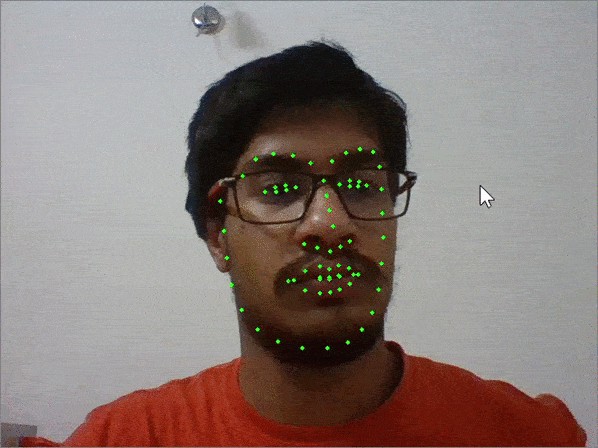
Results with Dlib
Dlib的结果
All right enough of maligning Dlib let’s move on to the real stuff.
恶意破坏Dlib足够好了,让我们继续讨论真正的东西。
We will require Tensorflow 2 and OpenCV for this task.
我们将需要Tensorflow 2和OpenCV来完成此任务。
# pip installpip install tensorflowpip install opencv# conda installconda install -c conda-forge tensorflowconda install -c conda-forge opencvOur first step is to find the faces in the images on which we can find facial landmarks. For this task, we will be using a Caffe model of OpenCV’s DNN module. If you are wondering how it fares against other models like Haar Cascades or Dlib’s frontal face detector or you want to know more about it in-depth then you can refer to this article:
我们的第一步是在图像中找到可以找到面部标志的面Kong。 对于此任务,我们将使用OpenCVDNN模块的Caffe模型。 如果您想知道它与Haar Cascades或Dlib的正面人脸检测器之类的其他型号相比效果如何,或者想深入了解它,那么可以参考本文:
You can download the required models from my GitHub repository.
您可以从GitHub 存储库下载所需的模型。
import cv2import numpy as npmodelFile = "models/res10_300x300_ssd_iter_140000.caffemodel"configFile = "models/deploy.prototxt.txt"net = cv2.dnn.readNetFromCaffe(configFile, modelFile)img = cv2.imread('test.jpg')h, w = img.shape[:2]blob = cv2.dnn.blobFromImage(cv2.resize(img, (300, 300)), 1.0,(300, 300), (104.0, 117.0, 123.0))net.setInput(blob)faces = net.forward()#to draw faces on imagefor i in range(faces.shape[2]): confidence = faces[0, 0, i, 2] if confidence > 0.5: box = faces[0, 0, i, 3:7] * np.array([w, h, w, h]) (x, y, x1, y1) = box.astype("int") cv2.rectangle(img, (x, y), (x1, y1), (0, 0, 255), 2)Load the network using cv2.dnn.readNetFromCaffe and pass the model's layers and weights as its arguments. It performs best on images resized to 300x300.
使用cv2.dnn.readNetFromCaffe加载网络,并传递模型的图层和权重作为其参数。 在调整为300x300的图像上,效果最佳。
We will be using a facial landmark detector provided by Yin Guobing in this Github repo. It also gives 68 landmarks and it is a Tensorflow CNN trained on 5 datasets! The pre-trained model can be found here. The author has also written a series of posts explaining the background, dataset, preprocessing, model architecture, training, and deployment that can be found here. I have provided their outlines here, but I would strongly encourage you to read them.
在此Github存储库中,我们将使用尹国兵提供的面部标志检测器。 它还提供了68个地标,这是一个Tensorflow CNN,经过5个数据集训练! 预训练的模型可以在这里找到。 作者还撰写了一系列文章,介绍了可以在此处找到的背景,数据集,预处理,模型架构,培训和部署。 我在这里提供了它们的概述,但我强烈建议您阅读它们。
In the first of those series, he describes the problem of stability of facial landmarks in videos followed by labeling out the existing solutions like OpenFace and Dlib’s facial landmark detection along with the datasets available. The third article is all about data preprocessing and making it ready to use. In the next two articles, the work is to extract the faces and apply facial landmarks on it to make it ready to train a CNN and store them as TFRecord files. In the sixth article, a model is trained using Tensorflow. In the final article, the model is exported as an API and shown how to use it in Python.
在第一个系列中,他描述了视频中面部标志的稳定性问题,然后标记了现有解决方案(如OpenFace和Dlib的面部标志检测)以及可用的数据集。 第三篇文章都是关于数据预处理并使其可供使用的。 在接下来的两篇文章中,工作是提取面部并在其上应用面部标志,以使其准备训练CNN并将其存储为TFRecord文件。 在第六篇文章中,使用Tensorflow训练模型。 在最后一篇文章中,该模型被导出为API,并展示了如何在Python中使用它。
We need the coordinates of the faces that acts as the region of interest and is extracted from the image. Then it is converted to a square shape of size 128x128 and passed to the model which returns the 68 key points which can then be normalized to the dimensions of the original image.
我们需要充当感兴趣区域并从图像中提取的脸部坐标。 然后将其转换为大小为128x128的正方形,并传递给该模型,该模型返回68个关键点,然后可以将其标准化为原始图像的尺寸。
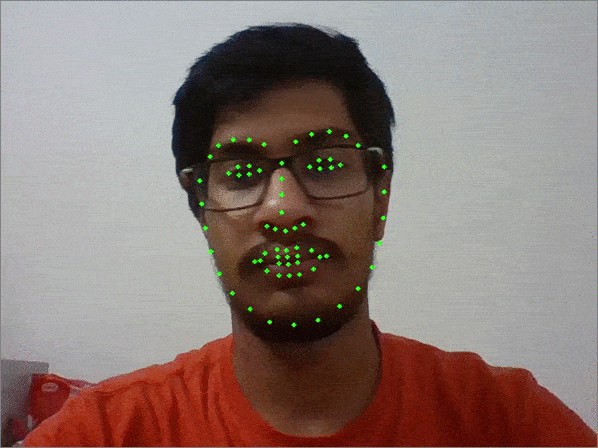
Result with Tensorflow model
Tensorflow模型的结果
The complete code used for this piece of work:
用于此工作的完整代码:
Now, that you know it can perform well on side-faces it can be utilized to make a head-pose estimator. If you want to do you can refer to this article:
现在,您知道它可以在侧面上很好地发挥作用,并且可以用来做头姿势估计器。 如果您想这样做,可以参考本文:
One of the major selling points of Dlib was its speed. Let’s see how they compare on my i5 processor (yeah 😔).
Dlib的主要卖点之一是它的速度。 让我们看看它们如何与我的i5处理器进行比较(是的)。
So if speed is the main concern and occluded or angled faces not so much then Dlib might be better suited for you otherwise I feel that the Tensorflow model reigns supreme without compromising a lot on speed.
因此,如果速度是主要考虑因素,而闭合或倾斜的面部不是那么多,那么Dlib可能更适合您,否则我觉得Tensorflow模型在不影响速度的前提下占据上风。
You find the properly documented code for both face detection and landmark detection here on GitHub, where I have tried to make an AI for online proctoring.
您可以在GitHub上找到正确记录的用于人脸检测和地标检测的代码,我在这里尝试制作用于在线采购的AI。
翻译自: https://towardsdatascience.com/robust-facial-landmarks-for-occluded-angled-faces-925e465cbf2e
人脸遮挡检测
免责声明:本文系网络转载或改编,未找到原创作者,版权归原作者所有。如涉及版权,请联系删
 技术文档
技术文档
 推荐好文
推荐好文






 155-2731-8020




