



软件

产品


网上找了很久没有完美符合我需求的代码,遂自己写个,纯分享向,有问题欢迎指出
需求:
1、可于Inspector检视面板序列化显示key和value。
2、value数据结构支持复杂嵌套
3、检视面板尽量清晰直观(强迫症
直接放代码,后面写简介
字典类SerializableDictionary
代码块
using System;
using System.Collections.Generic;
using UnityEngine;

namespace ZhmFramework.Core.Tools.Dictionary
{
    [Serializable]
    public class SerializableDictionary<TKey, TValue> : Dictionary<TKey, TValue>, ISerializationCallbackReceiver
    {
        [SerializeField] private List<TKey> keys = new List<TKey>();
        [SerializeField] private List<TValue> values = new List<TValue>();
        [SerializeField] private string keyLabel;
        [SerializeField] private string valueLabel;
        private bool isDirty = false;// 脏数据
        public SerializableDictionary() : base()
        {
            keyLabel = "Key";
            valueLabel = "Value";
        }

        public SerializableDictionary(string keyLabel, string valueLabel) : base()
        {
            this.keyLabel = keyLabel;
            this.valueLabel = valueLabel;
        }

        /// <summary>
        /// 原版this访问方法已被隐藏
        /// </summary>
        /// <param name="key"></param>
        public new TValue this[TKey key]
        {
            get
            {
                if (TryGetValue(key, out TValue value))
                    return value;
                throw new KeyNotFoundException($"Key: {key} 在字典中不存在");
            }
            set
            {
                if (ContainsKey(key))
                {
                    base[key] = value;
                    isDirty = true;
                }
                else
                {
                    Add(key, value);
                    isDirty = true;
                }
            }
        }

        /// <summary>
        /// #Add方案不安全,内部已调用TryAdd方法
        /// </summary>
        /// <param name="key"></param>
        /// <param name="value"></param>
        public new void Add(TKey key, TValue value)
        {
            TryAdd(key, value);
        }

        /// <summary>
        /// 尝试Add => 标记脏数据
        /// </summary>
        /// <param name="key"></param>
        /// <param name="value"></param>
        public new void TryAdd(TKey key, TValue value)
        {
            if (base.TryAdd(key, value))
                isDirty = true;
            else
                Debug.LogError($"{value}注册失败,可能:键已存在");
        }

        /// <summary>
        /// 清空 => 标记脏数据
        /// </summary>
        public new void Clear()
        {
            base.Clear();
            isDirty = true;
        }

        /// <summary>
        /// 移除 => 标记脏数据
        /// </summary>
        /// <param name="key"></param>
        /// <returns></returns>
        public new bool Remove(TKey key)
        {
            bool result = base.Remove(key);
            if (result)
                isDirty = true;
            return result;
        }

        public void OnBeforeSerialize()
        {
            if (!isDirty)
                return;
            keys.Clear();
            values.Clear();
            foreach (var kvp in this)
            {
                keys.Add(kvp.Key);
                values.Add(kvp.Value);
            }
            isDirty = false;
        }

        public void OnAfterDeserialize()
        {
            Clear();
            for (int i = 0; i < Mathf.Min(keys.Count, values.Count); i++)
            {
                if (!ContainsKey(keys[i]))
                {
                    Add(keys[i], values[i]);
                }
                else
                {
                    Debug.LogError($"该Key:{keys[i]}  在字典中已存在");
                }
            }
        }
    }
}
序列化绘制类SerializableDictionaryDrawer
代码块
#if UNITY_EDITOR
using UnityEditor;
using UnityEditorInternal;
using UnityEngine;

namespace ZhmFramework.Core.Tools.Dictionary
{
    [CustomPropertyDrawer(typeof(SerializableDictionary<,>), true)]
    public class SerializableDictionaryDrawer : PropertyDrawer
    {
        private ReorderableList list;

        public override void OnGUI(Rect position, SerializedProperty property, GUIContent label)
        {
            if (list == null)
            {
                var keys = property.FindPropertyRelative("keys");
                var values = property.FindPropertyRelative("values");
                var keyLabel = property.FindPropertyRelative("keyLabel");
                var valueLabel = property.FindPropertyRelative("valueLabel");

                list = new ReorderableList(property.serializedObject, keys, false, true, false, false);

                // 绘制Header回调
                list.drawHeaderCallback = (rect) =>
                {
                    float keyWidth = rect.width / 2.5f;
                    // 绘制 Label
                    EditorGUI.LabelField(new Rect(rect.x, rect.y, keyWidth, EditorGUIUtility.singleLineHeight),
                        $"Key [ {keyLabel.stringValue} ]");
                    EditorGUI.LabelField(
                        new Rect(rect.x + keyWidth, rect.y, rect.width - keyWidth, EditorGUIUtility.singleLineHeight),
                        $"Value [ {valueLabel.stringValue} ]");
                };

                // 绘制Element回调
                list.drawElementCallback = (rect, index, isActive, isFocused) =>
                {
                    // 获取数据
                    var keyProp = keys.GetArrayElementAtIndex(index);
                    var valueProp = values.GetArrayElementAtIndex(index);

                    // 绘制背景且X轴偏移保证左右边距等于上边距
                    Rect bgRect = new Rect(rect.x - 2, rect.y, rect.width + 4, rect.height);
                    EditorGUI.DrawRect(bgRect,
                        index % 2 == 0 ? new Color(0.2f, 0.2f, 0.2f) : new Color(0.24f, 0.24f, 0.24f));

                    // 计算宽高
                    float keyWidth = bgRect.width / 2.5f;
                    Rect keyRect = new Rect(bgRect.x + 5, bgRect.y + 5, keyWidth - 5, EditorGUIUtility.singleLineHeight);
                    Rect valueRect = new Rect(bgRect.x + keyWidth, bgRect.y + 5, bgRect.width - keyWidth - 10, bgRect.height - 15);

                    // 绘制Key (只读)
                    EditorGUI.BeginDisabledGroup(true);
                    EditorGUI.PropertyField(keyRect, keyProp, GUIContent.none, true);
                    EditorGUI.EndDisabledGroup();

                    Rect contentRect = new Rect(valueRect.x + 15, valueRect.y, valueRect.width - 10, EditorGUIUtility.singleLineHeight);
                    string labelStr = $"  {valueProp.type} : ";
                    if (IsFold(valueProp))
                    {
                        if (valueProp.isExpanded)
                        {
                            contentRect = new Rect(valueRect.x + 15, valueRect.y, valueRect.width - 10, valueRect.height + 8);
                        }
                        else
                        {
                            labelStr = $"  {valueProp.type} : ------";
                        }
                        // 绘制Value背景
                        GUI.Box(contentRect, GUIContent.none, EditorStyles.helpBox);
                        // 绘制Value (读写)
                        EditorGUI.PropertyField(valueRect, valueProp, new GUIContent(labelStr), true);
                    }
                    else
                    {
                        EditorGUI.indentLevel++;
                        GUI.Box(contentRect, GUIContent.none, EditorStyles.helpBox);
                        EditorGUI.PropertyField(valueRect, valueProp, new GUIContent(labelStr), true);
                        EditorGUI.indentLevel--;
                    }

                };
                // 修改高度回调
                list.elementHeightCallback = index =>
                {
                    // 获取数据
                    var keyProp = keys.GetArrayElementAtIndex(index);
                    var valueProp = values.GetArrayElementAtIndex(index);

                    // 获取数据项高度
                    float keyHeight = EditorGUI.GetPropertyHeight(keyProp, GUIContent.none, true);
                    float valueHeight = EditorGUI.GetPropertyHeight(valueProp, GUIContent.none, true);
                    return Mathf.Max(keyHeight, valueHeight) + 10;
                };
            }

            property.isExpanded = EditorGUI.Foldout(
                new Rect(position.x, position.y, position.width, EditorGUIUtility.singleLineHeight),
                property.isExpanded, label, true);

            if (property.isExpanded)
            {
                EditorGUI.indentLevel++;
                Rect listRect = new Rect(position.x, position.y + EditorGUIUtility.singleLineHeight + 2, position.width,
                    list.GetHeight());
                list.DoList(listRect);
                EditorGUI.indentLevel--;
            }
        }

        public override float GetPropertyHeight(SerializedProperty property, GUIContent label)
        {
            if (property.isExpanded && list != null)
            {
                return EditorGUIUtility.singleLineHeight + 2 + list.GetHeight();
            }

            return EditorGUIUtility.singleLineHeight;
        }

        /// <summary>
        /// 判断类型是否折叠类型
        /// </summary>
        /// <param name="sp"></param>
        /// <returns></returns>
        private static bool IsFold(SerializedProperty sp)
        {
            switch (sp.propertyType)
            {
                case SerializedPropertyType.Generic: // class/struct
                case SerializedPropertyType.ManagedReference: // C#引用类型
                    return true;
                default: // int, float, string, Vector3, Enum, bool 等
                    return false;
            }
        }
    }
}
#endif
OK,只需上两部分即可,下面写一个类试试功能
代码块
using System;
using UnityEngine;
using ZhmFramework.Core.Tools.Dictionary;

namespace Test
{
    [Serializable]
    public class TestAttributes
    {
        [SerializeField] private float hp;
        public float Hp
        {
            get => hp;
            set => hp = value;
        }
        [SerializeField] private float mp;
        public float Mp
        {
            get => mp;
            set => mp = value;
        }
        [SerializeField] private float atk;
        public float Atk
        {
            get => atk;
            set => atk = value;
        }
        [SerializeField] private float def;
        public float Def
        {
            get => def;
            set => def = value;
        }
        public TestAttributes(float hp, float mp, float atk, float def)
        {
            Hp = hp;
            Mp = mp;
            Atk = atk;
            Def = def;
        }
    }

    [Serializable]
    public struct TestStruct
    {
        public float hp;
        public float mp;
        public float atk;
        public float def;
    }

    public class TestDictionarySerializable : MonoBehaviour
    {
        public SerializableDictionary<string, TestAttributes> classDict = new SerializableDictionary<string, TestAttributes>("ID","Attribute");
        public SerializableDictionary<string, TestStruct> structDict = new SerializableDictionary<string, TestStruct>();
        public SerializableDictionary<string, string> stringDict = new SerializableDictionary<string, string>("TestKey","TestValue");
        public SerializableDictionary<string, int> intDict = new SerializableDictionary<string, int>();

        private void Start()
        {
            classDict.TryAdd("1", new TestAttributes(1, 1, 1, 1));
            classDict.TryAdd("2", new TestAttributes(2, 2, 2, 2));

            structDict.TryAdd("1", new TestStruct() { hp = 1, mp = 1, atk = 1, def = 1 });
            structDict.TryAdd("2", new TestStruct() { hp = 2, mp = 2, atk = 2, def = 2 });

            stringDict.TryAdd("1", "1");
            stringDict.TryAdd("2", "2");

            intDict.TryAdd("1", 1);
            intDict.TryAdd("2", 2);
        }
    }
}
最终界面显示如图。
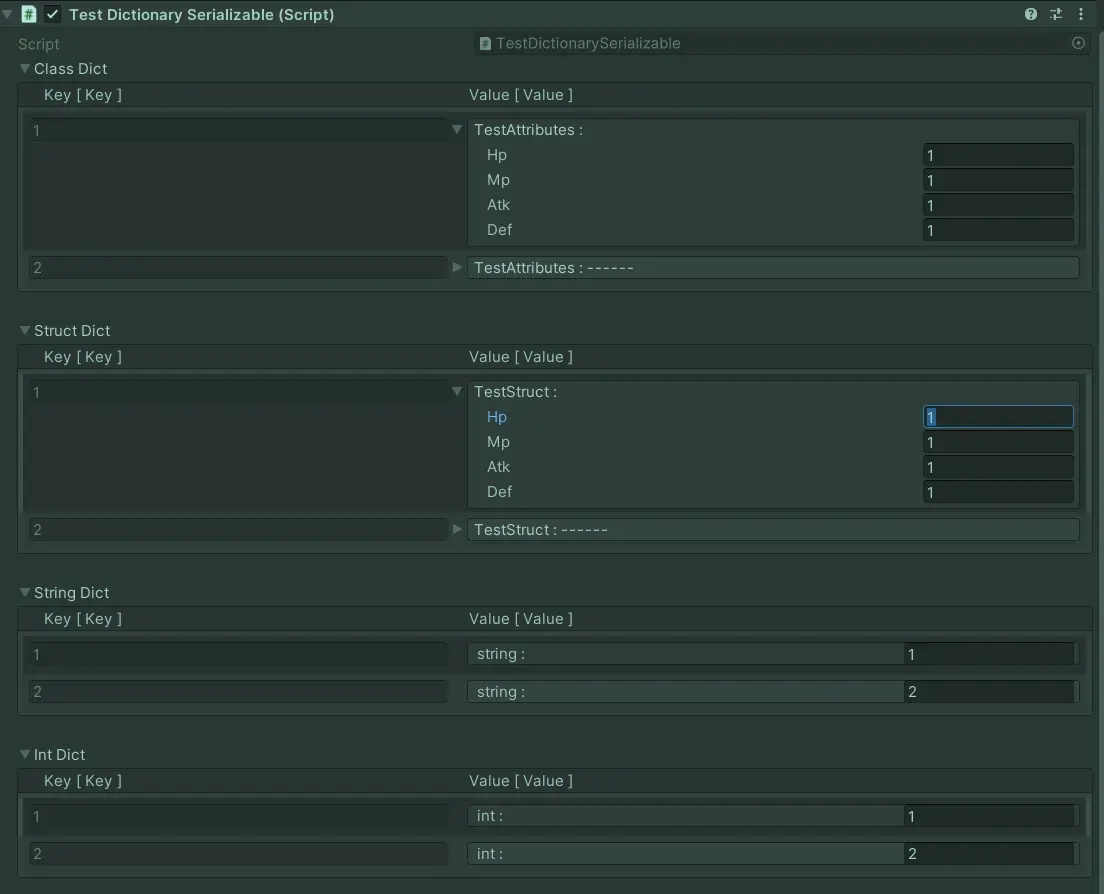
编辑器屎绿色是我调的防止双屏调试代码老是在运行状态修改代码(汗
实现思路:
其实就是用了Unity官方的ISerializationCallbackReceiver接口(这个接口的详细信息可以看官网)+PropertyDrawer+重写部分Dictionary方法。
仅调用ISerializationCallbackReceiver接口的序列化会有两个问题,一是在对Inspector界面对该列表进行增减或者任何试图修改key的操作时会出现错误(字典的key唯一)所以干脆用PropertyDrawer重新绘制,禁用增删拖动按钮,修改key为只读,即可避开Inspector上的误操作。同时使用脏数据标记,可以减少部分多余的列表同步操作(我也不确定这部分的性能消耗如何,但是能省则省)。再重写部分Dictionary方法,同步脏数据标记,保证数据安全。最后在PropertyDrawer里稍微调下布局,让value结构在各种情况下都美观一些...
后文:
我一直很纳闷Dictionary使用率这么高的一个东西Unity官方为什么不做序列化,现在看来可能有一部分这个唯一键的问题。不过此番尝试下来,其实序列化后的列表也不是不能加增删按钮和拖动效果,只要在代码里多做一个已有键判断和很多数据的校验,不过在我的所有项目需求里基本都不需要在inspector里做这些对数据项的操作,用到Dictionary的部分都是些静态数据,最后可以方便在没有数据的时候随手插一个空数据做测试,为了这个需求再多做这么多判断显然有点吃力不讨好(对我来说
免责声明:本文系网络转载或改编,未找到原创作者,版权归原作者所有。如涉及版权,请联系删
 技术文档
 推荐好文





 155-2731-8020