



许可优化
许可优化
产品
产品
解决方案
解决方案
服务支持
服务支持
关于
关于
软件库
当前位置:服务支持 >  软件文章 >  一种EEG预处理流程:EEG-fMRI范式(One EEG preprocessing pipeline - EEG-fMRI paradigm)

一种EEG预处理流程:EEG-fMRI范式(One EEG preprocessing pipeline - EEG-fMRI paradigm)

阅读数 8
点赞 0
article_banner

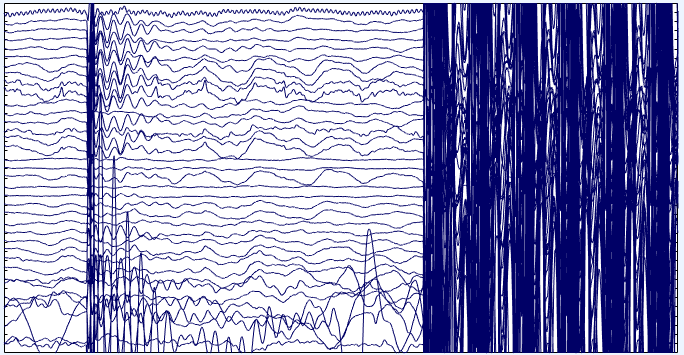
The preprocessing pipeline of EEG data from EEG-fMRI paradigm differs from that of regular EEG data, because they are mainly influenced by MRI artefacts. However, after removing the MRI artefacts at the first step, following ones would be the same as the regular pipeline.
795056-20161023161511842-1592058571.png

Figure above: an example of raw EEG data with MRI artefacts - the very dense part. Only after removing the dominating artefacts could we go on with other preprocessing and analyses.

Environment requirement

  • Matlab (R2015b).
  • EEGLab toolbox (v13.6.5b). Plug-ins needed: BERGEN, FMRIB, AAR.

Testing data

Acquired using an Brain Products system with 64 scalp channels. Standard procedure to setup the EEG system: fs = 5000 Hz, low-pass hard ware filter at 250 Hz. Using SyncBox to sync the EEG and fMRI clocks.

    Gathering continuous data for about 10-min.

Pipeline

  1. Removing gradient artefacts: using BERGEN plug-in. Sliding window length for artefact template = 31.
  2. Filtering: first high-pass at 0.5 Hz, then low-pass at 45 Hz - do NOT using band-pass filter, do them separately.
  3. Resample the data to fs = 500 Hz. Resample before QRS detection is beneficial (as far as I can see).
  4. Detect R-peaks, visually check incorrect ones and remove cardiac artefacts: using FMRIB plug-in (optimal basis set: first 3 PCs used). Using Edit -> Event values to delete the incorrect QRS events.
  5. Import channel locations: using '\dipfit2.3\standard_BESA\standard-10-5-cap385.elp'.
  6. Select the data points to be analysed - to save time.
  7. Remove ECG and bad channels (Must done before re-reference).
  8. Re-reference: average reference.
  9. Removing EOG (blinks) and EMG artefacts using AAR plug-in directly.

Note

  • The data is a continuous data. For task data (i.e. you may epoch them first), baseline correction is needed.
  • The AAR plugin is good to detect EOG and EMG artefacts, but sometimes they do not pick up ICs relating to residuals of R-peak artefacts.
  • Considering what mentioned above, an alternative is using 'ICA + ADJUST plug-in' to replace AAR in step 9. This is a better strategy with enough experience on recognising artefact ICs.
  • Removing power interference may be needed sometimes: 'Tools -> Filter the data -> Basic FIR filter -> Lower & Higher: both 50Hz, using Notch filter'.
  • The steps and their order may vary among different groups, while the main parts remain unchanged.
  • Inspired by 52Brain. Thanks a lot to the contributors.


免责声明:本文系网络转载或改编,未找到原创作者,版权归原作者所有。如涉及版权,请联系删

相关文章
技术文档
QR Code
微信扫一扫,欢迎咨询~
customer

online

联系我们
武汉格发信息技术有限公司
湖北省武汉市经开区科技园西路6号103孵化器
电话:155-2731-8020 座机:027-59821821
邮件:tanzw@gofarlic.com
Copyright © 2023 Gofarsoft Co.,Ltd. 保留所有权利
遇到许可问题?该如何解决!?
评估许可证实际采购量? 
不清楚软件许可证使用数据? 
收到软件厂商律师函!?  
想要少购买点许可证,节省费用? 
收到软件厂商侵权通告!?  
有正版license,但许可证不够用,需要新购? 
联系方式 board-phone 155-2731-8020
close1
预留信息,一起解决您的问题
* 姓名:
* 手机:

* 公司名称:

姓名不为空

姓名不为空

姓名不为空
手机不正确

手机不正确

手机不正确
公司不为空

公司不为空

公司不为空





