




软件

产品


人脸识别
使用世界上最准确的面对齐网络从Python中检测面部地标,能够检测2D和3D坐标中的点。
使用FAN的最先进的基于深度学习的面部对齐方法构建。为了检测面,库使用了dlib库。
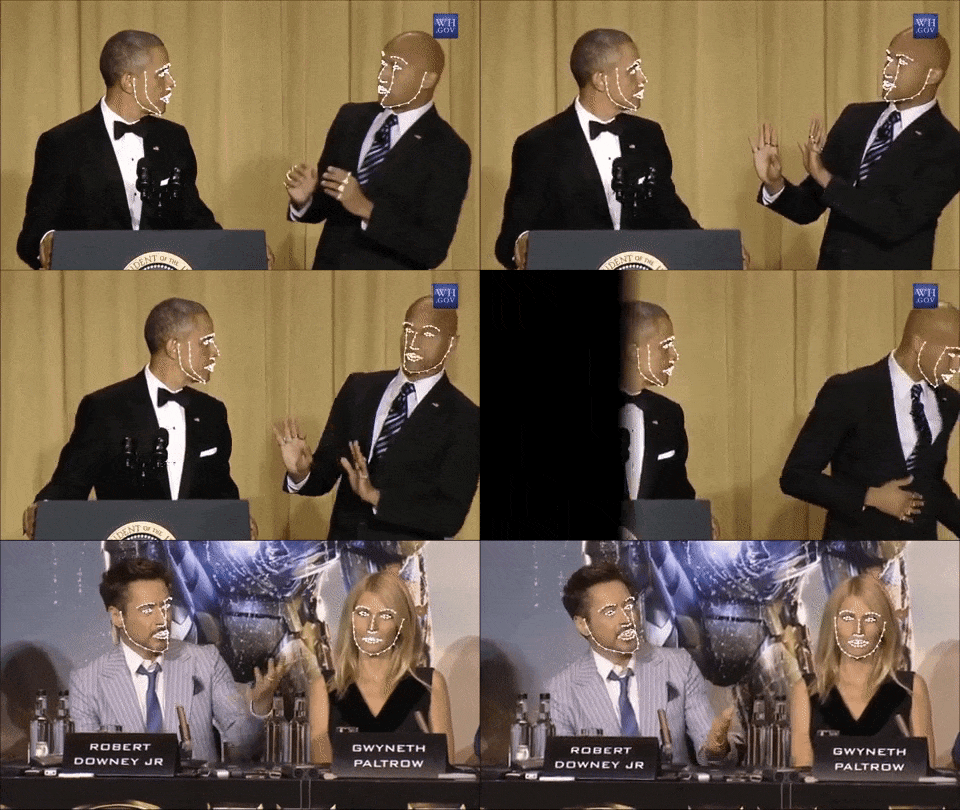
注意:lua版本也可以使用,查看这里
对于数值评估,强烈建议使用在本文中评估的Lua版本,它使用了indentical模型。更多语言支持正在开发中。
特征
检测2D图片中的面部标志点
 ]
]
import face_alignment
from skimage import io
fa = face_alignment.FaceAlignment(face_alignment.LandmarksType._2D, enable_cuda=True, flip_input=False)
input = io.imread('../test/assets/aflw-test.jpg')
preds = fa.get_landmarks(input)
检测3D图片中的面部标志点
import face_alignment
from skimage import io
fa = face_alignment.FaceAlignment(face_alignment.LandmarksType._3D, enable_cuda=True, flip_input=False)
input = io.imread('../test/assets/aflw-test.jpg')
preds = fa.get_landmarks(input)
查找给定图像中存在的所有面
import face_alignment
from skimage import io
fa = face_alignment.FaceAlignment(face_alignment.LandmarksType._2D, enable_cuda=False, flip_input=False)
input = io.imread('../test/assets/aflw-test.jpg')
preds = fa.detect_faces(input)
一次处理整个目录
import face_alignment
from skimage import io
fa = face_alignment.FaceAlignment(face_alignment.LandmarksType._2D, enable_cuda=False, flip_input=False)
input = io.imread('../test/assets/aflw-test.jpg')
preds = fa.process_folder('../test/assets/', all_faces=True)
更多也可以查看examples文件夹
安装
要求条件
Python 3.5+或Python 2.7(它可能与其他版本一起使用)
Linux或macOS(一旦pytorch获得支持,Windows可能会工作)
pytorch(> = 0.2推荐)
虽然不需要,为了获得最佳性能(特别是对于检测器),强烈建议您使用支持CUDA的GPU运行代码。
二进制
Conda构建即将推出!
源码安装
安装pytorch和pytorch依赖。从pytorch自述文件中获取的说明。对于更新版本检查框架github页面。
在Linux上
export CMAKE_PREFIX_PATH="(𝑑𝑖𝑟𝑛𝑎𝑚𝑒 (dirname (which conda))/../" # [anaconda root directory]
# Install basic dependencies
conda install numpy pyyaml mkl setuptools cmake gcc cffi
# Add LAPACK support for the GPU
conda install -c soumith magma-cuda80 # or magma-cuda75 if CUDA 7.5
在OSX上
export CMAKE_PREFIX_PATH=[anaconda root directory]
conda install numpy pyyaml setuptools cmake cffi
获取PyTorch源码
git clone --recursive https://github.com/pytorch/pytorch
安装PyTorch
在Linux上
python setup.py install
在OSX上
MACOSX_DEPLOYMENT_TARGET=10.9 CC=clang CXX=clang++ python setup.py install
获取face-alignment源代码
git clone https://github.com/1adrianb/face-alignment
安装face-alignment lib
pip install -r requirements.txt
python setup.py install
Docker 图像
提供了一个Docker文件来构建具有cuda支持和cudnn v5的图像。有关运行和构建Docker映像的更多说明,请查看原始Docker文档。
docker build -t face-alignment .
它是如何工作的?
虽然这里的工作是一个黑盒子,如果你想更多地了解该方法的内容,请在arxiv或我的网页上查看原始文件。
捐款
欢迎所有的贡献。如果您遇到任何问题(包括失败的图像示例),请随时打开问题。
引文
@inproceedings{bulat2017far,
title={How far are we from solving the 2D \& 3D Face Alignment problem? (and a dataset of 230,000 3D facial landmarks)},
author={Bulat, Adrian and Tzimiropoulos, Georgios},
booktitle={International Conference on Computer Vision},
year={2017}
}
致谢
给dlib开发人员提供预先训练的人脸检测模型
给pytorch团队提供这样一个令人敬畏的深层次的学习框架
对我的主管的耐心和建议。
给所有其他的python开发人员提供了这个存储库中使用的其他软件包。
原创文章,转载请注明 :使用pytorch构建2D和3D人脸比对库(使用face-alignment) - pytorch中文网
原文出处: https://ptorch.com/news/62.html
问题交流群 :168117787
免责声明:本文系网络转载或改编,未找到原创作者,版权归原作者所有。如涉及版权,请联系删
 技术文档
技术文档
 推荐好文
推荐好文






 155-2731-8020




