




软件

产品


Once the entities have been collected, the next step is to edit, modify or delete some of them. The functions that are oftenly used for this purpose are the following:
| Function | Description |
|---|---|
| base.GetEntityCardValues | Gets values from a card |
| base.SetEntityCardValues | Sets values to a card |
| base.CreateEntity | Creates a new entity |
| connections.CreateConnectionPoint | Creates a connection point |
| connections.CreateConnectionLine | Creates a connection line |
| connections.CreateConnectionFace | Creates a connection face |
| connections.RealizeConnections | Realizes connections |
| base.DeleteEntity | Deletes an entity |
| base.NewPart | Creates new parts |
| base.NewGroup | Creates new groups |
In order to acquire the values of an entity’s edit card the functions base.GetEntityCardValuesand Entity.get_entity_values are used. Both these functions work in a similar way, with the Entity.get_entity_values() method being a new addition and providing the ability to obtain any object that is referenced in an entity’s card.
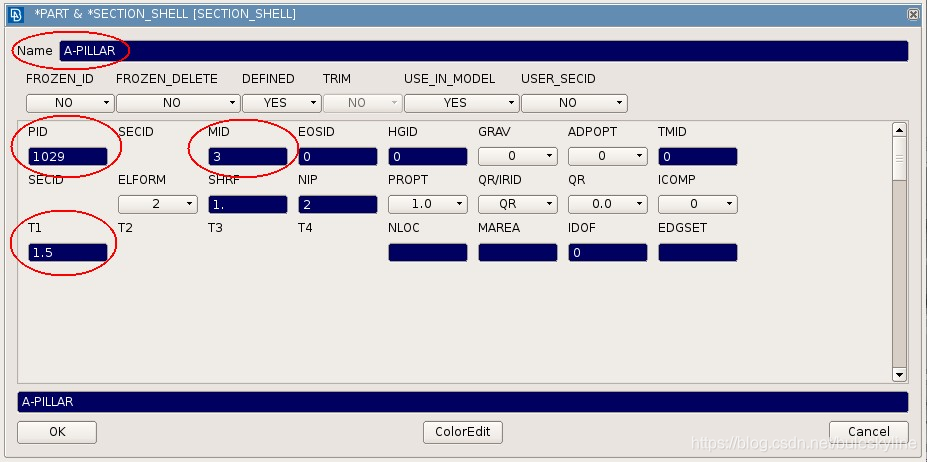
Their call normally follows functions that have collected a number of entities in a prior step. Appart from the deck and the reference to the entity, a list containing all the labels of the values to be obtained, must be given as an argument. These labels are the keywords of the fields, exactly as they appear in the edit card. The following example demonstrates the process of getting the values of the name, property id, material id and thickness, of all the SECTION_SHELL cards of the LSDYNA deck, by using the function base.GetEntityCardValues():
import ansa
from ansa import base
from ansa import constants

def GetValues():
    props = base.CollectEntities(constants.LSDYNA, None, 'SECTION_SHELL')
    #Initialize lists
    names = []
    pids = []
    mids = []
    thickness = []

    for prop in props:
        vals = base.GetEntityCardValues(constants.LSDYNA, prop, ('Name', 'PID', 'MID', 'T1'))
        names.append(vals['Name'])
        pids.append(vals['PID'])
        mids.append(vals['MID'])
        thickness.append(vals['T1'])
It is crucial for the user to be familiar with the labels of each edit card, since they must be written exactly as they appear in the cards. The function returns a dictionary with keys the requested fields and values the corresponding values. If an error occurs the value of the particular field will be None.
If the user needs direct access to the entity object of a card field, it is reccomended to use the method Entity.get_entity_values(). The following example demonstrates its use, in contrast to the actions performed previously, in order to get the entity object:
import ansa
from ansa import base
from ansa import constants

def main():
    shell = base.GetEntity(constants.ABAQUS, 'SHELL', 1)

    #previous approach
    vals = base.GetEntityCardValues(constants.ABAQUS, shell, ('G1', 'G2', 'G3', 'G4'))
    g1_obj = base.GetEntity(constants.ABAQUS, 'NODE', vals['G1'])
    print(g1_obj.ansa_type(constants.ABAQUS))

    #new approach
    vals2 = shell.get_entity_values(constants.ABAQUS, ('G1', 'G2', 'G3', 'G4'))
    print(vals2['G1'].ansa_type(constants.ABAQUS))
To avoid opening and closing cards just for seeing the names of the labels, three global label – keywords can be used. These keywords allow the extraction of the entity’s id, property and type, without knowing the names of their respective labels. Their syntax is the following:
| Label | Description |
|---|---|
| id | The entity’s ID |
| type | The entity’s ANSA type |
| prop | The entity’s property id |
A plain usage of these keywords is shown in the following example:
status = base.GetEntityCardValues(constants.LSDYNA, ent, ('__id__', '__type__', '__prop__'))
In order to get the
免责声明:本文系网络转载或改编,未找到原创作者,版权归原作者所有。如涉及版权,请联系删
 技术文档
技术文档
 推荐好文
推荐好文






 155-2731-8020




