




软件

产品


The Adams Command Server is an Adams View (or Adams Car) component that manages communication between Adams View and external software. Examples of external software include user-written applications created in Microsoft Visual Basic, Python, C, Java or similar. The server listens for either commands or queries from an external application and manages the command or query interaction with the Adams model. The server has a simple interface that is accessible from other programming languages that implement the TCP/IP communication protocol. The server also contains an interface for Microsoft Visual Basic that simplifies the communication protocol.
多体动力学仿真软件ADAMS可以通过Adams Command Server与外部程序进行TCP通信。首先需要打开ADAMS中的服务端,在Tool→Command Navigator中找到command_server,点击show会弹出一个图形界面的对话框。可以在对话框上点击Start Server开启服务器。如下图所示5002端口已经开启,可以通过TCP socket接收字符串指令:
由于控制或查询指令通过TCP以字符串形式发送给command server,因此客户端程序可以采用Python、C++等语言编写,只要指令是合法有效的Adams View Commands(具体语法可以参考官方文档中的Adams View Command Language Help)。外部程序发送的字符串指令主要分为两种,一种是以cmd开头的控制指令,另一种是以query开头的查询指令:
import socket

client_socket = socket.socket(socket.AF_INET, socket.SOCK_STREAM)
client_socket.connect(("localhost", 5002))

# formulate valid Adams View command language that starts with the string "cmd"
cmd = "cmd point create point_name = POINT__1 location = 10 , 15 , 10 relative_to = ground "
client_socket.send(cmd)

# receives feedback from the server. The server responds with the string "cmd: 0" for successful command processing
response = client_socket.recv(1024)

print response# Returns:  cmd: 0 (on success) cmd: 1 (error detected in View command)
cmd指令在相对于ground的(10, 15, 10)位置处创建了一个点,命名为POINT_1:
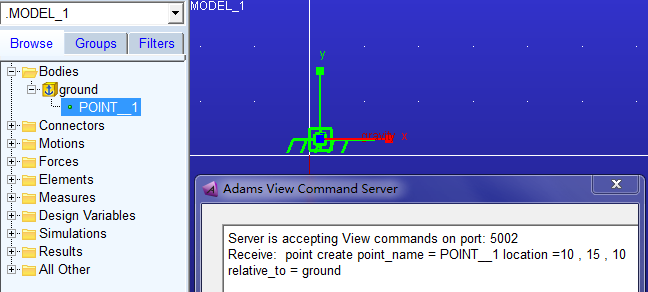
发送指令后收到cmd:0,说明指令执行成功

连续发送多条控制指令时必须通过新建的socket,下面代码创建了一个整型设计变量integer_numbers,然后又将其指改为16:
import socket
import time

cmds = ["cmd variable create variable_name=integer_numbers integer_value=12 range=10,20",
        "cmd variable set variable_name=integer_numbers integer_value=16"]

# Each command must be sent to the server over a new socket
for cmd in cmds:
    client_socket = socket.socket(socket.AF_INET, socket.SOCK_STREAM)
    start_time = time.time()
    dt = time.time() - start_time
    while dt < 60:    # wait for a new server connection:
        dt = time.time() - start_time
        try:
            client_socket.connect(("localhost", 5002))
            break
        except socket.error:
             pass

    print "Connected to socket, sending cmd: %s" % cmd
    client_socket.send(cmd)
    data = client_socket.recv(1024)
    print "Response from cmd was: %s" % data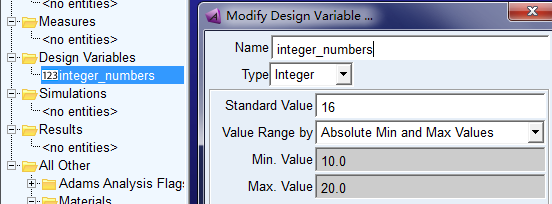
下面代码查询了零件PART_2的位置信息:
import socket

# create a socket & connect to the proper port/host
client_socket = socket.socket(socket.AF_INET, socket.SOCK_STREAM)
client_socket.connect(("localhost", 5002))

# queries must always start with the string "query" followed by an Adams View expression
the_query = "query part_2.location"
client_socket.send(the_query)

# server replies with a description of the data
query_description = client_socket.recv(1024)   # Description of result:  query: float : 3 : 12

# server waits for an "OK" command before sending the actual data
client_socket.send("OK")
query_data = client_socket.recv(1024)          # accepts the actual server data


# parse query data based on type:
description_list = query_description.split(':')
data_type = description_list[1]
data_length = int(description_list[2])
data_bytes = int(description_list[3])

print "Query returned %i values of data type %s" % (data_length, data_type)
print "Query data as a string is: %s" % query_data
输出如下:

参考:
Adams/2017/help/adams_view/Exchanging Data in Adams / Adams Command Server
Command Language Help
转载于:https://www.cnblogs.com/21207-iHome/p/7603825.html
免责声明:本文系网络转载或改编,未找到原创作者,版权归原作者所有。如涉及版权,请联系删
 技术文档
技术文档
 推荐好文
推荐好文






 155-2731-8020




