




软件

产品


文本框是用户图形界面程序中使用频率最高的 控件 类型之一,用户可以通过在文本框中输人或编辑数据来实现与内核的交互。另外,用户可以根据需求设置文本框对应的数据类型和取值范围。

AFXTextField(p, ncols, labelText, tgt=None, sel=0, opts=AFXTEXTFIELD_STRING,
x=0, y=0, w=0, h=0, pl=DEFAULT_PAD,
pr=DEFAULT_PAD, pt=DEFAULT_PAD, pb=DEFAULT_PAD)
ncols表示列数,即框框的长度,其他参数与前面的含义相同。
在复选框的基础上,进行增加文本框
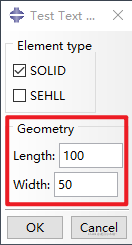
在界面文件中增加文本控件:

注册 :

注册文件【testcheckbutton_plugin.py】
from abaqusGui import *from abaqusConstants import ALLimport osutils, os ############################################################################ Class definition########################################################################### class testcheckbutton_plugin(AFXForm): #~~~~~~~~~~~~~~~~~~~~~~~~~~~~~~~~~~~~~~~~~~~~~~~~~~~~~~~~~~~~~~~~~~~~~~ def __init__(self, owner): # Construct the base class. # AFXForm.__init__(self, owner) self.radioButtonGroups = {} self.cmd = AFXGuiCommand(mode=self, method='', objectName='', registerQuery=False) pickedDefault = '' self.ele_solidKw = AFXBoolKeyword(self.cmd, 'ele_solid', AFXBoolKeyword.TRUE_FALSE, True, True) self.ele_shellKw = AFXBoolKeyword(self.cmd, 'ele_shell', AFXBoolKeyword.TRUE_FALSE, True, False) self.lengthKw = AFXFloatKeyword(self.cmd,'Length',True,100) self.widthKw = AFXFloatKeyword(self.cmd,'Width',True,50) #~~~~~~~~~~~~~~~~~~~~~~~~~~~~~~~~~~~~~~~~~~~~~~~~~~~~~~~~~~~~~~~~~~~~~~ def getFirstDialog(self): import testcheckbuttonDB return testcheckbuttonDB.testcheckbuttonDB(self) #~~~~~~~~~~~~~~~~~~~~~~~~~~~~~~~~~~~~~~~~~~~~~~~~~~~~~~~~~~~~~~~~~~~~~~ def doCustomChecks(self): # Try to set the appropriate radio button on. If the user did # not specify any buttons to be on, do nothing. # for kw1,kw2,d in self.radioButtonGroups.values(): try: value = d[ kw1.getValue() ] kw2.setValue(value) except: pass return True #~~~~~~~~~~~~~~~~~~~~~~~~~~~~~~~~~~~~~~~~~~~~~~~~~~~~~~~~~~~~~~~~~~~~~~ def okToCancel(self): # No need to close the dialog when a file operation (such # as New or Open) or model change is executed. # return False #~~~~~~~~~~~~~~~~~~~~~~~~~~~~~~~~~~~~~~~~~~~~~~~~~~~~~~~~~~~~~~~~~~~~~~# Register the plug-in#thisPath = os.path.abspath(__file__)thisDir = os.path.dirname(thisPath) toolset = getAFXApp().getAFXMainWindow().getPluginToolset()toolset.registerGuiMenuButton( buttonText='test checkbutton', object=testcheckbutton_plugin(toolset), messageId=AFXMode.ID_ACTIVATE, icon=None, kernelInitString='', applicableModules=ALL, version='N/A', author='N/A', description='N/A', helpUrl='N/A')界面文件 【testcheckbuttonDB.py】
from abaqusConstants import *from abaqusGui import *from kernelAccess import mdb, sessionimport osthisPath = os.path.abspath(__file__)thisDir = os.path.dirname(thisPath)class testcheckbuttonDB(AFXDataDialog): def __init__(self, form): AFXDataDialog.__init__(self, form, 'Test Text Button', self.OK|self.CANCEL, DIALOG_ACTIONS_SEPARATOR) okBtn = self.getActionButton(self.ID_CLICKED_OK) okBtn.setText('OK') GroupBox_1 = FXGroupBox(p=self, text='Element type', opts=FRAME_GROOVE) FXCheckButton(p=GroupBox_1, text='SOLID', tgt=form.ele_solidKw, sel=0) FXCheckButton(p=GroupBox_1, text='SEHLL', tgt=form.ele_shellKw, sel=0) GroupBox_2 = FXGroupBox(p=self, text='Geometry', opts=FRAME_GROOVE) AFXTextField(p=GroupBox_2,ncols=8,labelText='Length:',tgt=form.lengthKw,sel=0) AFXTextField(p=GroupBox_2,ncols=8,labelText='Width:',tgt=form.widthKw,sel=0)将复选框与文本框结合,实现在文本框前加个复选框,当被勾选时,文本框可以编辑,没被勾选则不能。
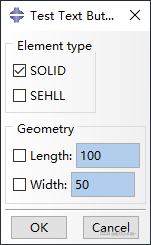
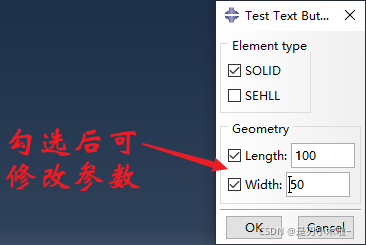
只需要在定义时进行简单修改:

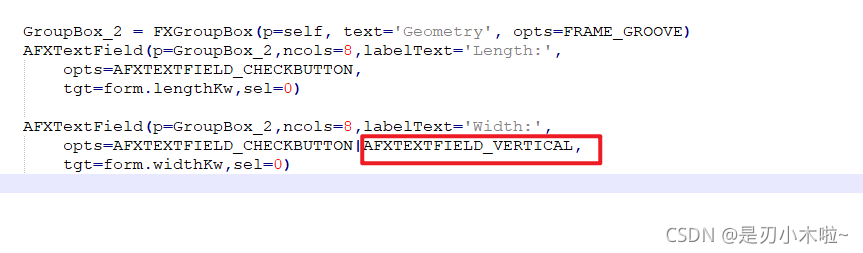
AFXTextField(p=GroupBox_2,ncols=8,labelText='Length:',opts=AFXTEXTFIELD_CHECKBUTTON,tgt=form.lengthKw,sel=0) AFXTextField(p=GroupBox_2,ncols=8,labelText='Width:',opts=AFXTEXTFIELD_CHECKBUTTON,tgt=form.widthKw,sel=0)默认是横着的,也可以设置成竖着的:

免责声明:本文系网络转载或改编,未找到原创作者,版权归原作者所有。如涉及版权,请联系删
 技术文档
技术文档
 推荐好文
推荐好文






 155-2731-8020




