




软件

产品


UF_MODL_trace_a_ray 函数 可以指定一个点和方向来发射射线,并指定允许被射线击中的实体,通过此函数可以分析出一些模型的几何属性。
先在 NX 中创建一个方块和一个点用于测试
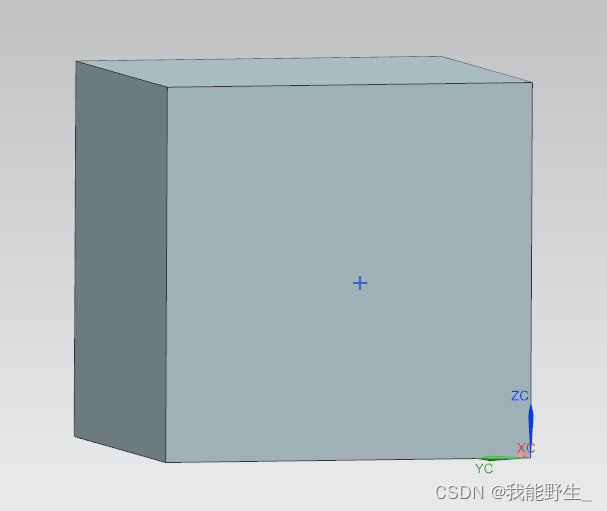
接下来创建工程,UF_MODL_trace_a_ray函数在uf_modl.h头文件中
#include <uf_modl.h>void MyClass::do_it(){ //先获取到部件中的点和实体 Point* pt_1st = *(theSession->Parts()->Work()->Points()->begin()); Body* body_1st = *(theSession->Parts()->Work()->Bodies()->begin()); //然后设定射线函数的参数: int num_bodies = 1; //允许被射线击中的实体的数量,这里直接给1,实际上可以给变量 tag_t* bodies = new tag_t(body_1st->Tag()); //接受射线的实体列表 double origin[3] = { pt_1st->Coordinates().X, pt_1st->Coordinates().Y, pt_1st->Coordinates().Z }; //定义射线的发射源(即pt_1st的坐标) double direction[3] = { 1,0,0 }; //定义射线的发射方向向量 double transform[16]; //定义转置坐标系矩阵。参数说明中有告知使用UF_MTX4_identity进行初始化 UF_MTX4_identity(transform); int num_desired = 0; //定义最大击中数量。 0代表不设限 int num_results; //返回值:击中数量 UF_MODL_ray_hit_point_info_t* hit_list; //返回值:射线函数运行结果结构体 UF_MODL_trace_a_ray(num_bodies , bodies , origin , direction , transform , num_desired , &num_results , &hit_list); //判断num_results是否大于零 来确定射线是否击中目标 if( num_results > 0 ) { char info[1024]; sprintf_s(info , "击中数量:[%d], 击中目标体tag值:[%d]" , num_results , hit_list->hit_body); lw->Open(); lw->WriteLine(info); //还可以进一步判断一些几何属性,例如:如果击中数量==2 ,那么使用击中点信息即可计算出该实体的厚度 if( num_results == 2 ) { double* p1 = hit_list[0].hit_point; double* p2 = hit_list[1].hit_point; double distance = sqrtf(powf(p1[0] - p2[0] , 2) + powf(p1[1] - p2[1] , 2) + powf(p1[2] - p2[2] , 2)); //输出信息 sprintf_s(info , "击中点p1坐标:[X=%.2f] [Y=%.2f] [Z=%.2f]\n击中点p2坐标:[X=%.2f] [Y=%.2f] [Z=%.2f]\n两击中点的距离值:[%.2f]" , p1[0] , p1[1] , p1[2] , p2[0] , p2[1] , p2[2] , distance); lw->WriteLine(info); } } //释放内存 delete[]bodies;}编译后运行并查看运行结果:
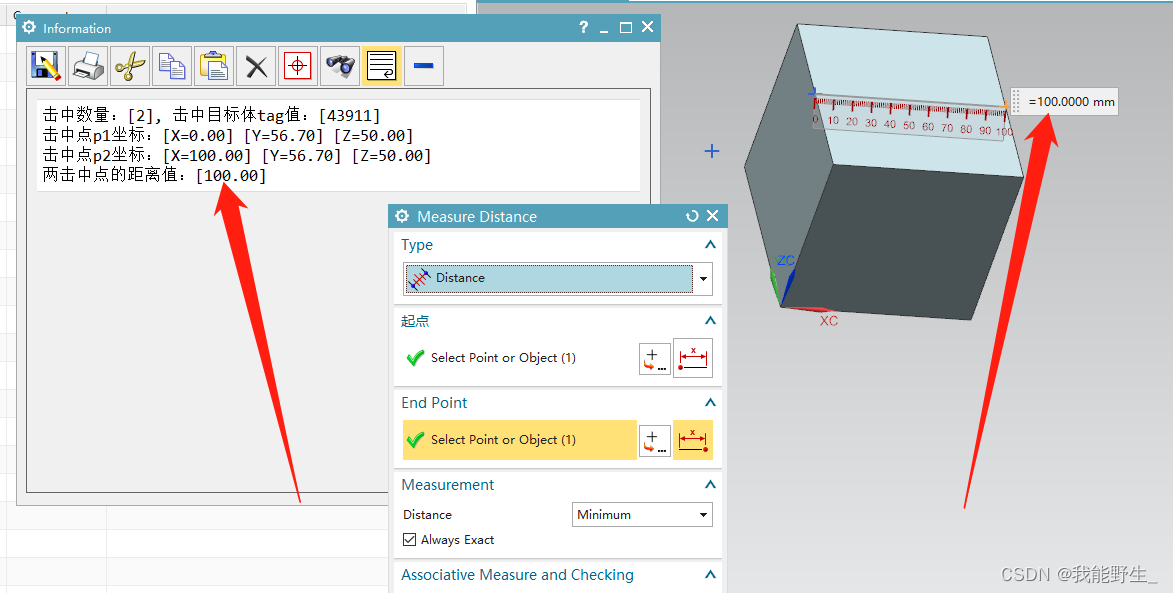
最后附上 完整代码
//BlogCode_Cpp // Mandatory UF Includes#include <uf.h>#include <uf_object_types.h> // Internal Includes#include <NXOpen/ListingWindow.hxx>#include <NXOpen/NXMessageBox.hxx>#include <NXOpen/UI.hxx>#include <uf_obj.h> // Internal+External Includes#include <NXOpen/Annotations.hxx>#include <NXOpen/Assemblies_Component.hxx>#include <NXOpen/Assemblies_ComponentAssembly.hxx>#include <NXOpen/Body.hxx>#include <NXOpen/BodyCollection.hxx>#include <NXOpen/Face.hxx>#include <NXOpen/Line.hxx>#include <NXOpen/NXException.hxx>#include <NXOpen/NXObject.hxx>#include <NXOpen/Part.hxx>#include <NXOpen/PartCollection.hxx>#include <NXOpen/Session.hxx>#include <uf_modl.h>#include <uf_mtx.h>#include <NXOpen/Part.hxx>#include <NXOpen/Point.hxx>#include <NXOpen/PointCollection.hxx> // Std C++ Includes#include <iostream>#include <sstream> using namespace NXOpen;using std::string;using std::exception;using std::stringstream;using std::endl;using std::cout;using std::cerr; //------------------------------------------------------------------------------// NXOpen c++ test class //------------------------------------------------------------------------------class MyClass{ // class members public: static Session* theSession; static UI* theUI; MyClass(); ~MyClass(); void do_it(); void print(const NXString&); void print(const string&); void print(const char*); private: Part* workPart , * displayPart; NXMessageBox* mb; ListingWindow* lw;}; //------------------------------------------------------------------------------// Initialize static variables//------------------------------------------------------------------------------Session* (MyClass::theSession) = NULL;UI* (MyClass::theUI) = NULL; //------------------------------------------------------------------------------// Constructor //------------------------------------------------------------------------------MyClass::MyClass(){ // Initialize the NX Open C++ API environment MyClass::theSession = NXOpen::Session::GetSession(); MyClass::theUI = UI::GetUI(); mb = theUI->NXMessageBox(); lw = theSession->ListingWindow(); workPart = theSession->Parts()->Work(); displayPart = theSession->Parts()->Display(); } //------------------------------------------------------------------------------// Destructor//------------------------------------------------------------------------------MyClass::~MyClass(){} //------------------------------------------------------------------------------// Print string to listing window or stdout//------------------------------------------------------------------------------void MyClass::print(const NXString& msg){ if( !lw->IsOpen() ) lw->Open(); lw->WriteLine(msg);}void MyClass::print(const string& msg){ if( !lw->IsOpen() ) lw->Open(); lw->WriteLine(msg);}void MyClass::print(const char* msg){ if( !lw->IsOpen() ) lw->Open(); lw->WriteLine(msg);} //------------------------------------------------------------------------------// Do something//------------------------------------------------------------------------------void MyClass::do_it(){ //先获取到部件中的点和实体 Point* pt_1st = *(theSession->Parts()->Work()->Points()->begin()); Body* body_1st = *(theSession->Parts()->Work()->Bodies()->begin()); //然后设定射线函数的参数: int num_bodies = 1; //允许被射线击中的实体的数量,这里直接给1,实际上可以给变量 tag_t* bodies = new tag_t(body_1st->Tag()); //接受射线的实体列表 double origin[3] = { pt_1st->Coordinates().X, pt_1st->Coordinates().Y, pt_1st->Coordinates().Z }; //定义射线的发射源(即pt_1st的坐标) double direction[3] = { 1,0,0 }; //定义射线的发射方向向量 double transform[16]; //定义转置坐标系矩阵。参数说明中有告知使用UF_MTX4_identity进行初始化 UF_MTX4_identity(transform); int num_desired = 0; //定义最大击中数量。 0代表不设限 int num_results; //返回值:击中数量 UF_MODL_ray_hit_point_info_t* hit_list; //返回值:射线函数运行结果结构体 UF_MODL_trace_a_ray(num_bodies , bodies , origin , direction , transform , num_desired , &num_results , &hit_list); //判断num_results是否大于零 来确定射线是否击中目标 if( num_results > 0 ) { char info[1024]; sprintf_s(info , "击中数量:[%d], 击中目标体tag值:[%d]" , num_results , hit_list->hit_body); lw->Open(); lw->WriteLine(info); //还可以进一步判断一些几何属性,例如:如果击中数量==2 ,那么使用击中点信息即可计算出该实体的厚度 if( num_results == 2 ) { double* p1 = hit_list[0].hit_point; double* p2 = hit_list[1].hit_point; double distance = sqrtf(powf(p1[0] - p2[0] , 2) + powf(p1[1] - p2[1] , 2) + powf(p1[2] - p2[2] , 2)); //输出信息 sprintf_s(info , "击中点p1坐标:[X=%.2f] [Y=%.2f] [Z=%.2f]\n击中点p2坐标:[X=%.2f] [Y=%.2f] [Z=%.2f]\n两击中点的距离值:[%.2f]" , p1[0] , p1[1] , p1[2] , p2[0] , p2[1] , p2[2] , distance); lw->WriteLine(info); } } //释放内存 delete[]bodies;} //------------------------------------------------------------------------------// Entry point(s) for unmanaged internal NXOpen C/C++ programs//------------------------------------------------------------------------------// Explicit Executionextern "C" DllExport void ufusr(char* parm , int* returnCode , int rlen){ UF_initialize(); try { // Create NXOpen C++ class instance MyClass* theMyClass; theMyClass = new MyClass(); theMyClass->do_it(); delete theMyClass; } catch( const NXException& e1 ) { UI::GetUI()->NXMessageBox()->Show("NXException" , NXOpen::NXMessageBox::DialogTypeError , e1.Message()); } catch( const exception& e2 ) { UI::GetUI()->NXMessageBox()->Show("Exception" , NXOpen::NXMessageBox::DialogTypeError , e2.what()); } catch( ... ) { UI::GetUI()->NXMessageBox()->Show("Exception" , NXOpen::NXMessageBox::DialogTypeError , "Unknown Exception."); } UF_terminate();} //------------------------------------------------------------------------------// Unload Handler//------------------------------------------------------------------------------extern "C" DllExport int ufusr_ask_unload(){ return (int)NXOpen::Session::LibraryUnloadOptionImmediately;} //定义UFUN函数入口 UFSession theUFsession = UFSession.GetUFSession(); //先获取到部件中的点和实体 Point3d pt_1st = theSession.Parts.Work.Points.ToArray()[0].Coordinates; Body body_1st = theSession.Parts.Work.Bodies.ToArray()[0]; //定义转置坐标系矩阵。参数说明中有告知使用UF_MTX4_identity进行初始化 double[] transform = new double[16]; theUFsession.Mtx4.Identity(transform); theUFsession.Modl.TraceARay(1, new Tag[] { body_1st.Tag }, new double[] { pt_1st.X, pt_1st.Y, pt_1st.Z }, new double[] { 1, 0, 0 }, transform, 0, out int num_result, out UFModl.RayHitPointInfo[] hit_list); //判断num_results是否大于零 来确定射线是否击中目标 if (num_result > 0) { theUfSession.Ui.OpenListingWindow(); theUfSession.Ui.WriteListingWindow($"击中数量:[{num_result}], 击中目标体tag值:[{hit_list[0].hit_body}]\n"); //还可以进一步判断一些几何属性,例如:如果击中数量==2 ,那么使用击中点信息即可计算出该实体的厚度 if (num_result == 2) { double[] p1 = hit_list[0].hit_point; double[] p2 = hit_list[1].hit_point; theUfSession.Ui.WriteListingWindow($"击中点p1坐标:[X={p1[0]}] [Y={p1[1]}] [Z={p1[2]}]\n"); theUfSession.Ui.WriteListingWindow($"击中点p2坐标:[X={p2[0]}] [Y={p2[1]}] [Z={p2[2]}]\n"); double distance = Math.Sqrt(Math.Pow(p1[0] - p2[0], 2) + Math.Pow(p1[1] - p2[1], 2) + Math.Pow(p1[2] - p2[2], 2)); theUfSession.Ui.WriteListingWindow($"两击中点的距离值:[{distance}]"); } }C#版本的完整代码:
using NXOpen;using NXOpen.UF;using System;using System.Linq;using System.Collections.Generic; public class Program{ // class members private static Session theSession; private static UI theUI; private static UFSession theUfSession; public static Program theProgram; public static bool isDisposeCalled; public Program() { try { theSession = Session.GetSession(); theUI = UI.GetUI(); theUfSession = UFSession.GetUFSession(); isDisposeCalled = false; } catch (NXOpen.NXException ex) { } } public static int Main(string[] args) { int retValue = 0; try { theProgram = new Program(); //定义UFUN函数入口 UFSession theUFsession = UFSession.GetUFSession(); //先获取到部件中的点和实体 Point3d pt_1st = theSession.Parts.Work.Points.ToArray()[0].Coordinates; Body body_1st = theSession.Parts.Work.Bodies.ToArray()[0]; //定义转置坐标系矩阵。参数说明中有告知使用UF_MTX4_identity进行初始化 double[] transform = new double[16]; theUFsession.Mtx4.Identity(transform); theUFsession.Modl.TraceARay(1, new Tag[] { body_1st.Tag }, new double[] { pt_1st.X, pt_1st.Y, pt_1st.Z }, new double[] { 1, 0, 0 }, transform, 0, out int num_result, out UFModl.RayHitPointInfo[] hit_list); //判断num_results是否大于零 来确定射线是否击中目标 if (num_result > 0) { theUfSession.Ui.OpenListingWindow(); theUfSession.Ui.WriteListingWindow($"击中数量:[{num_result}], 击中目标体tag值:[{hit_list[0].hit_body}]\n"); //还可以进一步判断一些几何属性,例如:如果击中数量==2 ,那么使用击中点信息即可计算出该实体的厚度 if (num_result == 2) { double[] p1 = hit_list[0].hit_point; double[] p2 = hit_list[1].hit_point; theUfSession.Ui.WriteListingWindow($"击中点p1坐标:[X={p1[0]}] [Y={p1[1]}] [Z={p1[2]}]\n"); theUfSession.Ui.WriteListingWindow($"击中点p2坐标:[X={p2[0]}] [Y={p2[1]}] [Z={p2[2]}]\n"); double distance = Math.Sqrt(Math.Pow(p1[0] - p2[0], 2) + Math.Pow(p1[1] - p2[1], 2) + Math.Pow(p1[2] - p2[2], 2)); theUfSession.Ui.WriteListingWindow($"两击中点的距离值:[{distance}]"); } } theProgram.Dispose(); } catch (NXOpen.NXException ex) { } return retValue; } public void Dispose() { try { if (isDisposeCalled == false) { } isDisposeCalled = true; } catch (NXOpen.NXException ex) { } } public static int GetUnloadOption(string arg) { return System.Convert.ToInt32(Session.LibraryUnloadOption.Immediately); } }
免责声明:本文系网络转载或改编,未找到原创作者,版权归原作者所有。如涉及版权,请联系删
 技术文档
技术文档
 推荐好文
推荐好文






 155-2731-8020




