




软件

产品


Author:louwill
mlxtend是一款高级的机器学习扩展库,可用于日常机器学习任务的主要工具,也可以作为 sklearn 的一个补充和辅助工具。
mlxtend主要包括以下模块:
下面分别从分类器、图像、绘图和预处理等几个模块来展示mlxtend的强大功能。
分类器
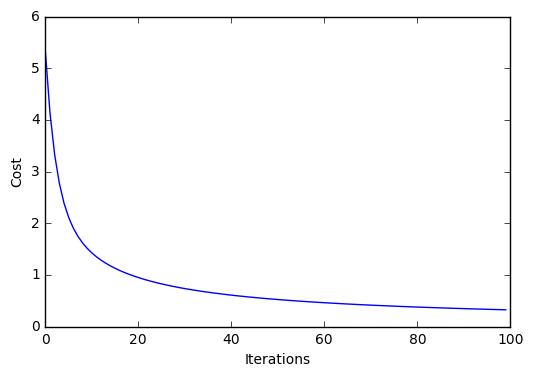
mlxtend提供了多种分类和回归算法api,包括多层感知机、stacking分类器、逻辑回归等。以逻辑回归为例:
from mlxtend.data import iris_data from mlxtend.plotting import plot_decision_regions from mlxtend.classifier import LogisticRegression import matplotlib.pyplot as plt # Loading Data X, y = iris_data() X = X[:, [0, 3]] # sepal length and petal width X = X[0:100] # class 0 and class 1 y = y[0:100] # class 0 and class 1 # standardize X[:,0] = (X[:,0] - X[:,0].mean()) / X[:,0].std() X[:,1] = (X[:,1] - X[:,1].mean()) / X[:,1].std() lr = LogisticRegression(eta=0.1, l2_lambda=0.0, epochs=100, minibatches=1, # for Gradient Descent random_seed=1, print_progress=3) lr.fit(X, y) plot_decision_regions(X, y, clf=lr) plt.title('Logistic Regression - Gradient Descent') plt.show() plt.plot(range(len(lr.cost_)), lr.cost_) plt.xlabel('Iterations') plt.ylabel('Cost') plt.show()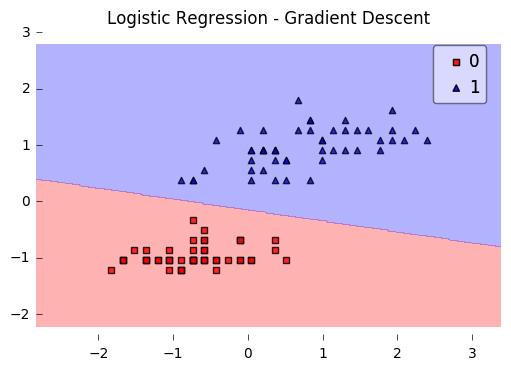
图像
图像模块提供了人脸特征点提取的api,示例如下:
import imageio import matplotlib.pyplot as plt from mlxtend.image import extract_face_landmarks img = imageio.imread('test-face.png') landmarks = extract_face_landmarks(img) print(landmarks.shape) print('\n\nFirst 10 landmarks:\n', landmarks[:10])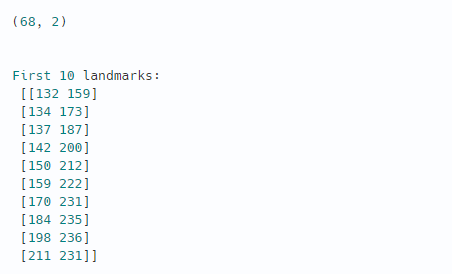
可视化展示:
fig = plt.figure(figsize=(15, 5)) ax = fig.add_subplot(1, 3, 1) ax.imshow(img) ax = fig.add_subplot(1, 3, 2) ax.scatter(landmarks[:, 0], -landmarks[:, 1], alpha=0.8) ax = fig.add_subplot(1, 3, 3) img2 = img.copy() for p in landmarks: img2[p[1]-3:p[1]+3,p[0]-3:p[0]+3,:] = (255, 255, 255) ax.imshow(img2) plt.show()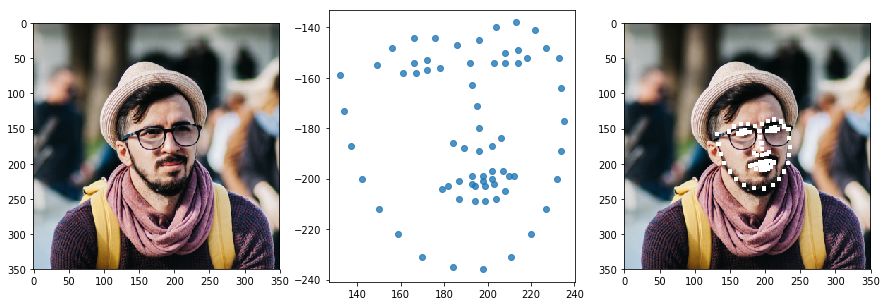
展示人脸特征点:
import numpy as np import matplotlib.pyplot as plt left = np.array([36, 37, 38, 39, 40, 41]) right = np.array([42, 43, 44, 45, 46, 47]) fig = plt.figure(figsize=(10,10)) plt.plot(landmarks[:,0], -landmarks[:,1], 'ro', markersize=8, alpha = 0.5) for i in range(landmarks.shape[0]): plt.text(landmarks[i,0]+1, -landmarks[i,1], str(i), size=14) left_eye = np.mean(landmarks[left], axis=0) right_eye = np.mean(landmarks[right], axis=0) print('Coordinates of the Left Eye: ', left_eye) print('Coordinates of the Right Eye: ', right_eye) plt.plot([left_eye[0]], [-left_eye[1]], marker='+', color='blue', markersize=10, mew=4) plt.plot([right_eye[0]], [-right_eye[1]], marker='+', color='blue', markersize=10, mew=4) plt.xticks([]) plt.yticks([]) plt.show()Coordinates of the Left Eye: [169.33333333 156. ] Coordinates of the Right Eye: [210.83333333 152.16666667]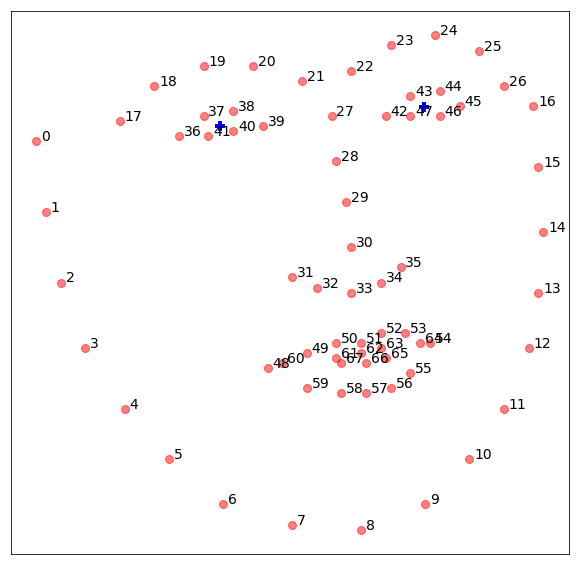
绘图
mlxtend的绘图模块提供了各种机器学习辅助绘图工具,比如分类散点图、热图、决策边界图、多分类混淆矩阵图等等。以多分类混淆 矩阵 图为例,sklearn的plot_confusion模块只提供了绘制二分类的混淆矩阵图,如果想绘制多分类的混淆矩阵,尝试使用mlxtend的plot_confusion_matrix函数。示例如下:
import matplotlib.pyplot as plt from mlxtend.evaluate import confusion_matrix from mlxtend.plotting import plot_confusion_matrix y_target = [1, 1, 1, 0, 0, 2, 0, 3] y_predicted = [1, 0, 1, 0, 0, 2, 1, 3] cm = confusion_matrix(y_target=y_target, y_predicted=y_predicted, binary=False) fig, ax = plot_confusion_matrix(conf_mat=cm) plt.show()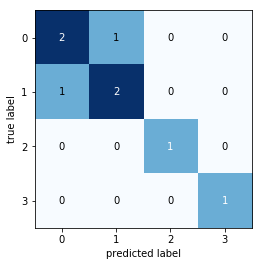
再来看如何绘制模型的决策边界图。比如我们想看看SVM在 iris数据集 上的分类效果,尝试绘制其决策边界图:
from mlxtend.plotting import plot_decision_regions import matplotlib.pyplot as plt from sklearn import datasets from sklearn.svm import SVC # Loading some example data iris = datasets.load_iris() X = iris.data[:, [0, 2]] y = iris.target # Training a classifier svm = SVC(C=0.5, kernel='linear') svm.fit(X, y) # Plotting decision regions plot_decision_regions(X, y, clf=svm, legend=2) # Adding axes annotations plt.xlabel('sepal length [cm]') plt.ylabel('petal length [cm]') plt.title('SVM on Iris') plt.show()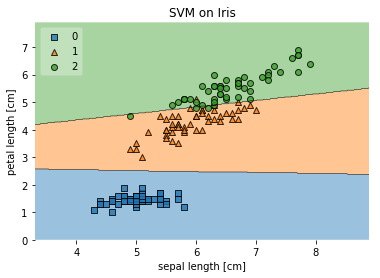
预处理
mlxtend预处理模块提供了各种数据标准化和归一化方法,这里以分类变量的one-hot编码为例。mlxtend下的one_hot可对列表或numpy数组的数据进行转换:
from mlxtend.preprocessing import one_hot import numpy as np # numpy array y = np.array([0, 1, 2, 1, 2]) one_hot(y)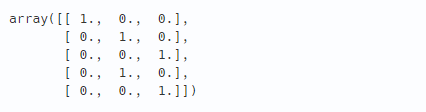
from mlxtend.preprocessing import one_hot # list y = [0, 1, 2, 1, 2] one_hot(y)
mlxtend其他模块和更多功能参考官方文档:
http://rasbt.github.io/mlxtend/
GitHub源码地址:
https://github.com/rasbt/mlxtend
参考资料:
http://rasbt.github.io/mlxtend/user_guide
免责声明:本文系网络转载或改编,未找到原创作者,版权归原作者所有。如涉及版权,请联系删
 技术文档
技术文档
 推荐好文
推荐好文






 155-2731-8020




