




软件

产品


Fluent UDF中有时候需要调用变量的 梯度 ,例如温度梯度,压力梯度,VOF梯度等等,一般是在C_T,C_P,C_VOF后面加上“_G”来获取,例如C_T_G,C_VOF_G。看似简单,实际上里面有比较多的“坑”,现以如下实例来提请各位看官注意。
首先,我们利用VC++ UDF Studio插件(https://vcudfstudio.github.io)启动Fluent,然后再点击Fluent中的“启动Visual Studio”菜单,这样我们就可以在Visual Studio中输入源码并编译UDF了。


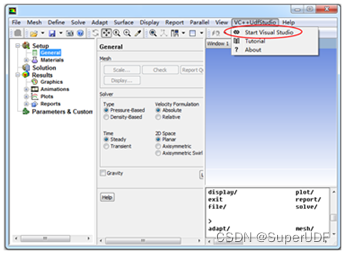
在Visual Studio项目中的udf_source. cpp 文件中输入如下源码。
#include "udf.h"#include "SuperUdfExtension.h" //VC++ UDF Studio自带的扩展库头文件,具体参考该软件中的编程手册#pragma comment(lib, "SuperUdfExtension.lib") //VC++ UDF Studio自带的扩展库的lib文件  int GetZoneIdByName(CString zoneName); //函数声明 DEFINE_ADJUST(show_gradient, domain){  face_t f;  real T_gradient[ND_ND];  int theInletID = GetZoneIdByName("inlet"); //根据边界名字获取其ID,如果返回-1表示找不到  if (-1 == theInletID)  {	  Message("Cannot find the boundary name 'inlet'. Please modify!\n");	  return;  }   Thread * wall_thread = Lookup_Thread(domain, theInletID); //根据inlet的ID获得其Thread  Thread *fluid_thread = THREAD_T0(wall_thread); //获得和边界face邻接的cell的thread   begin_f_loop(f, wall_thread) //对inlet的面进行循环  {	  cell_t c0 = F_C0(f, wall_thread); //获得和inlet面邻接的cell	  NV_V(T_gradient, =, C_T_G(c0, fluid_thread)); //将温度梯度赋值给T_gradient	  Message("c=%d, Temperature X gradient is %g\n", c0, T_gradient[0]);   //打印x方向的梯度  }  end_f_loop(f, wall_threa
免责声明:本文系网络转载或改编,未找到原创作者,版权归原作者所有。如涉及版权,请联系删
 技术文档
技术文档
 推荐好文
推荐好文






 155-2731-8020




