




软件

产品


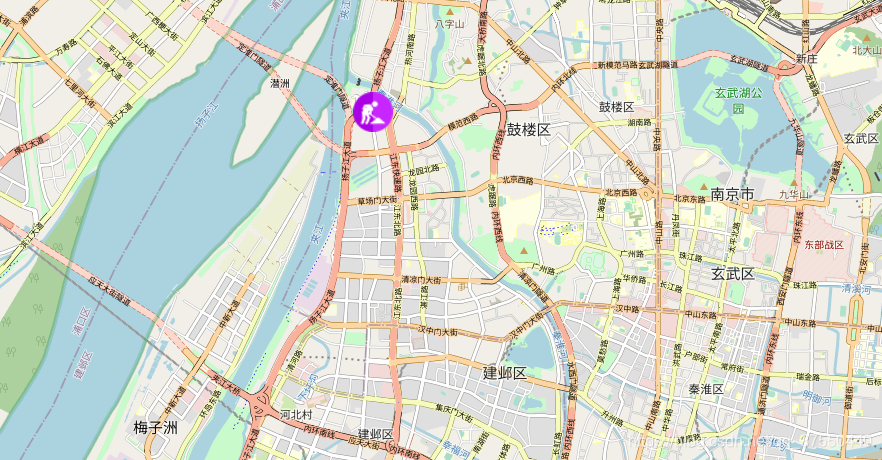
使用"esri/ symbols /PictureFillSymb"添加图片symbol到对应的位置
<!DOCTYPE html><html><head> <meta http-equiv="Content-Type" content="text/html; charset=utf-8" /> <title>Test Map</title> <link rel="stylesheet" href="https://js.arcgis.com/3.24/esri/css/esri.css"> <script src="https://js.arcgis.com/3.24/"></script> <script src="https://code.jquery.com/jquery-3.3.1.min.js"></script> <style> html, body, #map { height: 100%; width: 100%; margin: 0; padding: 0; } #addbtn { position: absolute; z-index: 999; top: 20px; left: 100px; } </style> <script> require([ "esri/map", "esri/graphic", "esri/geometry/Point", "esri/symbols/PictureMarkerSymbol", "esri/symbols/SimpleMarkerSymbol", "esri/geometry/Polygon", "esri/symbols/PictureFillSymbol", "esri/symbols/SimpleFillSymbol", "esri/symbols/SimpleLineSymbol", "esri/Color", "dojo/domReady!" ], function (Map, Graphic, Point,PictureMarkerSymbol,SimpleMarkerSymbol, Polygon, PictureFillSymbol, SimpleFillSymbol, SimpleLineSymbol,Color,) { var map = new Map("map", { // 底图格式 basemap: "osm", // 视觉中心点 center: [118.779, 32.044], // 缩放等级 zoom: 13, }); // 鼠标点击时地图的坐标 // map.on('click',function(evt){ // console.log(evt); // var point = evt.mapPoint // console.log(point.x,point.y); // }) // $("#addbtn").click(addGeometry); // 地图加载完成后执行函数 map.on('load',addGeometry) function addGeometry() { // "wkid": 4326 102100的不同 位置也会不同 var geometry = new Point({ "x": 13216981.21329723, "y": 3772852.221308317, "spatialReference": { "wkid": 102100 } }); var symbol = new PictureMarkerSymbol("1.png",40,40); // 前面二行可以参考官方 这句整合需要经验(你看到了类似的例子/或者记住这样的写法) map.graphics.add(new Graphic(geometry, symbol)); } }); </script></head><body> <div id="map"> <button id="addbtn">PictureGeometry</button> </div></body></html>效果图
欢迎交流 学习 !
流氓也是种气质Cookie热爱开源,崇尚简洁。写代码,也写生活。
免责声明:本文系网络转载或改编,未找到原创作者,版权归原作者所有。如涉及版权,请联系删
 技术文档
技术文档
 推荐好文
推荐好文






 155-2731-8020




