




软件

产品


Revit二次开发——读取cad中的文字信息_niuge No.1的博客-CSDN博客
https://blog.csdn.net/niuge8905/article/details/77204680
链接:https://pan.baidu.com/s/1WfzEbuBc6vH-tACedKwesA
提取码:apey
static string dll = @"https://www.gofarlic.com\Desktop\RvtToDwg\bin\Debug\TD_Mgd.dll";//引用位置Assembly a = Assembly.UnsafeLoadFrom(dll);原因:
(1)加载外部程序集TD_Mgd.dll不合适
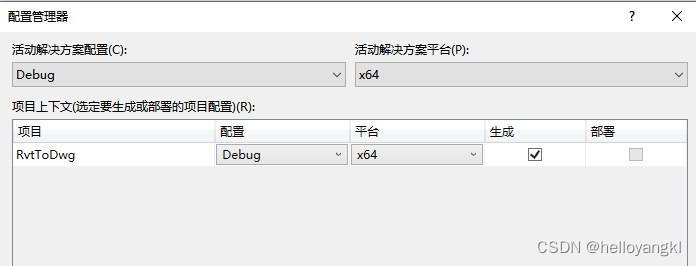
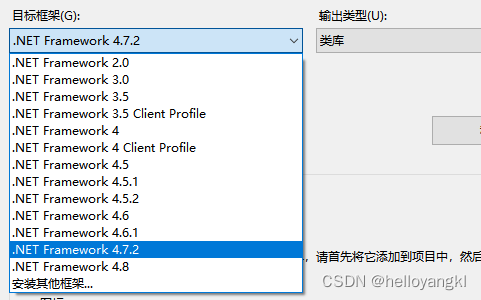
(2)处理器架构与引用dll不匹配
解决 办法:
(1)使用64位Teigha库,不能使用32位,因为RevitAPI与RevitAPIUI是使用64位;
(2)更改平台架构为64位:
这个问题困扰很多人,大多的解决办法是不行更有骗人的,其实就两行代码的问题。
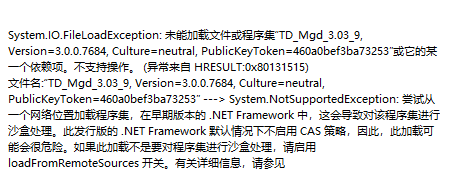
问题的根本原因是 :
在类库项目中引用了外部程序集TD_Mgd.dll,.Net的安全机制阻止了本地的Assembly。具体可参见该博客:问题解决方案
解决办法:
在ReadCADUtils中最上部添加以下两行代码就ok了
static string dll = @"https://www.gofarlic.com\Desktop\RvtToDwg\bin\Debug\TD_Mgd.dll";//引用位置Assembly a = Assembly.UnsafeLoadFrom(dll);1. revit 接口代码
public Result Execute(ExternalCommandData commandData, ref string message, ElementSet elements){//1.通过选择获取元素 Reference reference1 = uiDoc.Selection.PickObject(Autodesk.Revit.UI.Selection.ObjectType.Element,"点击图元");Element item = revitDoc.GetElement(reference1);ElementId elementId = item.GetTypeId();Element element = revitDoc.GetElement(elementId);//2.获取CAD链接文件路径string cadStirng = Path.GetDirectoryName(revitDoc.PathName) + "\\" + revitDoc.GetElement(element .GetTypeId()).Name;//3.获取CAD文字:ReadCADUtils readCADUtils = new ReadCADUtils();List<CADTextModel> cADTextList=readCADUtils.GetCADTextInfo(cadStirng);foreach (var item in cADTextList){ TaskDialog.Show("revit", item.Text+"\n"+"坐标原点为:"+item.Location);}return Result.Succeed;}2.获取CAD图元与文字 信息 的类
using System;using System.Collections.Generic;using System.Linq;using System.Text;using System.Threading.Tasks;using Autodesk.Revit;using Autodesk.Revit.DB;using Autodesk.Revit.UI;using CreatBridgeForRevit2018.ElementsSelect;using CreatBridgeForRevit2018.Filter;using Teigha.Runtime;using Teigha.DatabaseServices;using System.IO;using System.Collections;using Teigha.Geometry; namespace CreatBridgeForRevit2018.ReadCAD{ class ReadCADUtils { static string dll = @"https://www.gofarlic.com\Desktop\RvtToDwg\bin\Debug\TD_Mgd.dll";//手动指定引用dll路径 Assembly a = Assembly.UnsafeLoadFrom(dll); /// <summary> /// 取得链接cad的路径 /// </summary> /// <param name="cadLinkTypeID"></param> /// <param name="revitDoc"></param> /// <returns></returns> public string GetCADPath(ElementId cadLinkTypeID,Document revitDoc) { CADLinkType cadLinkType = revitDoc.GetElement(cadLinkTypeID) as CADLinkType; return ModelPathUtils.ConvertModelPathToUserVisiblePath(cadLinkType.GetExternalFileReference().GetAbsolutePath()); } /// <summary> /// 取得CAD的文字信息 /// </summary> /// <param name="dwgFile"></param> /// <returns></returns> public List<CADTextModel> GetCADTextInfo(string dwgFile) { List<CADTextModel> listCADModels = new List<CADTextModel>(); using (new Services()) { using (Database database = new Database(false, false)) { database.ReadDwgFile(dwgFile, FileShare.Read, true, ""); using (var trans = database.TransactionManager.StartTransaction()) { using (BlockTable table = (BlockTable)database.BlockTableId.GetObject(OpenMode.ForRead)) { using (SymbolTableEnumerator enumerator = table.GetEnumerator()) { StringBuilder sb = new StringBuilder(); while (enumerator.MoveNext()) { using (BlockTableRecord record = (BlockTableRecord)enumerator.Current.GetObject(OpenMode.ForRead)) { foreach (ObjectId id in record) { Entity entity = (Entity)id.GetObject(OpenMode.ForRead, false, false); CADTextModel model = new CADTextModel(); switch (entity.GetRXClass().Name) { case "AcDbText": Teigha.DatabaseServices.DBText text = (Teigha.DatabaseServices.DBText)entity; model.Location = ConverCADPointToRevitPoint(text.Position); model.Text = text.TextString; model.Angel = text.Rotation; model.Layer = text.Layer; listCADModels.Add(model); break; case "AcDbMText": Teigha.DatabaseServices.MText mText = (Teigha.DatabaseServices.MText)entity; model.Location = ConverCADPointToRevitPoint(mText.Location); model.Text = mText.Text; model.Angel = mText.Rotation; model.Layer = mText.Layer; listCADModels.Add(model); break; } } } } } } } } } return listCADModels; } /// <summary> /// 取得cad的图层名称 /// </summary> /// <param name="dwgFile"></param> /// <returns></returns> public IList<string> GetLayerName(string dwgFile) { IList<string> cadLayerNames = new List<string>(); using (new Services()) { using (Database database = new Database(false, false)) { database.ReadDwgFile(dwgFile, FileShare.Read, true, ""); using (var trans = database.TransactionManager.StartTransaction()) { using (LayerTable lt = (LayerTable)trans.GetObject(database.LayerTableId, OpenMode.ForRead)) { foreach (ObjectId id in lt) { LayerTableRecord ltr = (LayerTableRecord)trans.GetObject(id, OpenMode.ForRead); cadLayerNames.Add(ltr.Name); } } trans.Commit(); } } } return cadLayerNames; } /// <summary> /// 取得CAD里的线,包括直线、多段线、圆曲线 /// </summary> /// <param name="dwgFile"></param> /// <returns></returns> public List<CADGeometryModel> GetCADCurves(string dwgFile) { List<CADGeometryModel> listCADModels = new List<CADGeometryModel>(); using (new Services()) { using (Database database = new Database(false, false)) { database.ReadDwgFile(dwgFile, FileShare.Read, true, ""); using (var trans = database.TransactionManager.StartTransaction()) { using (BlockTable table = (BlockTable)database.BlockTableId.GetObject(OpenMode.ForRead)) { using (SymbolTableEnumerator enumerator = table.GetEnumerator()) { StringBuilder sb = new StringBuilder(); while (enumerator.MoveNext()) { using (BlockTableRecord record = (BlockTableRecord)enumerator.Current.GetObject(OpenMode.ForRead)) { foreach (ObjectId id in record) { Entity entity = (Entity)id.GetObject(OpenMode.ForRead, false, false); CADGeometryModel geoModel = new CADGeometryModel(); switch (entity.GetRXClass().Name) { case "AcDbPolyline": Teigha.DatabaseServices.Polyline pl = (Teigha.DatabaseServices.Polyline)entity; IList<XYZ> listPoints = new List<XYZ>(); for (int i = 0; i < pl.NumberOfVertices; i++) { listPoints.Add(new XYZ(MillimetersToUnits(pl.GetPoint2dAt(i).X), MillimetersToUnits(pl.GetPoint2dAt(i).Y), 0)); } PolyLine polyLine = PolyLine.Create(listPoints); listCADModels.Add(new CADGeometryModel() {CadPolyLine= polyLine,LayerName=pl.Layer }); break; case "AcDbLine": Teigha.DatabaseServices.Line line = (Teigha.DatabaseServices.Line)entity; Autodesk.Revit.DB.Line revitLine = Autodesk.Revit.DB.Line.CreateBound(ConverCADPointToRevitPoint(line.StartPoint), ConverCADPointToRevitPoint(line.EndPoint)); listCADModels.Add(new CADGeometryModel() {CadCurve=revitLine as Autodesk.Revit.DB.Curve ,LayerName=line.Layer}); break; case "AcDbArc": Teigha.DatabaseServices.Arc arc = (Teigha.DatabaseServices.Arc)entity; double enda, stara; if (arc.StartAngle> arc.EndAngle) { enda = arc.StartAngle; stara = arc.EndAngle; } else { enda = arc.EndAngle; stara = arc.StartAngle; } Autodesk.Revit.DB.Arc revitArc = Autodesk.Revit.DB.Arc.Create(Autodesk.Revit.DB.Plane.CreateByNormalAndOrigin(new XYZ( arc.Normal.X, arc.Normal.Y, arc.Normal.Z), ConverCADPointToRevitPoint(arc.Center)), MillimetersToUnits(arc.Radius), stara, enda); listCADModels.Add(new CADGeometryModel() { CadCurve = revitArc as Autodesk.Revit.DB.Curve, LayerName = arc.Layer }); break; default: break; } } } } } } } } } return listCADModels; } /// <summary> /// 毫米转化成英寸 /// </summary> /// <param name="value"></param> /// <returns></returns> private double MillimetersToUnits(double value) { return UnitUtils.ConvertToInternalUnits(value, DisplayUnitType.DUT_MILLIMETERS); } /// <summary> /// 将CAD里的点转化为Revit里的点 /// </summary> /// <param name="point"></param> /// <returns></returns> private XYZ ConverCADPointToRevitPoint(Point3d point) { return new XYZ(MillimetersToUnits(point.X), MillimetersToUnits(point.Y), MillimetersToUnits(point.Z)); } }public class CADTextModel { public XYZ Location { get; set; } public string Text { get; set; } public double Angle { get; set; } public string Layer { get; set; } public CADTextModel() { Location = null; Text = ""; Angle = 0; Layer = ""; } }}
免责声明:本文系网络转载或改编,未找到原创作者,版权归原作者所有。如涉及版权,请联系删
 技术文档
技术文档
 推荐好文
推荐好文






 155-2731-8020




