




软件

产品


网页上嵌入CAD图纸,用的 Autodesk Design Review控件嵌入IE,
网上的 dwf viewer方式没成功。
Head之间
<script type="text/javascript" language="javascript">
function ListSections()
{ var ECompViewer = ADViewer.ECompositeViewer;
var Sections = ECompViewer.Sections;
var secList = document.getElementById("SectionList");
for (iSection = 1;(iSection <= Sections.Count); iSection++)
{ var Section = Sections(iSection);
secList.innerHTML += Section.Title + "<BR>";
}
}
</script>
<script type="text/javascript" for="ADViewer" event="OnEndLoadItem(bstrItemType,vData, vResult)">
if (bstrItemType == 'DOCUMENT')
{ ListSections();
}
</script>
body之间
<div id="canvas" style="position:absolute; top:0px; left:0px; width:780px; height:600px; text-align:center; background-color:white">
<object id="ADViewer" classid="clsid:A662DA7E-CCB7-4743-B71A-D817F6D575DF" border="1" width="780" height="600" VIEWASTEXT>//创建Design Reiew对象
<param name="Src" value="Drawing2.dwf">
</object>
</div>
效果预览:
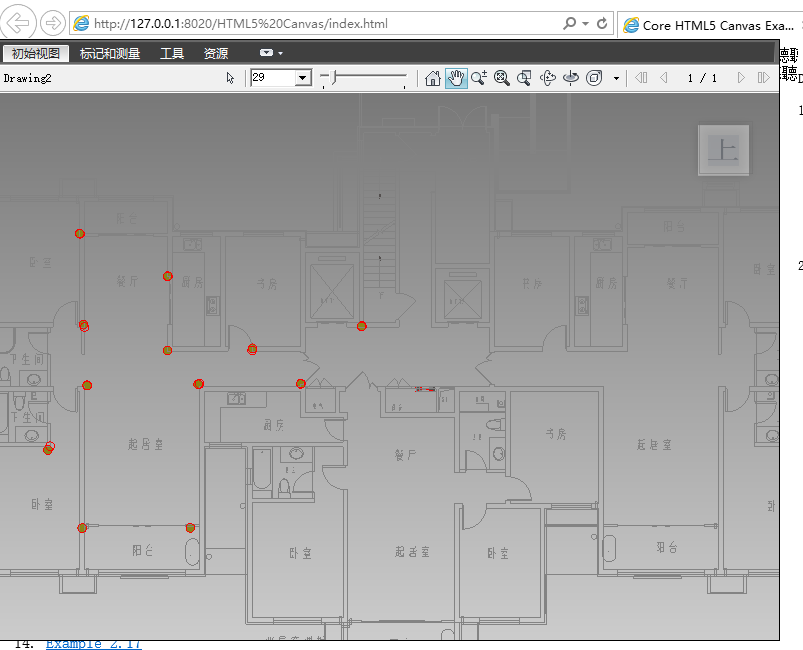
当然,别忘了下载控件,还有,需要在IE下运行,其他浏览器不太行
http://www.autodesk.com/products/design-review/download
http://download.autodesk.com/esd/designreview/2013/ADR/chs/SetupDesignReview2013.msi.zip
转载于:https://www.cnblogs.com/qiri07/p/5640610.html
免责声明:本文系网络转载或改编,未找到原创作者,版权归原作者所有。如涉及版权,请联系删
 技术文档
技术文档
 推荐好文
推荐好文






 155-2731-8020




