




软件

产品


代码之前一直运行正常,写了一个定时器后报错,本地测试为了立马能执行就用cron表达式* * * * * ?,为了只执行一次在最后面加上Thread.sleep(1000*3600*24)睡眠二十四小时从而达到每次测试只执行一次定时任务。
    @Scheduled(cron="* * * * * ?")
    public void execute() throws InterruptedException {
            System.out.println("调用时间"+CommonTool.getNowDateStr());
            insert();
            Thread.sleep(1000*3600*24);
    }1.2.3.4.5.6.
启动报错org.logicalcobwebs.proxool.ProxoolException: Attempt to refer to a unregistered pool by its alias 'XXX'
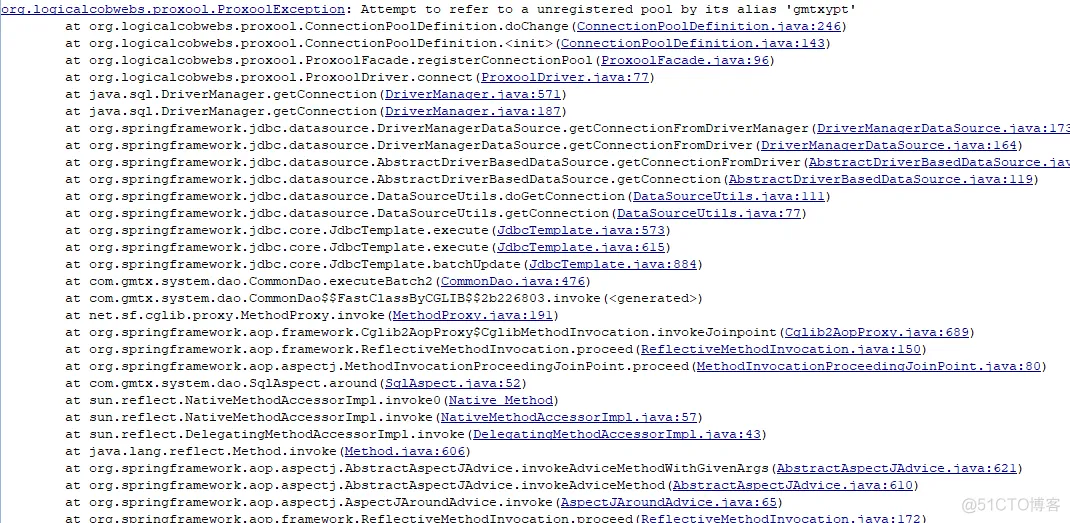
原因在于连接池没注册完成就调用了dao获取连接导致报错,但是只会在刚启动时报一次。只需要在调用dao前Thread.sleep(10000)睡眠十秒,等到线程池注册成功在进行dao操作。
在使用多数据源时,spring jdbctemplate + spring data jpa的情况下。为了防止事务有问题,proxool.xml下写了两个配置,一个给jdbc一个给jpa。当springdatajpa使用数据源时,总是会立马获取连接,原因不知道为什么。于是只能强制在加载org.springframework.web.context.ContextLoaderListener之前加载proxool。
原代码
    <servlet>
        <servlet-name>proxoolServletConfigurator</servlet-name>
        <servlet-class>
            org.logicalcobwebs.proxool.configuration.ServletConfigurator
        </servlet-class>
        <init-param>
            <param-name>xmlFile</param-name>
            <param-value>WEB-INF/classes/jdbcproxool.xml</param-value>
        </init-param>
        <load-on-startup>1</load-on-startup>
    </servlet>

    <!--spring的监听器-->
    <listener>
        <listener-class>
            org.springframework.web.context.ContextLoaderListener
        </listener-class>
    </listener>1.2.3.4.5.6.7.8.9.10.11.12.13.14.15.16.17.18.
改为
    <!--proxool的ListenerConfigurator监听器用的参数-->
    <context-param>
        <param-name>proxoolConfigLocation</param-name>
        <param-value>WEB-INF/classes/jdbcproxool.xml</param-value>
    </context-param>
    <!--proxool的监听器-->
    <listener>
        <listener-class>org.logicalcobwebs.proxool.configuration.ListenerConfigurator</listener-class>
    </listener>

    <!--spring的监听器-->
    <listener>
        <listener-class>
            org.springframework.web.context.ContextLoaderListener
        </listener-class>
    </listener>1.2.3.4.5.6.7.8.9.10.11.12.13.14.15.16.
ListenerConfigurator类需要自己新建
package org.logicalcobwebs.proxool.configuration;

import org.apache.commons.logging.Log;
import org.apache.commons.logging.LogFactory;
import org.logicalcobwebs.proxool.ProxoolException;
import org.logicalcobwebs.proxool.ProxoolFacade;

import javax.servlet.ServletContextEvent;
import java.io.File;
import java.util.Properties;
/**
 * proxool初始化*/
public class ListenerConfigurator implements
        javax.servlet.ServletContextListener {

    private static final Log LOG = LogFactory
            .getLog(ListenerConfigurator.class);

    private static final String XML_FILE_PROPERTY = "proxoolConfigLocation";

    private boolean autoShutdown = true;

    public void contextInitialized(ServletContextEvent servletConfig) {

        String appDir = servletConfig.getServletContext().getRealPath("/");

        Properties properties = new Properties();
        String value = servletConfig.getServletContext().getInitParameter(
                XML_FILE_PROPERTY);
        LOG.debug("proxoolConfigLocation:"+value);

        try {
            File file = new File(value);
            if (file.isAbsolute()) {
                JAXPConfigurator.configure(value, false);
            } else {
                LOG.debug(appDir + File.separator + value);
                JAXPConfigurator.configure(appDir + File.separator + value,
                        false);
            }
        } catch (ProxoolException e) {
            LOG.error("Problem configuring " + value, e);
        }
        if (properties.size() > 0) {
            try {
                PropertyConfigurator.configure(properties);
            } catch (ProxoolException e) {
                LOG.error("Problem configuring using init properties", e);
            }
        }
    }

    public void contextDestroyed(ServletContextEvent s) {
        if (autoShutdown) {
            ProxoolFacade.shutdown(0);
        }
    }
}1.2.3.4.5.6.7.8.9.10.11.12.13.14.15.16.17.18.19.20.21.22.23.24.25.26.27.28.29.30.31.32.33.34.35.36.37.38.39.40.41.42.43.44.45.46.47.48.49.50.51.52.53.54.55.56.57.58.
免责声明:本文系网络转载或改编,未找到原创作者,版权归原作者所有。如涉及版权,请联系删
武汉格发信息技术有限公司,格发许可优化管理系统可以帮你评估贵公司软件许可的真实需求,再低成本合规性管理软件许可,帮助贵司提高软件投资回报率,为软件采购、使用提供科学决策依据。支持的软件有: CAD,CAE,PDM,PLM,Catia,Ugnx, AutoCAD, Pro/E, Solidworks 等。
 技术文档
技术文档
 推荐好文
推荐好文






 155-2731-8020




