




软件

产品

下面是一个基于环形缓冲区的自定义粒子系统实现,使用Unity3D的Job System和Burst编译器实现高性能粒子效果。
对惹,这里有一个游戏开发交流小组,希望大家可以点击进来一起交流一下开发经验呀!
using UnityEngine;
using Unity.Collections;
using Unity.Jobs;
using Unity.Mathematics;
using Unity.Burst;
// 环形缓冲区粒子系统核心组件
[RequireComponent(typeof(ParticleRenderer))] public class RingBufferParticleSystem : MonoBehaviour { [Header("Emitter Settings")] public float emissionRate = 50f; // 每秒发射粒子数 public float3 emitterSize = new float3(1f, 0f, 1f); // 发射器尺寸 [Header("Particle Settings")] public float minLifetime = 1f; public float maxLifetime = 3f; public float minSize = 0.1f; public float maxSize = 0.5f; public float minSpeed = 2f; public float maxSpeed = 5f; public Color startColor = Color.white; public Color endColor = Color.clear; public float gravity = -9.81f; [Header("Performance")] [Range(512, 65536)] public int maxParticles = 8192; // 环形缓冲区大小 public bool useBurstCompiler = true; // 粒子数据结构 public struct Particle { public float3 position; public float3 velocity; public float lifetime; public float maxLifetime; public float size; public Color color; public bool alive; } // 环形缓冲区 private NativeArray<Particle> particleBuffer; private int writeIndex; private int activeCount; // 渲染组件 private ParticleRenderer particleRenderer; // 时间累积器 private float emissionAccumulator; private void Awake() { // 初始化环形缓冲区 particleBuffer = new NativeArray<Particle>(maxParticles, Allocator.Persistent); writeIndex = 0; activeCount = 0; // 获取渲染组件 particleRenderer = GetComponent<ParticleRenderer>(); } private void OnDestroy() { // 释放NativeArray if (particleBuffer.IsCreated) { particleBuffer.Dispose(); } } private void Update() { // 发射粒子 EmitParticles(Time.deltaTime); // 更新粒子 UpdateParticles(Time.deltaTime); // 更新渲染器 particleRenderer.UpdateParticles(particleBuffer, activeCount); } private void EmitParticles(float deltaTime) { emissionAccumulator += emissionRate * deltaTime; int particlesToEmit = Mathf.FloorToInt(emissionAccumulator); emissionAccumulator -= particlesToEmit; for (int i = 0; i < particlesToEmit; i++) { // 如果缓冲区已满,覆盖最旧的粒子 if (activeCount == maxParticles) { writeIndex = (writeIndex + 1) % maxParticles; activeCount--; } // 创建新粒子 Particle p = new Particle(); p.position = transform.position + new Vector3( emitterSize.x * (UnityEngine.Random.value - 0.5f), emitterSize.y * UnityEngine.Random.value, emitterSize.z * (UnityEngine.Random.value - 0.5f) ); // 随机方向 float angle = UnityEngine.Random.Range(0, 2 * Mathf.PI); p.velocity = new float3( Mathf.Cos(angle), UnityEngine.Random.value * 0.5f + 0.5f, Mathf.Sin(angle) ) * UnityEngine.Random.Range(minSpeed, maxSpeed); p.lifetime = UnityEngine.Random.Range(minLifetime, maxLifetime); p.maxLifetime = p.lifetime; p.size = UnityEngine.Random.Range(minSize, maxSize); p.color = startColor; p.alive = true; // 写入缓冲区 particleBuffer[writeIndex] = p; writeIndex = (writeIndex + 1) % maxParticles; activeCount++; } } private void UpdateParticles(float deltaTime) { if (useBurstCompiler) { // 使用Job System和Burst编译器优化性能 var job = new ParticleUpdateJob { Particles = particleBuffer, DeltaTime = deltaTime, Gravity = gravity, StartColor = startColor, EndColor = endColor }; JobHandle handle = job.Schedule(particleBuffer.Length, 64); handle.Complete(); } else { // 单线程更新 for (int i = 0; i < particleBuffer.Length; i++) { if (!particleBuffer[i].alive) continue; Particle p = particleBuffer[i]; p.lifetime -= deltaTime; if (p.lifetime <= 0) { p.alive = false; activeCount--; } else { // 应用重力 p.velocity.y += gravity * deltaTime; // 更新位置 p.position += p.velocity * deltaTime; // 更新颜色 float t = 1 - (p.lifetime / p.maxLifetime); p.color = Color.Lerp(startColor, endColor, t); } particleBuffer[i] = p; } } } // 粒子更新Job(使用Burst编译) [BurstCompile] public struct ParticleUpdateJob : IJobParallelFor { public NativeArray<Particle> Particles; public float DeltaTime; public float Gravity; public Color StartColor; public Color EndColor; public void Execute(int index) { Particle p = Particles[index]; if (!p.alive) return; p.lifetime -= DeltaTime; if (p.lifetime <= 0) { p.alive = false; } else { // 应用重力 p.velocity.y += Gravity * DeltaTime; // 更新位置 p.position += p.velocity * DeltaTime; // 更新颜色 float t = 1 - (p.lifetime / p.maxLifetime); p.color = Color.Lerp(StartColor, EndColor, t); } Particles[index] = p; } } } using UnityEngine; using Unity.Collections; // 粒子渲染组件 public class ParticleRenderer : MonoBehaviour { [Header("Rendering")] public Mesh particleMesh; public Material particleMaterial; public bool useGPUInstancing = true; // GPU实例化数据 private Matrix4x4[] matrices; private Vector4[] colors; private MaterialPropertyBlock propertyBlock; public void UpdateParticles(NativeArray<RingBufferParticleSystem.Particle> particles, int activeCount) { if (activeCount == 0) return; if (useGPUInstancing) { // 初始化数组 if (matrices == null || matrices.Length < activeCount) { matrices = new Matrix4x4[activeCount]; colors = new Vector4[activeCount]; propertyBlock = new MaterialPropertyBlock(); } // 填充渲染数据 int renderIndex = 0; for (int i = 0; i < particles.Length; i++) { if (!particles[i].alive) continue; RingBufferParticleSystem.Particle p = particles[i]; matrices[renderIndex] = Matrix4x4.TRS( p.position, Quaternion.identity, Vector3.one * p.size ); colors[renderIndex] = p.color; renderIndex++; } // 设置材质属性 propertyBlock.SetVectorArray("_Color", colors); // 绘制实例 Graphics.DrawMeshInstanced( particleMesh, 0, particleMaterial, matrices, activeCount, propertyBlock ); } else { // 备用渲染方法(调试用) for (int i = 0; i < particles.Length; i++) { if (!particles[i].alive) continue; RingBufferParticleSystem.Particle p = particles[i]; Matrix4x4 matrix = Matrix4x4.TRS( p.position, Quaternion.identity, Vector3.one * p.size ); Graphics.DrawMesh( particleMesh, matrix, particleMaterial, 0 ); } } } } using UnityEngine; // 示例粒子材质Shader public class ParticleShader : MonoBehaviour { // 粒子Shader示例(应在实际项目中创建对应的Shader文件) /* Shader "Custom/ParticleShader" { Properties { _Color("Color", Color) = (1,1,1,1) } SubShader { Tags { "RenderType"="Transparent" "Queue"="Transparent" } LOD 100 Blend SrcAlpha OneMinusSrcAlpha ZWrite Off Pass { CGPROGRAM #pragma vertex vert #pragma fragment frag #pragma multi_compile_instancing #include "UnityCG.cginc" struct appdata { float4 vertex : POSITION; UNITY_VERTEX_INPUT_INSTANCE_ID }; struct v2f { float4 vertex : SV_POSITION; UNITY_VERTEX_INPUT_INSTANCE_ID }; UNITY_INSTANCING_BUFFER_START(Props) UNITY_DEFINE_INSTANCED_PROP(float4, _Color) UNITY_INSTANCING_BUFFER_END(Props) v2f vert (appdata v) { v2f o; UNITY_SETUP_INSTANCE_ID(v); UNITY_TRANSFER_INSTANCE_ID(v, o); o.vertex = UnityObjectToClipPos(v.vertex); return o; } fixed4 frag (v2f i) : SV_Target { UNITY_SETUP_INSTANCE_ID(i); return UNITY_ACCESS_INSTANCED_PROP(Props, _Color); } ENDCG } } } */ }
高性能架构:
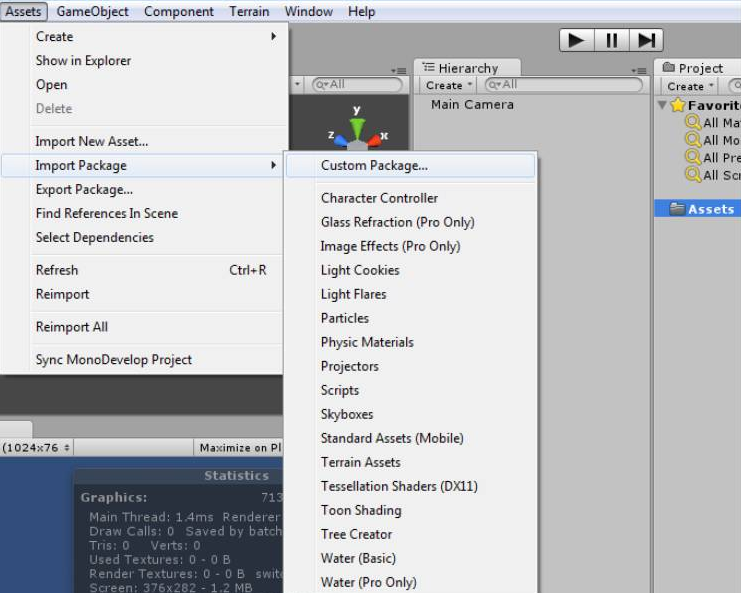
粒子特性:
渲染系统:
调整粒子参数:
性能调优:
这个自定义粒子系统提供了比Unity内置粒子系统更直接的内存控制,特别适合需要精确管理大量粒子的场景,如弹幕游戏、大规模特效等。
更多教学视
Unity3D www.bycwedu.com/promotion_channels/2146264125
免责声明:本文系网络转载或改编,未找到原创作者,版权归原作者所有。如涉及版权,请联系删
 技术文档
 推荐好文






 155-2731-8020