




软件

产品


matlab下载。
A:如果要安装正版,可以到matlab官网下载使用版本。
https://cn.mathworks.com/campaigns/products/ppc/baidu/matlab-trial-request.html?s_eid=ppc_14438
B:不过国内用户大部分会使用非试用版。可以参考下面两篇网络文章。
http://www.linuxdiyf.com/linux/27432.html
https://jingyan.baidu.com/article/ac6a9a5e0e67652b653eacc2.html
安装好matlab后,系统环境变量path下面会添加3条matlab路径,即表示安装成功。
#系统环境变量path里增加如下3项:
d:\install\MATLAB\R2016b\runtime\win64
d:\install\MATLAB\R2016b\bin
d:\install\MATLAB\R2016b\polyspace\bin在 caffe 02 win10 vs2015 编译(支持GPU) 的基础上,
使用cmake-gui工具,
选择:BUILD_matlab 项后,
依次点击 [configure]、[generator] 两个按钮,生成vs2015工程文件。 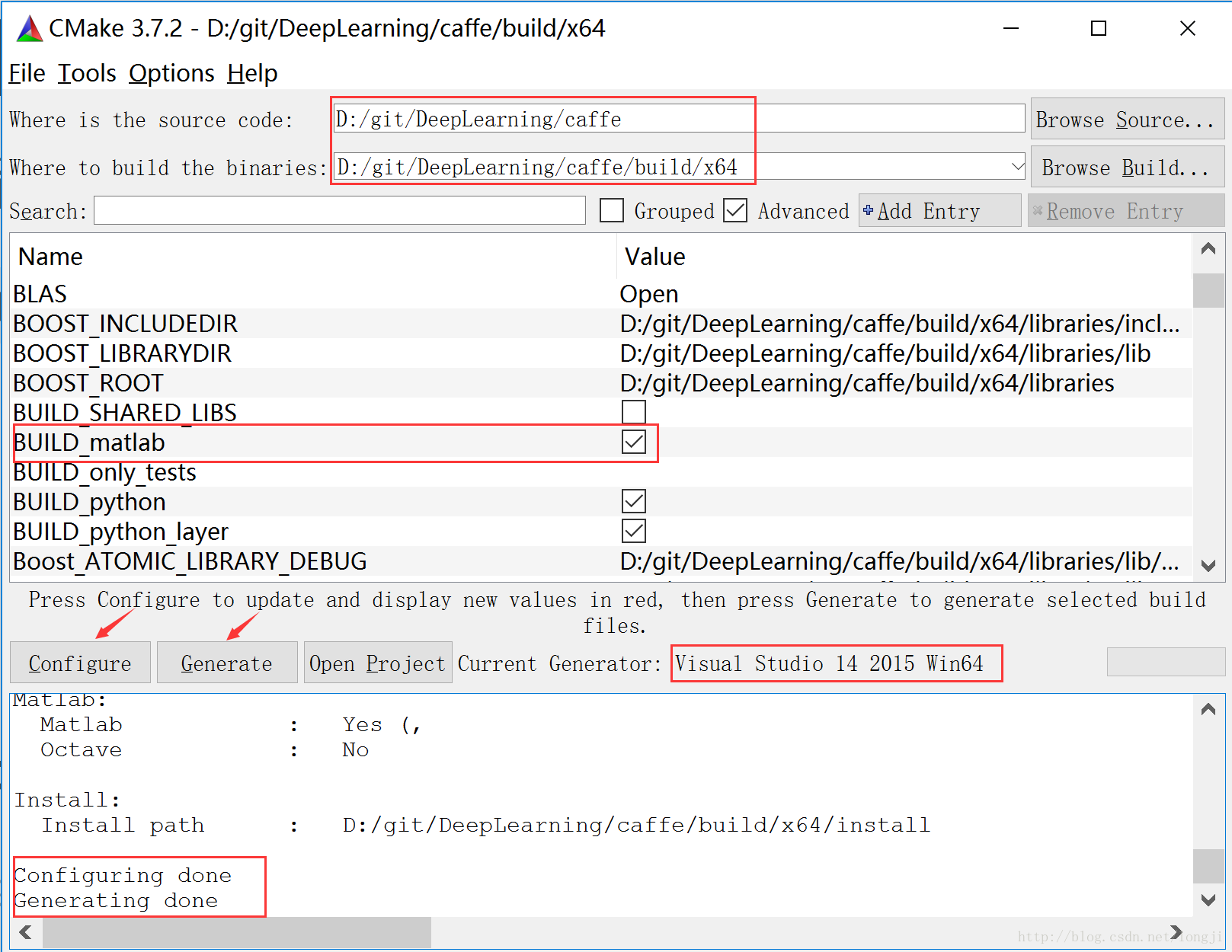
打开https://www.gofarlic.com\git\DeepLearning\caffe\build\x64\Caffe.sln;
重新编译caffe,生成的matcaffe接口:caffe_.mexw64。 https://www.gofarlic.com\git\DeepLearning\caffe\matlab\+caffe\private\Release\caffe_.mexw64
https://www.gofarlic.com\git\DeepLearning\caffe\matlab\+caffe\private\Debug\caffe_.mexw64
把Release下面的caffe_.mexw64拷贝到private下面。 这一步很重要,否则运行INSTALL安装时,会拷贝文件失败,导致matcaffe接口无法INSTALL到caffe\build\x64\install\matlab目录。
https://www.gofarlic.com\git\DeepLearning\caffe\matlab\+caffe\private\caffe_.mexw64A 设置系统 path 环境变量
一定要注意需要为matlab设置环境,在path环境变量中加入:https://www.gofarlic.com\git\DeepLearning\caffe\build\x64\install\bin
B 在matlab中加入matcaffe接口路径
把caffe根目录加入到matlib2016b的 设置路径 中,加入如下2个caffe相关路径。
https://www.gofarlic.com\git\DeepLearning\caffe\build\x64\install
https://www.gofarlic.com\git\DeepLearning\caffe\build\x64\install\bin
C 在caffe根目录下运行matcaffe测试
在matlab2016的命令行,切换还当前工作目录为caffe工作目录https://www.gofarlic.com/git/DeepLearning/caffe 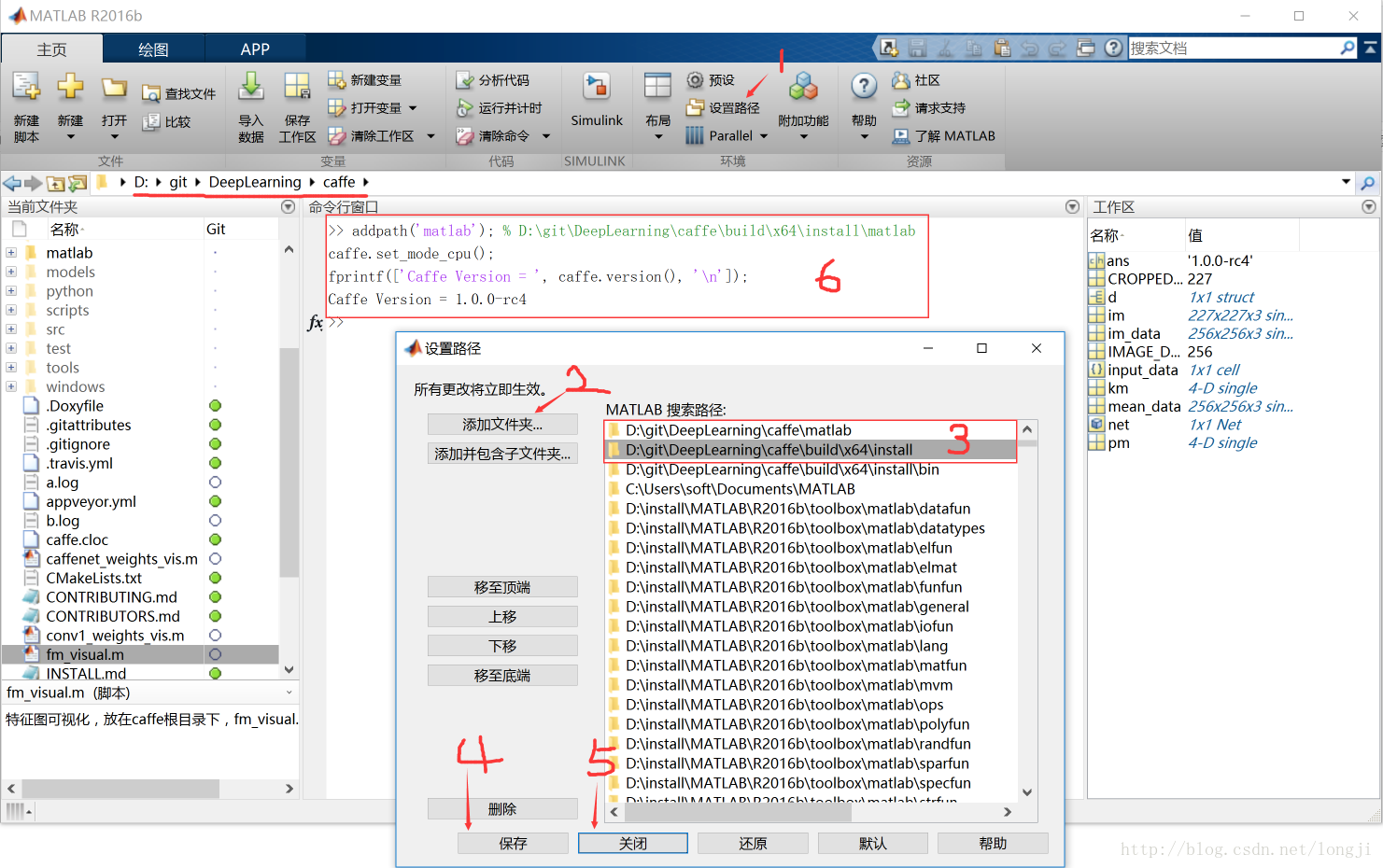
在 matlab命令行窗口运行如下语句:
% 设置接口路径(https://www.gofarlic.com\git\DeepLearning\caffe\build\x64\install下面的matlab)
addpath('matlab');
% 设置设备类型为cpu
caffe.set_mode_cpu();
% 打印caffe版本号
fprintf(['Caffe Version = ', caffe.version(), '\n']);
运行结果(如上图中6所示):
1 没有错误提示
2 正确显示版本号信息:Caffe Version = 1.0.0-rc4
 技术文档
技术文档
 推荐好文
推荐好文






 155-2731-8020




