




软件

产品


计算机视觉研究院专栏
作者:Edison_G
参考face-api.js https://github.com/justadudewhohacks/face-api.js#face-api.js-for-the-browse
关注并星标
从此不迷路
计算机视觉研究院

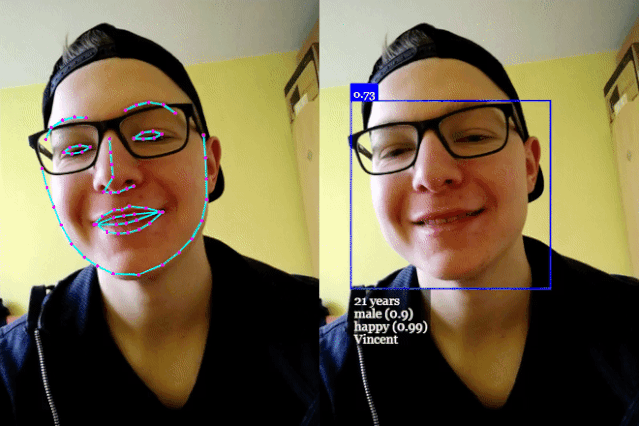
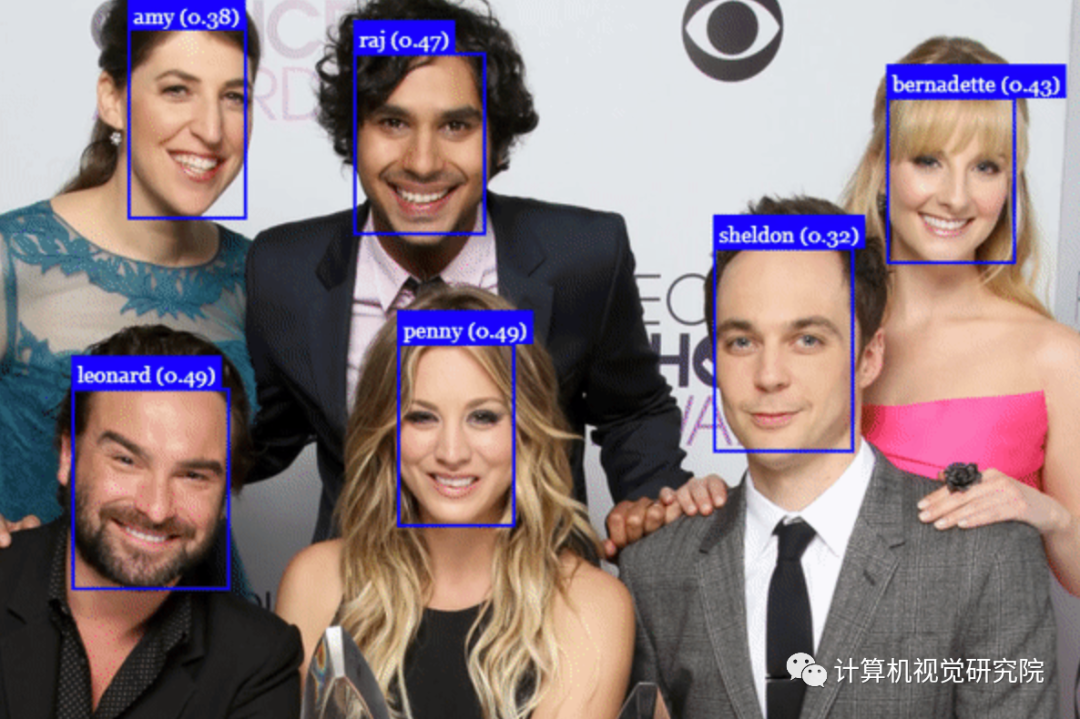
第一阶段实现对图片中人脸的识别并打上标签(比如:人名)
第二阶段使用摄像头实现对人物的识别,比如典型的应用做一个人脸考勤的系统
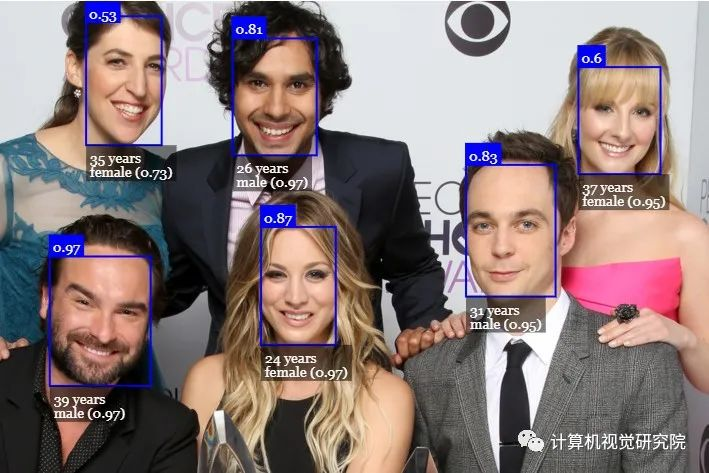
Face-api.js 是一个 JavaScript API,是基于 tensorflow.js 核心 API 的人脸检测和人脸识别的浏览器实现。它实现了一系列的卷积神经网络(CNN),针对网络和移动设备进行了优化。
是一个 JavaScript 文件上传库。可以拖入上传文件,并且会对图像进行优化以加快上传速度。让用户体验到出色、进度可见、如丝般顺畅的用户体验。确实很酷的一款上传图片的开源产品。
是一个 JavaScript 库,它以优雅的方式展示图片,视频和一些 html 内容。它包含你所期望的一切特性 —— 支持触屏,响应式和高度自定义。
代码具体实践步骤
还是先来看看代码吧,做这类开发,并没有想象中的那么难,因为难的核心别人都已经帮你实现了,所以和普通的程序开发没有什么不同,熟练掌握这些api的方法和功能就可以做出非常实用并且非常酷炫的产品。
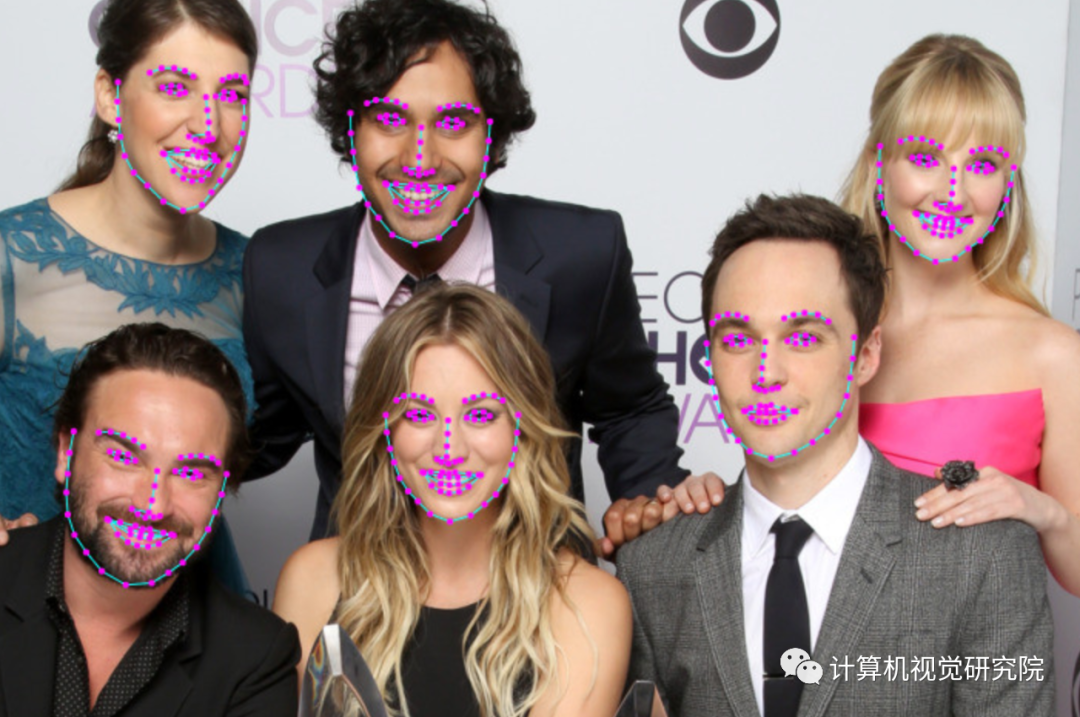
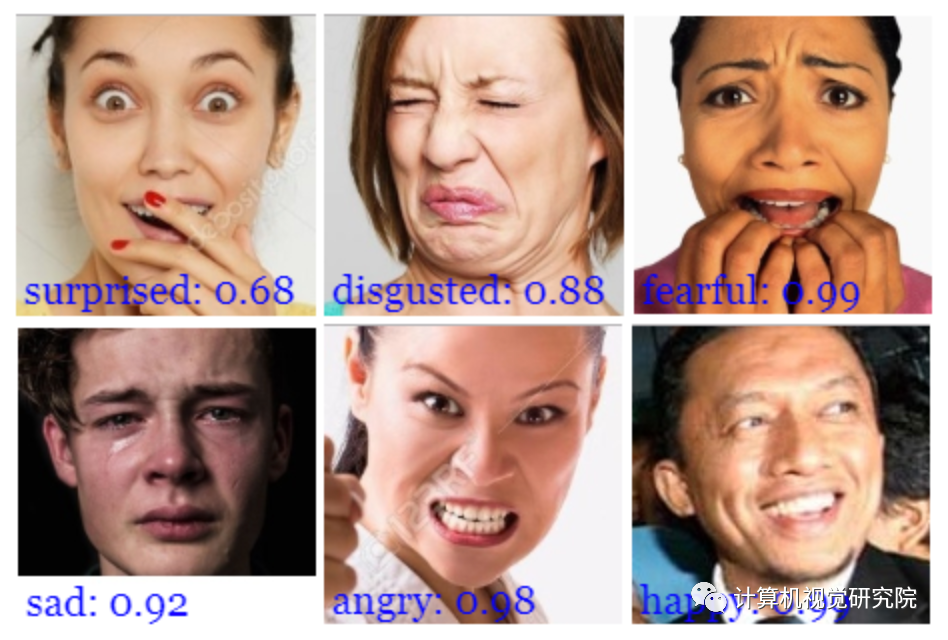
Clone the repository:
git clone https://github.com/justadudewhohacks/face-api.js.gitcd face-api.js/examples/examples-browsernpm inpm startBrowse to http://localhost:3000/.
cd face-api.js/examples/examples-nodejsnpm iNow run one of the examples using ts-node:
ts-node faceDetection.tsOr simply compile and run them with node:
tsc faceDetection.tsnode faceDetection.js代码·解析
这里对face-api.js类库代码做一下简单的说明。
function dodetectpic() { $.messager.progress(); //加载训练好的模型(weight,bias) Promise.all([ faceapi.nets.faceRecognitionNet.loadFromUri('https://raw.githubusercontent.com/justadudewhohacks/face-api.js/master/weights'), faceapi.nets.faceLandmark68Net.loadFromUri('https://raw.githubusercontent.com/justadudewhohacks/face-api.js/master/weights'), faceapi.nets.faceLandmark68TinyNet.loadFromUri('https://raw.githubusercontent.com/justadudewhohacks/face-api.js/master/weights'), faceapi.nets.ssdMobilenetv1.loadFromUri('https://raw.githubusercontent.com/justadudewhohacks/face-api.js/master/weights'), faceapi.nets.tinyFaceDetector.loadFromUri('https://raw.githubusercontent.com/justadudewhohacks/face-api.js/master/weights'), faceapi.nets.mtcnn.loadFromUri('https://raw.githubusercontent.com/justadudewhohacks/face-api.js/master/weights'), //faceapi.nets.tinyYolov.loadFromUri('https://raw.githubusercontent.com/justadudewhohacks/face-api.js/master/weights') ]).then(async () => { //在原来图片容器中添加一层用于显示识别的蓝色框框 const container = document.createElement('div') container.style.position = 'relative' $('#picmodal').prepend(container) //先加载维护好的人脸数据(人脸的特征数据和标签,用于后面的比对) const labeledFaceDescriptors = await loadLabeledImages() //比对人脸特征数据 const faceMatcher = new faceapi.FaceMatcher(labeledFaceDescriptors, 0.6) //获取输入图片 let image = document.getElementById('testpic') //根据图片大小创建一个图层,用于显示方框 let canvas = faceapi.createCanvasFromMedia(image) //console.log(canvas); container.prepend(canvas) const displaySize = { width: image.width, height: image.height } faceapi.matchDimensions(canvas, displaySize) //设置需要使用什么算法和参数进行扫描识别图片的人脸特征 const options = new faceapi.SsdMobilenetv1Options({ minConfidence: 0.38 }) //const options = new faceapi.TinyFaceDetectorOptions() //const options = new faceapi.MtcnnOptions() //开始获取图片中每一张人脸的特征数据 const detections = await faceapi.detectAllFaces(image, options).withFaceLandmarks().withFaceDescriptors() //根据人脸轮廓的大小,调整方框的大小 const resizedDetections = faceapi.resizeResults(detections, displaySize) //开始和事先准备的标签库比对,找出最符合的那个标签 const results = resizedDetections.map(d => faceMatcher.findBestMatch(d.descriptor)) console.log(results) results.forEach((result, i) => { //显示比对的结果 const box = resizedDetections[i].detection.box const drawBox = new faceapi.draw.DrawBox(box, { label: result.toString() }) drawBox.draw(canvas) console.log(box, drawBox) }) $.messager.progress('close'); }) }//读取人脸标签数据 async function loadLabeledImages() { //获取人脸图片数据,包含:图片+标签 const data = await $.get('/FaceLibs/GetImgData'); //对图片按标签进行分类 const labels = [...new Set(data.map(item => item.Label))] console.log(labels); return Promise.all( labels.map(async label => { const descriptions = [] const imgs = data.filter(item => item.Label == label); for (let i = 0; i < imgs.length; i++) { const item = imgs[i]; const img = await faceapi.fetchImage(`${item.ImgUrl}`) //console.log(item.ImgUrl, img); //const detections = await faceapi.detectSingleFace(img).withFaceLandmarks().withFaceDescriptor() //识别人脸的初始化参数 const options = new faceapi.SsdMobilenetv1Options({ minConfidence:0.38}) //const options = new faceapi.TinyFaceDetectorOptions() //const options = new faceapi.MtcnnOptions() //扫描图片中人脸的轮廓数据 const detections = await faceapi.detectSingleFace(img, options).withFaceLandmarks().withFaceDescriptor() console.log(detections); if (detections) { descriptions.push(detections.descriptor) } else { console.warn('Unrecognizable face') } } console.log(label, descriptions); return new faceapi.LabeledFaceDescriptors(label, descriptions) }) ) }face-api 有几个非常重要的方法下面说明一下都是来自 https://github.com/justadudewhohacks/face-api.js/ 的介绍在使用这些方法前必须先加载训练好的模型,这里并不需要自己照片进行训练了,face-api.js应该是在tensorflow.js上改的所以这些训练好的模型应该和python版的tensorflow都是通用的。所有可用的模型都在https://github.com/justadudewhohacks/face-api.js/tree/master/weights 可以找到。
//加载训练好的模型(weight,bias)// ageGenderNet 识别性别和年龄// faceExpressionNet 识别表情,开心,沮丧,普通// faceLandmark68Net 识别脸部特征用于mobilenet算法// faceLandmark68TinyNet 识别脸部特征用于tiny算法// faceRecognitionNet 识别人脸// ssdMobilenetv1 google开源AI算法除库包含分类和线性回归// tinyFaceDetector 比Google的mobilenet更轻量级,速度更快一点// mtcnn 多任务CNN算法,一开浏览器就卡死// tinyYolov2 识别身体轮廓的算法,不知道怎么用 Promise.all([ faceapi.nets.faceRecognitionNet.loadFromUri('https://raw.githubusercontent.com/justadudewhohacks/face-api.js/master/weights'), faceapi.nets.faceLandmark68Net.loadFromUri('https://raw.githubusercontent.com/justadudewhohacks/face-api.js/master/weights'), faceapi.nets.faceLandmark68TinyNet.loadFromUri('https://raw.githubusercontent.com/justadudewhohacks/face-api.js/master/weights'), faceapi.nets.ssdMobilenetv1.loadFromUri('https://raw.githubusercontent.com/justadudewhohacks/face-api.js/master/weights'), faceapi.nets.tinyFaceDetector.loadFromUri('https://raw.githubusercontent.com/justadudewhohacks/face-api.js/master/weights'), faceapi.nets.mtcnn.loadFromUri('https://raw.githubusercontent.com/justadudewhohacks/face-api.js/master/weights'), //faceapi.nets.tinyYolov.loadFromUri('https://raw.githubusercontent.com/justadudewhohacks/face-api.js/master/weights') ]).then(async () => {})非常重要参数设置,在优化识别性能和比对的正确性上很有帮助,就是需要慢慢的微调。
SsdMobilenetv1Optionsexport interface ISsdMobilenetv1Options { // minimum confidence threshold // default: 0.5 minConfidence?: number // maximum number of faces to return // default: 100 maxResults?: number} // exampleconst options = new faceapi.SsdMobilenetv1Options({ minConfidence: 0.8 })TinyFaceDetectorOptionsexport interface ITinyFaceDetectorOptions { // size at which image is processed, the smaller the faster, // but less precise in detecting smaller faces, must be divisible // by 32, common sizes are 128, 160, 224, 320, 416, 512, 608, // for face tracking via webcam I would recommend using smaller sizes, // e.g. 128, 160, for detecting smaller faces use larger sizes, e.g. 512, 608 // default: 416 inputSize?: number // minimum confidence threshold // default: 0.5 scoreThreshold?: number} // exampleconst options = new faceapi.TinyFaceDetectorOptions({ inputSize: 320 })MtcnnOptionsexport interface IMtcnnOptions { // minimum face size to expect, the higher the faster processing will be, // but smaller faces won't be detected // default: 20 minFaceSize?: number // the score threshold values used to filter the bounding // boxes of stage 1, 2 and 3 // default: [0.6, 0.7, 0.7] scoreThresholds?: number[] // scale factor used to calculate the scale steps of the image // pyramid used in stage 1 // default: 0.709 scaleFactor?: number // number of scaled versions of the input image passed through the CNN // of the first stage, lower numbers will result in lower inference time, // but will also be less accurate // default: 10 maxNumScales?: number // instead of specifying scaleFactor and maxNumScales you can also // set the scaleSteps manually scaleSteps?: number[]} // exampleconst options = new faceapi.MtcnnOptions({ minFaceSize: 100, scaleFactor: 0.8 })最常用的图片识别方法,想要识别什么就调用相应的方法就好了。
// all facesawait faceapi.detectAllFaces(input)await faceapi.detectAllFaces(input).withFaceExpressions()await faceapi.detectAllFaces(input).withFaceLandmarks()await faceapi.detectAllFaces(input).withFaceLandmarks().withFaceExpressions()await faceapi.detectAllFaces(input).withFaceLandmarks().withFaceExpressions().withFaceDescriptors()await faceapi.detectAllFaces(input).withFaceLandmarks().withAgeAndGender().withFaceDescriptors()await faceapi.detectAllFaces(input).withFaceLandmarks().withFaceExpressions().withAgeAndGender().withFaceDescriptors() // single faceawait faceapi.detectSingleFace(input)await faceapi.detectSingleFace(input).withFaceExpressions()await faceapi.detectSingleFace(input).withFaceLandmarks()await faceapi.detectSingleFace(input).withFaceLandmarks().withFaceExpressions()await faceapi.detectSingleFace(input).withFaceLandmarks().withFaceExpressions().withFaceDescriptor()await faceapi.detectSingleFace(input).withFaceLandmarks().withAgeAndGender().withFaceDescriptor()await faceapi.detectSingleFace(input).withFaceLandmarks().withFaceExpressions().withAgeAndGender().withFaceDescriptor()Detect all faces in an image. Returns Array<FaceDetection>:
const detections = await faceapi.detectAllFaces(input)Detect the face with the highest confidence score in an image. Returns FaceDetection | undefined:
const detection = await faceapi.detectSingleFace(input)By default detectAllFaces and detectSingleFace utilize the SSD Mobilenet V1 Face Detector. You can specify the face detector by passing the corresponding options object:
const detections1 = await faceapi.detectAllFaces(input, new faceapi.SsdMobilenetv1Options())const detections2 = await faceapi.detectAllFaces(input, new faceapi.TinyFaceDetectorOptions())具体可以参考官方Github具体步骤!
/End.

我们开创“计算机视觉协会”知识星球一年有余,也得到很多同学的认可,我们定时会推送实践型内容与大家分享,在星球里的同学可以随时提问,随时提需求,我们都会及时给予回复及给出对应的答复。
如果想加入我们“计算机视觉研究院”,请扫二维码加入我们。我们会按照你的需求将你拉入对应的学习群!
计算机视觉研究院主要涉及深度学习领域,主要致力于人脸检测、人脸识别,多目标检测、目标跟踪、图像分割等研究方向。研究院接下来会不断分享最新的论文算法新框架,我们这次改革不同点就是,我们要着重”研究“。之后我们会针对相应领域分享实践过程,让大家真正体会摆脱理论的真实场景,培养爱动手编程爱动脑思考的习惯!
免责声明:本文系网络转载或改编,未找到原创作者,版权归原作者所有。如涉及版权,请联系删
 技术文档
技术文档
 推荐好文
推荐好文






 155-2731-8020




