




软件

产品


在调研人脸 关键点检测 算法时,找到了一篇较新的人脸106个点检测的论文Grand Challenge of 106-Point Facial Landmark Localization, 进一步深挖该篇论文,发现新构建的人脸关键点数据集---- JD - landmark,并且已经开源了,于是乎,立马给项目负责人Dr. Hailin Shi发了封希望能够获得一份该数据集的邮件,数据集就这么快速的到手了,感谢为该项目付出的所有人。
下载的数据集是JD-landmark.zip,执行以下操作:
unzip JD-landmark.zip   //需要输入解压密码,详细请查看回复你的邮件
cd JD-landmark
解压后的数据分为3部分 Train, Val and Test,每个目录下又分landmark、picture、picture_crop、rect;文件目录层级结构如下图所示:
JD-landmark
|	|--Test
|	|    |-landmark
|	|    |     |-000001.jpg.txt
|	|	 |-picture
|	|	 |	 |-000001.jpg
|	|	 |-picture_crop
|	|	 |    |-000001.jpg
|	|	 |-rect
|	|		 |-000001.jpg.rect
|	|-Train
|	|    |-landmark
|	|    |     |-000001.jpg.txt
|	|	 |-picture
|	|	 |	 |-000001.jpg
|	|	 |-picture_crop
|	|	 |    |-000001.jpg
|	|	 |-rect
|	|		 |-000001.jpg.rect
|	|---Val
|	|    |-landmark
|	|    |     |-000001.jpg.txt
|	|	 |-picture
|	|	 |	 |-000001.jpg
|	|	 |-picture_crop
|	|	 |    |-000001.jpg
|	|	 |-rect
|	|		 |-000001.jpg.rect
其中:
landmark:106个关键点文件,文件命名为xxxx. jpg .txt,[x0 y0 x1 y1 … x105 y105]
picture: 原始图片,文件命名为xxxx.jpg
picture_crop:根据人脸框截取出来的人脸图片
rect: 人脸位置矩形框,[tx,ty,bx,by]
可以简单看下效果:
import os, sys
import cv2
import glob
import matplotlib.pyplot as plt

JdLandmarkPath='/path/JD-landmark'
test_path=os.path.join(JdLandmarkPath, 'Test')
test_landmark_path=os.path.join(test_path, 'landmark')
test_rect_path=os.path.join(test_path, 'rect')
test_imgs_path=os.path.join(test_path, 'picture')

test_img=os.path.join(test_imgs_path, '000001.jpg')
test_landmark=os.path.join(test_landmark_path, '000001.jpg.txt')
test_rect=os.path.join(test_rect_path, '000001.jpg.rect')
# imread image
img=cv2.imread(test_img)
# load landmark
with open(test_landmark, 'r') as f:
    lines=f.readlines()
    keypoits=lines[1:] # line 1 is keypoint num, skip it
    for poit in keypoits:
        x, y = poit.split(' ')
        cv2.circle(img, (int(float(x)), int(float(y))), 4, (0, 0, 255), -1)
# load rect
with open (test_rect, 'r') as f:
    lines = f.readlines()
    x, y, bx, by = lines[0].split(' ')
    cv2.rectangle(img, (int(x), int(y)), (int(bx), int(by)), (255,0,0), 2)

cv2.imwrite('img.jpg', img)
img = cv2.cvtColor(img,cv2.COLOR_BGR2RGB)
plt.imshow(img)
结果如下图所示: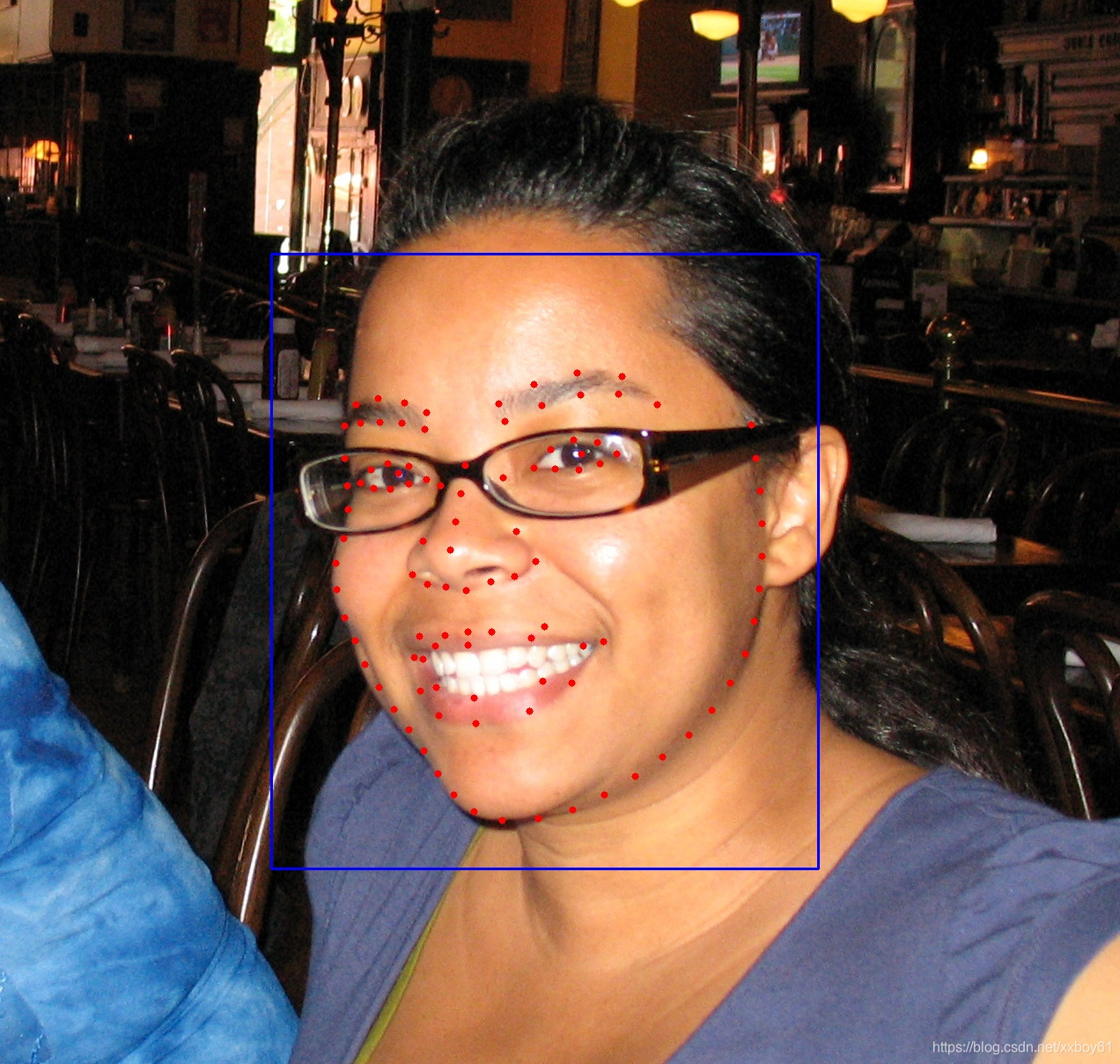
Test/picture/000001.jpg
其他数据集亦是如此,可以自行查看。
这里选择的处理方式是将图片路径,landmark关键点和人脸位置矩形框写到一个文件中去,文件格式为 文件名 106个人脸关键点 人脸位置矩形框,预处理代码如下所示:
import os, sys
import cv2

def gen_JDlandmark_label_txt(fpath):
    #### train datasets
    train_path=os.path.join(JdLandmarkPath, 'Train')
    train_label_txt=os.path.join(JdLandmarkPath, 'jd_106pt_train_label.txt')

    train_landmark_path=os.path.join(train_path, 'landmark')
    train_rect_path=os.path.join(train_path, 'rect')
    train_imgs_path=os.path.join(train_path, 'picture')
    with open(train_label_txt, 'w') as f:
        train_imgs=os.listdir(train_imgs_path)
        train_imgs.sort()
        for img in train_imgs:
            picture_path = os.path.join(train_imgs_path, img)
            landmark_path=picture_path.replace('picture', 'landmark')+'.txt'
            landmark=''
            with open(landmark_path, 'r') as landmarkf:
                lines=landmarkf.readlines()
                keypoints=lines[1:]
                for point in keypoints:
                    x, y = point.rstrip('\n').split(' ')
                    landmark += x + ' ' + y + ' '

            rect_path=picture_path.replace('picture', 'rect')+'.rect'
            rect = ''
            with open(rect_path, 'r') as rectf:
                lines = rectf.readlines()
                tx, ty, bx, by = lines[0].split(' ')
                rect += tx + ' ' + ty + ' ' + bx + ' ' + by

            picture_path='/'.join(picture_path.split('/')[-3:])
            f.write(picture_path + ' ' + landmark  + rect + '\n')


    #### valid datasets
    valid_path=os.path.join(JdLandmarkPath, 'Val')
    valid_label_txt=os.path.join(JdLandmarkPath, 'jd_106pt_val_label.txt')

    valid_landmark_path=os.path.join(valid_path, 'landmark')
    valid_rect_path=os.path.join(valid_path, 'rect')
    valid_imgs_path=os.path.join(valid_path, 'picture')
    with open(valid_label_txt, 'w') as f:
        valid_imgs=os.listdir(valid_imgs_path)
        valid_imgs.sort()
        for img in valid_imgs:
            picture_path = os.path.join(valid_imgs_path, img)
            landmark_path=picture_path.replace('picture', 'landmark')+'.txt'
            landmark=''
            with open(landmark_path, 'r') as landmarkf:
                lines=landmarkf.readlines()
                keypoints=lines[1:]
                for point in keypoints:
                    x, y = point.rstrip('\n').split(' ')
                    landmark += x + ' ' + y + ' '

            rect_path=picture_path.replace('picture', 'rect')+'.rect'
            rect = ''
            with open(rect_path, 'r') as rectf:
                lines = rectf.readlines()
                tx, ty, bx, by = lines[0].split(' ')
                rect += tx + ' ' + ty + ' ' + bx + ' ' + by

            picture_path='/'.join(picture_path.split('/')[-3:])
            f.write(picture_path + ' ' + landmark  + rect + '\n')

    #### test datasets
    test_path=os.path.join(JdLandmarkPath, 'Test')
    test_label_txt=os.path.join(JdLandmarkPath, 'jd_106pt_test_label.txt')

    test_landmark_path=os.path.join(test_path, 'landmark')
    test_rect_path=os.path.join(test_path, 'rect')
    test_imgs_path=os.path.join(test_path, 'picture')
    with open(test_label_txt, 'w') as f:
        test_imgs=os.listdir(test_imgs_path)
        test_imgs.sort()
        for img in test_imgs:
            picture_path = os.path.join(test_imgs_path, img)
            landmark_path=picture_path.replace('picture', 'landmark')+'.txt'
            landmark=''
            with open(landmark_path, 'r') as landmarkf:
                lines=landmarkf.readlines()
                keypoints=lines[1:]
                for point in keypoints:
                    x, y = point.rstrip('\n').split(' ')
                    landmark += x + ' ' + y + ' '

            rect_path=picture_path.replace('picture', 'rect')+'.rect'
            rect = ''
            with open(rect_path, 'r') as rectf:
                lines = rectf.readlines()
                tx, ty, bx, by = lines[0].split(' ')
                rect += tx + ' ' + ty + ' ' + bx + ' ' + by

            picture_path='/'.join(picture_path.split('/')[-3:])
            f.write(picture_path + ' ' + landmark  + rect + '\n')
    print(f'gen dataset label done\n\ttrain lable_path:{train_label_txt}\n\ttest label path:{test_label_txt}\n\tvalid label_path:{valid_label_txt}')

if __name__ == "__main__":
    JdLandmarkPath='/path/JD-landmark'
    gen_JDlandmark_label_txt(JdLandmarkPath)
代码运行后将在/path/JD-landmark 下生成jd_106pt_train_label.txt、jd_106pt_test_label.txt、jd_106pt_val_label.txt。内容如下图所示: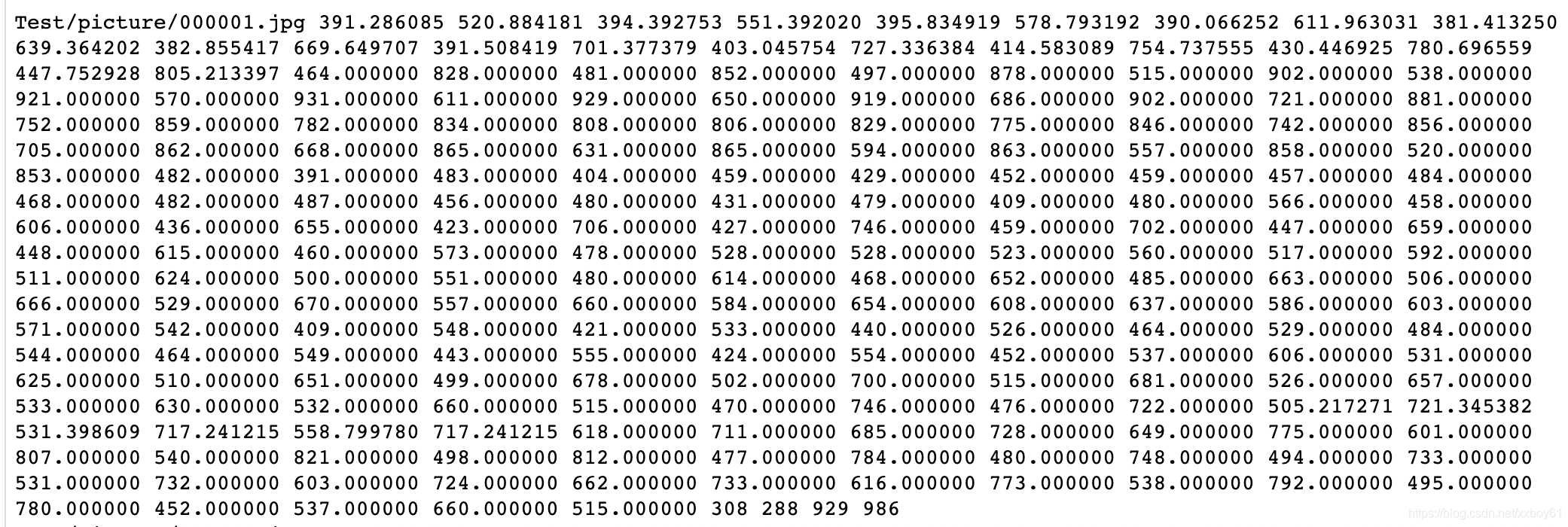
jd_106pt_test_label.txt
这里选择使用pytorch来做相关项目,因此数据增强也是基于pytorch的Dataset,DataLoader那套机制来处理的。
# -*- coding: utf-8 -*-
from __future__ import print_function, division
import random
import os
import torch
import pandas as pd
import numpy as np
import matplotlib.pyplot as plt
from torch.utils.data import Dataset, DataLoader
import cv2
from torchvision import transforms, utils
from PIL import Image

def show_landmarks(image, landmarks, rects):
    image = image.numpy()
    image = np.transpose(image,(1,2,0))
    image = 255*(image*0.5+0.5)
    image = image.astype(np.uint8)
    image = cv2.cvtColor(image, cv2.COLOR_RGB2BGR)
    landmarks= landmarks.numpy()
    landmarks=landmarks.reshape((-1,2))

    rects= rects.numpy()
    rects=rects.reshape((-1,2))
    h,w = image.shape[0:2]
    for i in landmarks:
        cv2.circle(image, (int(w*i[0]), int(h*i[1]) ), 3, (255,0,0), -1 )

    cv2.rectangle(image, (int(rects[0][0]*w), int(rects[0][1]*h)),
                         (int(rects[1][0]*w), int(rects[1][1]*h)), (0,255, 0), 1)

    return image

class Resize(object):
    """Rescale the image in a sample to a given size.

    Args:
        output_size (tuple or int): Desired output size. If tuple, output is
            matched to output_size. If int, smaller of image edges is matched
            to output_size keeping aspect ratio the same.
    """

    def __init__(self, output_size):
        assert isinstance(output_size, (int, tuple))
        self.output_size = output_size

    def __call__(self, sample):
        image, landmarks, rects = sample['image'], sample['landmarks'], sample['rects']
        h, w = image.shape[:2]
        if isinstance(self.output_size, int):
            if h > w:
                new_h, new_w = self.output_size * h / w, self.output_size
            else:
                new_h, new_w = self.output_size, self.output_size * w / h
        else:
            new_h, new_w = self.output_size

        new_h, new_w = int(new_h), int(new_w)
        img = cv2.resize(image, (new_h, new_w))
        landmarks = landmarks * [new_w / w, new_h / h]
        rects = rects * [new_w / w, new_h / h]

        return {'image': img, 'landmarks': landmarks, 'rects': rects}

class RandomCrop(object):
    """Crop randomly the image in a sample.

    Args:
        output_size (tuple or int): Desired output size. If int, square crop
            is made.
    """

    def __init__(self, output_size):
        assert isinstance(output_size, (int, tuple))
        if isinstance(output_size, int):
            self.output_size = (output_size, output_size)
        else:
            assert len(output_size) == 2
            self.output_size = output_size

    def __call__(self, sample):
        image, landmarks, rects = sample['image'], sample['landmarks'], sample['rects']

        h, w = image.shape[:2]
        new_h, new_w = self.output_size

        top = np.random.randint(0, h - new_h)
        left = np.random.randint(0, w - new_w)

        image = image[top: top + new_h,left: left + new_w]
        landmarks = landmarks - [left, top]
        rects = rects - [left, top]

        return {'image': image, 'landmarks': landmarks, 'rects': rects}

class ToTensor(object):
    """Convert ndarrays in sample to Tensors."""

    def __init__(self,image_size):
        self.image_size = image_size

    def __call__(self, sample):
        image, landmarks, rects = sample['image'], sample['landmarks'], sample['rects']

        # swap color axis because
        # numpy image: H x W x C
        # torch image: C X H X W
        image = image.transpose((2, 0, 1))
        landmarks =landmarks.reshape(-1,1)
        landmarks =np.squeeze(landmarks)
        rects = np.squeeze(rects)
        return {'image': torch.from_numpy(image).float().div(255),
                'landmarks': torch.from_numpy(landmarks).float().div(self.image_size),
                'rects': torch.from_numpy(rects).float().div(self.image_size)}

class RandomFlip(object):
    def __call__(self, sample):
        image, landmarks, rects = sample['image'], sample['landmarks'], sample['rects']
        if random.random()<0.5:
            image = cv2.flip(image,1)
            landmarks[:,0] = image.shape[1]-landmarks[:,0]
            rects[:,0] = image.shape[1]-rects[:,0]

        return {'image': image, 'landmarks': landmarks, 'rects': rects}

class RandomRotate(object):
    def __call__(self, sample):
        image, landmarks, rects = sample['image'], sample['landmarks'], sample['rects']
        img_h,img_w = image.shape[0:2]
        center = (img_w//2, img_h//2)
        random_degree=np.random.uniform(-15.0, 15.0)

        rot_mat = cv2.getRotationMatrix2D(center, random_degree, 1)
        img_rotated_by_alpha = cv2.warpAffine(image, rot_mat, (img_w, img_h))

        rotated_landmark = np.asarray([(rot_mat[0][0]*x+rot_mat[0][1]*y+rot_mat[0][2],
                                        rot_mat[1][0]*x+rot_mat[1][1]*y+rot_mat[1][2]) for (x, y) in landmarks])

        rotated_rects = np.asarray([(rot_mat[0][0]*x+rot_mat[0][1]*y+rot_mat[0][2],
                                     rot_mat[1][0]*x+rot_mat[1][1]*y+rot_mat[1][2]) for (x, y) in rects])

        return {'image': img_rotated_by_alpha, 'landmarks': rotated_landmark, 'rects': rotated_rects}

class Normalize(object):
    def __init__(self,mean,std):
        self.mean = mean
        self.std = std
    def __call__(self, sample):
        image = sample['image']
        for t, m, s in zip(image, self.mean, self.std):
            t.sub_(m).div_(s)
        sample['image'] = image
        return sample

class FaceLandmarksDataset(Dataset):
    """Face Landmarks dataset."""

    def __init__(self, label_dict_list, point_num=106, transform=None):
		#################################################################
        ### Initialize paths, transforms, and so on
        #################################################################
        self.images = []
        self.landmarks = []
        self.rects = []
        for label_dict in label_dict_list:
            label_frame = pd.read_csv(label_dict["label_file"], sep=" ", header=None)
            for infor  in label_frame.iterrows():
                imgpath = os.path.join(label_dict["root_dir"], infor[1][0])
                landmark = infor[1][1: (2*point_num+1) ].values.astype(np.int).reshape((-1,2))
                rect = infor[1][2*point_num+1: ].values.astype(np.int).reshape((-1,2))

                self.images.append(imgpath)
                self.landmarks.append(landmark)
                self.rects.append(rect)

        self.transform = transform

    def __len__(self):
    	#################################################################
        ### Indicate the total size of the dataset
        #################################################################
        return len(self.images)

    def __getitem__(self, index):
    	#################################################################
        # 1. Read from file (using numpy.fromfile, PIL.Image.open)
        # 2. Preprocess the data (torchvision.Transform).
        # 3. Return the data (e.g. image and label)
        #################################################################
        image = cv2.imread(self.images[index])
        image = cv2.cvtColor(image, cv2.COLOR_BGR2RGB)
        landmarks = self.landmarks[index]
        rect = self.rects[index]
        sample = {'image': image, 'landmarks': landmarks, 'rects': rect}
        if self.transform:
            sample = self.transform(sample)

        return sample


if __name__=="__main__":
	test_transform = transforms.Compose([Resize((112,112)),
                                        RandomCrop(96),
                                        RandomFlip(),
                                        RandomRotate(),
                                        ToTensor(96),
                                        Normalize([ 0.5, 0.5, 0.5 ],[ 0.5, 0.5, 0.5 ])])
    testset  = FaceLandmarksDataset([{"root_dir":"/path/JD-landmark",
                                      "label_file":"/path/JD-landmark/jd_106pt_test_label.txt"}],
                                      point_num=106,
                                      transform=test_transform)
    print('FaceLandmarksDataset testset picture numbers:', len(testset))
    test_loader = torch.utils.data.DataLoader(testset,
    										   batch_size=4,
    										   shuffle=True,
    										   num_workers=1)
    result=[]
    for sample in test_loader:
        for i in range(len(sample["image"])):
            image = sample["image"][i]
            landmark = sample["landmarks"][i]
            rect = sample["rects"][i]
            rimg = show_landmarks(image, landmark, rect)
            result.append(rimg)
        break

    # show whatever you want
	idx=1
	for i in range(0, len(result)):
	    try:
	        plt.ion()
	        plt.figure(idx)
	        plt.imshow(result[i])
	    except:
	        pass
	    finally:
	        idx+=1
The End!!!!
免责声明:本文系网络转载或改编,未找到原创作者,版权归原作者所有。如涉及版权,请联系删
 技术文档
技术文档
 推荐好文
推荐好文






 155-2731-8020




