




软件

产品


ANSYS Fluent的求解器包含三种类型的可执行文件:Cortex、host和compute节点(简称“节点”)。当ANSYS Fluent运行时,将启动Cortex的一个实例,然后是一个主机和n个计算节点,从而给出总共n+2个运行进程。因此,在并行运行时(建议在串行运行时),必须确保函数将作为主机和节点进程成功执行。(For this reason, it is necessary when running in parallel (and recommended when running in serial) that you make sure that your function will successfully execute as a host and a node process.)
可以通过向UDF添加特殊宏和编译器指令来实现这一点,如下所述。编译器指令(如#if RP_NODE、RP_HOST)及其否定形式指示编译器仅包含应用于特定进程的函数部分,而忽略其余部分(请参见编译器指令)(see Compiler Directives)
一般的经验法则是,如果串行UDF执行的操作依赖于从另一个计算节点(或主机HOST)发送或接收数据,或使用在ANSYS Fluent版本18.2之后引入的宏类型(串行UDF不保证支持),则必须“并行化”。当与多个节点一起使用时,需要并行化串行源代码的某些类型的操作包括:
编写“并行化”UDF的源代码后,可以使用与串行UDF相同的方法编译它。编译UDF的说明可以在编译UDF中找到。 Instructions for compiling UDFs can be found in Compiling UDFs.
离散相位模型(DPM)UDF的并行化
DPM模型可用于以下并行选项:
当使用特定于DPM的UDF时,它将基于上述并行选项在负责所考虑粒子的计算机上执行。由于DPM模型所需的所有流体变量都保存在跟踪粒子的数据结构中,因此在并行ANSYSFluent中使用DPM UDF时无需特别注意,以下两种情况除外。
首先,当使用DEFINE_DPM_output宏写入采样输出文件时,不允许使用C函数fprintf。相反,提供了新的函数par_fprintf和par_fprintf_head来启用并行文件写入。每个计算节点将其信息写入单独的临时文件。这些单独的文件被放在一起,并由ANSYSFluent整理成最终输出文件。新函数可用于与C函数fprintf相同的参数列表,前提是ANSYS Fluent对文件的排序需要扩展参数列表的规范。有关使用这些宏的详细信息,请参阅par_fprintf_head和par_fprintf函数以及DEFINE_DPM_OUTPUT。
其次,在存储有关粒子的信息时。在并行模拟的情况下,必须使用粒子特定的用户变量,因为它们可以通过宏TP_user_REAL(TP,i)(TP为Tracked_particle*类型)和PP_user_REAL(p,i)访问(p为particle*类型)。只有这些信息与粒子一起跨越分区边界,而其他局部或全局变量不跨越分区边界。
请注意,如果需要访问其他数据,例如单元值,那么对于除了共享内存之外的并行选项,将可以访问所有流体和解算器变量。但是,如果选择“共享内存”选项,则只能访问宏SV_DPM_LIST和SV_DPMS_LIST中定义的变量。这些宏在文件dpm.h中定义。
本节包含可用于并行化串行UDF的宏。如果适用,这些宏的定义可以在引用的头文件中找到(如para.h)。
当将UDF转换为并行运行时,函数的某些部分可能需要由host完成,某些部分需要由计算节点node完成。在编译UDF时会进行这种区分。通过使用ANSYSFluent提供的编译器指令,可以指定要分配给主机或计算节点的函数部分。编写的UDF将作为主机和节点版本的单个文件编写,但函数的不同部分将被编译以生成不同版本的动态链接共享对象文件libudf。(Windows上的libudf.dll)。例如,打印任务可以专门分配给主机host,而诸如计算整个网格的总体积之类的任务将分配给计算节点node。由于大多数操作都是由主机或计算节点执行的,因此编译器指令的否定形式更为常用。
请注意,主机host的主要目的是解释来自Cortex的命令,并将这些命令(和数据)传递给计算节点node 0进行分发。由于 host 不包含网格数据,因此需要小心不要将主体包含在任何可能导致除零的计算中。在这种情况下,当编译器执行与网格相关的计算时,需要通过将这些操作包装在#if!RP_HOST 指令。
例如,假设UDF将计算面线程的总面积,然后使用该总面积计算通量。如果不从这些操作中排除主机,则主机上的总面积将为零,并且当函数试图除以零以获得通量时,将发生浮点异常。
Example:
#if !RP_HOST avg_pres = total_pres_a / total_area; /* if you do not exclude the host this operation will result in a division by zero and error! Remember that host has no data so its total will be zero.*/ #endif 使用#if!RP_NODE指令,当希望将计算节点从没有数据的操作中排除时。下面列出了并行编译器指令及其执行的操作:
/**********************************************************************/ /* Compiler Directives */ /**********************************************************************/ #if RP_HOST /* only host process is involved */ #endif #if RP_NODE /* only compute nodes are involved */ #endif /*********************************************************************/ /* Negated forms that are more commonly used */ /*********************************************************************/ #if !RP_HOST /* only compute nodes are involved */ #endif #if !RP_NODE /* only host process is involved */ #endif下面的简单UDF显示了编译器指令的使用。adjust 函数用于定义名为 where_am_i 的函数。此函数查询以确定正在执行的进程类型,然后在计算节点的监视器上显示消息。
Example:
/***************************************************** Simple UDF that uses compiler directives *****************************************************/ #include "udf.h" DEFINE_ADJUST(where_am_i, domain) { #if RP_HOST Message("I am in the host process\n"); #endif /* RP_HOST */ #if RP_NODE Message("I am in the node process with ID %d\n",myid); /* myid is a global variable which is set to the multiport ID for each node */ #endif /* RP_NODE */ } 这种在不同类型的过程之间简单的功能分配在有限数量的实际情况下是有用的。例如,可能希望在运行特定计算时(通过使用RP_NODE或!RP_HOST)在计算节点上显示消息。或者,也可以选择指定主机进程来显示消息(使用RP_host或!RP_NODE)。通常,希望主机进程只编写一次消息。诸如“运行调整功能”之类的简单消息很简单。或者,可能希望从所有节点收集数据,并从主机打印一次总数。要执行这种类型的操作,UDF需要在进程之间进行某种形式的通信。最常见的通信模式是主机和节点进程之间的通信。(The most common mode of communication is between the host and the node processes)。
有两组类似的宏可用于在主机和计算节点之间发送数据:host_to_node_type_num和node_to_host_type_num。
要将数据从主机进程发送到所有节点进程(间接通过计算节点0),使用以下形式的宏:
host_to_node_type_num(val_1,val_2,...,val_num);其中“num”是将在参数列表中传递的变量数,“type”是将传递的变量的数据类型。最多可以传递7个变量。数组和字符串也可以从主机传递到节点,一次传递一个,如下例所示。
有关将文件从主机传输到节点的信息,请参阅并行读取文件。(Reading Files in Parallel.)
Examples:
/* integer and real variables passed from host to nodes */ host_to_node_int_1(count); host_to_node_real_7(len1, len2, width1, width2, breadth1, breadth2, vol); /* string and array variables passed from host to nodes */ char wall_name[]="wall-17"; int thread_ids[10] = {1,29,5,32,18,2,55,21,72,14}; host_to_node_string(wall_name,8); /* remember terminating NUL character */ host_to_node_int(thread_ids,10);请注意,这些host_to_node通信宏不需要由并行UDF的编译器指令“保护”,因为所有这些宏都会自动执行以下操作:
这组宏最常见的用途是将参数或边界条件从主机传递到节点进程。有关用法的演示,请参阅并行UDF示例中的示例UDF。(See the example UDF in Parallel UDF Example for a demonstration of usage.)
7.3.2.2.2. Node-to-Host Data Transfer
要将数据从计算节点0发送到主机进程,请使用以下形式的宏:
node_to_host_type_num(val_1,val_2,...,val_num);其中“num”是将在参数列表中传递的变量数,“type”是将传递的变量的数据类型。最多可以传递7个变量。数组和字符串也可以从主机传递到节点,一次传递一个,如下例所示。
注意,与host_to_node宏不同,将数据从主机进程传递到所有计算节点(间接通过计算节点0),node_to_host宏仅将数据从计算节点0传递到主机。
Examples:
/* integer and real variables passed from compute node-0 to host */ node_to_host_int_1(count); node_to_host_real_7(len1, len2, width1, width2, breadth1, breadth2, vol); /* string and array variables passed from compute node-0 to host */ char *string; int string_length; real vel[ND_ND]; node_to_host_string(string,string_length); node_to_host_real(vel,ND_ND);node_to_host 宏不需要受编译器指令(如#if RP_node)的保护,因为它们会自动执行以下操作:
这组宏的最常见用法是将全局缩减结果(global reduction results)从计算节点 node0 传递给主机host 进程。在要传递的值由所有计算节点计算的情况下,在发送单个收集(求和)值之前,必须对来自所有计算节点的数据进行某种类型的收集(例如求和)。Refer to the example UDF in Parallel UDF Example for a demonstration of usage and Global Reduction Macros for a full list of global reduction operations.
7.3.2.3. Predicates
并行ANSYSFluent中有许多宏可用于逻辑测试。这些逻辑宏(称为“谓词”)由后缀P表示,可以用作UDF中的测试条件。如果满足括号中的条件,则以下谓词返回TRUE。
/* predicate definitions from para.h header file */ # define MULTIPLE_COMPUTE_NODE_P (compute_node_count > 1) # define ONE_COMPUTE_NODE_P (compute_node_count == 1) # define ZERO_COMPUTE_NODE_P (compute_node_count == 0)有许多谓词允许使用计算节点ID测试UDF中节点进程的标识。计算节点的ID存储为全局整数变量myid(请参阅进程标识)。下面列出的每个宏都测试进程的myid的某些条件。例如,谓词I_AM_NODE_ZERO_P 将 myid 的值与计算node-0 ID进行比较,当它们相同时返回TRUE。另一方面,I_AM_NODE_SAME_P(n)将传入 n 的计算节点 ID 与 myid 进行比较。当两个ID相同时,函数返回TRUE。节点ID谓词通常用于UDF中的条件if语句。
/* predicate definitions from para.h header file */ # define I_AM_NODE_HOST_P (myid == host) # define I_AM_NODE_ZERO_P (myid == node_zero) # define I_AM_NODE_ONE_P (myid == node_one) # define I_AM_NODE_LAST_P (myid == node_last) # define I_AM_NODE_SAME_P(n) (myid == (n)) # define I_AM_NODE_LESS_P(n) (myid < (n)) # define I_AM_NODE_MORE_P(n) (myid > (n))回想一下,在分区网格中的单元格和面中,一个面可能会出现在一个或两个分区中,但为了求和运算不会将其计算两次,它被正式分配给其中一个分区。上面的测试与相邻单元的分区ID一起使用,以确定它是否属于当前分区。所使用的惯例是,编号较小的计算节点被指定为该面的“主要”("principal")计算节点。如果面位于其主计算节点上,则PRINCEPAL_FACE_P返回TRUE。如果要对面执行全局求和,并且某些面是分区边界面,则可以将宏用作测试条件。以下是para.h中PRINCEPAL_FACE_P的定义。有关PRINCEPAl_FACE_P更多信息,See Cells and Faces in a Partitioned Mesh for more information about PRINCIPAL_FACE_P.
/* predicate definitions from para.h header file */ # define PRINCIPAL_FACE_P(f,t) (!TWO_CELL_FACE_P(f,t) || \ PRINCIPAL_TWO_CELL_FACE_P(f,t)) # define PRINCIPAL_TWO_CELL_FACE_P(f,t) \ (!(I_AM_NODE_MORE_P(C_PART(F_C0(f,t),THREAD_T0(t))) || \ I_AM_NODE_MORE_P(C_PART(F_C1(f,t),THREAD_T1(t)))))全局缩减(global reduction)操作是从所有计算节点node收集数据,并将数据缩减为单个值或值数组的操作。这些操作包括全局求和、全局最大值和最小值以及全局逻辑运算。这些宏以前缀PRF_G开头,并在PRF.h中定义。
每个宏的变量数据类型在宏名称中标识,其中R表示 real 数据类型,I表示 int 整数,L表示 logical 逻辑。例如,宏 PRF_GISUM 查找计算节点 node 上整数的总和。
以下章节中讨论的每个全局约简宏都有两个不同的版本:一个采用单个变量参数,而另一个采用变量数组。名称末尾附加1(one)的宏接受一个参数,并返回一个变量作为全局缩减结果。例如,宏PRF_GIHIGH1(x)扩展为一个函数,该函数接受一个参数x,并计算所有计算节点中变量x的最大值,然后返回该值。然后可以将结果分配给另一个变量(如y),如下面的示例所示。
Example: Global Reduction Variable Macro
{ int y; int x = myid; y = PRF_GIHIGH1(x); /* y now contains the same number (compute_node_count- 1 ) on all the nodes */ }另一方面,不带1后缀的宏计算全局缩减变量数组。这些宏有三个参数:x、N和 iwork,其中x是一个数组,N是数组中元素的数量,而 iwork 是一个与临时存储所需的x类型和大小相同的数组。这种类型的宏传递给数组x,数组x中的元素在从函数返回后填充新结果。例如,宏 PRF_GIHIGH(x,N,iwork)扩展为一个函数,该函数计算所有计算节点上数组x的每个元素的最大值,将数组iwork用于临时存储,并通过用每个元素的全局最大值替换每个元素来修改数组x。函数不返回值。
Example: Global Reduction Variable Array Macro
{ real x[N], iwork[N]; /* The elements of x are set in the working array here and will have different values on each compute node. In this case, x[0] could be the maximum cell temperature of all the cells on the compute node. x[1] the maximum pressure, x[2] the maximum density, etc. */ PRF_GRHIGH(x,N,iwork); /* The maximum value for each value over all the compute nodes is found here */ /* The elements of x on each compute node now hold the same maximum values over all the compute nodes for temperature, pressure, density, etc. */ }7.3.2.4.1. Global Summations
可用于计算变量全局和的宏由后缀SUM标识。PRF_GISUM1和PRF_GISUM分别计算整数变量和整数变量数组的全局和。
PRF_GRSUM1(x)计算所有计算节点上实变量x的全局和。当运行单精度版本的ANSYS Fluent时,全局和为float类型,当运行双精度版本时为double类型。或者,当运行双精度时,PRF_GRSUM(x,N,iwork)计算单精度和双精度浮点变量数组的全局和。
| Global Summations | |
| Macro | Action |
| PRF_GISUM1(x) | Returns sum of integer x over all compute nodes. |
| PRF_GISUM(x,N,iwork) | Sets x to contain sums over all compute nodes. |
| PRF_GRSUM1(x) | Returns sum of x over all compute nodes; float if single precision,double if double precision. |
| PRF_GRSUM(x,N,iwork) | Sets x to contain sums over all compute nodes; float array if single precision, double array if double precision. |
7.3.2.4.2. Global Maximums and Minimums
可用于计算变量全局最大值和最小值的宏分别由后缀HIGH和LOW标识。PRF_GIHIGH1和PRF_GIHI 分别计算整数变量和整数变量数组的全局最大值。
第2位 I 表示为整数类型,第2位 R 表示为实数类型。
PRF_GRHIGH1(x)计算所有计算节点上实变量x的全局最大值。运行ANSYS Fluent的单精度版本时,全局最大值的类型为float,运行双精度版本时为double。
PRF_GRHIGH(x,N,iwork)计算实变量数组的全局最大值,类似于上一页对PRF_GRSUM(x,N,iwork)的描述。用于PRF_GHIGH宏的相同命名约定适用于PRF_GLOW。
| Global Maximums | |
| Macro | Action |
| PRF_GIHIGH1(x) | Returns maximum of integer x over all compute nodes. |
| PRF_GIHIGH(x,N,iwork) | Sets x to contain maximums over all compute nodes. |
| PRF_GRHIGH1(x) | Returns maximums of x over all compute nodes; float if single precision, double if double precision. |
| PRF_GRHIGH(x,N,iwork) | Sets x to contain maximums over all compute nodes; float array if single precision, double array if double precision. |
| Global Minimums | |
| Macro | Action |
| PRF_GILOW1(x) | Returns minimum of integer x over all compute nodes. |
| PRF_GILOW(x,N,iwork) | Sets x to contain minimums over all compute nodes. |
| PRF_GRLOW1(x) | Returns minimum of x over all compute nodes; float if single precision, double if double precision. |
| PRF_GRLOW(x,N,iwork) | Sets x to contain minimums over all compute nodes; float array if single precision, double array if double precision. |
7.3.2.4.3. Global Logicals
可用于计算全局逻辑and和逻辑OR的宏分别由后缀and和OR标识。PRF_GLOR1(x)计算所有计算节点上变量x的全局逻辑或。PRF_GLOR(x,N,iwork)计算变量数组x的全局逻辑或。如果计算节点上的任何对应元素为TRUE,则x的元素设置为TRUE。
相反,PRF_GLAND(x)计算所有计算节点的全局逻辑与,而PRF_GLEND(x,N,iwork)计算变量数组x的全局逻辑和。如果计算节点上的所有对应元素都为TRUE,则x的元素设置为TRUE。
| Global Logicals | |
| Macro | Action |
| PRF_GLOR1(x) | TRUE when variable x is TRUE for any of the compute nodes |
| PRF_GLOR(x,N,work) | TRUE when any of the elements in variable array x is TRUE |
| PRF_GLAND1(x) | TRUE when variable x is TRUE for allcompute nodes |
| PRF_GLAND(x,N,iwork) | TRUE when every element in variable array x is TRUE |
7.3.2.4.4. Global Synchronization
当希望在继续下一个操作之前全局同步计算节点时,可以使用PRF_GSYNC()。当在UDF中插入一个 PRF_GSYNC 宏时,在所有计算节点上完成源代码中前面的命令之前,不会执行任何超出该宏的命令。在调试函数时,同步也可能很有用。
内部和外部单元和面(cells and faces)有不同的循环宏可用于并行编程。
7.3.2.5.1. Looping Over Cells
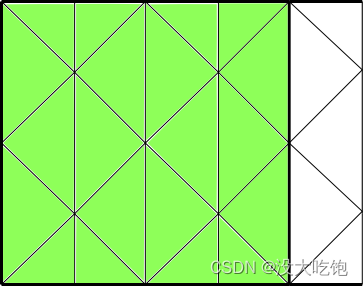
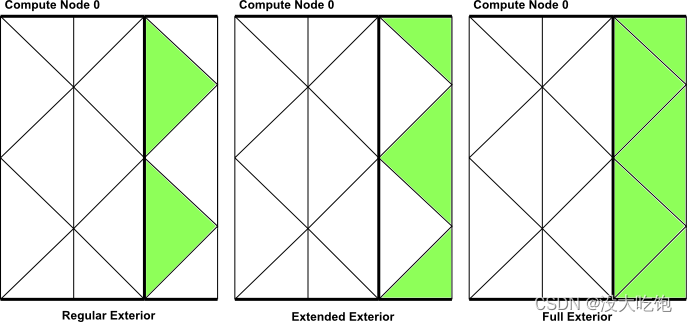
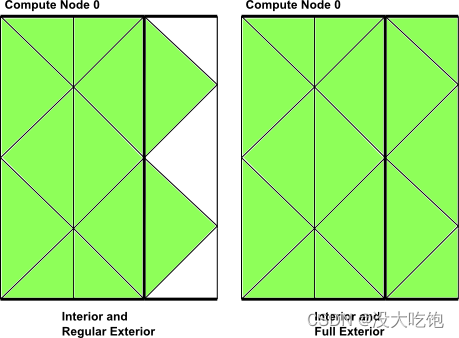
并行ANSYS Fluent中的分区网格由内部单元和外部单元(interior cells and exterior cells)组成(见图7.6)。有一组单元循环宏可用于仅循环内部单元格、仅循环外部单元格或同时循环内部和外部单元格。
7.3.2.5.2. Interior Cell Looping Macro
宏begin,end_c_loop_int在分区网格中的内部单元格上循环(图7.11:在分区网格的内部单元格中循环使用begin,end_c_loop.int(由绿色单元格表示)),并由后缀int标识。它包含一个begin和end语句,在这些语句之间,可以依次对线程的每个内部单元格执行操作。宏被传递一个单元索引c和一个单元线程指针tc。
begin_c_loop_int(c, tc) { } end_c_loop_int(c, tc)Figure 7.11: Looping Over Interior Cells in a Partitioned Mesh Usingbegin,end_c_loop_int (indicated by the green cells)
Example:
real total_volume = 0.0; begin_c_loop_int(c,tc) { /* C_VOLUME gets the cell volume and accumulates it. The end result will be the total volume of each compute node’s respective mesh */ total_volume += C_VOLUME(c,tc); } end_c_loop_int(c,tc)7.3.2.5.3. Exterior Cell Looping Macro
有三个宏可以在分区网格中的外部单元格上循环(图7.12:使用begin,end_c_loop_[re]ext(由绿色单元格表示)在分区网格的外部单元格中循环)。
每个宏都包含一个开始和结束语句,在这些语句之间,可以依次对线程的每个外部单元执行操作。宏被传递一个单元索引 c 和单元线程指针 tc 。在大多数情况下,不需要使用外部单元循环宏。仅当在UDF中遇到特殊需要时,才提供这些功能。
begin_c_loop_ext(c, tc) { } end_c_loop_ext(c,tc)Figure 7.12: Looping Over Exterior Cells in a Partitioned Mesh Using begin,end_c_loop_[re]ext (indicated by the green cells)
7.3.2.5.4. Interior and Exterior Cell Looping Macro
有两个宏可以在分区网格中的内部和部分或所有外部单元上循环(图7.13:使用begin,end_c_loop_int_ext在分区网格的内部和外部单元上进行循环)。
每个宏都包含一个开始和结束语句,在这些语句之间,可以依次对线程的内部和外部单元执行操作。宏被传递一个单元索引c和一个单元线程指针tc。
begin_c_loop(c, tc) { } end_c_loop(c ,tc)Figure 7.13: Looping Over Both Interior and Exterior Cells in a Partitioned Mesh Using begin,end_c_loop_int_ext
Example:
real temp; begin_c_loop(c,tc) { /* get cell temperature, compute temperature function and store result in user-defined memory, location index 0. */ temp = C_T(c,tc); C_UDMI(c,tc,0) = (temp - tmin) / (tmax - tmin); /* assumes a valid tmax and tmin has already been computed */ } end_c_loop(c,tc)7.3.2.5.5. Looping Over Faces
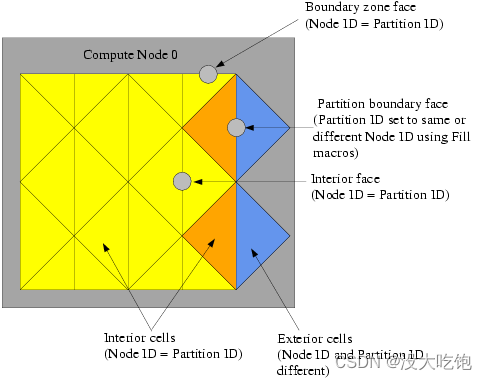
在并行化计算中,面可分为两种类型:内面和边界区面( interior faces and boundary zone faces)(图7.7:分区网格:面)。分区边界面是位于计算节点网格的分区边界上的内部面。
begin,end_f_loop是并行ANSYS Fluent中可用的面循环宏,它在计算节点中的所有内部和边界区域面上循环。宏begin,end_f_loop包含一个begin和end语句,在这些语句之间,可以对线程的每个面执行操作。向宏传递面索引f和面线程指针tf。
begin_f_loop(f, tf) { } end_f_loop(f,tf)重要提示:begin_f_loop_int 和 begin_f_loop_ext 是循环宏,分别围绕计算节点中的内部面和外部面循环。_int 格式相当于 begin_c_loop_int 。虽然这些宏存在,但它们在UDF中没有实际应用,因此不应使用。
回想一下,分区边界面位于两个相邻计算节点之间的边界上,并在两个节点上表示。因此,当分区边界面在面循环中计数两次时,需要进行一些计算(例如求和)。这可以通过使用PRINCEPA_FACE_P 测试当前节点是否是面部循环宏中的面部主要计算节点来纠正。如下例所示。有关详细信息,请参见分区网格中的单元格和面( Cells and Faces in a Partitioned Mesh)。
Example
begin_f_loop(f,tf) /* each compute node checks whether or not it is the principal compute node with respect to the given face and thread */ if PRINCIPAL_FACE_P(f,tf) /* face is on the principal compute node, so get the area and pressure vectors, and compute the total area and pressure for the thread from the magnitudes */ { F_AREA(area,f,tf); total_area += NV_MAG(area); total_pres_a += NV_MAG(area)*F_P(f,tf); } end_f_loop(f,tf) total_area = PRF_GRSUM1(total_area); total_pres_a = PRF_GRSUM1(total_pres_a);通常,单元和面具有从 0 到 n-1 的分区ID,其中 n 是计算节点的数量。单元和面的分区ID分别存储在变量 C_PART 和 F_PART 中。C_PART(C,tc)存储单元格的整数分区ID,F_PART(F,tf)存储面部的整数分区标识。
注意,myid 可以与分区ID partition ID一起使用,因为外部单元的分区ID是相邻计算节点的ID。
7.3.2.6.1. Cell Partition IDs
对于内部单元,分区ID与计算节点ID相同。对于外部单元,计算节点ID和分区ID不同。例如,在具有两个计算节点(0和1)的并行系统中,计算节点0的外部单元具有分区ID 1,计算节点1的外部单元的分区ID为0(图7.14)。
Figure 7.14: Partition Ids for Cells and Faces in a Compute Node
7.3.2.6.2. Face Partition IDs
对于内部面 和 边界面,分区ID与计算节点ID相同。但是,分区边界面(Partition boundary face)的分区ID可以与计算节点相同,也可以是相邻节点的ID,具体取决于 F_PART 填充的值(图7.14:计算节点中单元和面的分区ID)。回想一下,计算节点的外部单元只有分区边界面;单元的其他面属于相邻的计算节点。因此,根据要使用UDF进行的计算,可能希望使用与计算节点相同的分区ID(使用 fill_face_Part_with_same)或不同的ID(使用 fill_face_Part _with_Difference)填充分区边界面。
在使用F_PART宏访问面分区ID之前,需要填充面分区ID。在并行UDF中很少需要面分区ID
7.3.2.7. Message Displaying Macros
可以使用消息实用程序指导ANSYSFluent在主机或节点进程上显示消息。为此,只需使用条件if语句和适当的编译器指令(如#if RP_NODE)来选择希望消息来自的进程。这在以下示例中进行了演示。
Example
#if RP_NODE Message("Total Area Before Summing %f\n",total\_area); #endif /* RP_NODE */在本例中,消息将由计算节点发送。(主机不会发送。)
Message0是Message实用程序的一种特殊形式。Message0将仅从计算节点0发送消息,并在其他计算节点上被忽略,而不必使用编译器指令。
Example
/* Let Compute Node-0 display messages */ Message0("Total volume = %f\n",total_volume);7.3.2.8. Message Passing Macros
当希望将数据从主机发送到所有计算节点或从节点0发送到主机时,通常会使用node_to_host…和host_to_node…形式的高级通信宏,这些宏在主机和节点进程之间的通信中进行了描述。但是,当需要在计算节点之间传递数据或将所有计算节点的数据传递到计算节点0时,不能使用这些高级宏。在这些情况下,可以使用本节中描述的特殊消息传递宏。
注意,高级通信宏扩展到执行许多低级消息传递操作的功能,这些操作将数据段作为单个数组从一个进程发送到另一个进程。这些低级消息传递宏可以在宏名称中通过字符 SEND 和 RECV 轻松识别。用于向进程发送数据的宏的前缀为 PRF_CSEND,而用于从进程接收数据的宏则为PRF_CRECV。要发送或接收的数据可以属于以下数据类型:
当运行单精度版本的ANSYS Fluent时,REAL变量被指定为浮点数据float类型,而当运行双精度版本时,则被指定为双精度double变量。消息传递宏在prf中定义。prf.h文件,如下所列。
/* message passing macros */ PRF_CSEND_CHAR(to, buffer, nelem, tag) PRF_CRECV_CHAR (from, buffer, nelem, tag) PRF_CSEND_INT(to, buffer, nelem, tag) PRF_CRECV_INT(from, buffer, nelem, tag) PRF_CSEND_REAL(to, buffer, nelem, tag) PRF_CRECV_REAL(from, buffer, nelem, tag) PRF_CSEND_BOOLEAN(to, buffer, nelem, tag) PRF_CRECV_BOOLEAN(from, buffer, nelem, tag)消息传递宏有四个参数。对于“发送”消息:
对于“接收”消息:
注意,如果要发送或接收的变量在函数中定义为实real变量,则可以使用带有_real后缀的消息传递宏。如果运行的是双精度,则编译器将替换为PRF_CSEND_DOUBLE或PRF_CRECV_DOUBLE,如果运行的是单精度,则将替换为PRF_CSEND_FLOAT或PRF_CRECV_FLOAT。
由于消息传递宏是低级宏,因此需要确保从节点进程发送消息时,相应的接收宏出现在接收节点进程中。请注意,UDF不能使用消息传递宏将消息从计算节点(0除外)直接发送到主机。它们可以通过计算节点0间接向主机发送消息。
例如,如果希望并行UDF从所有计算节点向主机发送数据以进行后处理,则必须首先将数据从每个计算节点传递到计算节点0,然后再从计算节点0传递到主机。在计算节点进程向计算节点0发送消息的情况下,计算节点0必须具有从N个节点接收N个消息的循环。
下面是使用消息传递宏PRF_CSEND和PRF_CRECV的编译并行UDF的示例。有关函数的详细信息,请参阅代码中的注释(*/)。
Example: Message Passing
#include "udf.h" #define WALLID 3 DEFINE_ON_DEMAND(face_p_list) { #if !RP_HOST /* Host will do nothing in this udf. */ face_t f; Thread *tf; Domain *domain; real *p_array; real x[ND_ND], (*x_array)[ND_ND]; int n_faces, i, j; domain=Get_Domain(1); /* Each Node will be able to access its part of the domain */ tf=Lookup_Thread(domain, WALLID); /* Get the thread from the domain */ /* The number of faces of the thread on nodes 1,2... needs to be sent to compute node-0 so it knows the size of the arrays to receive from each */ n_faces=THREAD_N_ELEMENTS_INT(tf); /* No need to check for Principal Faces as this UDF will be used for boundary zones only */ if(! I_AM_NODE_ZERO_P) /* Nodes 1,2... send the number of faces */ { PRF_CSEND_INT(node_zero, &n_faces, 1, myid); } /* Allocating memory for arrays on each node */ p_array=(real *)malloc(n_faces*sizeof(real)); x_array=(real (*)[ND_ND])malloc(ND_ND*n_faces*sizeof(real)); begin_f_loop(f, tf) /* Loop over interior faces in the thread, filling p_array with face pressure and x_array with centroid */ { p_array[f] = F_P(f, tf); F_CENTROID(x_array[f], f, tf); } end_f_loop(f, tf) /* Send data from node 1,2, ... to node 0 */ Message0("\nstart\n"); if(! I_AM_NODE_ZERO_P) /* Only SEND data from nodes 1,2... */ { PRF_CSEND_REAL(node_zero, p_array, n_faces, myid); PRF_CSEND_REAL(node_zero, x_array[0], ND_ND*n_faces, myid); } else {/* Node-0 has its own data, so list it out first */ Message0("\n\nList of Pressures...\n"); for(j=0; j<n_faces; j++) /* n_faces is currently node-0 value */ { # if RP_3D Message0("%12.4e %12.4e %12.4e %12.4e\n", x_array[j][0], x_array[j][1], x_array[j][2], p_array[j]); # else /* 2D */ Message0("%12.4e %12.4e %12.4e\n", x_array[j][0], x_array[j][1], p_array[j]); # endif } } /* Node-0 must now RECV data from the other nodes and list that too */ if(I_AM_NODE_ZERO_P) { compute_node_loop_not_zero(i) /* See para.h for definition of this loop */ { PRF_CRECV_INT(i, &n_faces, 1, i); /* n_faces now value for node-i */ /* Reallocate memory for arrays for node-i */ p_array=(real *)realloc(p_array, n_faces*sizeof(real)); x_array=(real(*)[ND_ND])realloc(x_array,ND_ND*n_faces*sizeof(real)); /* Receive data */ PRF_CRECV_REAL(i, p_array, n_faces, i); PRF_CRECV_REAL(i, x_array[0], ND_ND*n_faces, i); for(j=0; j<n_faces; j++) { # if RP_3D Message0("%12.4e %12.4e %12.4e %12.4e\n", x_array[j][0], x_array[j][1], x_array[j][2], p_array[j]); # else /* 2D */ Message0("%12.4e %12.4e %12.4e\n", x_array[j][0], x_array[j][1], p_array[j]); # endif } } } free(p_array); /* Each array has to be freed before function exit */ free(x_array); #endif /* ! RP_HOST */ } EXCHANGE_SVAR_MESSAGE、EXCHANGE_VAR_MESSAGE_EXT和EXCHANGE_WAR_FACE_MESSAGE可用于在计算节点之间交换存储变量(SV_…)。
EXCHANGE_SVAR_MESSAGE和EXCHANGE_VAR_MESSAGE_EXT在计算节点之间交换单元数据,而EXCHANGE_WAR_FACE_MESSAGE交换面数据。
EXCHANGE_SVAR_MESSAGE用于在常规外部单元上交换数据,而EXCHANGE_VAR_MESSAGE_EXT用于在常规和扩展外部单元上进行数据交换。注意,当使用EXCHANGE宏时,计算节点是“虚拟”同步的;接收计算节点在继续之前等待发送数据。
/* Compute Node Exchange Macros */ EXCHANGE_SVAR_FACE_MESSAGE(domain, (SV_P, SV_NULL)); EXCHANGE_SVAR_MESSAGE(domain, (SV_P, SV_NULL)); EXCHANGE_SVAR_MESSAGE_EXT(domain, (SV_P, SV_NULL));UDF中很少需要EXCHANGE_SVAR_FACE_MESSAGE()。可以在计算节点之间交换多个存储变量。存储变量名称在参数列表中用逗号分隔,列表以SV_NULL结尾。例如,EXCHANGE_SVAR_MESSAGE(域,(SV_P、SV_T、SV_NULL))用于交换单元压力和温度变量。可以从包含变量定义语句的头文件中确定存储变量名称。例如,设希望与相邻的计算节点交换单元压力(C_P)。可以查看包含C_P(mem.h)定义的头文件,并确定单元压力的存储变量为SV_P。需要将存储变量传递给交换宏。
宏PRINCEPAL_FACE_P只能在编译的UDF中使用。
PRF_GRSUM1和类似的全局缩减宏(Global Reduction Macros)不能在DEFINE_SOURCE和DEFINE_PROPERTY UDF等宏中使用,这些UDF通常针对每个单元格(或面)调用,因此在每个计算节点上调用的次数不同。作为解决方法,可以使用在每个节点上仅调用一次的宏,例如DEFINE_ADJUST、DEFINE_on_DEMAND和DEFINE_EXECUTE_AT_END UDF。例如,可以编写一个DEFINE_ADJUST UDF,用于计算调整函数中的全局和sum值,然后将变量保存在用户定义的内存中。随后,可以从用户定义的内存中检索存储的变量,并在DEFINE_SOURCE UDF中使用它。如下所示。
在以下示例中,火花体积在DEFINE_ADJUST函数中计算,并且该值使用C_UDMI存储在用户定义的存储器中。然后从用户定义的内存中检索该值,并在DEFINE_SOURCE UDF中使用。
注意:当所用Macro参数列表内含有Cell_t、Face_t 等,表明该宏仅在node中使用!
#include "udf.h" /* These variables will be passed between the ADJUST and SOURCE UDFs */ static real spark_center[ND_ND] = {ND_VEC(20.0e-3, 1.0e-3, 0.0)};static real spark_start_angle = 0.0, spark_end_angle = 0.0;static real spark_energy_source = 0.0;static real spark_radius = 0.0;static real crank_angle = 0.0; DEFINE_ADJUST(adjust, domain){ #if !RP_HOST const int FLUID_CHAMBER_ID = 2; real cen[ND_ND], dis[ND_ND]; real crank_start_angle; real spark_duration, spark_energy; real spark_volume; real rpm; cell_t c; Thread *ct; rpm = RP_Get_Real("dynamesh/in-cyn/crank-rpm"); crank_start_angle = RP_Get_Real("dynamesh/in-cyn/crank-start-angle"); spark_start_angle = RP_Get_Real("spark/start-ca"); spark_duration = RP_Get_Real("spark/duration"); spark_radius = RP_Get_Real("spark/radius"); spark_energy = RP_Get_Real("spark/energy"); /* Set the global angle variables [deg] here for use in the SOURCE UDF */ crank_angle = crank_start_angle + (rpm * CURRENT_TIME * 6.0); spark_end_angle = spark_start_angle + (rpm * spark_duration * 6.0); ct = Lookup_Thread(domain, FLUID_CHAMBER_ID); spark_volume = 0.0; begin_c_loop_int(c, ct) { C_CENTROID(cen, c, ct); NV_VV(dis,=,cen,-,spark_center); if (NV_MAG(dis) < spark_radius) { spark_volume += C_VOLUME(c, ct); } } end_c_loop_int(c, ct) spark_volume = PRF_GRSUM1(spark_volume); spark_energy_source = spark_energy/(spark_duration*spark_volume); Message0("\nSpark energy source = %g [W/m3].\n", spark_energy_source);#endif} DEFINE_SOURCE(energy_source, c, ct, dS, eqn){ /* Don't need to mark with #if !RP_HOST as DEFINE_SOURCE is only executed on nodes as indicated by the arguments "c" and "ct" */ real cen[ND_ND], dis[ND_ND]; if((crank_angle >= spark_start_angle) && (crank_angle < spark_end_angle)) { C_CENTROID(cen, c, ct); NV_VV(dis,=,cen,-,spark_center); if (NV_MAG(dis) < spark_radius) { return spark_energy_source; } } /* Cell is not in spark zone or within time of spark discharge */ return 0.0;}Important: Interpreted UDFs cannot be used with an Infiniband interconnect. The compiled UDF approach should be used in this case.
7.3.4. Process Identification
并行ANSYSFluent中的每个process都有一个唯一的整数标识符,该标识符存储为全局变量myid。当在并行UDF中使用myid时,它将返回当前计算节点(包括主机)的整数ID。主机进程的ID为host(=999999),并存储为全局变量host。 Compute node-0 计算节点0的ID为0,并分配给全局变量 node_zero。以下是并行ANSYS Fluent中的全局变量列表。
Global Variables in Parallel ANSYS Fluent
int node_zero = 0; int host = 999999; int node_one = 1; int node_last; /* returns the id of the last compute node */ int compute_node_count; /* returns the number of compute nodes */ int myid; /* returns the id of the current compute node (and host) */myid通常用于并行UDF代码中的条件if语句。下面是一些使用全局变量myid的示例代码。在本例中,首先通过累加计算面线程中的面总数。然后,如果myid不是计算节点0,则使用消息传递宏PRF_CSEND_INT将面数从所有计算节点传递到计算节点0。(See Message Passing Macros for details onPRF_CSEND_INT.)
Example: Usage of myid
int noface=0; begin_f_loop(f, tf) /* loops over faces in a face thread and computes number of faces */ { noface++; } end_f_loop(f, tf) /* Pass the number of faces from node 1,2, ... to node 0 */ #if RP_NODE if(myid!=node_zero) { PRF_CSEND_INT(node_zero, &noface, 1, myid); } #endif 7.3.5. Parallel UDF Example
以下是一个串行UDF的示例,该UDF已被并行化,因此可以在任何版本的ANSYSFluent(主机、节点)上运行。/*注释*/中提供了对简单系列版本的各种更改的解释,并在下面讨论。UDF名为face_av,使用调整函数定义,计算特定面部区域上压力的全局和,并计算其面积平均值。
Example: Global Summation of Pressure on a Face Zone and its Area Average Computation
#include "udf.h" DEFINE_ADJUST(face_av,domain) { /* Variables used by host, node versions */ int surface_thread_id=0; real total_area=0.0; real total_force=0.0; /* "Parallelized" Sections */ #if !RP_HOST /* Compile this section for computing processes only since these variables are not available on the host */ Thread* thread; face_t face; real area[ND_ND]; #endif /* !RP_HOST */ /* Get the value of the thread ID from a user-defined Scheme variable */ #if !RP_NODE surface_thread_id = RP_Get_Integer("pres_av/thread-id"); Message("\nCalculating on Thread # %d\n",surface_thread_id); #endif /* !RP_NODE */ /* To set up this user Scheme variable in cortex type */ /* (rp-var-define 'pres_av/thread-id 2 'integer #f) */ /* After set up you can change it to another thread's ID using : */ /* (rpsetvar 'pres_av/thread-id 7) */ /* Send the ID value to all the nodes */ host_to_node_int_1(surface_thread_id); #if RP_NODE Message("\nNode %d is calculating on thread # %d\n",myid, surface_thread_id); #endif /* RP_NODE */ #if !RP_HOST /* thread is only used on compute processes */ thread = Lookup_Thread(domain,surface_thread_id); begin_f_loop(face,thread) /* If this is the node to which face "officially" belongs,*/ /* get the area vector and pressure and increment */ /* the total area and total force values for this node */ if (PRINCIPAL_FACE_P(face,thread)) { F_AREA(area,face,thread); total_area += NV_MAG(area); total_force += NV_MAG(area)*F_P(face,thread); } end_f_loop(face,thread) Message("Total Area Before Summing %f\n",total_area); Message("Total Normal Force Before Summing %f\n",total_force); # if RP_NODE /* Perform node synchronized actions here */ total_area = PRF_GRSUM1(total_area); total_force = PRF_GRSUM1(total_force); # endif /* RP_NODE */ #endif /* !RP_HOST */ /* Pass the node's total area and pressure to the Host for averaging */ node_to_host_real_2(total_area,total_force); #if !RP_NODE Message("Total Area After Summing: %f (m2)\n",total_area); Message("Total Normal Force After Summing %f (N)\n",total_force); Message("Average pressure on Surface %d is %f (Pa)\n", surface_thread_id,(total_force/total_area)); #endif /* !RP_NODE */ }该函数首先初始化所有进程的变量surface_thread_id、total_area和total_force。这样做是因为变量由主机和节点进程(host and node processes)使用。计算节点将变量用于计算目的,主机将它们用于消息传递和显示目的。接下来,预处理器将仅在节点node版本(而不是主机host)上编译线程、面和面积变量,因为面和线程 faces and threads仅在ANSYSFluent的节点node版本中定义。(请注意,通常情况下,主机会忽略这些语句,因为它的面和单元格数据 face and cell data为零,但排除主机是一种良好的编程实践。See Macros for Parallel UDFsfor details on compiler directives.
接下来,主机进程使用RP_Get_Integer实用程序(请参阅Scheme Macros)获得名为pres_av/thread id的用户定义Scheme变量,并将其分配给变量surface_thread_id。(请注意,此用户定义的Scheme变量之前在Cortex中设置,并通过键入注释中显示的文本命令指定值2。)。为线程ID设置基于Scheme的变量后,可以从文本界面轻松地将其更改为另一个线程ID,而无需修改源代码和重新编译UDF。由于主机与Cortex通信,而节点不知道Scheme变量,因此必须指导编译器使用#if!RP_NODE。否则将导致编译错误。
然后使用host_to_node宏将surface_thread_id从主机传递到计算节点0。计算节点0则自动将变量分配给其他计算节点。节点进程使用#if!RP_HOST,并计算总面积和总力。由于主机不包含任何线程数据,如果不指导编译器,它将忽略这些语句,但这样做是很好的编程实践。宏PRINCEPAL_FACE_P用于确保分区边界处的面不会计数两次(请参见分区网格中的单元格和面)。在全局求和之前,节点显示监视器上的总面积和力(使用消息实用程序)。PRF_GRSUM1(全局缩减宏)是一个全局求和宏,用于计算所有计算节点的总面积和力。这些操作使用#if RP_NODE针对计算节点。
免责声明:本文系网络转载或改编,未找到原创作者,版权归原作者所有。如涉及版权,请联系删
 技术文档
技术文档
 推荐好文
推荐好文






 155-2731-8020




