




软件

产品


故障现象1:学习安装vcs时,出现如下打印:
8:30:51 (lmgrd) Server's System Date and Time: Fri May 05 2023 08:30:51 EDT
8:30:51 (lmgrd) SLOG: Summary LOG statistics is enabled.
8:30:51 (lmgrd) license manager: can't initialize:Cannot find license file.
8:30:51 (lmgrd) The license files (or license server system network addresses) attempted are
8:30:51 (lmgrd) listed below. Use LM_LICENSE_FILE to use a different license file,
8:30:51 (lmgrd) or contact your software provider for a license file.
8:30:51 (lmgrd) Filename: "/usr/ local /flexlm/licenses/license.dat"
8:30:51 (lmgrd) License Path: "/usr/local/flexlm/licenses/license.dat"
8:30:51 (lmgrd) FlexNet Licensing error:-1,359
8:30:51 (lmgrd) System Error:2 No such file or directory
8:30:51 (lmgrd) Using license file "/usr/local/flexlm/licenses/license.dat"
故障原因:
安装时没有注意,把这个文件错放到其他位置了:"/home/synopsys/scl/2018.06/admin/license/Synopsys.dat"
解决办法:
根据自己情况(Synopsys.dat中设置的位置),检查并确保这个dat文件位置正确;
不行的话就在几个可能的地方都放置这个Synopsys.dat文件;
故障现象2:学习安装vcs时,出现如下打印:
8:47:10 (lmgrd) Server's System Date and Time: Fri May 05 2023 08:47:10 EDT
8:47:10 (lmgrd) SLOG: Summary LOG statistics is enabled.
8:47:10 (lmgrd) license manager: can't initialize:Invalid license file syntax.
8:47:10 (lmgrd) License Path: "/home/synopsys/scl/2018.06/admin/license/Synopsys.dat"
8:47:10 (lmgrd) FlexNet Licensing error:-2,40027
故障原因:
dat文件的mac地址这里不应该有多余的冒号(:)
解决 办法:
去掉冒号,新的dat内容如下:
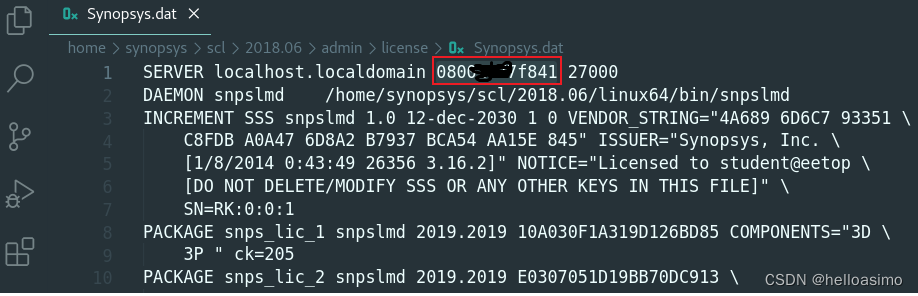
故障现象3:
9:06:32 (lmgrd) Server's System Date and Time: Fri May 05 2023 09:06:32 EDT
9:06:32 (lmgrd) SLOG: Summary LOG statistics is enabled.
9:06:32 (lmgrd) Failed to open the TCP port number in the license.
故障原因:
to do.
解决办法:
to do.
故障现象4:学习安装vcs时,出现如下打印:
16:53:49 (lmgrd) -----------------------------------------------
16:53:49 (lmgrd) Please Note:
16:53:49 (lmgrd)
16:53:49 (lmgrd) This log is intended for debug purposes only.
16:53:49 (lmgrd) In order to capture accurate license
16:53:49 (lmgrd) usage data into an organized repository,
16:53:49 (lmgrd) please enable report logging. Use Flexera Software LLC's
16:53:49 (lmgrd) software license administration solution,
16:53:49 (lmgrd) FlexNet Manager, to readily gain visibility
16:53:49 (lmgrd) into license usage data and to create
16:53:49 (lmgrd) insightful reports on critical information like
16:53:49 (lmgrd) license availability and usage. FlexNet Manager
16:53:49 (lmgrd) can be fully automated to run these reports on
16:53:49 (lmgrd) schedule and can be used to track license
16:53:49 (lmgrd) servers and usage across a heterogeneous
16:53:49 (lmgrd) network of servers including Windows NT, Linux
16:53:49 (lmgrd) and UNIX.
16:53:49 (lmgrd)
16:53:49 (lmgrd) -----------------------------------------------
16:53:49 (lmgrd)
16:53:49 (lmgrd)
16:53:49 (lmgrd) Server's System Date and Time: Mon Nov 20 2023 16:53:49 CST
16:53:49 (lmgrd) SLOG: Summary LOG statistics is enabled.
11-20 16:53:49 ~$ 16:54:29 (lmgrd) "localhost.localdomain": Not a valid server hostname, exiting.
16:54:29 (lmgrd) Valid license server system hosts are: "loaclhost" 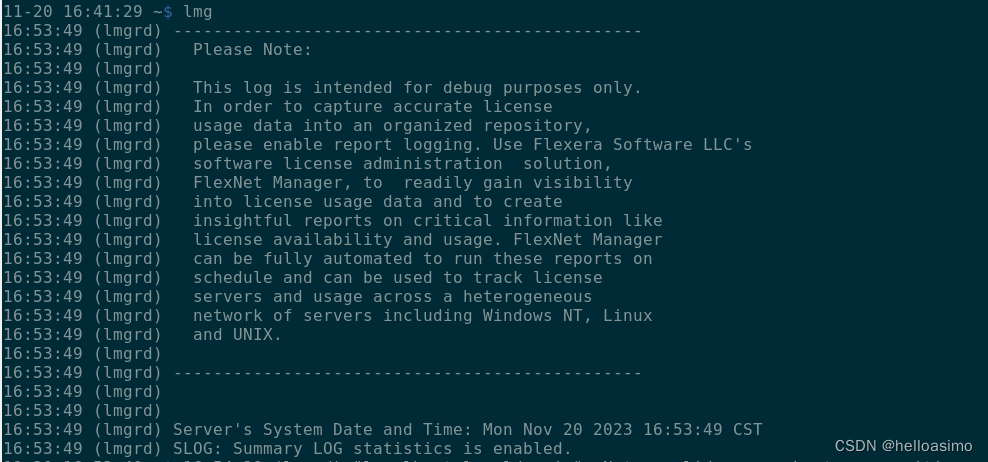
故障原因:
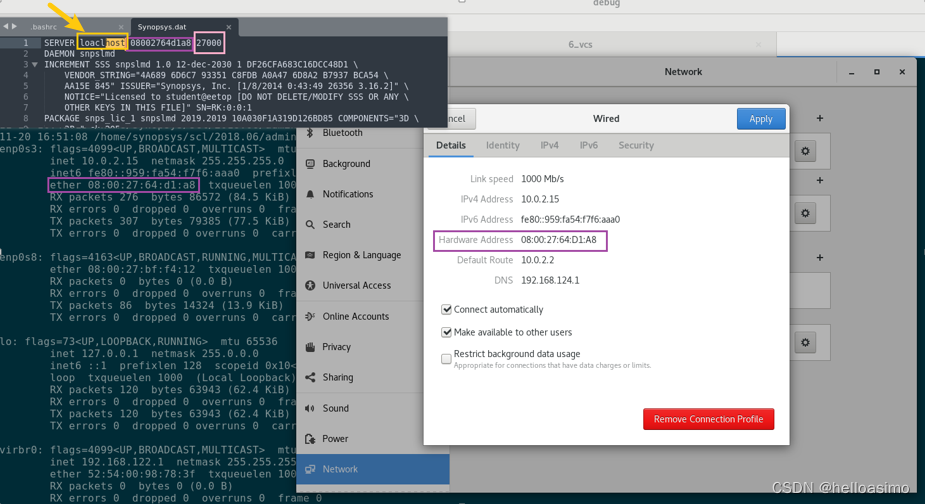
箭头所指单词,拼写错误;
通过hostname,可以得到正确的单词拼写;

解决办法:
将/home/synopsys/scl/2018.06/admin/license/Synopsys.dat中的单词修改为localhost,重新运行lmg,即可解决;
for ref:
export LM_LICENSE_FILE=27000@loaclhost
alias lmg_synopsys="lmgrd -c /home/synopsys/scl/2018.06/admin/license/Synopsys.dat"
alias lmg="lmgrd -c /home/synopsys/scl/2018.06/admin/license/Synopsys.dat"
参考1:
https://blog.csdn.net/weixin_40377195/article/details/109788338?ops_request_misc=%257B%2522request%255Fid%2522%253A%2522168327802716800211518289%2522%252C%2522scm%2522%253A%252220140713.130102334..%2522%257D&request_id=168327802716800211518289&biz_id=0&utm_medium=distribute.pc_search_result.none-task-blog-2~all~top_positive~default-1-109788338-null-null.142^v86^insert_down1,239^v2^insert_chatgpt&utm_term=%E8%8A%AF%E7%8E%8B%E5%9B%BD&spm=1018.2226.3001.4187
2.
Thanks VCS engineers , 出了这么优秀的工具。
免责声明:本文系网络转载或改编,未找到原创作者,版权归原作者所有。如涉及版权,请联系删
 技术文档
技术文档
 推荐好文
推荐好文






 155-2731-8020




