




软件

产品


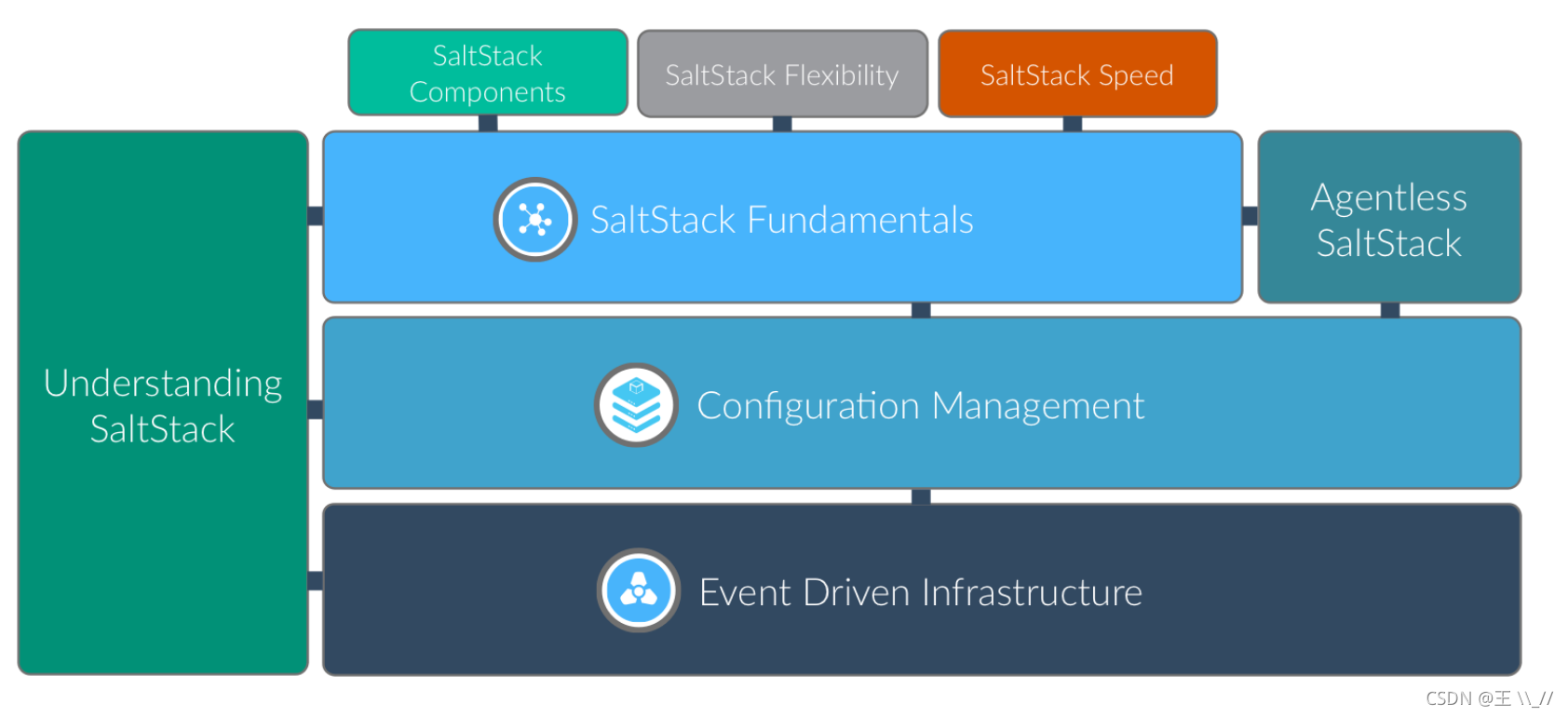
作为一个运维人员,很大一部分工作是在业务的配置管理和状态维护以及版本发布上,而当业务场景及公司规模上了一定规模后,人为手工的去做这些工作将变得极其困难,此时我们将需要利用一些自动化运维的工具来达到批量管理的目的。
常见的自动化运维工具:
此三款属同类工具,皆可用来提高运维管理的效率,但它们又各有优势,目前主流的自动化运维工具是 ansible 和saltstack。其中ansible无需安装客户端,这是其最大的优势,而saltstack则需要安装客户端工具,类似zabbix的agent。应用场景方面,ansible常用于小型企业,而saltstack则常用于中大型企业,因为ansible无法并行执行而saltstack可以并行。但不论其特点如何,本质上均属同类,所以只需要掌握一种即可轻松胜任运维工作。
可以将SaltStack理解为神笔马良的那只笔!
SaltStack 是一种基于 C/S 架构的服务器基础架构集中化 管理平台 ,底层使用ZeroMQ消息队列pub/sub方式通信,使用SSL证书签发的方式进行认证管理,传输采用AES加密,通过管理端下发指令,客户端接受指令的方式进行操作,管理端称为 Master,客户端称为 Minion。SaltStack 具备配置管理、远程执行、监控等功能,一般可以理解为是简化版的 Puppet 和加强版的 Func。SaltStack 本身是基于 Python 语言开发实现,结合了轻量级的消息队列软件 ZeroMQ 与 Python 第三方模块(Pyzmq、PyCrypto、Pyjinjia2、python-msgpack 和 PyYAML 等)构建,通过部署 SaltStack 环境,运维人员可以在成千上万台服务器上做到批量执行命令,根据不同的业务特性进行配置集中化管理、分发文件、采集系统数据及软件包的安装与管理等。
saltstack服务架构
在saltstack架构中服务器端叫Master,客户端叫Minion。
在Master和Minion端都是以守护进程的模式运行,一直监听配置文件里面定义的ret_port(接受minion请求)和publish_port(发布消息)的端口。
当Minion运行时会自动连接到配置文件里面定义的Master地址ret_port端口进行连接认证。
saltstack除了传统的C/S架构外,其实还有一种叫做masterless的架构,其不需要单独安装一台 master 服务器,只需要在每台机器上安装 Minion端,然后采用本机只负责对本机的配置管理机制服务的模式。
特性:
SaltStack有四大功能,分别是:
SaltStack可以通过远程执行实现批量管理,并且通过描述状态来达到实现某些功能的目的。
SaltStack四大运行方式:
SaltStack 客户端(Minion)在启动时,会自动生成一套密钥,包含私钥和公钥。之后将公钥发送给服务器端,服务器端验证并接受公钥,以此来建立可靠且加密的通信连接。同时通过消息队列 ZeroMQ 在客户端与服务端之间建立消息发布连接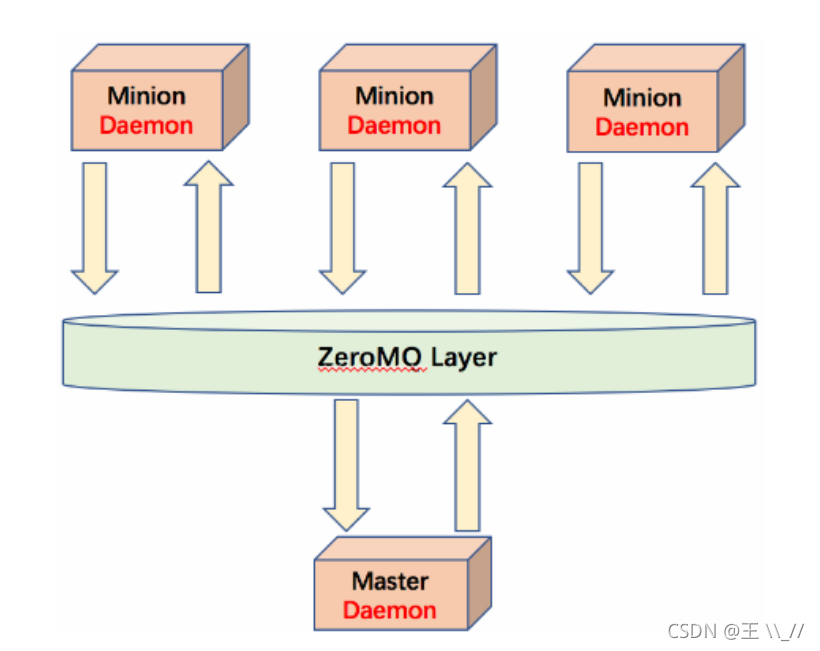
saltstack工作方式: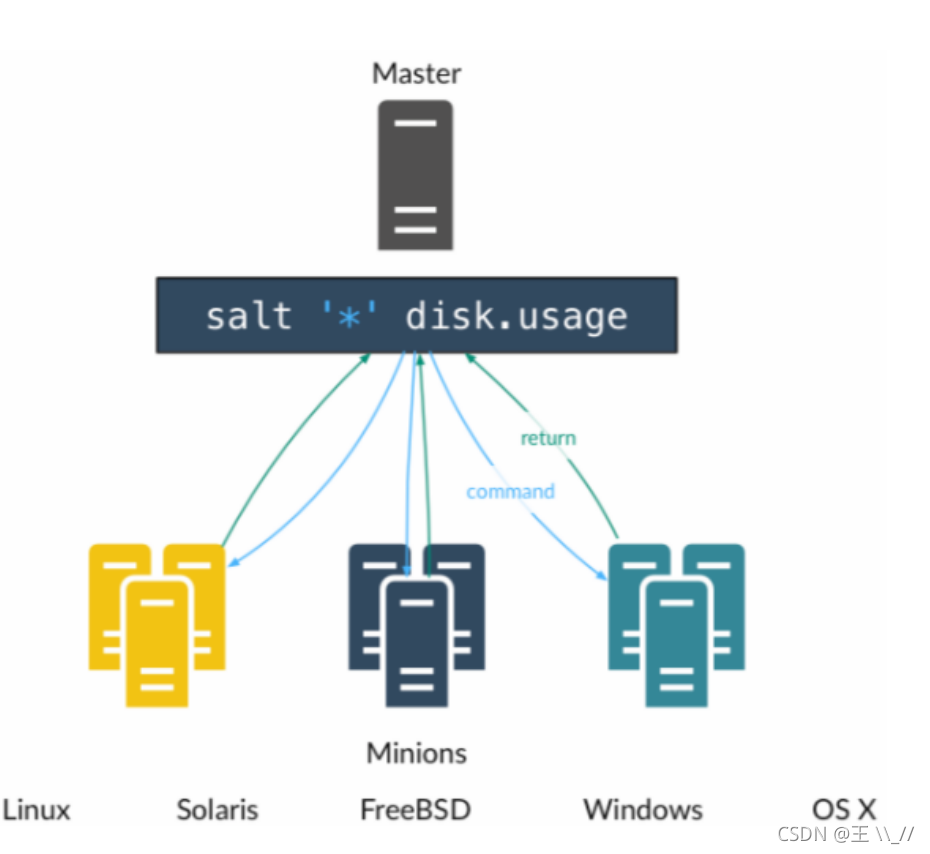
环境说明:
| 主机名 | IP | 系统版本 | 硬件 |
|---|---|---|---|
| master | 192.168.164.133 | Redhat 8.2 | CPU4核、内存8G以上 |
| node01 | 192.168.164.128 | Centos 7.0 | CPU4核、内存5G以上 |
//第一步改主机名、关防火墙!!!
[root@localhost]# hostnamectl set-hostname master
[root@localhost]# bash
[root@master ~]#

[root@master ~]# systemctl disable --now firewalld.service
[root@master ~]# setenforce 0
[root@master ~]# vim /etc/selinux/config
# This file controls the state of SELinux on the system.
# SELINUX= can take one of these three values:
#     enforcing - SELinux security policy is enforced.
#     permissive - SELinux prints warnings instead of enforcing.
#     disabled - No SELinux policy is loaded.
SELINUX=disabled              //改为disabled
# SELINUXTYPE= can take one of these three values:
#     targeted - Targeted processes are protected,
#     minimum - Modification of targeted policy. Only selected processes are protected.
#     mls - Multi Level Security protection.
SELINUXTYPE=targeted
下载系统相应版本的repo源和key,然后安装
saltstack官网repo源地址
master主机是Redhat8系统,所以下载的是Redhat8的key和repo源
//下载key和repo源
[root@master ~]# yum -y isntall epel-release   //epel源仓库
[root@master ~]# sudo rpm --import https://repo.saltproject.io/py3/redhat/8/x86_64/latest/SALTSTACK-GPG-KEY.pub
[root@master ~]# curl -fsSL https://repo.saltproject.io/py3/redhat/8/x86_64/latest.repo | sudo tee /etc/yum.repos.d/salt.repo
[root@master ~]# ll /etc/yum.repos.d/
总用量 12
-rw-r--r--. 1 root root 2595 8月   1 14:12 Centos-8.repo
-rw-r--r--. 1 root root  358 8月   1 14:12 redhat.repo
-rw-r--r--. 1 root root  292 11月  1 22:36 salt.repo   //下载过后就有了saltstack的repo源码

//有了repo源后就是安装saltstack,master主机需要安装salt-master 和 salt-minion
[root@master ~]# yum -y install salt-master salt-minion
安装过程略,很快。
安装过后就是修改配置文件,然后重启即可
[root@master ~]# cd /etc/salt/
[root@master salt]# ls
cloud           cloud.profiles.d   minion     proxy
cloud.conf.d    cloud.providers.d  minion.d   proxy.d
cloud.deploy.d  master             minion_id  roster
cloud.maps.d    master.d           pki
[root@master salt]# vim minion    //在#master:下一行添加内容
......
# Set the location of the salt master server. If the master server cannot be
# resolved, then the minion will fail to start.
#master: salt
master: 192.168.164.133   //添加内容,master指定master控主机的IP地址

# Set http proxy information for the minion when doing requests
......


//重启,然后就可以看见4405、4506端口
root@master ~]# systemctl enable --now salt-master
Created symlink from /etc/systemd/system/multi-user.target.wants/salt-master.service to /usr/lib/systemd/system/salt-master.service.
[root@localhost ~]# systemctl enable --now salt-minion
Created symlink from /etc/systemd/system/multi-user.target.wants/salt-minion.service to /usr/lib/systemd/system/salt-minion.service.
[root@master salt]# ss -antl
State  Recv-Q Send-Q   Local Address:Port   Peer Address:Port
LISTEN 0      128            0.0.0.0:22          0.0.0.0:*
LISTEN 0      128            0.0.0.0:4505        0.0.0.0:*    //发布端口
LISTEN 0      128            0.0.0.0:4506        0.0.0.0:*    //接受请求端口
LISTEN 0      128               [::]:22             [::]:*
//第一步改主机名、关防火墙!!!
[root@localhost]# hostnamectl set-hostname node01
[root@localhost]# bash
[root@node01 ~]#

[root@node01 ~]# systemctl disable --now firewalld.service
[root@node01 ~]# setenforce 0
[root@node01 ~]# vim /etc/selinux/config
# This file controls the state of SELinux on the system.
# SELINUX= can take one of these three values:
#     enforcing - SELinux security policy is enforced.
#     permissive - SELinux prints warnings instead of enforcing.
#     disabled - No SELinux policy is loaded.
SELINUX=disabled              //改为disabled
# SELINUXTYPE= can take one of these three values:
#     targeted - Targeted processes are protected,
#     minimum - Modification of targeted policy. Only selected processes are protected.
#     mls - Multi Level Security protection.
SELINUXTYPE=targeted
下载系统相应版本的repo源,然后安装
saltstack官网repo源地址
node01主机是Centos7系统,所以下载的Centos7的epo源。
注意:node01受控端不需要下载key,且只需要安装salt-minion!!!
[root@master ~]# yum -y isntall epel-release   //epel源仓库
[root@node01 ~]# curl -fsSL https://repo.saltproject.io/py3/redhat/7/x86_64/latest.repo | sudo tee /etc/yum.repos.d/salt.repo
[root@node01 ~]# ll /etc/yum.repos.d/
总用量 36
-rw-r--r--. 1 root root 1664 4月  29 2018 CentOS-Base.repo
-rw-r--r--. 1 root root 1309 4月  29 2018 CentOS-CR.repo
-rw-r--r--. 1 root root  649 4月  29 2018 CentOS-Debuginfo.repo
-rw-r--r--. 1 root root  314 4月  29 2018 CentOS-fasttrack.repo
-rw-r--r--. 1 root root  630 4月  29 2018 CentOS-Media.repo
-rw-r--r--. 1 root root 1331 4月  29 2018 CentOS-Sources.repo
-rw-r--r--. 1 root root 4768 4月  29 2018 CentOS-Vault.repo
-rw-r--r--. 1 root root  374 11月  1 22:36 salt.repo    //下载repo后就有了repo源库


//下载了repo库后就是安装saltstack的salt-minion
[root@node01 ~]# yum -y install salt-minion
# 安装过程略,很快。
修改配置文件,然后启动服务即可
[root@node01 ~]# cd /etc/salt/
[root@node01 salt]# ls
cloud           cloud.profiles.d   minion     proxy
cloud.conf.d    cloud.providers.d  minion.d   proxy.d
cloud.deploy.d  master             minion_id  roster
cloud.maps.d    master.d           pki
[root@node01 salt]# vim minion
......
# resolved, then the minion will fail to start.
#master: salt
master: 192.168.164.133     //添加内容,master指定master控主机的IP地址

# Set http proxy information for the minion when doing requests
......

//启动服务,并设置开机自启
[root@node01 salt]# systemctl enable --now salt-minion
[root@node01 salt]# ss -antl    //受控端是没有端口启动的
State      Recv-Q Send-Q Local Address:Port               Peer Address:Port
LISTEN     0      128     *:22                  *:*
LISTEN     0      100    127.0.0.1:25                  *:*
LISTEN     0      128    :::22                 :::*
LISTEN     0      100       ::1:25                 :::*


//用status查看是否启动
[root@node01 salt]# systemctl status salt-minion
● salt-minion.service - The Salt Minion
   Loaded: loaded (/usr/lib/systemd/system/salt-minion.service; enabled; vendor preset: disabled)
   Active: active (running) since 一 2021-11-01 22:40:12 CST; 34min ago   //服务以启动
     Docs: man:salt-minion(1)
           file:///usr/share/doc/salt/html/contents.html
           https://docs.saltproject.io/en/latest/contents.html
 Main PIhttps://www.gofarlic.com 8018 (salt-minion)
   CGroup: /system.slice/salt-minion.service
           ├─8018 /usr/bin/python3 /usr/bin/salt-minion
           ├─8040 /usr/bin/python3 /usr/bin/salt-minion
           └─8236 /usr/bin/python3 /usr/bin/salt-minion
saltstack的配置文件在/etc/salt目录
配置文件说明:
| 配置文件 | 说明 |
|---|---|
| /etc/salt/master | 主控端(控制端)配置文件 |
| /etc/salt/minion | 受控端配置文件 |
配置文件/etc/salt/master默认的配置就可以很好的工作,使用一般情况下我们是不需要配置的。
配置文件/etc/salt/minion常用配置参数
在日常使用过程中,经常需要调整或修改Master配置文件,SaltStack大部分配置都已经指定了默认值,只需根据自己的实际需求进行修改即可。下面的几个参数是比较重要的
saltstack主控端是依靠openssl证书来与受控端主机认证通讯的,受控端启动后会发送给主控端一个公钥证书文件,在主控端用salt-key命令来管理证书。
salt-minion与salt-master的认证过程:
salt-key常用的选项
//查看已有的证书
[root@master ~]# salt-key -L
Accepted Keys:
Denied Keys:
Unaccepted Keys:
master
Rejected Keys:
# 如果没有出现node01需要等待一会,这和主机的配置是有关系的。

//到node01主机查看是否生成了证书文件
[root@node01 salt]# pwd
/etc/salt
[root@node01 salt]# tree pki     //如果没有tree目录结构功能,可以yum下载tree
pki
├── master
└── minion
    ├── minion.pem     //私钥
    └── minion.pub    //公钥,是要传给控制端master的

//到master再次查看证书情况,
[root@master ~]# salt-key -L
Accepted Keys:
Denied Keys:
Unaccepted Keys:
master
node01
Rejected Keys:

[root@master ~]# tree /etc/salt/pki
/etc/salt/pki
├── master
│   ├── master.pem
│   ├── master.pub
│   ├── minions
│   ├── minions_autosign
│   ├── minions_denied
│   ├── minions_pre     //为接受的证书,要使minion目录中有受控机的公钥才行
│   │   └── master
        └── node01     //在控制端查看来自受控端的公钥是以主机命名的,这个文件和node01中的minion.pub文件一致
│   └── minions_rejected
└── minion
    ├── minion.pem
    └── minion.pub


# 接受来自受控的证书
[root@master ~]# salt-key -ya node01
The following keys are going to be accepted:
Unaccepted Keys:
node01
Key for minionnode01 accepted.

#此时再查看master主机的pki证书信息
[root@master ~]# tree /etc/salt/pki
/etc/salt/pki
├── master
│   ├── master.pem
│   ├── master.pub
│   ├── minions
│   │   └── node01    //此时node01已经在minion中,这样才可以被master控制
│   ├── minions_autosign
│   ├── minions_denied
│   ├── minions_pre
│   │   └── master
│   └── minions_rejected
└── minion
    ├── minion.pem
    └── minion.pub

#master接受证书后,也会把自己的证书发给node01。要双向认证
[root@node01 salt]# tree pki
pki
├── master
└── minion
    ├── minion_master.pub     //master主机的证书
    ├── minion.pem
    └── minion.pub

# 现在node01就在受信任中了
[root@master ~]# salt-key -L
Accepted Keys:
node01
Denied Keys:
Unaccepted Keys:
master
Rejected Keys:
语法:salt [options] [arguments]
//常用的options
	--version       //查看saltstack的版本号
    --versions-report   //查看saltstack以及依赖包的版本号
    -h      //查看帮助信息
    -c CONFIG_DIR   //指定配置文件目录(默认为/etc/salt/)
    -t TIMEOUT      //指定超时时间(默认是5s)
    --async     //异步执行
    -v      //verbose模式,详细显示执行过程
    --username=USERNAME     //指定外部认证用户名
    --password=PASSWORD     //指定外部认证密码
    --log-file=LOG_FILE     //指定日志记录文件

//常用target参数
    -E      //正则匹配
    -L      //列表匹配
    -S      //CIDR匹配网段
    -G      //grains匹配
    --grain-pcre    //grains加正则匹配
    -N      //组匹配
    -R      //范围匹配
    -C      //综合匹配(指定多个匹配)
    -I      //pillar值匹配
远程执行操作
[root@master ~]# salt node01 test.ping    //test是一个模块,ping是当中的一个功能
node01:
    True     //出现true表示master和node01可以通讯

#除了上面用完成主机名外还可以使用正则表达式,和网段等
[root@master ~]# salt node01 test.ping
node01:
    True
[root@master ~]# salt 'n*' test.ping
node01:
    True
[root@master ~]# salt -E 'n*' test.ping
node01:
    True
[root@master ~]# salt 'node*' test.ping
node01:
    True
[root@master ~]# salt -S '192.168.164.0/24' test.ping    //-S 匹配网段
node01:
    True
[root@master ~]# salt -L master,node01 test.ping
node01:
    True
master:
    True


免责声明:本文系网络转载或改编,未找到原创作者,版权归原作者所有。如涉及版权,请联系删
 技术文档
技术文档
 推荐好文
推荐好文






 155-2731-8020




