




软件

产品


Adams2015安装出错的一种情况
最近 学习 Adams,安装遇到了小问题,网上合适的答案不好找,故分享给后来者。
问题:
按 网站 的教程,安装Adams 2015后,打开Adams - View x64 2015,卡在红色启动界面;
打开MSC. Licensing Utility后,图中service/license file栏中,涂黑色的services栏是空白(即没有配置服务)导致无法启动Adams。
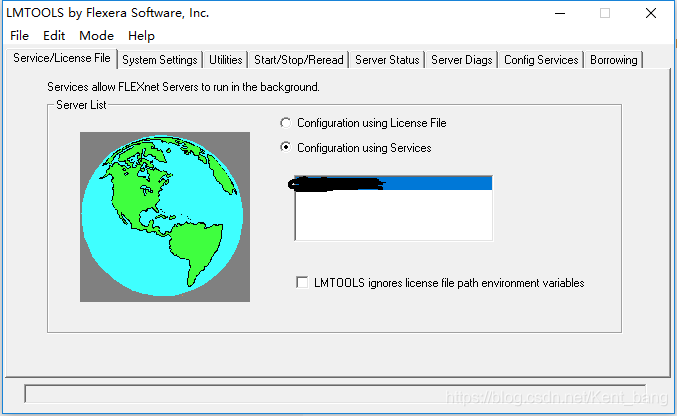
解决:
Step1:在Config Services栏中
1.在Path to the Imgrd. exe file 中,点Browse 找到当初保存的MSC. Software \MSC.Licensing\11.9\lmgrd.exe;
一般文件在C:\MSC.Software\MSC.Licensing\11.9\lmgrd.exe 或 C:\Users\电脑用户名\AppData\Roaming\MSC.Software\MSC.Licensing\11.9\lmgrd.exe
2.在Path to the license.exe file 中,点Browse 找到当初保存的MSC.Software\MSC.Licensing\11.9\license.dat;
一般文件在C:\MSC.Software\MSC.Licensing\11.9\license.dat 或 C:\Users\电脑用户名\AppData\Roaming\MSC.Software\MSC.Licensing\11.9\license.dat
3.单击右上角的Save Service (创建服务)
免责声明:本文系网络转载或改编,未找到原创作者,版权归原作者所有。如涉及版权,请联系删
 技术文档
技术文档
 推荐好文
推荐好文






 155-2731-8020




