




软件

产品


A grid is a raster data storage format native to ESRI. There are two types of grids: integer and floating point. Use integer grids to represent discrete data and floating-point grids to represent continuous data.
Attributes for an integer grid are stored in a value attribute table (VAT). A VAT has one record for each unique value in the grid. The record stores the unique value (VALUE is an integer that represents a particular class or grouping of cells) and the number of cells (COUNT) in the grid represented by that value. For example, if 50 cells have a value of 1 representing a forest, then the VAT would show a VALUE = 1 and COUNT = 50 for each of the 50 cells.
Learn more about raster dataset attribute tables
Floating-point grids do not have a VAT because the cells in the grid can assume any value within a given range of values. The cells in this type of grid do not fall neatly into discrete categories. The cell value itself is the attribute that describes the location. For example, in a grid that represents elevation data in meters above sea level, a cell with a value of 10.1662 indicates that the location is about 10 meters above sea level.
The range of data values that can be stored as grid values are:
Grids are implemented using a tiled raster data structure in which the basic unit of data storage is a rectangular block of cells. Blocks are stored on disk in compressed form in a variable-length file structure referred to as a tile. Each block is stored as one variable-length record.
The size of the tile for a grid is based on the number of rows and columns in the grid at the time of creation. The upper limit on the size of a tile is set by the application and is very large (currently set at 4,000,000 x 4,000,000 cells). As a result, most grids used for GIS applications are automatically stored in a single tile. The spatial data for a grid is automatically split across multiple tiles if the size of the grid at the time of creation is larger than the upper limit for the size of a tile.
The blocked storage organization for grids supports both sequential and random spatial access to large raster datasets. The blocking structure imposes no restrictions on the joint analysis of grids. Tiles and blocks from different grids also need not coincide in map space for joint analysis. The tile and block structure of a grid is completely hidden from the user, who always creates and manipulates a grid as though it were a seamless raster of uniformly square cells.
Grids use a run-length raster compression scheme that is adaptive at the block level. Each block is tested to determine the depth (bits per cell) to be used for the block and to determine which storage technique (cell-by-cell or run-length-coded) is more efficient. The block is stored in the format that requires less disk space. The adaptive compression scheme is the optimal choice because of its ability to efficiently represent both homogenous categorical data and heterogenous continuous data while supporting joint analysis using both types of data. Single layer per-cell operations, such as data reclassification, operate directly on runs of data without decompression. Multilayer per-cell operations on compressed input layers intersect runs of data from the different layers and operate on the intersected runs. Single layer per-neighborhood operations and multilayer per-cell operations that mix compressed and uncompressed data expand runs into cells and perform traditional cell-by-cell processing transparently.
The tile-block structure of a grid is also transparent to any application programs that access the spatial data in a grid. Programs that manipulate grids access the spatial data by setting a rectangular window defined in map coordinates.
Grid data storage
A grid is stored in an ArcInfo workspace. The name of a grid cannot be stored using spaces, it cannot start with a number, and it cannot be longer than 13 characters (a multiband grid is allowed up to 9 characters ). The grid, like a coverage, is stored as a separate directory with associated tables and files that contain specific information about the grid. In an integer grid directory (originally created by ArcInfo Workstation), the following tables and files are found: the BND table, which stores the boundary of the grid; the HDR file, which stores specific information describing the grid, for example, cell resolution and blocking factor; the STA table, which contains statistics for the grid; the VAT table, which stores the attribute data associated with the zones of the grid; the LOG, which monitors the activity that has occurred on the grid; and the tile file w001001.adf (q0x1y1), which stores the cell data and the accompanying index file w001001x.adf (q0x1y1x) that indexes the blocks in the tile and the LOG. (Some of these may not exist if created using ArcGIS operators, such as the LOG file.)
If a grid is altered, the values and information contained in the files and tables are updated immediately. The information contained in an INFO table is accessible to the user and provides information about the grid.
Record	VALUE	COUNT
1	0	628872
2	1	265043
3	2	151150
4	3	3185652
5	4	79983
6	5	4782
7	6	74334
8	7	8877
9	8	1817
10	9	491
11	10	 858
12	11	8770
13	12	28789
14	13	72539
15	14	3686
16	15	3932
17	16	13227
18	17	1890
19	18	1305
20	19	427286
21	20	6695
Stack
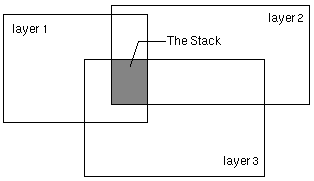
A stack consists of an ordered set of spatially overlapping grids (referred to as layers) treated as a single entity for multivariate analysis. Cluster analysis, classification, and principal component analysis all work on the layers in a stack.
A stack has the following characteristics:
INFO: LIST JER135.STK
Record  INDEX   GRID
1       1     jer1
2       2     jer3
3       3     jer5


      The INDEX item gives the position of a grid in the stack, while the GRID item lists the grid names that comprise the stack. The spatial data of the input grids are not duplicated in the stack. As a result, the stack will always reflect the latest version of the input grids. The STK file is as accessible as any other INFO file. You can add items for descriptive purposes, such as an item for storing the date that the data was collected, but don’t use INFO to alter the values in the INDEX item or names in the GRID item. All manipulations to these items should only be performed using a variety of the stack management commands available in GRID.


      The PRJ file, when present, stores the projection information of the stack.
Projection STATEPLANE
Zone     4701
Datum    NAD27
Zunits   NO
Units    FEET
Spheroid CLARKE1866
Xshift   0.0000000000
Yshift   0.0000000000
Parameters


      If the projection is unknown for all input grids in the stack, no PRJ file is created.


      The name of a grid stack cannot be stored using spaces, it cannot start with a number, and it cannot be longer than nine characters.
NoData in a grid
Every cell in a grid has a value assigned to it; however, cells without actual values can be assigned NoData on the grid representing that theme. NoData and 0 (zero) are not the same; 0 is a valid value. For this reason, NoData cells cannot be used in calculating the statistics in a grid's STA table.
转载于:https://www.cnblogs.com/gxiang/archive/2009/09/09/1562995.html
免责声明:本文系网络转载或改编,未找到原创作者,版权归原作者所有。如涉及版权,请联系删
 技术文档
技术文档
 推荐好文
推荐好文






 155-2731-8020




