




软件

产品


大家好,本文是轻松学Pytorch系列文章第十篇,本文将介绍如何使用卷积神经网络实现参数回归预测,这个跟之前的分类预测最后softmax层稍有不同,本文将通过卷积神经网络实现一个回归网络预测人脸landmark,这里主要是预测最简单的五点坐标。
网络结构与设计
首先说一下,这里我参考了OpenVINO官方提供的一个基于卷积神经网络回归预测landmark的文档,因为OpenVINO官方并没有说明模型结构,更加没有源代码可以参考,但是我发现它对模型描述有一句话:
It has a classic convolutional design: stacked 3x3 convolutions, batch normalizations, PReLU activations, and poolings. Final regression is done by the global depthwise pooling head and FullyConnected layers
然后我就猜测了它的整个网络结构应该是这样:
多个单应的Stacked CONV ->BN->PReLU->Pooling 全局深度池化层 全连接输出5点坐标
同时我注意到它最终的模型很小,又结合它的输入是64x64大小的图像,所以我觉得Stacked CONV应该是连续2~3卷积层,这点我想作者在设计的时候参考了VGG16~19的结构,所以我也借用了一下。然后最重要的是全局深度池化,我当时看到depthwise我就知道了,跟1x1卷积类似,但是它不会有参数计算,所以我用pytorch自定义了一个。这样我就完成了整个网络的构建,最终我训练完网络大小只有1MB左右,官方的模型大小是800KB,感觉相差不大,而且我觉得我的模型还可以进一步减少层数,应该做到跟它差不多大不会它费事。官方说它们模型是基于caffe训练的,我就用pytorch自己搞一波,反正我也不知道它的模型具体长什么样子。就这样我就完成了模型审计,最终我的模型有三个stacked卷积层,一个全局深度池化头,全连接层输出10个数,就是五个点信息。这块的代码如下:
1class Net(torch.nn.Module): 2 def __init__(self): 3 super(Net, self).__init__() 4 self.cnn_layers = torch.nn.Sequential( 5 # 卷积层 (64x64x3的图像) 6 torch.nn.Conv2d(3, 16, 3, padding=1), 7 torch.nn.Conv2d(16, 32, 3, padding=1), 8 torch.nn.BatchNorm2d(32), 9 torch.nn.PReLU(),10 torch.nn.MaxPool2d(2, 2),11 # 32x32x3212 torch.nn.Conv2d(32, 64, 3, padding=1),13 torch.nn.Conv2d(64, 64, 3, padding=1),14 torch.nn.BatchNorm2d(64),15 torch.nn.PReLU(),16 torch.nn.MaxPool2d(2, 2),1718 # 64x64x1619 torch.nn.Conv2d(64, 128, 3, padding=1),20 torch.nn.Conv2d(128, 128, 3, padding=1),21 torch.nn.BatchNorm2d(128),22 torch.nn.PReLU(),23 torch.nn.MaxPool2d(2, 2)24 )25 self.dw_max = ChannelPool(128, 8*8)26 # linear layer (16*16 -> 10)27 self.fc = torch.nn.Linear(64, 10)2829 def forward(self, x):30 # stack convolution layers31 x = self.cnn_layers(x)3233 # 16x16x12834 # 深度最大池化层35 out = self.dw_max(x)36 # 全连接层37 out = self.fc(out)38 return out数据集
本来我想找一些公开的数据集的,但是经过一番挣扎之后,发现公开数据集还要各种处理得自己写一堆东西,所以说不要以为免费公开就好用,免费跟好用还差好远。后来我花了点时间自己标注了一个数据集,数据集的下载在之前轻松学Pytorch自定义数据制作上有链接,感兴趣的可以自己去下载即可。总计有1041张标记数据,几十张测试数据。
模型训练
模型训练的损失,损失公式如下:
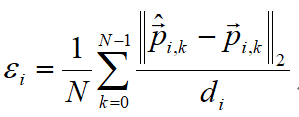
其中i表示第i个样本,N表示总的五个点,然后计算预测值跟真实值的L2,d表示真实值中两个眼睛之间的距离,作为归一化使用处理。训练的代码如下:
1# 使用GPU 2if train_on_gpu: 3 model.cuda() 4 5ds = FaceLandmarksDataset("https://www.gofarlic.com/facedb/Face-Annotation-Tool/landmark_output.txt") 6num_train_samples = ds.num_of_samples() 7dataloader = DataLoader(ds, batch_size=16, shuffle=True) 8 9# 训练模型的次数10num_epochs = 5011optimizer = torch.optim.SGD(model.parameters(), lr=0.01)12model.train()13for epoch in range(num_epochs):14 train_loss = 0.015 for i_batch, sample_batched in enumerate(dataloader):16 images_batch, landmarks_batch = \17 sample_batched['image'], sample_batched['landmarks']18 if train_on_gpu:19 images_batch, landmarks_batch = images_batch.cuda(), landmarks_batch.cuda()20 optimizer.zero_grad()21 # forward pass: compute predicted outputs by passing inputs to the model22 output = model(images_batch)23 # calculate the batch loss24 loss = myloss_fn(output, landmarks_batch)25 # backward pass: compute gradient of the loss with respect to model parameters26 loss.backward()27 # perform a single optimization step (parameter update)28 optimizer.step()29 # update training loss30 train_loss += loss.item()31 # 计算平均损失32 train_loss = train_loss / num_train_samples3334 # 显示训练集与验证集的损失函数35 print('Epoch: {} \tTraining Loss: {:.6f} '.format(epoch, train_loss))3637# save model38model.eval()39torch.save(model, 'model_landmarks.pt')模型测试:
最终得到的输出模型,我在使用了一个视频文件进行检测,该视频文件跟训练的数据无交叉,使用opencv实现人脸检测,然后调用模型对人脸进行landmark检测的输出结果如下:
1def video_landmark_demo(): 2 cnn_model = torch.load("./model_landmarks.pt") 3 # capture = cv.VideoCapture(0) 4 capture = cv.VideoCapture("https://www.gofarlic.com/images/video/example_dsh.mp4") 5 6 # load tensorflow model 7 net = cv.dnn.readNetFromTensorflow(model_bin, config=config_text) 8 while True: 9 ret, frame = capture.read()10 if ret is not True:11 break12 frame = cv.flip(frame, 1)13 h, w, c = frame.shape14 blobImage = cv.dnn.blobFromImage(frame, 1.0, (300, 300), (104.0, 177.0, 123.0), False, False);15 net.setInput(blobImage)16 cvOut = net.forward()17 # 绘制检测矩形18 for detection in cvOut[0,0,:,:]:19 score = float(detection[2])20 if score > 0.5:21 left = detection[3]*w22 top = detection[4]*h23 right = detection[5]*w24 bottom = detection[6]*h2526 # roi and detect landmark27 roi = frame[np.int32(top):np.int32(bottom),np.int32(left):np.int32(right),:]28 rw = right - left29 rh = bottom - top30 img = cv.resize(roi, (64, 64))31 img = (np.float32(img) / 255.0 - 0.5) / 0.532 img = img.transpose((2, 0, 1))33 x_input = torch.from_numpy(img).view(1, 3, 64, 64)34 probs = cnn_model(x_input.cuda())35 lm_pts = probs.view(5, 2).cpu().detach().numpy()36 for x, y in lm_pts:37 x1 = x * rw38 y1 = y * rh39 cv.circle(roi, (np.int32(x1), np.int32(y1)), 2, (0, 0, 255), 2, 8, 0)4041 # 绘制42 cv.rectangle(frame, (int(left), int(top)), (int(right), int(bottom)), (255, 0, 0), thickness=2)43 cv.putText(frame, "score:%.2f"%score, (int(left), int(top)), cv.FONT_HERSHEY_SIMPLEX, 0.5, (0, 0, 255), 1)44 c = cv.waitKey(1)45 if c == 27:46 break47 cv.imshow("face detection + landmark", frame)4849 cv.waitKey(0)50 cv.destroyAllWindows()515253if __name__ == "__main__":54 video_landmark_demo()完全超高实时无压力,跟OpenVINO自带的模型没有什么不同,下一步应该转为ONNX,然后转IR使用OpenVINO调用试试。欢迎拍砖!留言,点赞亦可!
好消息!
小白学视觉知识星球
开始面向外开放啦👇👇👇
下载1:OpenCV-Contrib扩展模块中文版教程 在「小白学视觉」公众号后台回复:扩展模块中文教程,即可下载全网第一份OpenCV扩展模块教程中文版,涵盖扩展模块安装、SFM算法、立体视觉、目标跟踪、生物视觉、超分辨率处理等二十多章内容。  下载2:Python视觉实战项目52讲在「小白学视觉」公众号后台回复:Python视觉实战项目,即可下载包括图像分割、口罩检测、车道线检测、车辆计数、添加眼线、车牌识别、字符识别、情绪检测、文本内容提取、面部识别等31个视觉实战项目,助力快速学校计算机视觉。  下载3:OpenCV实战项目20讲在「小白学视觉」公众号后台回复:OpenCV实战项目20讲,即可下载含有20个基于OpenCV实现20个实战项目,实现OpenCV学习进阶。  交流群 欢迎加入公众号读者群一起和同行交流,目前有SLAM、三维视觉、传感器、自动驾驶、计算摄影、检测、分割、识别、医学影像、GAN、算法竞赛等微信群(以后会逐渐细分),请扫描下面微信号加群,备注:”昵称+学校/公司+研究方向“,例如:”张三 + 上海交大 + 视觉SLAM“。请按照格式备注,否则不予通过。添加成功后会根据研究方向邀请进入相关微信群。请勿在群内发送广告,否则会请出群,谢谢理解~


计算机书童 为大家分享计算机、机器人领域的顶会顶刊论

免责声明:本文系网络转载或改编,未找到原创作者,版权归原作者所有。如涉及版权,请联系删
 技术文档
技术文档
 推荐好文
推荐好文






 155-2731-8020




